SAASINSPECTOR
Otter.ai logo

Otter.ai Review

Meeting transcription and AI note-taking for individuals, small teams, and medium-sized businesses

Visit Otter.aiFrom $16.99/user/mo

Research-based review. We analyzed vendor documentation, customer reviews on G2, Capterra, and Reddit, and live pricing — not hands-on testing yet. We update as our team puts tools through real workflows.

The verdict

Otter.ai is an AI meeting assistant that records, transcribes, and summarizes calls while extracting action items and syncing them to tools like Asana, Jira, and CRMs. It's best suited for sales teams, educators, and professionals who attend high volumes of calls and need structured follow-up without manual effort. With over a million users and nearly a decade of development, it largely delivers on its core promise, though accuracy dips with accents and noisy audio.

Pros

  • Real-time transcription is reliable and consistently praised across G2 and Capterra reviews for core accuracy.
  • Speaker identification works well on straightforward calls with clear audio and distinct voices.
  • Automatic action item extraction exceeds expectations and reduces manual follow-up work after meetings.
  • Native integrations push action items directly to Asana or Jira without requiring manual input.
  • AI Chat feature allows users to search and query their entire meeting history across past calls.
  • AI Meeting Workflows let users set custom triggers to auto-generate follow-ups for specific call types.
  • Chrome extension enables recording without dropping a visible bot into the call.
  • CRM sync functionality makes it particularly useful for sales teams managing pipeline activity.

Cons

  • Transcription accuracy degrades noticeably in noisy environments or with speakers who have heavy accents.
  • Pricing page raises more questions than it answers, making it hard to evaluate plans before committing.
  • The Otter Notetaker bot joining calls can be intrusive or unwelcome for some meeting participants.
  • The platform has shifted its identity from transcription tool to 'Conversational Knowledge Engine,' which may overcomplicate the pitch for simple use cases.
  • Some features that matter most to power users require digging beyond what the homepage transparently communicates.
  • User complaints surfaced on Trustpilot suggest recurring friction points that vendor documentation does not acknowledge.
From $16.99/user/moFree plan YesFree trial No

Our research on Otter.ai started with the pricing page. Always does. We pulled G2 reviews, Capterra feedback, Reddit threads, and Trustpilot complaints, then cross-referenced what the company claims against what users actually report. Founded in 2016 and headquartered in Mountain View, Otter has had nearly a decade to get this right. Mostly, it has.

Otter.ai homepage screenshot
Otter.ai — Homepage

What is Otter.ai?

Transcription tool, originally. That's the short version. It's now pitching itself as a "Conversational Knowledge Engine" that records meetings, generates summaries, captures action items, and lets you query your entire meeting history through an AI chat interface.

The core loop is simple. Connect Otter to your calendar, it sends the Otter Notetaker bot into your Zoom or Google Meet or Teams call, and when the call ends you get a transcript, a summary, and a list of action items. The more interesting stuff sits on top of that: AI Chat that searches across all your past meetings, CRM sync for sales teams, and a Chrome extension that records without dropping a bot into the call at all.

Over a million users are on the platform. The audience skews toward sales teams, educators, journalists, and anyone whose job involves sitting in a lot of calls they need to remember later. That tracks.

Otter.ai Features: Automation, AI Assistant & Workflow Capabilities

Otter.ai features screenshot
Otter.ai — Features

Real-time transcription is table stakes at this point. Otter does it, and from what we read across G2 and Capterra, it does it well enough that most users don't complain about the core function. Speaker identification works reliably for straightforward calls. Accuracy gets shakier in noisy environments or with heavy accents, according to multiple reviewers.

Beyond transcription, Otter's automation story is more interesting than most competitors bother to build. It automatically pulls action items from meeting content and can push those items to Asana or Jira without you touching anything. The AI Meeting Workflows feature lets you set up custom triggers, so certain call types automatically generate certain follow-ups.

Honestly, the action item extraction is better than we expected. G2 reviewers in operations roles consistently flag it as one of the main reasons they stayed on a paid plan.

The AI Chat feature deserves a closer look. You can ask it questions about calls from six months ago and it'll pull context. You can ask it to draft a follow-up email based on what was discussed. It connects to Google Docs and Notion exports, so the meeting content doesn't just sit in Otter's silo. That's genuinely useful for teams who want to do something with their transcripts beyond archiving them.

The bot-free recording via Chrome extension is a small thing that matters. Nobody loves seeing a bot join their call. Otter's desktop recording option sidesteps that entirely. Not every competitor has figured this out.

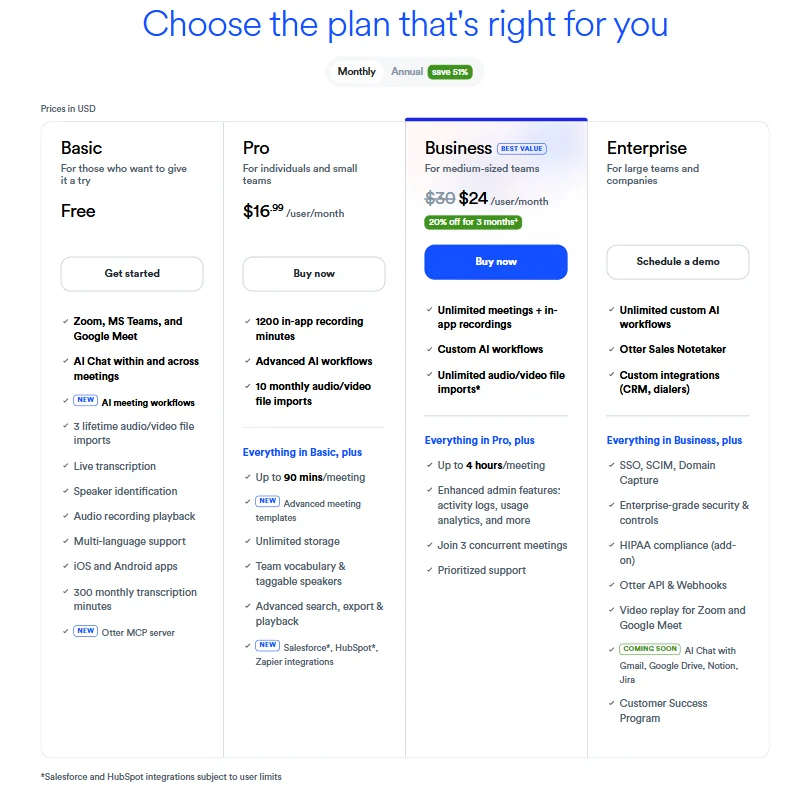
The Basic plan includes AI meeting workflows and three lifetime audio/video file imports. Pro adds 1,200 in-app recording minutes and advanced AI workflows. Business gives you unlimited meetings with in-app recordings, custom AI workflows, and unlimited audio/video file imports. Worth noting that the file import cap on Basic is a hard three, lifetime, not per month. That's a limitation that'll frustrate anyone who imports older recordings.

One thing Otter doesn't do: email management and presentation building aren't on the roadmap, at least not anywhere we found. Tightly scoped, which is either a feature or a limitation depending on what you need.

Otter.ai AI Quality: How Smart and Useful Is the Assistant?

Otter runs on a proprietary AI model, not a named third-party LLM. That means you're trusting their own infrastructure, which is either fine or a concern depending on your IT team's disposition.

Transcription accuracy is what most reviews orbit around. On clean audio with clear speakers, it's good. Very good, even. But Reddit threads from the past couple of years surface a recurring complaint: accuracy drops noticeably with accents that fall outside standard American English. For a tool supporting multiple languages including Japanese and Chinese, that's a real gap.

The summaries are competent. They pull out decisions and action items reliably. We're skeptical of the claim that they're dramatically better than what Fireflies.ai or Fathom AI Notetaker produce, based on what we read from users who've tried both. The output is similar. Otter's advantage is depth of search across historical meetings, not per-meeting summary quality.

The AI Chat is the genuinely differentiated piece. Being able to ask "what did we decide about the Q3 budget across all our planning meetings?" and get a useful answer is not something most transcription tools do. That's Otter trying to be a knowledge layer, not just a recording tool. Whether you need that depends entirely on how much institutional memory your team loses between calls.

Otter.ai Integrations: What Does It Connect To?

The integration list is long. The depth varies.

Zoom and Google Meet get native meeting bot support, as does Microsoft Teams. Google Calendar connects to auto-schedule the bot. That part works without much fiddling, according to most reviews. Slack gets notifications. Salesforce and HubSpot get CRM sync, and those integrations are flagged as new on the Pro plan, which is worth knowing if you were expecting them to be mature.

The Asana and Jira connections for pushing action items are real and functional. The Notion sync works. API access and webhooks exist, but only on Enterprise. Zapier is available on lower tiers, Pro and above.

MCP Server support is listed as new on the Basic plan, which means Otter meeting content can feed into external AI workflows including ChatGPT and Claude. Most competitors haven't shipped that yet. Fair.

What's missing is email. There's no Gmail or Outlook integration. For a tool trying to be the hub of your meeting workflow, that's an odd gap. A lot of meeting follow-up happens in email. Otter drops you at the export stage and leaves you to handle the rest yourself.

Is Otter.ai Easy to Use?

The initial setup is not complicated. Connect your calendar, install the extension if you want bot-free recording, and the system mostly runs itself. G2 reviewers consistently mention that onboarding is low-friction. That matches what Otter's own docs suggest.

The interface is clean. Highlights, annotations, and speaker tags are all accessible without digging through menus. The mobile app on iOS and Android gets mentioned positively in reviews, and the Basic plan explicitly lists both, which suggests Otter isn't treating mobile as an afterthought.

Where complexity creeps in is with the AI workflows. Custom workflows and AI Chat queries require setup and some trial and error. Users who want the out-of-the-box experience get it. Users who want to build more customized automations will need to invest some time. That's not a knock. It's just how it is.

A handful of Capterra reviewers flagged the search function as occasionally slow on large archives. We've seen worse. But if your library is big, expect some lag.

Otter.ai Pricing: Is It Worth It vs Free Alternatives?

Otter.ai pricing screenshot
Otter.ai — Pricing

The free Basic plan exists and it's meaningful. You get real-time transcription, live transcription, speaker identification, and 300 monthly transcription minutes. Enough to test. Not enough to run a sales team on.

Pro is $16.99 per user per month on the monthly billing shown in the pricing page. Business is listed at $24 per user per month, discounted from $30, with a 20% off promotion currently running for three months. Enterprise is custom pricing, schedule a demo. There's an annual billing option advertised as saving 51%, which would bring Pro down to roughly $8.33 per user per month, which is the figure Otter promotes in its headline pricing elsewhere.

The refund policy isn't publicly stated anywhere we found. That's a problem. You're committing to an annual plan on a tool where the exit terms aren't visible upfront. We'd want to know what happens if the tool doesn't work for your use case before paying for a year.

Compared to Fathom, which has a genuinely free tier with no meaningful feature cap for individuals, Otter's entry price is defensible but not a slam dunk. Otter's value proposition gets stronger at the Business tier where CRM integrations and team collaboration features kick in. Individual users doing basic note-taking might not need to pay at all.

Not cheap, not expensive. That's about right.

Otter.ai vs Fireflies.ai: Which Productivity Tool Wins?

Both tools record, transcribe, and summarize meetings. The overlap is substantial.

Fireflies.ai tends to win on CRM depth in user comparisons. Its Salesforce integration has more configuration options. Otter tends to win on cross-meeting search and the AI Chat layer. If you care more about searching institutional knowledge than logging call data to a CRM, Otter is the better fit.

Accuracy is roughly comparable based on what reviewers say. Neither product is dramatically better on clean audio. On accent diversity and noisy calls, neither is reliably great.

Otter's bot-free recording via Chrome extension is a real advantage Fireflies doesn't match. In enterprise environments where meeting bots raise eyebrows, that matters. Not great for Fireflies on that front.

Pricing is close at the entry level. Fireflies's free tier has more generous transcription limits than Otter's. At the business tier, they're pricing in the same range.

The honest answer is that for most teams, the difference comes down to workflow fit. Otter if you want meeting knowledge you can actually query later. Fireflies if your primary output is CRM data.

Who Should Use Otter.ai? (And Who Shouldn't)

Sales teams running high-volume calls with CRM requirements. That's the strongest use case. The Salesforce and HubSpot connections, combined with automated action item extraction, are genuinely useful at that scale. The Business plan's enhanced admin features, activity logs, and usage analytics also matter once you're managing a team, not just yourself.

Educators and journalists. Otter's searchable archive and the ability to annotate transcripts in real time make it practical for anyone who records a lot of interviews or lectures.

Solo users on a budget should look at Fathom first. The free plan here is limited. There's no strong argument for paying $16.99 a month on monthly billing unless you specifically need AI workflows or cross-meeting AI Chat.

Enterprises needing deep customization get SSO, SCIM, Domain Capture, HIPAA compliance as an add-on, and API plus webhooks, but only on the Enterprise tier with undisclosed pricing. That's a commitment to make without knowing the number.

Teams in languages outside English should approach with some caution. The multi-language support is listed as a Basic feature. The accuracy in those languages, based on what we read, is inconsistent.

Otter.ai Review Verdict

Otter is a mature tool. That shows. The core transcription is reliable, the auto-bot integration with the major meeting platforms works without drama, and the action item extraction is better than average.

The AI Chat across meeting history is the most interesting thing Otter does that competitors haven't fully replicated. It's the clearest argument for choosing Otter over a cheaper or free alternative. If your team makes decisions in meetings and then spends weeks trying to reconstruct what was decided, that feature has real value.

The weak spots are real. Accuracy on non-standard accents is a persistent complaint. The refund policy being invisible is annoying. The email integration gap means you're still doing manual work after every meeting export. And for individual users without heavy workflow needs, Fathom or even Read AI will serve you without a monthly bill.

We'd recommend Otter to teams. The Business tier features justify the cost when you're coordinating across people and need the CRM sync and admin controls. Solo users should try the free plan first and see if the caps push them into needing paid.

Solid product. Right use case matters. That's about as much enthusiasm as the data supports.

Frequently Asked Questions

Is Otter.ai free to use?

There is a free plan. It includes real-time transcription, live transcription, speaker identification, and 300 monthly transcription minutes, plus the new MCP server support. That's enough for occasional use or testing. Most teams will hit the ceiling fast and need to decide whether Pro at $16.99 per month, or significantly less on annual billing, is worth it.

How accurate is Otter.ai's transcription?

On clean audio with standard American English, accuracy is genuinely good and most reviews confirm that. The accuracy drops in noisy environments or with speakers whose accents fall outside that baseline, which is a documented pattern across G2 and Reddit feedback. Capable, not perfect.

Does Otter.ai work with Microsoft Teams?

Yes. Otter has a native Microsoft Teams integration that allows automatic transcription without extra setup beyond connecting your calendar. The Otter Notetaker bot joins Teams calls the same way it joins Zoom or Google Meet calls, and the transcript and summary workflow is the same across all three platforms.

Otter.ai is featured in

Alternatives to Otter.ai

See all Otter.ai alternatives →

Other AI Productivity Tool options we've reviewed.

User reviews

Review Otter.ai

Your rating

Reviews are moderated and appear once approved.