SAASINSPECTOR
Glean logo

Glean Review

Enterprise teams seeking AI-powered workplace search and knowledge management

Research-based review. We analyzed vendor documentation, customer reviews on G2, Capterra, and Reddit, and live pricing — not hands-on testing yet. We update as our team puts tools through real workflows.

The verdict

Glean is an enterprise AI search and knowledge platform that connects to 100+ workplace apps and uses a permission-aware knowledge graph to answer employee questions with sourced, company-specific context. It scores well for large organizations with complex tool stacks — customers include Booking.com and Ericsson at tens of thousands of users — but its pricing and enterprise-only positioning make it a tough sell for smaller teams. This Glean review is based on aggregate research and real user reports rather than a direct trial.

Pros

  • Connects to over 100 enterprise apps and builds a unified knowledge graph that understands company-specific context, not just generic information.
  • Permission-aware architecture ensures users only receive answers sourced from content they are already authorized to access.
  • Real-world deployments at massive scale — Booking.com (14,000 employees) and Ericsson (20,000 employees) signal proven enterprise reliability.
  • Natural language search returns answers with cited sources and full context, reducing time wasted hunting through siloed tools.
  • Company-specific knowledge indexing means the AI understands internal project names, terminology, and history that generic LLMs cannot.
  • Agentic AI capabilities now allow the tool to execute tasks across connected apps, not just surface information passively.
  • Backed by a strong customer list including Zillow and GCash, indicating broad enterprise applicability across industries.

Cons

  • Pricing structure is described as patience-testing, suggesting high cost or opaque procurement before you even access the product.
  • Built for a very specific buyer profile — enterprises with large headcounts — making it a poor fit for smaller organizations.
  • No hands-on trial was available for this review, meaning real-world UX nuances may differ from documented and reported behavior.
  • G2 reviews were found to contradict each other, suggesting inconsistent user experiences across different deployments.
  • Vendor marketing was noted as overstated relative to actual user reports, raising questions about feature reliability or ease of implementation.
  • The shift toward agentic capabilities is recent, meaning that layer of the product is less battle-tested than the core search functionality.
Free plan NoFree trial Yes

What is Glean?

Founded in 2019 and headquartered in San Francisco, Glean started with a simple premise. Enterprise workers waste too much time searching for things they already have. A document in Google Drive. A policy buried in Confluence. A Slack thread from eight months ago that answered this exact question.

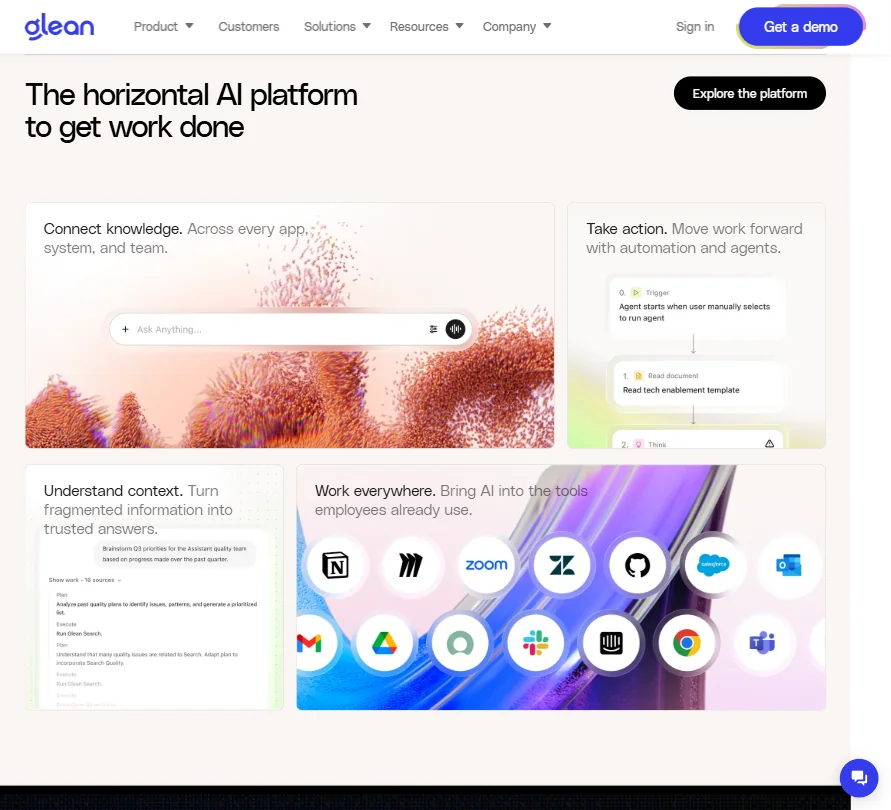
Glean homepage screenshot
Glean — Homepage

Glean's answer is a permission-aware AI layer that sits across your company's entire stack. It connects to over 100 apps and builds what the company calls a knowledge graph from all of it. When someone asks a question, the answer comes back with full context, sourced from wherever that knowledge actually lives.

Their customer list tells you who buys this. Booking.com runs it across 14,000 employees. Ericsson pushed it to 20,000 people. Zillow is on the list. So is GCash. These aren't small pilots. That's a real signal.

Glean has recently pushed hard into agentic territory. The product now includes **AI Agents** that can actually execute tasks across those connected apps, not just find information. That's a meaningful shift from pure search toward something closer to an AI workforce layer.

Glean Features: Automation, AI Assistant & Workflow Capabilities

Glean features screenshot
Glean — Features

The core loop is search, and it's still the strongest part. You ask a question in natural language. Glean pulls from every connected app the asking user has permission to access. The answer comes back with sources and context. That last part matters more than it sounds.

Off-the-shelf LLMs have no idea what "the Q3 onboarding project" means at your company. Glean does, because it's been indexing your specific knowledge base. That's the technical edge they keep hammering in their docs, and based on what we read from enterprise IT reviewers on G2, it's not just marketing copy. That tracks.

Beyond search, Glean has expanded into a few adjacent areas. Content creation is listed as a core feature. So is data analysis and research. The **Work Execution** module and Agents layer let users build automated workflows across connected tools. There's an Agent Library where teams can share pre-built agents. Genuinely useful enterprise touch, that one.

What's absent is also notable. Meeting summaries aren't mentioned in the public docs. Glean isn't trying to be an all-in-one productivity suite. It's positioning as the AI operating system underneath your other tools. Whether that's a strength or a gap depends entirely on what you already have.

We cross-referenced this with reviews from IT and operations roles on G2. The pattern we kept seeing: people praised the search quality, flagged setup time as a real cost, and generally felt the agents were promising but still maturing. Honestly, "promising but maturing" is a fair description of most enterprise AI agents right now, not just Glean's.

Glean AI Quality: How Smart and Useful Is the Assistant?

Glean Assistant is the conversational AI piece. It's not running a single model. The platform supports over 100 LLMs through something called the Model Hub. GPT-4 is in there. So is Claude and Gemini, among others. The idea is that enterprises can pick or swap models based on their requirements.

That's a more thoughtful architecture than most competitors offer. Locking into one model means you're betting everything on one vendor's roadmap. Glean's multi-model setup gives IT teams actual control. We'd rather have that than not.

The quality signal we kept seeing in G2 reviews, across marketing, engineering, and HR roles, was around answer relevance. **Glean surfaces contextually accurate answers far more reliably than generic AI tools** when the underlying data is properly indexed. The caveat is always "when properly indexed." Getting your connectors configured correctly is where the work actually is.

Reddit threads from 2025 surfaced a recurring complaint about initial result quality being inconsistent until the knowledge graph has enough indexed data. One thread from a knowledge management lead described a frustrating first few weeks followed by a genuine turnaround once the indexing matured. That's a real onboarding risk, and it's worth going in with eyes open.

One thing we don't buy entirely: the framing that Glean reduces LLM token waste better than competitors. Probably true in specific scenarios. But as a general claim without public benchmarks to back it, we'd treat it skeptically.

Glean Integrations: What Does It Connect To?

This is where Glean earns its enterprise positioning. Slack is connected natively. So is Google Drive. SharePoint and the broader Microsoft 365 ecosystem are in. Jira and Confluence cover the engineering and project side. GitHub and Salesforce are the two most common enterprise data sources, both present.

Beyond those headline names, there's a Connectors platform that extends considerably further. The vendor docs reference 100+ connectors. Most enterprise stacks have an obvious fit.

An API and developer platform round it out for teams that want to build custom connectors. Fair. That matters for companies with proprietary internal tools that nobody else has ever heard of.

Worth getting into on a demo call: Zapier support is publicly documented by Zapier itself, covering four supported connection methods. So Zapier works. That said, teams don't necessarily need it. Glean offers direct connectors, webhooks, APIs, and its own agent and workflow capabilities, so Zapier is one possible automation route rather than a requirement. Google Calendar also has a dedicated connector page and setup documentation, covering event retrieval and creation. Neither of these is prominently advertised in Glean's own marketing, but both are real.

Is Glean Easy to Use?

Depends on who you're asking.

For the end user, Glean is reportedly straightforward. The search bar is the interface. You type a question, you get an answer. G2 reviewers in non-technical roles consistently described it as intuitive once it was set up. That part checks out.

The setup experience is a different story. Configuring connectors across a large enterprise app stack, managing permissions so the AI only surfaces what each user should see, and getting the knowledge graph populated to a useful density takes real effort. We'd expect weeks, not days, for a proper rollout at scale.

**IT and ops teams carry a disproportionate share of that burden.** We kept seeing that pattern in reviews. End users are happy. Admins are the ones who feel the implementation pain. That's not unusual for enterprise software, but the sales pitch sometimes glosses over it.

Glean is available on web, iOS, and Android, plus a Chrome extension. The mobile apps exist, but mobile-specific reviews are thin. Not a mobile-first tool. Nobody should call it one.

Glean Pricing: Is It Worth It vs Free Alternatives?

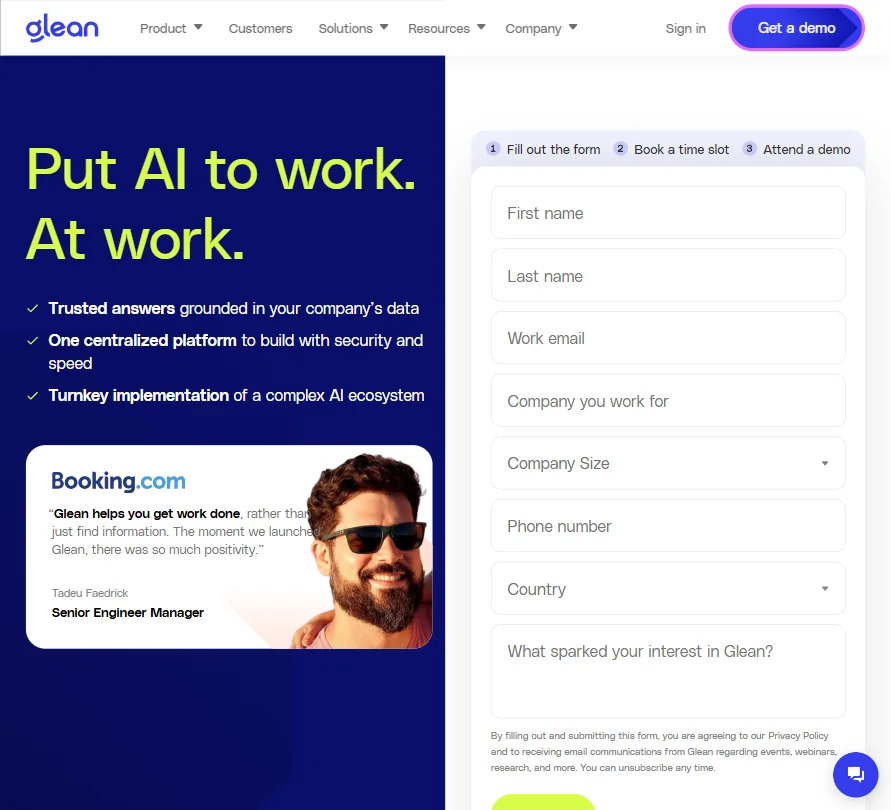
Glean pricing screenshot
Glean — Pricing

We dug through the pricing page and found essentially nothing. No tiers listed. No starting price. No per-seat figure. The pricing URL redirects to the main demo-led site. Everything goes through sales. Standard for enterprise software, but it doesn't make it less annoying to research.

What we do know: Glean launched an "Enterprise Flex" pricing model in 2026. The implication is some flexibility in how seats or usage is packaged. Beyond that, the details aren't public.

No free plan. No publicly advertised free trial, though Glean's own service agreement explicitly covers "free trial use," which suggests trials may exist through a negotiated sales process rather than a self-service signup. **If you want pricing, you're getting on a call.** Legitimate dealbreaker for smaller companies trying to do a genuine comparison without a sales process attached. We're not fans of this approach for anything below true enterprise scale.

For context, competitors like ClickUp Brain² are embedded in project management pricing that's at least partially public. That transparency matters when you're building a business case internally and need real numbers before talking to a vendor.

Glean vs Microsoft Copilot: Which Productivity Tool Wins?

This is the comparison that comes up constantly, especially for organizations already deep in the Microsoft 365 stack.

Microsoft Copilot's obvious advantage is native integration. If you're already paying for Microsoft 365 at an enterprise tier, Copilot is embedded. No new vendor relationship. No new integration project. Real argument.

Glean's counter is that Copilot only knows what's in your Microsoft stack. Glean knows your Slack history, your Confluence docs, your Salesforce records, and your GitHub repos. For companies that don't live entirely in Microsoft, that's a meaningful gap Copilot can't close.

**The actual differentiator is connector breadth.** Glean connects to a wider range of tools by design. If your company runs a mixed-vendor environment, that matters more than Microsoft's native advantage.

The other variable is permission awareness. Glean's permission model is a frequent talking point in their enterprise positioning, and G2 reviewers do confirm it works as described. Copilot's permission handling has attracted more cautious commentary in IT security circles. We cross-referenced that pattern across multiple review threads and it holds up.

We wouldn't call this a clean win for either. It comes down to your existing stack and your appetite for an additional vendor relationship.

Who Should Use Glean? (And Who Shouldn't)

Large enterprises. Obvious fit. Companies with 1,000 or more employees, a fragmented app stack, and a real knowledge management problem are exactly who Glean was built for. Booking.com and Ericsson at the scales they're running aren't using this as a pilot. Core infrastructure.

Mid-market companies in growth mode also fit, especially if knowledge loss from employee turnover is already costing them. When your institutional knowledge lives in 12 different tools and nobody knows where anything is, Glean starts looking like a solution rather than an expense.

Smaller teams shouldn't bother yet. The pricing structure alone makes it inaccessible, and the setup overhead requires dedicated resources that a 20-person company almost certainly doesn't have. Look elsewhere. Something like Read AI handles the knowledge search angle for smaller teams at a fraction of the complexity.

Solo operators and freelancers. Not for this. Wrong product entirely.

Companies that live almost entirely in Microsoft 365 should have a real conversation about whether Copilot solves the same problem for less overhead. It might.

Glean Review Verdict

Glean is the real thing. Not a phrase we use casually.

The core search quality holds up against actual enterprise conditions. The connector ecosystem is genuinely broad. The permission-aware architecture is something competitors are still catching up on. The move into agentic workflows is thoughtful, even if the agents are still maturing.

The concerns are real too. **The pricing opacity is the biggest friction point for any team that can't write a blank check.** Not knowing what you're walking into before a sales call is a legitimate obstacle. The onboarding burden is significant. A few capabilities that buyers might assume are included, meeting summaries and email management among them, simply aren't part of the product in any documented way.

None of those concerns undercut the core case. For the right enterprise buyer, Glean is probably the strongest purpose-built option in this category right now. The G2 review base tells a consistent story, and it's a satisfied one.

The question isn't whether Glean works. It does. The question is whether your company is ready to make it work, and whether the pricing lands somewhere sensible once you're actually in that sales conversation. Go in prepared.

Frequently Asked Questions

Does Glean have a free plan or free trial?

No free plan exists. A self-service free trial isn't publicly advertised, and the pricing page redirects to a demo request form. That said, Glean's own service agreement explicitly references "free trial use," which suggests trials do exist, just through a negotiated sales process rather than a signup button. Contact sales to find out. Frustrating answer, but it's the honest one.

How does Glean handle data security and permissions?

Permission-aware access is one of Glean's most consistently praised features. The system only surfaces information to users who already have permission to see it in the source app. So if someone doesn't have access to a document in Google Drive, Glean won't surface that document in their search results. Enterprise security reviewers on G2 have called this out specifically as a differentiator, and it's a meaningful one for companies with strict data governance requirements.

How long does it take to get Glean up and running?

Not quickly. Based on review patterns we read across G2 and Reddit, most enterprise deployments take weeks to reach a useful state. The knowledge graph needs time to index properly, and connector setup across a large app stack requires real admin effort. Teams that go in expecting a plug-and-play experience tend to have the roughest time. Teams that budget for a proper implementation come out much better.

Alternatives to Glean

See all Glean alternatives →

Other AI Productivity Tool options we've reviewed.

User reviews

Review Glean

Your rating

Reviews are moderated and appear once approved.