We pulled Notion's public docs, ran through G2 and Capterra review threads, and cross-referenced what Reddit was saying before writing any of this. What we kept seeing is a product that covers more ground than almost anything in its category, and charges you accordingly for the privilege. The promise is one workspace for docs, databases, projects, and AI automation. For a lot of teams, it mostly delivers. For others, it's an expensive commitment they're not ready to maintain.
Founded in 2016, San Francisco. Over 100 million users now. Not scrappy. The product has weight, and it has complexity to match.
What is Notion?
Block-based, all the way down. Every heading, paragraph, image, and database row is a block you can move, nest, or transform. That sounds like a technical detail. In practice, it means you can build almost any kind of document or system without hitting a structural wall. A company wiki, a sprint board, a shared meeting log, all in the same place.
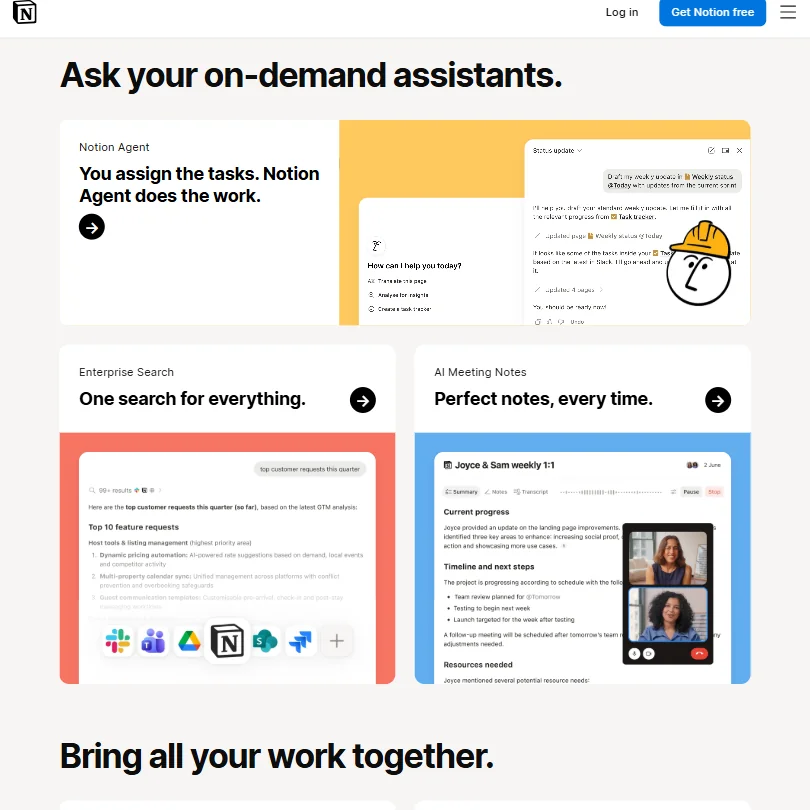
The AI layer isn't an afterthought anymore. **Notion AI** handles writing, summarization, and workspace Q&A. Notion Agent handles task execution. Custom Agents, introduced publicly on February 24, 2026, and moved to commercial credit-based pricing on May 4, 2026, go further still. They run autonomously on things like task routing and sprint planning. That's a real shift from "AI assistant" toward something closer to "AI coworker."
Honestly, the ambition is real. Not everyone lands this combination. Notion has been building toward it for years and the pieces are mostly in place.
The positioning sits Notion against Confluence for wikis, ClickUp for project management, and Airtable for structured data. One tool doing all of that is either very convenient or a mess of compromises. Which one depends almost entirely on how your team is wired.
Notion Features: Automation, AI Assistant & Workflow Capabilities

The feature list is long. That's not always a compliment.
**Custom Agents** are where the May 2026 pricing change matters most. Before that date, Notion had basic workflow automation. After it, you have agents that can route incoming tasks, generate sprint reports, and handle repetitive planning work without anyone clicking buttons. The credit system runs at $10 per 1,000 credits. We'll come back to that in the pricing section. It's not as clean as it sounds.
AI Meeting Notes handles meeting summaries automatically. It works alongside Notion Calendar, which runs as a separate app rather than a native calendar view. Functional, but it doesn't replace a dedicated calendar tool. Google Calendar connects through the Calendar app, not through the main workspace, and a few G2 reviewers flagged that disconnect as a mild operational annoyance.
On the database side, you get Kanban, timeline, gallery, and standard table views. AI Autofill populates structured data fields using AI. Operations-role reviewers on G2 mention this feature regularly, usually positively, though some note the Autofill logic gets unpredictable on messy data.
The Web Clipper browser extension saves content from anywhere into your workspace. Projects get full support: tasks, sub-tasks, timelines, dependencies, and progress tracking are all present. Sprints too.
What Notion doesn't have is email management. Not a feature. You'll need integrations if email context matters to your workflow. Offline mode exists on desktop apps but it's limited, and a recurring note across Reddit threads from 2024 and 2025 is that users on trains or in spotty-wifi hotels found the offline experience inconsistent. Don't plan your offline work session around it.
Notion AI Quality: How Smart and Useful Is the Assistant?
Notion AI runs on models from OpenAI and Anthropic, though Notion doesn't publish which version or what routing logic they use. Most users don't care. What they care about is whether it makes their work faster.
Across G2 and Capterra, our research kept surfacing two camps. Solo users and small teams find Notion AI genuinely useful for drafting, summarizing long pages, and answering questions about their own workspace content. Larger teams and power users hit limits faster. The Q&A agent is only as good as your workspace organization. Sprawl of half-finished pages and inconsistent naming produces confident but useless answers.
That tracks. Any AI knowledge base tool has this problem.
Enterprise Search and Q&A is the most interesting capability for bigger teams. Ask a question, get an answer sourced from internal docs. **This feature works well when the underlying knowledge base is clean** and works badly when it isn't. No magic there.
Writing assistance is solid. Nothing that distinguishes Notion from other OpenAI-powered tools, but it's context-aware within your workspace, which is worth something. Asking it to summarize a project brief it can actually see is more useful than pasting content into a separate chat window.
We're mildly skeptical of the Custom Agents claims. The feature is commercially new and deep review data hasn't accumulated yet. Early comments in r/notion are cautiously positive, but "autonomously automates repetitive team workflows" is a strong statement for a feature running on a credit meter that launched recently.
Notion Integrations: What Does It Connect To?
Reasonable, without being exceptional. Slack connects natively and handles task routing through the Agents feature. GitHub and Google Drive connect. Zapier covers anything without a native connector. The public API at developers.notion.com is real and documented, and developer-focused teams use it to build custom workflows.
Microsoft 365 integration is described in Notion's own docs as basic. That's their word. User reports confirm it. **Teams embedded in the Microsoft stack will find the 365 support underwhelming**, and if your team lives in Teams and SharePoint, Notion will feel like it's fighting you a little.
The integration list in the docs includes Loom, Amplitude, and Asana, among a few others. Depth varies. The Asana connector is more of a migration or link-sharing bridge than a real two-way sync. Don't expect bidirectional task sync without building it yourself.
Is Notion Easy to Use?
No. Not at first.
The block editor takes getting used to. New users on G2 consistently flag the learning curve. The "/" command to insert blocks is intuitive once you know it exists. Before that, new users have no idea what to do. The database system is powerful and confusing in roughly equal proportion. Relational databases with rollups and formulas are not beginner concepts, and Notion presents them without much scaffolding.
Reddit threads are consistent on this. The r/notion sub has years of posts from people asking how to structure their workspace. When a product's community spends significant energy on setup questions rather than feature questions, the onboarding isn't doing its job.
**The template library helps significantly**, and it's one of the better moves Notion has made. Pre-built templates for sprint planning, wikis, meeting notes, and personal dashboards give new users a starting point better than a blank page. But templates solve the setup problem once. They don't solve the ongoing complexity of maintaining a large Notion workspace over time.
Real-time collaboration is genuinely good. Comments, mentions, and shared workspaces all work the way you'd expect. The permissions system is flexible enough for most teams. That part of the experience is polished.
Mobile is functional. Not the main event. iOS and Android apps exist and work, but editing complex databases or navigating deeply nested pages on a phone isn't pleasant. Most users treat mobile as a read-mostly experience.
Notion Pricing: Is It Worth It vs Free Alternatives?

The free plan is real. Not a gimmick. Solo users can get a lot done on it. Students and educators get the Plus plan free with a school email, which is a genuinely generous move and probably explains part of the enormous user base.
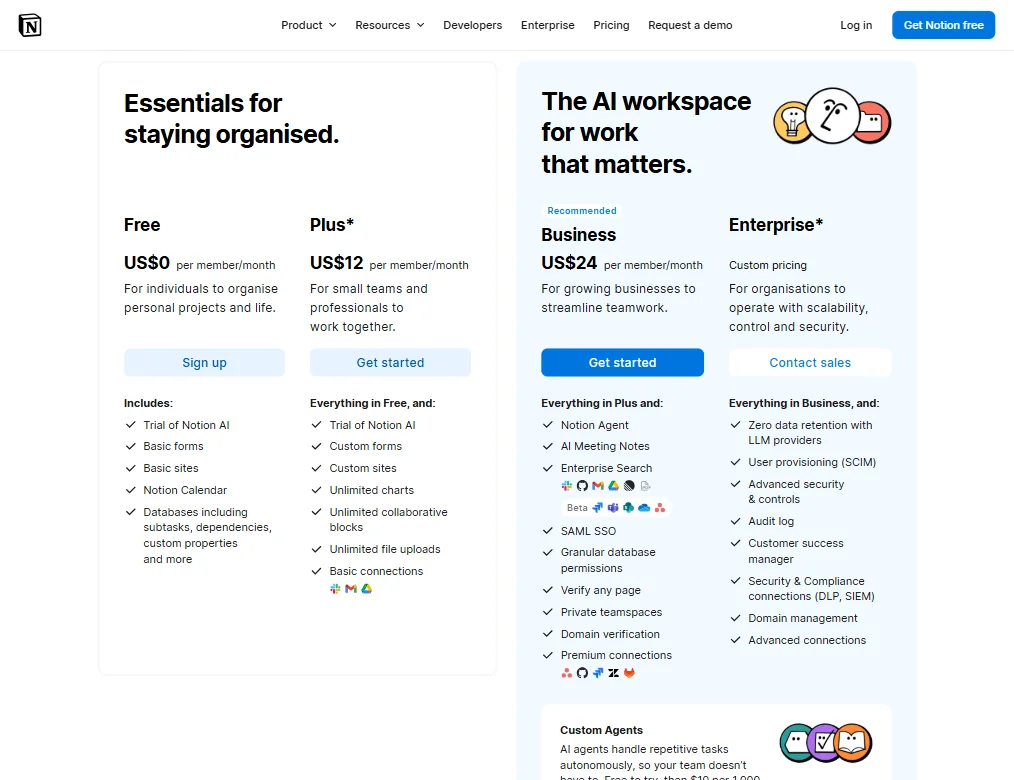
Beyond free, it gets interesting. The Plus plan sits at $12 per member per month. Business sits at $24 per member per month and is where the meaningful AI features now live: Notion Agent, AI Meeting Notes, Enterprise Search, and the full agent functionality. Enterprise is custom pricing, as expected, and adds zero data retention with LLM providers, SCIM provisioning, and audit logs, among a few other controls.
The Custom Agents credit system adds another variable. $10 per 1,000 credits for agent usage on top of your subscription. **What 1,000 credits actually buys you in practice** isn't specific enough in the documentation to budget around comfortably. Vague credit pricing has burned teams before. You set up automation, it runs more than expected, the bill surprises you. We've seen that pattern elsewhere and it doesn't get better on its own.
Notion's Trustpilot presence sits at 2.3 out of 5 across 422 reviews. Billing frustration and unexpected charges appear prominently in recent reviews. That's a small sample against the much larger G2 pool, but the gap is wide enough to flag. G2 and Capterra reviewers skew toward power users who chose the product. Trustpilot captures more casual or unhappy users. The delta between those two pools tells you something.
Refund policy. Not publicly stated anywhere we could find. Not ideal.
Notion vs Confluence: Which Productivity Tool Wins?
For knowledge management and wikis, this is the obvious comparison. Confluence has been the enterprise standard for years. Notion has eaten into that ground substantially.
Confluence is more structured. Its permission system is mature. Large enterprise teams with compliance requirements often stay there because it's predictable. Deep Jira integration is a real advantage for teams already in the Atlassian ecosystem.
Notion is more flexible. **For teams without an existing Atlassian footprint, Notion is the stronger choice** on almost every dimension except raw enterprise compliance controls. The AI layer tips the balance further toward Notion for teams that want knowledge base Q&A and writing assistance built in.
Price is worth examining directly. Confluence Standard is listed at approximately $5.42 per user per month, while Notion Business currently costs $20 per user per month. Notion doesn't win on price across every configuration. For small to mid-sized teams on Business tier, that gap is notable.
The real answer is straightforward. Confluence wins when you're already in Atlassian's orbit. Notion wins when you're not, and want a more modern workspace with better AI tooling out of the box.
Teams with purely project-management needs might find Asana a more focused option than either. Notion does project management well, but it's not purpose-built for it.
Who Should Use Notion? (And Who Shouldn't)
Small to mid-sized teams building out an internal knowledge base. That's the core fit. Docs, project tracking, and meeting notes in one workspace without six different subscriptions.
Startups. Notion is close to the default workspace tool for early-stage companies now, and that's earned. The flexibility lets you build what you need as the company changes shape.
Solo power users who want a structured personal operating system. The free plan covers a lot, and the template community around personal productivity is massive.
Enterprise teams with heavy Microsoft 365 dependency. The integration is shallow, and companies deep in the Microsoft stack will hit friction. Glean might be worth a look as a purpose-built enterprise knowledge search layer that sits on top of existing tools rather than replacing them.
Anyone who needs email management in their workflow. Not there. Won't find it.
Teams that want a lightweight, low-maintenance setup. Notion rewards investment. If nobody's willing to maintain the workspace structure, it drifts into chaos. We've read enough r/notion posts about "my Notion became a graveyard" to take that seriously. Not great for passive deployers.
Notion Review Verdict
Getting docs, databases, project management, and AI into a single coherent workspace is hard. Notion does it better than most. That's not a faint compliment.
The friction points are real, though. The learning curve is steeper than the marketing suggests. The Custom Agents credit pricing is vague in a way that should make any team with unpredictable automation volume nervous. The Trustpilot billing complaints are a recurring signal worth monitoring.
**The strongest case for Notion is that nothing else at the same price covers as much ground.** Confluence covers less and costs more for small teams under current published pricing. ClickUp is powerful but the interface fights you in different ways. Airtable is better for pure database work and worse for everything else.
The weakest case is the one you build when your team isn't committed to maintaining workspace structure. Notion without someone tending it eventually becomes an expensive pile of half-used pages. The tool is only as good as the habits built around it. Fair.
We'd recommend it for teams willing to put in the setup work. Not for teams looking for something they can deploy and ignore.
Frequently Asked Questions
Is Notion AI included in the free plan?
No. Notion AI features sit in the Business tier at $24 per member per month under the current pricing structure. The free plan covers core workspace features but not the AI writing assistant, AI Meeting Notes, or the Enterprise Search and Q&A functionality. Custom Agents add credit-based costs on top of the subscription.
How does Notion compare to ClickUp for project management?
Both tools handle projects and both have added AI layers in recent years. ClickUp is more purpose-built for project management, with more native automation options and feature depth that project-heavy teams often prefer. Notion handles projects well, but project management is part of a broader workspace rather than the primary focus. Teams that need a dedicated PM tool with deep automation may find ClickUp Brain² more appropriate. Teams that want project management embedded alongside their docs and knowledge base tend to prefer Notion.
What is the refund policy for Notion?
Notion doesn't publish a clear refund policy on their public-facing website. We couldn't find a stated window or process. If you're testing the product, the free plan or any available trial period is the cleaner route before committing to an annual paid plan. Given the billing-related complaints visible in Notion's Trustpilot reviews, we'd recommend clarifying refund terms directly with their support team before upgrading on an annual basis.