Jamie is a bot-free AI meeting note-taker that runs on desktop and mobile, picking up audio in the background of online and in-person meetings instead of sending a bot to join the call. A generous always-free plan is available, but the number of AI-generated notes it produces each month is what mostly decides which plan you need.

What is Jamie?
Jamie is made by wespond UG, a company registered in Rosrath, Germany, and its data is hosted and processed in the EU. It runs as a web app plus native apps for Windows, Mac, iOS and Android, so meetings can be captured from a phone or an in-person room as well as a computer.
What Jamie captures from a meeting
Jamie does not send a bot into your calls; it runs locally on your device and picks up audio across Zoom, Microsoft Teams and Google Meet, as well as in-person meetings, both included on every plan. Transcription and summaries cover more than 80 languages.
It captures audio only, deleting the audio file once a transcript is ready; there is no video recording. Ask Jamie, a chat feature that can search across every past meeting, is included on the free plan. Jamie does not offer clip or highlight creation.
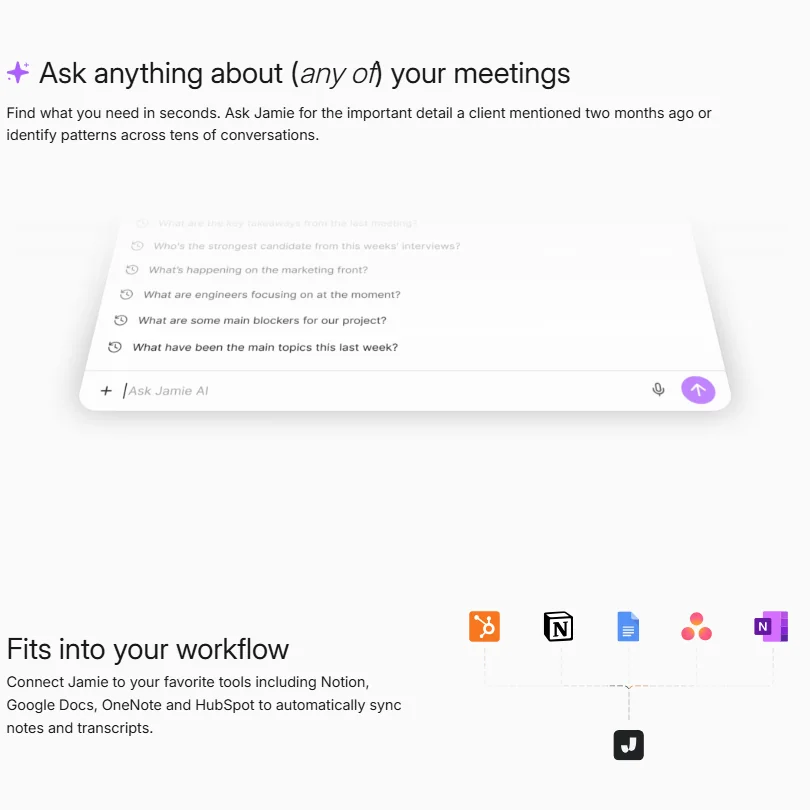
Meeting notes can sync automatically to a CRM, including HubSpot, Salesforce, Dynamics 365 and Attio, from the Pro plan up.
Working with other people
Jamie also connects to Asana, OneNote, Google Docs, Affinity, DealCloud, Notion, Slack, GitHub and Linear. An API and an MCP server that lets external AI assistants query Jamie's meeting data are both available from the Pro plan up. Shared team workspaces are included on the Team and Enterprise plans, and single sign-on via SAML is offered on Enterprise.
Jamie pricing: what each plan gives
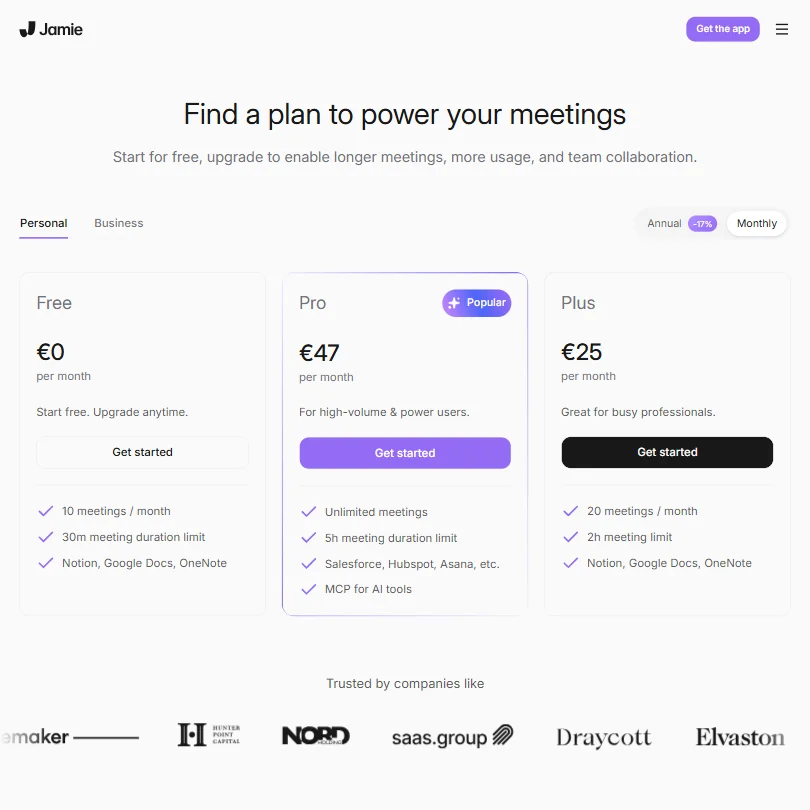
The free plan costs €0 a user a month and gives 10 AI notes a month, a 30-minute meeting limit, unlimited storage, in-person meetings, 50 custom vocabulary terms, 1 custom note template and the Ask Jamie chat.
Plus costs €25 a user a month (€21 a user a month billed yearly) and raises the AI-notes allowance to 20 a month, extends the meeting limit to 2 hours, and keeps 50 vocabulary terms and 1 custom template. Pro costs €47 a user a month (€39 a user a month billed yearly) and removes the AI-notes cap, adding unlimited custom templates, CRM sync, the API and the MCP server. Team costs €39 a user a month (€33 a user a month billed yearly), priced below Pro, and adds the shared team workspace. Enterprise pricing is custom and adds SAML single sign-on.
There is no free trial of a paid plan; the free tier is the way to try Jamie before subscribing.
Privacy and security
Your data is never used to train Jamie's models or any third-party models. Its SOC 2 Type II audit is in progress and it is not yet certified. It is fully GDPR compliant, and data storage and processing stays within the EEA, Switzerland and the UK, with servers located in Frankfurt, Germany. An automated consent email can notify meeting attendees before a meeting starts, included on every plan.
Support runs through email and a help center.
Who Jamie suits
Jamie suits people who want meeting notes captured without a visible bot, including in-person conversations, and who need broad language coverage with data kept inside the EU.
It suits less well anyone generating a high volume of AI notes on a budget, since the free plan allows only 10 a month and Plus, the cheapest paid plan, raises that to just 20. It also suits less well anyone who needs SOC 2 certification today or a video recording of the call, since Jamie captures audio only.
Screenshots
How Jamie compares
Jamie scores 6.8 out of 10 among the AI meeting assistants we rate. These three do the same job and are the closest to it, compared on what each vendor publishes.
Otter.ai
Jamie's language coverage runs to 80, well past Otter's 6, and Jamie does not train its AI on your data on any plan, while Otter trains on recordings and transcripts with no opt-out. Otter adds talk time tracking, a feature Jamie's plans do not have. Otter also offers HIPAA compliance as an Enterprise add-on, something Jamie does not have.
Pick Otter.ai if you need talk time tracking or a HIPAA option.
Pick Jamie if you want more languages with no AI training on any plan.
Fireflies.ai
Jamie caps out at 80 languages while Fireflies reaches 100, and Fireflies keeps the meeting video from its free plan, while Jamie only captures audio and deletes it after processing. Fireflies also lets you cut and share clips, a feature Jamie's plans do not offer. Jamie's cheapest paid plan raises the free plan's cap to just 20 AI notes a month, and Fireflies adds HIPAA compliance on its Enterprise plan, which Jamie does not offer.
Pick Fireflies.ai if you want video kept and clips to share.
Pick Jamie if you want audio only capture and no AI training on any plan.
Read AI
Read AI transcribes 16 languages to Jamie's 80, though Jamie only captures audio while Read AI keeps meeting video from its Enterprise plan up. Read AI includes a personalized coaching feature on its free plan, a feature Jamie's plans do not offer. Neither tool trains its AI on your data.
Pick Read AI if you want coaching built into the free plan.
Pick Jamie if you want more languages and audio deleted after processing.
Frequently Asked Questions
How much does Jamie cost?
There is a free plan with 10 AI notes a month and a 30-minute meeting limit. Paid plans start at Plus for €25 a user a month (€21 billed yearly) and rise through Pro and Team to Enterprise, which is priced on request.
Does Jamie need a bot to join my meetings?
No. Jamie runs on your device and picks up audio in the background, so no bot joins the call, and it also captures in-person meetings.
How many AI notes does Jamie generate each month?
The free plan allows 10 AI notes a month, Plus raises that to 20, and Pro, Team and Enterprise remove the cap entirely.
Does Jamie train on my meetings?
No. Your data is never used to train Jamie's models or any third-party models, and all data storage and processing stays within the EEA, Switzerland and the UK.