ChatGPT is the broad starting point for a teacher who wants one assistant for lesson plans, handout images, voice and research.
Buying guide · 18 tools ranked
Best AI Tools for Teachers
Find the best AI tools for teachers, grouped by the job each one does in a school week: planning lessons, building slides, reading and summarizing sources, giving feedback and checking student writing, making classroom visuals and video, and keeping meeting notes. Choose one tool per job instead of comparing every tool with every other, and use each group's notes to see what separates the picks.
Our top 3 AI Tools for Teachers
Gamma is the pick when you want a whole lesson deck drafted from a prompt, an outline or an uploaded Word file, PDF or Google Doc, then shared as a link.
Perplexity answers a question with inline citations on every plan, Free included, so it suits a teacher who needs current sources quickly, such as a news event for a civics lesson.
Best AI assistants for lesson planning
3 picksLesson planning is a conversation more than a template, so what separates the assistants is memory, folders and which files they can read. ChatGPT includes Projects and web search on its free plan, plus voice, images and memory. Gemini reads Gmail, Calendar and Drive through Connected Apps, and its free context window is 32,000 tokens. Claude's free plan has web search, memory and file creation but does not generate images. All three train on consumer chats unless you opt out, and Gemini needs Keep Activity turned off. Choose by where your files live and whether you want images in the same tool.
#ToolScorePriceWhy pick it
From $8free planChatGPT is the broad starting point for a teacher who wants one assistant for lesson plans, handout images, voice and research.
Show detailsHide details01 ChatGPT: Best for planning, images and voice in one assistant8.8Score 8.8 out of 10From $8free planChatGPT is the broad starting point for a teacher who wants one assistant for lesson plans, handout images, voice and research.Visit site ↗ReviewDetailsCloseShow more about ChatGPT
From $8free plan
ChatGPT is the broad starting point for a teacher who wants one assistant for lesson plans, handout images, voice and research.
Show detailsHide detailsChatGPT: Best for planning, images and voice in one assistant
8.8Score 8.8 out of 10From $8free planChatGPT is the broad starting point for a teacher who wants one assistant for lesson plans, handout images, voice and research.Visit site ↗ReviewDetailsClose
ChatGPT is the broad starting point for a teacher who wants one assistant for lesson plans, handout images, voice and research. The free plan includes unlimited text chat, web search and Projects, so you can keep a folder per class, though image generation is limited and slower there. The catch is that deep research is limited on Free and Go, and you have to opt out of training yourself. Choose Gemini instead if your school runs on Google.
- The Free plan includes unlimited text chats with GPT-5.6 Luna, subject to abuse guardrails.
- Web search is included on every individual plan, including Free.
- Go, the cheapest paid plan, still does not unlock GPT-6 Astra, GPT-5.6 Sol or GPT-5.6 Sol Pro, and may include ads.
From $4.99free planGemini suits teachers whose planning already lives in Gmail, Calendar and Drive, because Connected Apps lets it read from them.
Show detailsHide details02 Gemini: Best for teachers who work in Google apps7.9Score 7.9 out of 10From $4.99free planGemini suits teachers whose planning already lives in Gmail, Calendar and Drive, because Connected Apps lets it read from them.Visit site ↗ReviewDetailsCloseShow more about Gemini
From $4.99free plan
Gemini suits teachers whose planning already lives in Gmail, Calendar and Drive, because Connected Apps lets it read from them.
Show detailsHide detailsGemini: Best for teachers who work in Google apps
7.9Score 7.9 out of 10From $4.99free planGemini suits teachers whose planning already lives in Gmail, Calendar and Drive, because Connected Apps lets it read from them.Visit site ↗ReviewDetailsClose
Gemini suits teachers whose planning already lives in Gmail, Calendar and Drive, because Connected Apps lets it read from them. All three Gemini models are on the free plan, and so is image generation. The catch is a 32,000 token context window on free, against 1 million on Google AI Pro and Ultra, and Google uses your chats to improve its models unless you turn off Keep Activity, which also switches off memory. ChatGPT keeps Projects on its free plan.
- Gemini is free to use with any personal Google account, with Google's Flash models included.
- Google AI Pro at $19.99 a month includes Gemini 4 Argon, Google's newest frontier model.
- The free plan's context window is capped at 32,000 tokens, far below the 1 million tokens on Pro and Ultra.
From $20free planThe free plan on Claude already has web search, file creation, code execution, voice and memory across conversations, which suits a teacher who wants to try an assistant before paying.
Show detailsHide details03 Claude: Best for a free plan with memory and voice7.8Score 7.8 out of 10From $20free planThe free plan on Claude already has web search, file creation, code execution, voice and memory across conversations, which suits a teacher who wants to try an assistant before paying.Visit site ↗ReviewDetailsCloseShow more about Claude
From $20free plan
The free plan on Claude already has web search, file creation, code execution, voice and memory across conversations, which suits a teacher who wants to try an assistant before paying.
Show detailsHide detailsClaude: Best for a free plan with memory and voice
7.8Score 7.8 out of 10From $20free planThe free plan on Claude already has web search, file creation, code execution, voice and memory across conversations, which suits a teacher who wants to try an assistant before paying.Visit site ↗ReviewDetailsClose
The free plan on Claude already has web search, file creation, code execution, voice and memory across conversations, which suits a teacher who wants to try an assistant before paying. The Sonnet and Haiku models are free, while deep research and the Opus and Fable models start on Pro. The catch is that Claude does not generate images, so pair it with Canva or Adobe Express, and consumer chats train Anthropic's models unless you opt out.
- The free plan already includes web search, file creation, code execution and memory across conversations.
- Deep research is available from the Pro plan up.
- The Opus and Fable models are only available from the Pro plan up.
Best AI presentation makers for teachers
3 picksSlide tools differ in how much they draft for you and what they cost per teacher. Gamma writes a deck from a prompt, an outline or an uploaded document and publishes it as a link, but its free plan is 400 credits granted once. Canva starts from a large template library, with Magic Design turning a prompt into a presentation. Visme adds charts, infographics and an AI photo editor, and commercial use starts on its Pro plan. Compare what one prompt gives on a free plan, 10 cards in Gamma and up to 50 slides per Visme project, then choose between a drafted deck and a template.
#ToolScorePriceWhy pick it
From $12free planGamma is the pick when you want a whole lesson deck drafted from a prompt, an outline or an uploaded Word file, PDF or Google Doc, then shared as a link.
Show detailsHide details04 Gamma: Best for full decks drafted from a prompt8.6Score 8.6 out of 10From $12free planGamma is the pick when you want a whole lesson deck drafted from a prompt, an outline or an uploaded Word file, PDF or Google Doc, then shared as a link.Visit site ↗ReviewDetailsCloseShow more about Gamma
From $12free plan
Gamma is the pick when you want a whole lesson deck drafted from a prompt, an outline or an uploaded Word file, PDF or Google Doc, then shared as a link.
Show detailsHide detailsGamma: Best for full decks drafted from a prompt
8.6Score 8.6 out of 10From $12free planGamma is the pick when you want a whole lesson deck drafted from a prompt, an outline or an uploaded Word file, PDF or Google Doc, then shared as a link.Visit site ↗ReviewDetailsClose
Gamma is the pick when you want a whole lesson deck drafted from a prompt, an outline or an uploaded Word file, PDF or Google Doc, then shared as a link. Reviewers can comment without editing, and decks export to PDF, PPTX, PNG or Google Slides. The catch is the free plan: 400 credits granted once, up to 10 cards per prompt and Gamma branding until Plus. Canva fits better when slides and handouts should share one Brand Kit.
- Turns a written prompt, an outline or an uploaded Word document, PDF or Google Doc into a structured deck automatically.
- Imports existing PDF and PPTX files and exports finished decks to PDF, PPTX, PNG or Google Slides.
- Free plan output carries Gamma's own branding, which is only removed starting on the Plus plan.
From $18free planChoose Canva when slides, handouts and posters should all come from one template library. Magic Design turns a written prompt into a finished presentation, and the free plan includes over 1.6 million templates, one three-color Brand Kit and 5GB of storage, with a 30-day trial of Pro.
Show detailsHide details05 Canva: Best for templates for slides and handouts7.8Score 7.8 out of 10From $18free planChoose Canva when slides, handouts and posters should all come from one template library. Magic Design turns a written prompt into a finished presentation, and the free plan includes over 1.6 million templates, one three-color Brand Kit and 5GB of storage, with a 30-day trial of Pro.Visit site ↗ReviewDetailsCloseShow more about Canva
From $18free plan
Choose Canva when slides, handouts and posters should all come from one template library. Magic Design turns a written prompt into a finished presentation, and the free plan includes over 1.6 million templates, one three-color Brand Kit and 5GB of storage, with a 30-day trial of Pro.
Show detailsHide detailsCanva: Best for templates for slides and handouts
7.8Score 7.8 out of 10From $18free planChoose Canva when slides, handouts and posters should all come from one template library. Magic Design turns a written prompt into a finished presentation, and the free plan includes over 1.6 million templates, one three-color Brand Kit and 5GB of storage, with a 30-day trial of Pro.Visit site ↗ReviewDetailsClose
Choose Canva when slides, handouts and posters should all come from one template library. Magic Design turns a written prompt into a finished presentation, and the free plan includes over 1.6 million templates, one three-color Brand Kit and 5GB of storage, with a 30-day trial of Pro. The catch is that free AI use is capped at up to 20 uses, and Canva trains on uploaded content by default unless you opt out. Gamma builds a whole deck from one prompt.
- The free plan includes over 1,000 design types, more than 1.6 million templates, more than 4.7 million stock photos, videos, graphics and audio clips, and 5GB of storage at no cost.
- Magic Design turns a written prompt into a finished design, extending the same approach to presentations and video.
- The AI Image Generator's Vector style produces a raster image with a vector look, not an editable vector or SVG file.
From $29free planVisme is for teachers who build data-heavy material. It makes presentations, infographics and documents from a prompt, a template, an uploaded file or a pasted URL, and includes AI photo tools such as a background remover and an upscaler.
Show detailsHide details06 Visme: Best for infographics and charts in presentations6.9Score 6.9 out of 10From $29free planVisme is for teachers who build data-heavy material. It makes presentations, infographics and documents from a prompt, a template, an uploaded file or a pasted URL, and includes AI photo tools such as a background remover and an upscaler.Visit site ↗ReviewDetailsCloseShow more about Visme
From $29free plan
Visme is for teachers who build data-heavy material. It makes presentations, infographics and documents from a prompt, a template, an uploaded file or a pasted URL, and includes AI photo tools such as a background remover and an upscaler.
Show detailsHide detailsVisme: Best for infographics and charts in presentations
6.9Score 6.9 out of 10From $29free planVisme is for teachers who build data-heavy material. It makes presentations, infographics and documents from a prompt, a template, an uploaded file or a pasted URL, and includes AI photo tools such as a background remover and an upscaler.Visit site ↗ReviewDetailsClose
Visme is for teachers who build data-heavy material. It makes presentations, infographics and documents from a prompt, a template, an uploaded file or a pasted URL, and includes AI photo tools such as a background remover and an upscaler. The free Basic plan gives unlimited projects of up to 50 slides, with the Visme logo. The catch is that commercial use starts on Pro and the app runs in a browser only, where Canva has apps.
- Generates a full presentation from a written prompt, choosing a style and filling in text, images and icons.
- Builds a deck from an uploaded document or a pasted URL as well as from a prompt.
- Commercial use of what you create is limited to the Pro plan and above; Basic and Starter are for personal use only.
Best AI tools for summarizing reading material
3 picksReading tools split into those that answer from your files and those that answer from the web. NotebookLM and Anara stay inside the sources you upload and cite the passage. NotebookLM takes up to 50 sources per notebook on its free plan and adds podcast-style Audio Overviews, while Anara handles very long papers and searches academic databases. Perplexity searches the web and cites inline on every plan. Look at the free upload limits, since Anara's free plan allows 5 uploads a day. Choose a source-bound tool for a set reading list and Perplexity for a question you have not yet researched.
#ToolScorePriceWhy pick it
From $20free planPerplexity answers a question with inline citations on every plan, Free included, so it suits a teacher who needs current sources quickly, such as a news event for a civics lesson.
Show detailsHide details07 Perplexity: Best for cited answers from the live web8.7Score 8.7 out of 10From $20free planPerplexity answers a question with inline citations on every plan, Free included, so it suits a teacher who needs current sources quickly, such as a news event for a civics lesson.Visit site ↗ReviewDetailsCloseShow more about Perplexity
From $20free plan
Perplexity answers a question with inline citations on every plan, Free included, so it suits a teacher who needs current sources quickly, such as a news event for a civics lesson.
Show detailsHide detailsPerplexity: Best for cited answers from the live web
8.7Score 8.7 out of 10From $20free planPerplexity answers a question with inline citations on every plan, Free included, so it suits a teacher who needs current sources quickly, such as a news event for a civics lesson.Visit site ↗ReviewDetailsClose
Perplexity answers a question with inline citations on every plan, Free included, so it suits a teacher who needs current sources quickly, such as a news event for a civics lesson. Free uses automatic model selection and limited file uploads. The catch is that data retention and training are on by default for Free, Pro and Max and must be switched off in settings, and deep research needs Pro. NotebookLM stays inside your own files.
- Every plan, including Free, returns answers with inline citations to sources.
- Perplexity orchestrates models from several AI companies alongside its own Sonar 2 model.
- AI data retention and training are on by default for Free, Pro and Max, and must be turned off in settings.
From $12free planAnara is the pick if you read research papers for a degree or professional development and want every answer traced to the exact passage.
Show detailsHide details08 Anara: Best for reading journal articles with citations7.3Score 7.3 out of 10From $12free planAnara is the pick if you read research papers for a degree or professional development and want every answer traced to the exact passage.Visit site ↗ReviewDetailsCloseShow more about Anara
From $12free plan
Anara is the pick if you read research papers for a degree or professional development and want every answer traced to the exact passage.
Show detailsHide detailsAnara: Best for reading journal articles with citations
7.3Score 7.3 out of 10From $12free planAnara is the pick if you read research papers for a degree or professional development and want every answer traced to the exact passage.Visit site ↗ReviewDetailsClose
Anara is the pick if you read research papers for a degree or professional development and want every answer traced to the exact passage. It handles uploads of up to 10,000 pages on Pro, searches your documents and academic databases together, and lets you choose among several models. The catch is that the free plan allows 2,000 AI words and 5 uploads a day, and its focus on scientific research means it will not plan lessons. NotebookLM is broader.
- Supports document libraries of up to 10,000 pages per upload, far exceeding most comparable tools.
- Every AI-generated answer is traceable back to the specific source passage, eliminating hallucinated citations.
- Founding date and headquarters are not publicly disclosed.
Pricing N/Afree planNotebookLM answers questions strictly from the documents you upload and cites the passage, which makes it a lower-risk place to study a reading list or a set of articles.
Show detailsHide details09 Google NotebookLM: Best for answers drawn from your own sources4.9Score 4.9 out of 10Pricing N/Afree planNotebookLM answers questions strictly from the documents you upload and cites the passage, which makes it a lower-risk place to study a reading list or a set of articles.Visit site ↗ReviewDetailsCloseShow more about Google NotebookLM
Pricing N/Afree plan
NotebookLM answers questions strictly from the documents you upload and cites the passage, which makes it a lower-risk place to study a reading list or a set of articles.
Show detailsHide detailsGoogle NotebookLM: Best for answers drawn from your own sources
4.9Score 4.9 out of 10Pricing N/Afree planNotebookLM answers questions strictly from the documents you upload and cites the passage, which makes it a lower-risk place to study a reading list or a set of articles.Visit site ↗ReviewDetailsClose
NotebookLM answers questions strictly from the documents you upload and cites the passage, which makes it a lower-risk place to study a reading list or a set of articles. The free plan holds up to 50 sources per notebook, and Audio Overviews turn your sources into a podcast-style discussion for review. The catch is that it cannot fill gaps from outside knowledge. Perplexity is the tool for a question you have not researched.
- The free tier is genuinely capable, handling up to 50 sources per notebook without requiring a paid subscription.
- Responses are constrained strictly to user-uploaded sources, with citations pointing back to the exact document and passage, making outputs verifiable.
- Output formats like slide decks and infographics feel outside the tool's core identity and may reflect feature sprawl rather than focused improvement.
Best AI writing feedback and AI detection tools for teachers
3 picksThis job covers improving your own writing and checking student writing, and the tools overlap less than their feature lists suggest. Grammarly and QuillBot correct grammar, tone and wording, and both include a plagiarism checker and an AI detector. GPTZero is built for educators, with sentence-level highlighting, batch uploads of up to 250 files and Writing Replay, which records how a document was composed. Its accuracy figure is its own claim, so treat a flag as a reason for a conversation, not proof. Choose by whether you are editing text or reviewing a class set.
#ToolScorePriceWhy pick it
From $12free planGrammarly checks grammar, spelling and tone where you already write, including Google Docs, Word and the browser, so it fits report comments and parent emails.
Show detailsHide details10 Grammarly: Best for grammar and tone checks in Google Docs8.3Score 8.3 out of 10From $12free planGrammarly checks grammar, spelling and tone where you already write, including Google Docs, Word and the browser, so it fits report comments and parent emails.Visit site ↗ReviewDetailsCloseShow more about Grammarly
From $12free plan
Grammarly checks grammar, spelling and tone where you already write, including Google Docs, Word and the browser, so it fits report comments and parent emails.
Show detailsHide detailsGrammarly: Best for grammar and tone checks in Google Docs
8.3Score 8.3 out of 10From $12free planGrammarly checks grammar, spelling and tone where you already write, including Google Docs, Word and the browser, so it fits report comments and parent emails.Visit site ↗ReviewDetailsClose
Grammarly checks grammar, spelling and tone where you already write, including Google Docs, Word and the browser, so it fits report comments and parent emails. The free plan gives 100 AI prompts a month and tone detection, while Pro, at $30 monthly or $12 billed yearly, adds full sentence rewrites, plagiarism and AI detection and 2,000 prompts. The catch is that most meaningful features need Pro. QuillBot adds paraphrasing modes.
- Grammarly works across an impressive range of platforms including Chrome, Safari, Firefox, Edge, Windows, Mac, iOS, Android, Microsoft Word, and Google Docs.
- The plagiarism checker is built directly into the editor rather than being a separate export tool, a useful workflow for academic and content marketing use.
- The free plan is significantly limited, though it does include tone detection and 100 AI prompts a month alongside basic grammar, spelling, and punctuation; most meaningful features still require a paid Pro subscription.
From $12.99free planGPTZero is built for the teacher reviewing a class set. It highlights likely AI text sentence by sentence, scans up to 250 files at once, records how a document was composed with Writing Replay, and connects to Google Docs and Canvas LMS.
Show detailsHide details11 GPTZero: Best for checking student work for AI use7.8Score 7.8 out of 10From $12.99free planGPTZero is built for the teacher reviewing a class set. It highlights likely AI text sentence by sentence, scans up to 250 files at once, records how a document was composed with Writing Replay, and connects to Google Docs and Canvas LMS.Visit site ↗ReviewDetailsCloseShow more about GPTZero
From $12.99free plan
GPTZero is built for the teacher reviewing a class set. It highlights likely AI text sentence by sentence, scans up to 250 files at once, records how a document was composed with Writing Replay, and connects to Google Docs and Canvas LMS.
Show detailsHide detailsGPTZero: Best for checking student work for AI use
7.8Score 7.8 out of 10From $12.99free planGPTZero is built for the teacher reviewing a class set. It highlights likely AI text sentence by sentence, scans up to 250 files at once, records how a document was composed with Writing Replay, and connects to Google Docs and Canvas LMS.Visit site ↗ReviewDetailsClose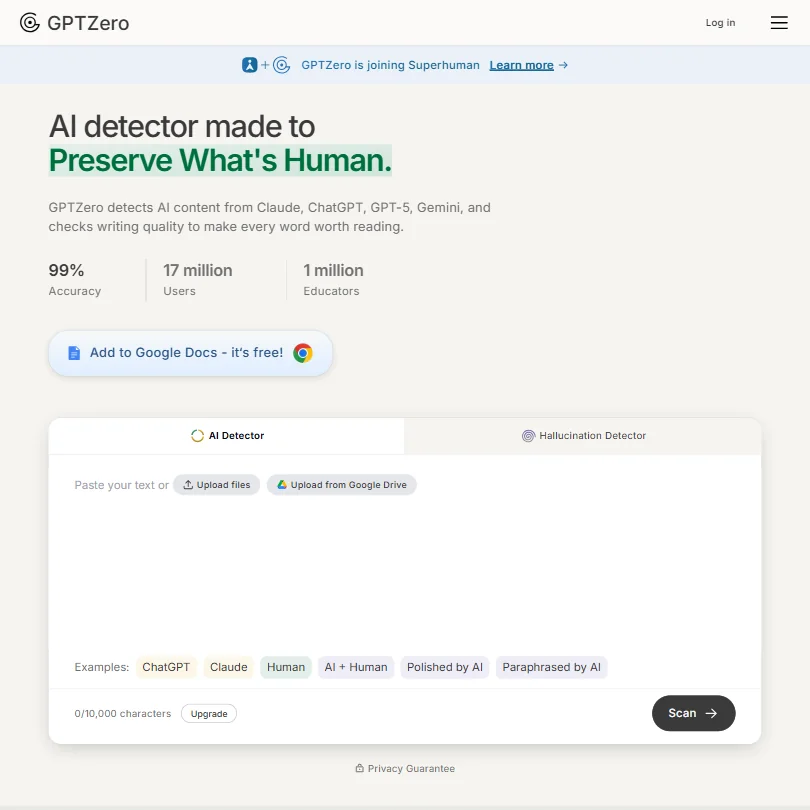
GPTZero is built for the teacher reviewing a class set. It highlights likely AI text sentence by sentence, scans up to 250 files at once, records how a document was composed with Writing Replay, and connects to Google Docs and Canvas LMS. The free plan covers 10,000 words a month. The catch is that its 99% accuracy figure is its own claim and there is no mobile app, so treat a flag as a reason to talk with the student.
- Sentence-level AI detection granularity allows users to pinpoint exactly which parts of a document are flagged as AI-generated.
- Batch uploading supports up to 250 files at once, making it a practical time-saver for educators grading large sets of essays.
- The 99% accuracy figure is GPTZero's own claim, so treat it as a marketing number rather than a guarantee.
From $19.95free planQuillBot is the choice when you need to rework text, not just check it. It has ten paraphrasing modes, a summarizer, a grammar checker, a citation generator for APA, MLA and Chicago, and a translator across 50+ languages, with Word add-in and browser extensions.
Show detailsHide details12 QuillBot: Best for paraphrasing and summarizing readings7.3Score 7.3 out of 10From $19.95free planQuillBot is the choice when you need to rework text, not just check it. It has ten paraphrasing modes, a summarizer, a grammar checker, a citation generator for APA, MLA and Chicago, and a translator across 50+ languages, with Word add-in and browser extensions.Visit site ↗ReviewDetailsCloseShow more about QuillBot
From $19.95free plan
QuillBot is the choice when you need to rework text, not just check it. It has ten paraphrasing modes, a summarizer, a grammar checker, a citation generator for APA, MLA and Chicago, and a translator across 50+ languages, with Word add-in and browser extensions.
Show detailsHide detailsQuillBot: Best for paraphrasing and summarizing readings
7.3Score 7.3 out of 10From $19.95free planQuillBot is the choice when you need to rework text, not just check it. It has ten paraphrasing modes, a summarizer, a grammar checker, a citation generator for APA, MLA and Chicago, and a translator across 50+ languages, with Word add-in and browser extensions.Visit site ↗ReviewDetailsClose
QuillBot is the choice when you need to rework text, not just check it. It has ten paraphrasing modes, a summarizer, a grammar checker, a citation generator for APA, MLA and Chicago, and a translator across 50+ languages, with Word add-in and browser extensions. The catch is that it is built mainly for students and academic writers, and the document editor is uncomfortable on small screens. Grammarly adds tone detection.
- Offers ten paraphrasing modes, which is significantly more than most competitors that typically offer three or four.
- Comprehensive feature set includes grammar checker, plagiarism detector, citation generator (APA, MLA, Chicago), AI Detector, Summarizer, and Translator covering 50+ languages.
- Pricing is almost entirely invisible on the homepage, making it difficult to evaluate cost before committing.
Best AI tools for classroom visuals and video
4 picksVisuals for the classroom come from templates, while video tools replace filming. Canva and Adobe Express both start from large template libraries with AI image tools and a brand kit, and Adobe Express adds a built-in scheduler and does not train on your personal content. Synthesia and HeyGen make talking avatar videos from a script with no camera needed. Free video plans are small: Synthesia gives 10 minutes a month and HeyGen 3 watermarked videos. Choose a template tool for posters and handouts, and an avatar tool when a lesson needs a narrator or a translation.
#ToolScorePriceWhy pick it
From $29free planHeyGen is the better fit for a teacher who wants a lesson video translated, because it supports translation in 175+ languages with lip-sync matched to the new voice.
Show detailsHide details13 HeyGen: Best for translating lesson videos into other languages8.9Score 8.9 out of 10From $29free planHeyGen is the better fit for a teacher who wants a lesson video translated, because it supports translation in 175+ languages with lip-sync matched to the new voice.Visit site ↗ReviewDetailsCloseShow more about HeyGen
From $29free plan
HeyGen is the better fit for a teacher who wants a lesson video translated, because it supports translation in 175+ languages with lip-sync matched to the new voice.
Show detailsHide detailsHeyGen: Best for translating lesson videos into other languages
8.9Score 8.9 out of 10From $29free planHeyGen is the better fit for a teacher who wants a lesson video translated, because it supports translation in 175+ languages with lip-sync matched to the new voice.Visit site ↗ReviewDetailsClose
HeyGen is the better fit for a teacher who wants a lesson video translated, because it supports translation in 175+ languages with lip-sync matched to the new voice. The free plan gives 3 watermarked videos a month with 500+ stock avatars and one voice clone, and you can build a digital twin from a short recording. The catch is that the feature set gets busy and older tutorials may be outdated. Synthesia drafts a script and slides from a document.
- HeyGen supports video translation across 175+ languages with lip-sync matched to the new voice, making localization highly accessible.
- The AI Studio editor allows users to adjust tone, delivery, gesture timing, and emotional register through text controls without re-recording.
- The feature set is described as getting 'busy,' suggesting a steeper learning curve for new users navigating the full platform.
From $29free planSynthesia produces narrated avatar videos from a script with no camera, microphone or studio, which suits lessons you want to reuse or staff training.
Show detailsHide details14 Synthesia: Best for narrated lesson videos without filming8.8Score 8.8 out of 10From $29free planSynthesia produces narrated avatar videos from a script with no camera, microphone or studio, which suits lessons you want to reuse or staff training.Visit site ↗ReviewDetailsCloseShow more about Synthesia
From $29free plan
Synthesia produces narrated avatar videos from a script with no camera, microphone or studio, which suits lessons you want to reuse or staff training.
Show detailsHide detailsSynthesia: Best for narrated lesson videos without filming
8.8Score 8.8 out of 10From $29free planSynthesia produces narrated avatar videos from a script with no camera, microphone or studio, which suits lessons you want to reuse or staff training.Visit site ↗ReviewDetailsClose
Synthesia produces narrated avatar videos from a script with no camera, microphone or studio, which suits lessons you want to reuse or staff training. Its AI Video Assistant drafts a script and builds slides from a document or URL, and it covers 160+ languages. The free plan gives 10 minutes of video a month and 9 stock avatars with no card. The catch is its corporate focus: Starter allows 120 minutes a year. HeyGen offers 500+ free stock avatars.
- Supports 160+ languages, making it practical for global teams needing multilingual video content without hiring voice actors.
- No camera, microphone or studio required; the entire production workflow runs in-browser from script to export.
- Higher-tier pricing creates a feature wall that enterprise buyers can clear but smaller teams and individual users quietly cannot.
From $9.99free planAdobe Express is the free route to class posters, flyers and short videos. The free plan has over 100,000 templates, over a million Adobe Stock photos, videos and music tracks and more than 4,000 fonts, and real-time co-editing lets a colleague work in the same project.
Show detailsHide details15 Adobe Express: Best for free templates for posts and flyers8.6Score 8.6 out of 10From $9.99free planAdobe Express is the free route to class posters, flyers and short videos. The free plan has over 100,000 templates, over a million Adobe Stock photos, videos and music tracks and more than 4,000 fonts, and real-time co-editing lets a colleague work in the same project.Visit site ↗ReviewDetailsCloseShow more about Adobe Express
From $9.99free plan
Adobe Express is the free route to class posters, flyers and short videos. The free plan has over 100,000 templates, over a million Adobe Stock photos, videos and music tracks and more than 4,000 fonts, and real-time co-editing lets a colleague work in the same project.
Show detailsHide detailsAdobe Express: Best for free templates for posts and flyers
8.6Score 8.6 out of 10From $9.99free planAdobe Express is the free route to class posters, flyers and short videos. The free plan has over 100,000 templates, over a million Adobe Stock photos, videos and music tracks and more than 4,000 fonts, and real-time co-editing lets a colleague work in the same project.Visit site ↗ReviewDetailsClose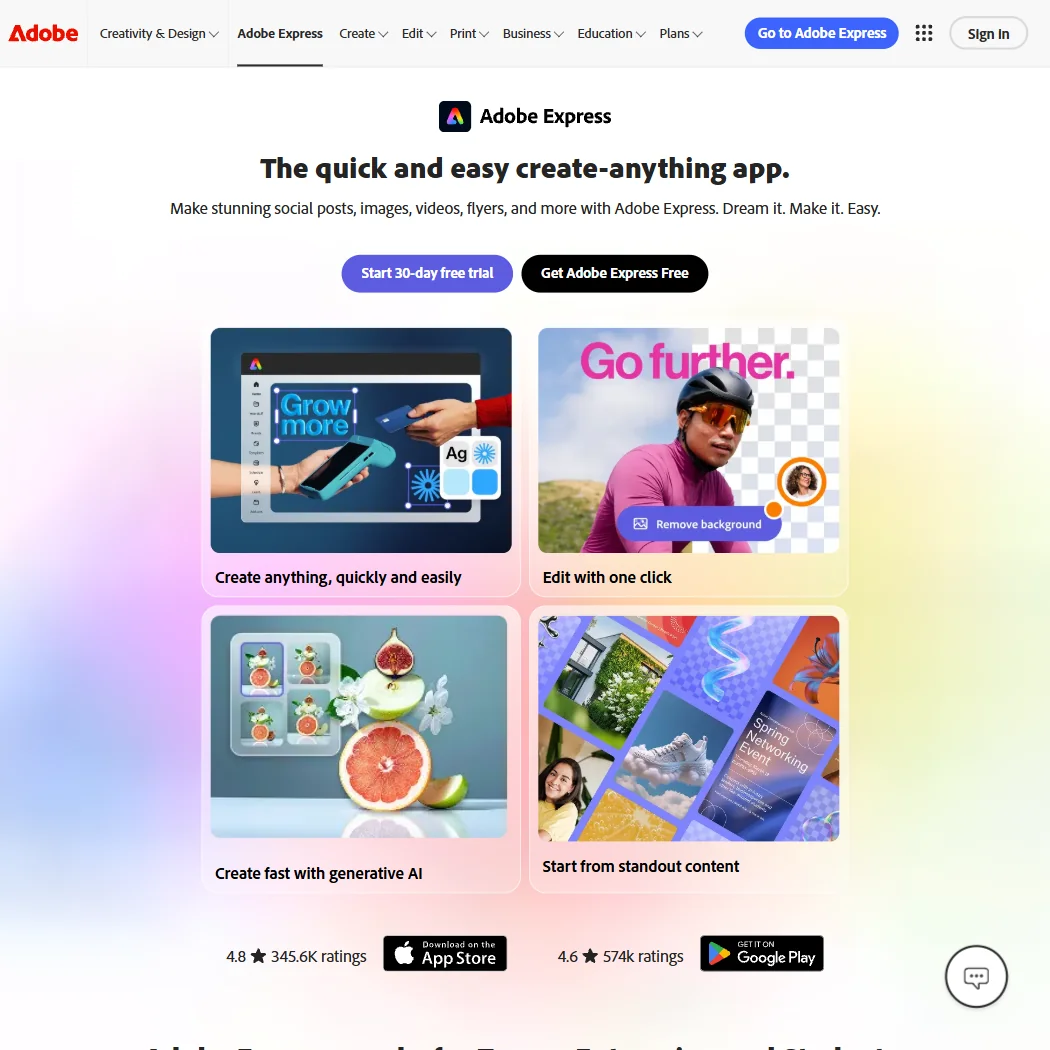
Adobe Express is the free route to class posters, flyers and short videos. The free plan has over 100,000 templates, over a million Adobe Stock photos, videos and music tracks and more than 4,000 fonts, and real-time co-editing lets a colleague work in the same project. Adobe does not train its models on your personal content. The catch is that Premium generative AI is capped at 250 credits a month and phone and chat support are for paid users. Canva is the alternative.
- The free plan alone includes more than 100,000 templates, over a million Adobe Stock photos, videos and music tracks, and more than 4,000 fonts, at no cost.
- Real-time co-editing and commenting let more than one person work on the same project together.
- Generative AI on the paid Premium plan is capped at 250 credits a month per user.
From $18free planPick Canva here when classroom visuals need to be printed or shared as short videos. The AI Image Generator creates images on the page, Magic Eraser, Magic Edit and Magic Expand fix them afterward, and the platform also offers video editing and print ordering.
Show detailsHide details16Canva: Best for classroom posters and short videos7.8Score 7.8 out of 10From $18free planPick Canva here when classroom visuals need to be printed or shared as short videos. The AI Image Generator creates images on the page, Magic Eraser, Magic Edit and Magic Expand fix them afterward, and the platform also offers video editing and print ordering.Visit site ↗ReviewDetailsCloseShow more about Canva
From $18free plan
Pick Canva here when classroom visuals need to be printed or shared as short videos. The AI Image Generator creates images on the page, Magic Eraser, Magic Edit and Magic Expand fix them afterward, and the platform also offers video editing and print ordering.
Show detailsHide detailsCanva: Best for classroom posters and short videos
7.8Score 7.8 out of 10From $18free planPick Canva here when classroom visuals need to be printed or shared as short videos. The AI Image Generator creates images on the page, Magic Eraser, Magic Edit and Magic Expand fix them afterward, and the platform also offers video editing and print ordering.Visit site ↗ReviewDetailsClosePick Canva here when classroom visuals need to be printed or shared as short videos. The AI Image Generator creates images on the page, Magic Eraser, Magic Edit and Magic Expand fix them afterward, and the platform also offers video editing and print ordering. The catch is that paid plans are priced per person, so each extra teacher costs the full plan price again. Adobe Express adds a scheduler and Adobe Stock.
- The free plan includes over 1,000 design types, more than 1.6 million templates, more than 4.7 million stock photos, videos, graphics and audio clips, and 5GB of storage at no cost.
- Magic Design turns a written prompt into a finished design, extending the same approach to presentations and video.
- The AI Image Generator's Vector style produces a raster image with a vector look, not an editable vector or SVG file.
Best AI note takers for teachers
3 picksMeeting tools record, transcribe and summarize, and the differences are minutes, training and where notes live. Fireflies gives unlimited transcription on its free plan and does not train on your data. Otter's free plan has 300 monthly minutes and trains its models on recordings with no opt-out. Notion is a workspace rather than a recorder, and its full AI, including meeting notes, starts on the Business plan. Fireflies and Otter can join with a bot or capture audio without one. Choose by how many minutes you need, how you feel about training, and whether the notes should sit beside your lesson plans.
#ToolScorePriceWhy pick it
From $18free planFireflies suits department meetings and planning sessions you want searchable afterward. The free plan includes unlimited transcription, live transcripts, clips and API access, it records with a bot or without one through the desktop app, and the mobile app can summarize in-person conversations.
Show detailsHide details17 Fireflies.ai: Best for free live transcripts of meetings9.1Score 9.1 out of 10From $18free planFireflies suits department meetings and planning sessions you want searchable afterward. The free plan includes unlimited transcription, live transcripts, clips and API access, it records with a bot or without one through the desktop app, and the mobile app can summarize in-person conversations.Visit site ↗ReviewDetailsCloseShow more about Fireflies.ai
From $18free plan
Fireflies suits department meetings and planning sessions you want searchable afterward. The free plan includes unlimited transcription, live transcripts, clips and API access, it records with a bot or without one through the desktop app, and the mobile app can summarize in-person conversations.
Show detailsHide detailsFireflies.ai: Best for free live transcripts of meetings
9.1Score 9.1 out of 10From $18free planFireflies suits department meetings and planning sessions you want searchable afterward. The free plan includes unlimited transcription, live transcripts, clips and API access, it records with a bot or without one through the desktop app, and the mobile app can summarize in-person conversations.Visit site ↗ReviewDetailsClose
Fireflies suits department meetings and planning sessions you want searchable afterward. The free plan includes unlimited transcription, live transcripts, clips and API access, it records with a bot or without one through the desktop app, and the mobile app can summarize in-person conversations. Fireflies does not train its models on your data. The catch is AI credits, capped at 20 per seat on Pro. Otter has a smaller free allowance.
- The free plan includes unlimited transcription and live transcription at no cost.
- It does not use personal information to train its AI models and contractually prohibits its vendors from doing so.
- AI credits for premium AI features stay capped at 20 per seat on the Pro plan, rising only on higher tiers.
From $12free planNotion keeps lesson plans, unit wikis and project databases in one workspace, viewable as boards, timelines and calendars, and guests never need a paid seat.
Show detailsHide details18 Notion: Best for keeping plans, docs and notes together8.3Score 8.3 out of 10From $12free planNotion keeps lesson plans, unit wikis and project databases in one workspace, viewable as boards, timelines and calendars, and guests never need a paid seat.Visit site ↗ReviewDetailsCloseShow more about Notion
From $12free plan
Notion keeps lesson plans, unit wikis and project databases in one workspace, viewable as boards, timelines and calendars, and guests never need a paid seat.
Show detailsHide detailsNotion: Best for keeping plans, docs and notes together
8.3Score 8.3 out of 10From $12free planNotion keeps lesson plans, unit wikis and project databases in one workspace, viewable as boards, timelines and calendars, and guests never need a paid seat.Visit site ↗ReviewDetailsClose
Notion keeps lesson plans, unit wikis and project databases in one workspace, viewable as boards, timelines and calendars, and guests never need a paid seat. The free plan has unlimited pages for individuals, and by default Notion does not use customer data to train its models. The catch is that the full AI agent, meeting notes and cross-app search start on Business at $24 per member a month, while Free and Plus get a limited trial of AI. Fireflies or Otter transcribe.
- Docs, wikis and project databases are included in Notion at no extra cost.
- Guests never require a paid seat on any Notion plan.
- Notion's full AI, including its agent, meeting notes and cross-app search, is included only from the Business plan.
From $8.33free planOtter works when you need an occasional transcript. The free plan gives 300 monthly minutes plus live transcription and AI Chat across meetings, and its apps capture in-person conversations without a bot.
Show detailsHide details19 Otter.ai: Best for quick transcripts, 300 free minutes6.4Score 6.4 out of 10From $8.33free planOtter works when you need an occasional transcript. The free plan gives 300 monthly minutes plus live transcription and AI Chat across meetings, and its apps capture in-person conversations without a bot.Visit site ↗ReviewDetailsCloseShow more about Otter.ai
From $8.33free plan
Otter works when you need an occasional transcript. The free plan gives 300 monthly minutes plus live transcription and AI Chat across meetings, and its apps capture in-person conversations without a bot.
Show detailsHide detailsOtter.ai: Best for quick transcripts, 300 free minutes
6.4Score 6.4 out of 10From $8.33free planOtter works when you need an occasional transcript. The free plan gives 300 monthly minutes plus live transcription and AI Chat across meetings, and its apps capture in-person conversations without a bot.Visit site ↗ReviewDetailsClose
Otter works when you need an occasional transcript. The free plan gives 300 monthly minutes plus live transcription and AI Chat across meetings, and its apps capture in-person conversations without a bot. The catch is that recordings and transcripts are de-identified and used to train Otter's models with no opt-out, free file imports are 3 for life, and there is no video recording. Fireflies does not train on your data.
- The free Basic plan runs forever and includes live transcription and AI Chat across meetings.
- Meetings can be captured with a bot that auto-joins Zoom, Google Meet and Microsoft Teams, or without one through desktop and mobile apps, including in-person conversations.
- Recordings and transcripts are automatically de-identified and used to train Otter's models, with no opt-out.
How to choose AI tools for teachers
Tools that look alike on their home pages ration very different things. Assistants count messages and context window, slide tools count credits and cards, reading tools count sources and uploads, video tools count minutes, and meeting tools count transcription minutes and decide whether to train on what they hear. What you need depends on what you plan every week, how much student writing you review and how comfortable you are with a tool learning from your content. This guide matches each job to the tools on this page, then covers free plans, where they stop, privacy and when paying is worth it.
Start with the job, not the tool
A school week passes through several jobs, and no single tool on this page does all of them well.
- Planning lessons. Turning a topic and a standard into a plan, a quiz or a parent email. ChatGPT, Gemini and Claude are assistants for it, and each has a free plan.
- Building slides. Getting from a plan to something you can show. Gamma drafts a deck from a prompt or document, Canva starts from templates, and Visme adds charts and infographics.
- Reading and summarizing. Working through articles, papers and reports. NotebookLM and Anara answer from your uploads, and Perplexity answers from the web with citations.
- Feedback and checking. Improving your own writing and reviewing students'. Grammarly and QuillBot edit text, and GPTZero checks it for AI use.
- Visuals and video. Posters, handouts and recorded lessons. Canva and Adobe Express make visuals, and Synthesia and HeyGen make avatar videos.
- Meetings and notes. Keeping a record of staff meetings and planning sessions. Fireflies and Otter transcribe, and Notion stores the notes.
The table shows where to start on any budget.
| Job | Free | Worth paying for |
|---|---|---|
| Planning lessons | ChatGPT, Gemini or Claude free plans | ChatGPT Plus at $20 a month, Google AI Pro at $19.99, or Claude Pro at $20 |
| Building slides | Canva free, or Gamma's 400 one-time credits | Gamma Plus at $12 a month ($9 billed annually), or Canva Pro at $18 |
| Reading and summarizing | NotebookLM free, 50 sources per notebook; Perplexity free | Google AI Plus at $4.99 for 100 sources, or Anara Plus at $12 |
| Feedback and checking | Grammarly free, 100 AI prompts a month; GPTZero free, 10,000 words a month | Grammarly Pro, or GPTZero Premium at $23.99 a month ($12.99 billed yearly) |
| Visuals and video | Adobe Express or Canva free; Synthesia 10 minutes a month; HeyGen 3 videos a month | Adobe Express Premium at $9.99, or HeyGen Creator at $29 |
| Meetings and notes | Fireflies free; Otter 300 minutes a month; Notion free | Fireflies Pro at $18, or Otter Pro at $16.99 ($8.33 billed yearly) |
Free plans cannot give you unlimited deep research, decks without branding, video without a watermark or more than a few hundred transcription minutes. Pay first for the job that costs you the most time each week, which for most teachers is the assistant used for planning, and leave the video and meeting tools until a routine exists.
What the free plans actually give you
Each kind of tool rations something different, so one free plan lasts a month and another lasts an afternoon.
- Assistants. ChatGPT's free plan has unlimited text chat, web search and Projects, with limited deep research and image generation. Gemini's has all three models and image generation, with a 32,000 token window. Claude's has web search, file creation, code execution and memory. In a normal week any of them covers lesson drafts and emails.
- Slide tools. Gamma gives 400 credits once and up to 10 cards per prompt. Visme's free Basic plan gives unlimited projects, 500 MB of storage and up to 50 slides each, with its logo. Canva's free plan includes 5GB of storage and up to 20 AI uses.
- Reading tools. NotebookLM takes up to 50 sources per notebook. Anara gives 2,000 AI words and 5 uploads a day, with imports up to 20MB or 120 pages. Perplexity's free plan returns cited answers with limited file uploads.
- Feedback tools. Grammarly's free plan gives 100 AI prompts a month and tone detection. GPTZero's gives 10,000 words a month, 1 Advanced Scan and 5 AI Highlights in the Chrome extension. QuillBot has a free plan too.
- Visual tools. Adobe Express's free plan has over 100,000 templates, and Canva's free plan has over 1.6 million, plus one three-color Brand Kit.
- Video tools. Synthesia gives 10 minutes a month and 9 stock avatars with no card. HeyGen gives 3 watermarked videos a month, 500+ stock avatars and one voice clone.
- Meeting tools. Fireflies gives unlimited transcription and live transcripts. Otter gives 300 monthly minutes and 3 lifetime file imports. Notion's free plan gives unlimited pages for individuals.
Which tools fit which teacher
- A teacher on a Google school account. Start with Gemini, because it reads Gmail, Calendar and Drive through Connected Apps. Add NotebookLM for your sources and Gamma, which exports to Google Slides.
- A teacher planning every unit from scratch. Start with ChatGPT, because Projects keep a folder per class on the free plan. Add Canva for handouts and Claude when you want file creation and memory without paying.
- A teacher who reviews a lot of student writing. Start with GPTZero for sentence-level highlights and batch scans, because it was built for educators. Add Grammarly for your own comments and emails.
- A graduate student or instructor reading research. Start with NotebookLM for a fixed reading list, because every answer cites a source passage. Add Anara for long papers and Perplexity for new questions.
- A department head or coach. Start with Fireflies for meeting records, because the free plan does not train on your data. Add Notion for shared notes and Synthesia for repeatable staff training videos.
- A teacher with multilingual families or classes. Start with HeyGen, because it translates videos into 175+ languages with lip-sync. Add QuillBot's translator, which covers 50+ languages.
A typical unit step by step
- Gather sources. Upload your readings to NotebookLM or Anara, or ask Perplexity a current question and keep the citations.
- Plan the unit. Describe the topic and the length to ChatGPT, Gemini or Claude, and keep each class in its own Project or chat.
- Build the slides. Draft a deck in Gamma, start from a Canva template, or use Visme when the lesson needs charts.
- Make the visuals. Create posters and handouts in Adobe Express or Canva, and generate images in ChatGPT, Gemini or Canva, since Claude does not generate them.
- Record or narrate. Turn a script into an avatar video with Synthesia, or translate it with HeyGen.
- Edit and check writing. Run your own comments through Grammarly or QuillBot, and review student essays with GPTZero.
- Keep the notes. Record planning sessions with Fireflies or Otter, and file the summaries in Notion.
- Read every output. Check facts, names and dates in anything an assistant produced before it reaches students.
Where free plans stop
| Limit | Tools | What happens when you hit it |
|---|---|---|
| Monthly counts | Grammarly (100 AI prompts), GPTZero (10,000 words), Synthesia (10 minutes), HeyGen (3 videos), Otter (300 minutes) | You wait for the next month or move to a paid plan |
| Daily limits | Anara (2,000 AI words and 5 uploads a day) | The allowance resets the next day |
| One-off allowances | Gamma (400 credits), Otter (3 file imports) | Once used, they do not come back |
| Size caps | NotebookLM (50 sources), Gemini (32,000 token window), Visme (500 MB, 50 slides), Canva (5GB, up to 20 AI uses) | Larger projects need a paid plan |
| Marks and branding | Gamma branding, Visme logo, HeyGen watermark | Output stays marked until you pay |
| Held back features | Deep research on Claude and Perplexity, full AI in Notion | The feature starts on Pro or Business |
Monthly counts reward batching: write the script before you generate the video and collect the readings before you open a notebook. A watermark or logo is simple, because anything shown to parents or colleagues should come from a plan without one. Use the free plan to test your routine on one real unit, then pay for the one tool that holds you back.
Privacy and who sees your students' work
Student names, grades and drafts are not yours to share freely, so check how a tool treats what you paste. Several tools state a policy, and the stated values differ more than the sales pages suggest.
| Stated policy | Tools |
|---|---|
| Trains on your content unless you turn it off | Gemini (turn off Keep Activity, which also switches off memory), Claude (opt out on consumer plans), Canva (opt out in privacy settings), Perplexity (on by default for Free, Pro and Max) |
| Trains with no opt-out | Otter |
| Offers an opt-out | ChatGPT, Grammarly, Gamma |
| States it does not train on your content | Fireflies, Adobe Express, Notion (by default), Synthesia, NotebookLM, Anara |
Keep student names and grades out of tools in the first two rows, or switch training off on day one. Visme includes commercial use from Pro, so a teacher who sells materials needs that plan or a different tool.
Mistakes to avoid
- Treating an AI detector flag as proof. GPTZero's 99% accuracy figure is its own claim. Use the highlights and Writing Replay as the start of a conversation with the student.
- Pasting student names into a tool that trains. Gemini, Claude, Canva, Perplexity and Otter all use content for training in some form. Use anonymous examples or switch training off first.
- Spending a one-off allowance on drafts. Gamma's 400 credits and Otter's 3 file imports never renew. Write the outline first and test on one real lesson.
- Expecting Claude to make images. It does not generate them. Use ChatGPT, Gemini, Canva or Adobe Express for pictures.
- Assuming a paid plan removes every AI limit. Adobe Express Premium caps generative AI at 250 credits a month, Fireflies Pro caps AI credits at 20 per seat, and Canva's extra AI use is a separately priced AI Pass add-on.
When it is worth paying
You have outgrown a free plan when you plan your week around its limit. Trimming a transcript to save minutes, skipping a video because of a watermark or splitting a long reading across notebooks are all signs.
| If you are | Upgrade to | What changes |
|---|---|---|
| Planning daily with long documents | ChatGPT Plus or Google AI Pro | ChatGPT Plus expands usage and adds scheduled tasks; Google AI Pro gives a 1 million token window |
| Building decks every week | Gamma Plus | 1,000 monthly credits, up to 20 cards per prompt and no Gamma branding |
| Designing for a whole department | Canva Pro | 5 Brand Kits, 100GB of storage and about 10 times the AI use, with a 30-day trial |
| Reading papers daily | Anara Plus or Google AI Plus | Anara Plus gives 4,000 AI words and 10 uploads a day plus Zotero and Mendeley connectors; Google AI Plus gives 100 sources per notebook |
| Reviewing class sets | GPTZero Premium | 300,000 words a month, Advanced AI Scan and multilingual detection |
| Editing every day | Grammarly Pro | 2,000 AI prompts, full sentence rewrites and plagiarism and AI detection |
| Producing video lessons | HeyGen Creator | 600 credits, videos up to 30 minutes, 1080p export and voice cloning |
| Recording many meetings | Fireflies Pro | 8,000 minutes of storage per seat and 20 AI credits |
Billing changes the price. Gamma Plus is $12 monthly and $9 billed annually, Visme Starter is $29 monthly and $12.25 billed annually, Otter Pro is $16.99 monthly and $8.33 billed yearly, and GPTZero Premium is $23.99 monthly and $12.99 billed yearly. Canva Pro and Business include a 30-day free trial, Adobe Express gives 30 days of Premium, and Grammarly Pro has a 7-day trial. Notion has no free trial of a paid plan, and Gamma's free plan needs no credit card.
How we picked
Every tool here is ranked by its score, and each score is worked out from the vendor’s own published pages: pricing, plans, features and terms. No score is adjusted by hand. All 18 tools have enough published facts to be scored, and on average 95% of each score comes from facts the vendor publishes. The facts behind these scores were checked between 14 September 2026 and 14 October 2026.
Scores compare tools that do the same job, which is why the list is grouped by job: a video editor and a grammar checker are never ranked against each other.
| Ranked as | On this page | What we score | Scoring guide |
|---|---|---|---|
| AI assistants11 reviewed | 4 | 4 criteria, 13 checked facts: what it can do, where it works, pricing, privacy and trust | How we score these → |
| AI presentation makers4 reviewed | 2 | 5 criteria, 20 checked facts: what you can make, workflow and output, pricing, teams and platforms, privacy and trust | How we score these → |
| AI graphic design tools8 reviewed | 2 | 5 criteria, 23 checked facts: what you can make, workflow and output, pricing, teams and platforms, privacy and trust | How we score these → |
| Paper readers8 reviewed | 2 | 6 criteria, 29 checked facts: finding papers, reading and analysing papers, systematic reviews, pricing, citing and writing, access | How we score these → |
| AI writing assistants6 reviewed | 2 | 5 criteria, 20 checked facts: what it helps with, pricing, where it works, teams and control, privacy and security | How we score these → |
| AI avatar video tools7 reviewed | 2 | 5 criteria, 20 checked facts: avatars, pricing, training and interactivity, languages and output, teams and privacy | How we score these → |
| AI meeting assistants17 reviewed | 2 | 4 criteria, 18 checked facts: what it captures, where it works, pricing, privacy and trust | How we score these → |
| AI detectors and humanizers5 reviewed | 1 | 5 criteria, 20 checked facts: detecting AI text, rewriting, pricing, where it works, teams and trust | How we score these → |
| AI work management tools8 reviewed | 1 | 4 criteria, 17 checked facts: what it manages, working with others, pricing, privacy and trust | How we score these → |
Common questions
Which of these tools work on a phone or tablet?
ChatGPT, Gemini, Claude, Gamma, Canva, Grammarly, QuillBot, Fireflies, Otter and Notion all list mobile apps. Adobe Express runs in the browser and on iOS and Android, Visme runs in a browser only, GPTZero has no mobile app, and Anara has an iOS app but no Android app. Notion also has an offline mode.
How do I turn a document into a presentation?
Gamma builds a deck from an uploaded Word file, PDF or Google Doc and exports to PPTX or Google Slides. Visme builds one from an uploaded document or a pasted URL, and Synthesia turns a document or URL into slides with a script. Canva's Magic Design starts from a written prompt rather than a file.
Which tools can translate a lesson into another language?
HeyGen translates video into 175+ languages with lip-sync matched to the new voice, and Synthesia covers 160+ languages for its avatars. QuillBot's translator covers 50+ languages for text. Gemini and Fireflies both list 30+ languages, which helps with multilingual questions and meeting transcripts.
Do I pay per teacher, or can a school share one plan?
Most paid plans here are per person. Gamma and Canva bill per seat, Notion Business is $24 per member, and Fireflies and Otter bill per user. Notion lets guests in without a paid seat, up to 10 external guests on Free and Plus. For a department, compare team plans before buying several individual ones.
Is one subscription cheaper than several separate tools?
Google AI Plus at $4.99 raises Gemini usage and lifts NotebookLM to 100 sources, and Google AI Pro at $19.99 gives Gemini a 1 million token window and NotebookLM 300 sources. That bundle costs about the same as ChatGPT Plus or Claude Pro alone, so it is the one to look at first if you read a lot.