Read AI is a meeting assistant that joins Zoom, Google Meet and Microsoft Teams calls as a bot to record, transcribe and summarize them, then lets you search across those meetings alongside email and chat. What decides whether it suits you is whether a bot visibly joining every call is acceptable, and how much you need from higher tiers like video playback, single sign-on and HIPAA support.

What is Read AI?
Read AI is a company headquartered in the United States. It provides Read Assistant, a bot that records and summarizes meetings, and Ask Read, a search layer over meeting transcripts and connected apps.
Read AI runs in the browser, with desktop apps for Windows and Mac and mobile apps for iOS and Android.
What Read AI captures from a meeting
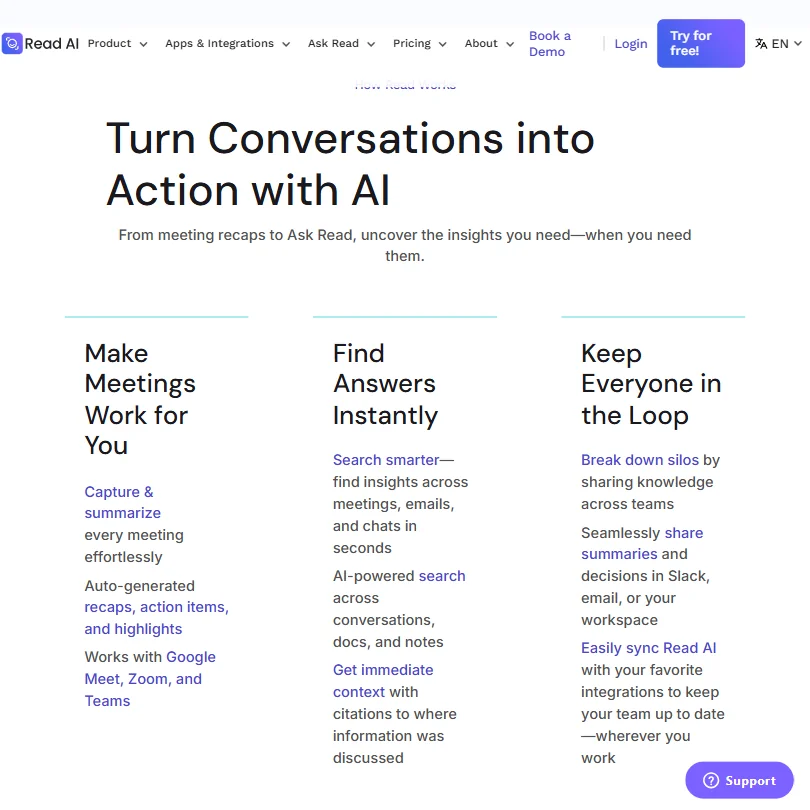
Read Assistant joins Zoom, Teams and Google Meet calls as a visible participant; there is no bot-free recording for video calls. The Android and iOS apps can capture in-person meetings and live events.
Meeting reports are available in 16+ languages. An in-meeting dashboard called Live Notes and Metrics shows transcription, summaries and metrics in real time, and this is included even on the free plan.
Custom note templates can be created for meeting reports, in addition to Read's own templates. Ask Read lets you search and ask questions across your whole meeting history, and unlimited enterprise search is included on every plan, including Free.
Read AI includes a Meeting Coach with metrics like talking speed, filler words, bias and charisma, also on the free plan. Video and audio playback of recorded meetings, and video highlights, are on Enterprise and up. CRM sync is available with Salesforce and HubSpot.
Working with other people
A workspace with shared access starts on the Pro plan; more advanced admin controls for distribution rules and license management come on higher tiers. Read AI integrates with HubSpot, Salesforce, Notion, Asana, Confluence, Jira, Linear, Slack, Google Drive, Microsoft OneDrive, Google Calendar and Outlook, plus Zapier and webhooks for more connections.
It has an API, and connects as a Claude Connector, a ChatGPT App and an MCP server, so other AI tools can pull in meeting content. Ask Read's own Search Copilot gives direct access to Anthropic Claude and OpenAI GPT models on paid plans.
Read AI pricing: what each plan gives

The Free plan costs nothing and includes 5 meeting reports a month, a 1 hour maximum meeting length, unlimited enterprise search and basic integrations.
Pro costs $19.75 a month ($15 a month billed annually) per user and removes the meeting cap entirely, adding unlimited meeting transcripts, priority report processing, a 4 hour maximum meeting length and 100 file upload credits a month. Enterprise costs $29.75 a month ($22.50 a month billed annually) per user and adds video and audio playback, video highlights and premium support. Enterprise+ costs $39.75 a month ($29.75 a month billed annually) per user, requires 5 or more licenses, and adds support for enabling HIPAA compliance plus SAML single sign-on and SCIM.
New users can try a 7 day trial of the Enterprise plan.
Privacy and security
AI training on your content is opt-in and off by default; you decide whether to contribute to model improvement and can change your mind at any time. Read AI is SOC 2 Type II certified, independently audited annually.
For customers in the EU and EEA, Read AI acts as a data processor under GDPR Article 28 and offers a Data Processing Agreement with standard contractual clauses. Single sign-on with SAML is on Enterprise+, which also adds SCIM. HIPAA compliance can be enabled on Enterprise+, and a HIPAA Business Associate Agreement is available on request.
Read announces itself at the start of every meeting and requires host approval before joining. Participants can opt out at any time, and their meeting data is then immediately and permanently deleted. Support runs through a help center and a status page.
Who Read AI suits
Read AI suits teams that want a free meeting notes tool with real time metrics and coaching, plus the ability to search across meetings, email and chat from Ask Read. It also suits teams already using Claude or ChatGPT who want their meeting content reachable through those tools via the MCP server.
It suits less well anyone who needs a bot-free way to join calls, since Read Assistant joins as a visible participant. It also suits less well anyone who needs video playback of recordings, single sign-on or HIPAA support without moving up to Enterprise or Enterprise+.
Screenshots
Frequently Asked Questions
How much does Read AI cost?
The Free plan costs nothing and includes 5 meeting reports a month. Paid plans start with Pro at $19.75 a month ($15 a month billed annually) per user, rising through Enterprise to Enterprise+ at $39.75 a month ($29.75 a month billed annually) per user, which requires 5 or more licenses.
Can I use Read AI without a bot joining my calls?
No. Read Assistant joins Zoom, Google Meet and Microsoft Teams calls as a visible participant; there is no bot-free recording for video calls. In-person meetings and live events can be captured separately through the Android and iOS apps.
What can Ask Read search across?
Ask Read searches your meeting transcripts alongside connected apps like email and messaging, with unlimited enterprise search included even on the Free plan. Its Search Copilot also gives direct access to Anthropic Claude and OpenAI GPT models on paid plans.
Does Read AI train on my meetings?
Training is opt-in and off by default; you decide whether your content contributes to model improvement and can change that choice at any time.