SAASINSPECTOR
Monday logo

Monday Review

Teams and enterprises needing AI-powered project management, CRM, and service workflows

Visit MondayFrom $12/mo

Research-based review. We analyzed vendor documentation, customer reviews on G2, Capterra, and Reddit, and live pricing — not hands-on testing yet. We update as our team puts tools through real workflows.

The verdict

Monday.com is a mature AI work platform designed for teams that need project management, CRM, and service workflows in a single workspace. Its AI agent layer is among the most developed of any competitor, supporting both pre-built and custom agents connected to external models. Scoring reflects genuine capability alongside real complexity and pricing friction that may not suit every organization.

Pros

  • The AI agent layer is more developed than most competitors, with pre-built agents for research, reporting, meeting summaries, and process optimization.
  • Custom AI agents can be built and connected to external models including Claude, ChatGPT, and Gemini via integrations and MCP-connected tools.
  • The Process Automator agent actively scans workflows and identifies where repetitive manual work can be eliminated, going beyond simple rule-based automation.
  • Paid plans include up to 25,000 automation actions per month, which is more than most teams will ever need.
  • Monday covers project management, CRM, and service workflows under one roof, reducing the need for multiple separate tools.
  • With 225,000+ organizations on the platform since 2012, the product is mature and stable rather than still finding its footing.
  • Core project management infrastructure is robust, including Gantt charts, timeline views, portfolio management, and resource tracking.

Cons

  • The platform's breadth across project management, CRM, and service workflows can be a liability depending on what a team actually needs.
  • Pricing details are not fully transparent on the homepage, requiring additional research to understand true costs.
  • The shift to AI-first and 'agent workforce' positioning may feel like overreach for teams that simply need straightforward task tracking.
  • The volume of features and configuration options creates complexity that smaller or simpler teams may find overwhelming.
  • Teams that don't need the AI layer are still paying into a platform that has been significantly restructured around it.
From $12/moFree plan YesFree trial Yes

Twelve thousand G2 reviews, Capterra threads, Reddit complaints, and Monday's own pricing documentation. That's where this comes from. No live account. We cross-referenced the vendor docs against what real users actually report, and the gap is smaller than you'd expect for a platform this size. Monday has been around since 2012. Two hundred twenty-five thousand organizations. This isn't a product still searching for a use case.

Monday homepage screenshot
Monday — Homepage

The AI pivot, though, is genuinely different from what most project tools have done. Worth paying attention to.

What is Monday?

Started as a board-based work operating system. Spreadsheets with color coding, timelines, automations. That was the pitch for years. The 2024 and 2025 updates pushed it into AI-first territory, and the homepage now leads with agent workforce language rather than task tracking.

The current framing is an open AI work platform where human teams and agents collaborate in the same workspace. That's not just copy. The agent infrastructure is genuinely more developed than what Asana or Notion have shipped at this point. You get pre-built agents for research, reporting, and process optimization. Custom agents too. And those agents connect to Claude, ChatGPT, and Gemini through integrations and MCP-connected tools.

Founded in Tel Aviv, the platform now tries to cover project management, CRM, and service workflows under one roof. Whether that breadth is a strength or a headache depends entirely on your situation.

Monday Features: Automation, AI Assistant & Workflow Capabilities

Monday features screenshot
Monday — Features

Gantt charts, timeline views, portfolio management, resource tracking. The expected project infrastructure is there. But the automation layer is where things get interesting.

The Process Automator agent scans existing workflows and flags repetitive manual work. That's not rule-based automation. It's closer to an AI system auditing your processes and suggesting cuts. Pro plans include 250 automation actions per month, and Enterprise scales that to 25,000 daily API calls, which is a ceiling most teams will never actually hit.

The Sidekick AI assistant handles in-context help across boards and documents. It drafts content inside Monday Docs, answers questions about your workspace, and generates AI-powered data fields through what Monday calls AI columns. Those appear on Standard plans and above.

The meeting layer is more nuanced than the homepage suggests. Monday AI Notetaker transcribes calls and generates summaries, takeaways, and action items. It supports Zoom, Microsoft Teams, and Google Meet. Honestly, that's solid coverage. But per Monday's own documentation, the notetaker is an add-on for Pro and Enterprise plans, not Standard and above as some earlier coverage implied. Teams already running a dedicated tool like Fathom AI Notetaker should check whether the overlap justifies dropping a subscription.

On the CRM side, you get a centralized communications hub, two-way Gmail and Outlook sync, and an outreach caller agent. There's also a Monday CRM Chrome extension, publicly documented, that works with Gmail to capture leads, view or update deals, and log activities. It's CRM-specific, not a general work management extension. We're skeptical it replaces a real CRM for sales-heavy teams, but for teams that want a single platform without deep pipeline analytics, it probably holds.

The free plan runs indefinitely. Two seats, three boards, 200-plus templates. No credit card. Not a 14-day trap.

Monday AI Quality: How Smart and Useful Is the Assistant?

Better than most. Harder to evaluate from the outside than we'd like.

Monday's AI infrastructure spans multiple models. Claude and ChatGPT are available through integrations. Microsoft Copilot connects via the Microsoft 365 integration. Gemini shows up too. There's a proprietary layer baked into the platform itself. The multi-model approach means you're not locked into one provider's limitations, which is a defensible architectural decision, not just a feature roster.

Across G2 and Capterra, what we kept seeing was users praising the AI columns feature specifically. The ability to add AI-powered fields that auto-populate based on context showed up repeatedly as genuinely useful rather than gimmicky. Operations teams and project managers mentioned it most often.

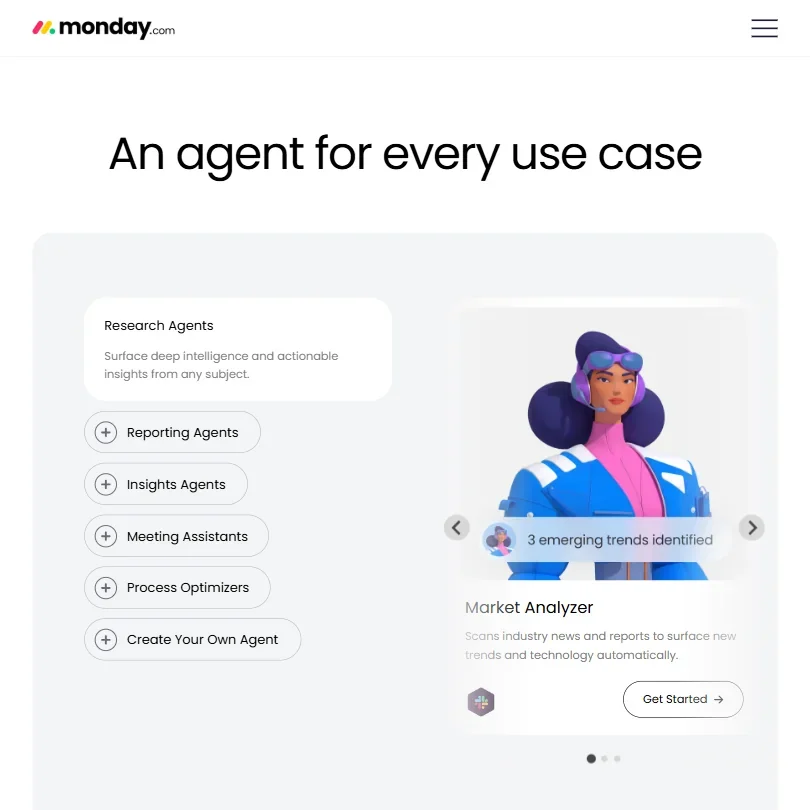
The Research Agents are interesting. Market Analyzer and Vendor Scout are pre-built agents that pull intelligence from external sources. That's a different category of AI functionality than summarizing your own data. We can't verify accuracy without hands-on testing. We'd treat those claims with caution until you've run them yourself.

Simulation mode deserves a mention. Before deploying an agent live, you can test it in a sandboxed environment. Practical. Most competitors haven't bothered with that yet.

One pattern across Reddit threads from 2024 and 2025: the AI features work well when you're already deep in the Monday ecosystem, but feel thin when you're trying to use them as a replacement for a dedicated AI tool. Fair. That's probably the right expectation to set going in.

Monday Integrations: What Does It Connect To?

Slack and Google Workspace are covered. Microsoft 365 is covered, including the Copilot integration. Salesforce and Jira both connect. Zapier extends the reach further.

API access runs from 1,000 daily calls on Standard to 25,000 on Enterprise. REST API access, not just webhook-level. That matters if you're building anything custom on top of Monday's data.

MCP support is the more forward-looking piece. MCP-connected tools position Monday as a hub that can reach external AI services as they emerge, not just pre-approved ones. We noticed it. Hard to argue with that approach if it actually holds up in practice.

G2 reviewers in IT and operations roles called out the Microsoft 365 integration as particularly solid. The Gmail two-way sync in the CRM layer came up positively too, though some users mentioned initial setup friction.

On the browser extension question: Monday does publicly document a CRM Chrome extension for Gmail. It's not a general work management extension, but it exists and is clearly supported. Earlier versions of our research marked this as unconfirmed. Corrected.

Is Monday Easy to Use?

The visual board interface is approachable. Color coding, drag-and-drop, recognizable structures. Onboarding gets high marks consistently across G2 and Capterra. New team members usually find their footing fast.

Then the complexity creeps in. Monday tries to be project management, CRM, service desk, AI workspace, and automation engine simultaneously. When you start building across those surfaces, setup overhead grows quickly. G2 reviewers in marketing roles consistently flagged that configuring automations beyond basic rules required more time than expected. Reddit threads from 2025 surface recurring complaints about admin overhead at larger workspace scales.

Not great for teams that want zero ramp-up time. Pre-built agents are accessible enough. Building a custom agent requires comfort with Monday's configuration logic, which isn't complicated by developer standards, but it's not click-and-go either.

Teams willing to invest two or three hours upfront tend to report the payoff as worth it. Teams that aren't willing to do that should probably look elsewhere.

Monday Pricing: Is It Worth It vs Free Alternatives?

Monday pricing screenshot
Monday — Pricing

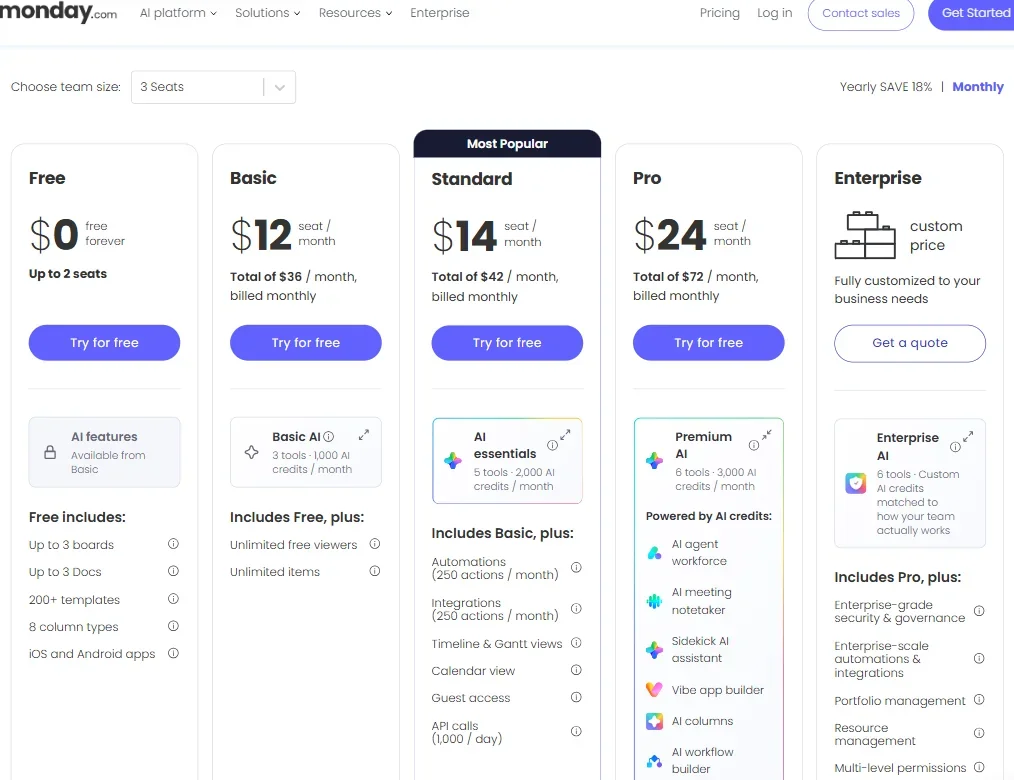
The Free plan gives you two seats and three boards, indefinitely. Basic runs $12 per seat per month, billed at $36 total per month for three seats at the monthly rate shown in the pricing page. Standard is $14 per seat, totaling $42 per month for three seats. Pro is $24 per seat, $72 per month for three seats. Enterprise is custom pricing, which means a sales conversation.

Most of the AI features sit at Standard or above. The AI Notetaker is an add-on on Pro and Enterprise. Timeline and Gantt views, calendar view, and guest access all require Standard at minimum. A 10-person team running Pro is looking at $240 per month at monthly billing rates, before any add-ons.

That's not outrageous for the feature depth. But it's not cheap either, especially when tools like ClickUp compete in the same space with aggressive pricing. Worth doing the actual math for your seat count before you commit.

Refund policy: not publicly stated. We dug through the pricing page and help docs and couldn't surface clear terms. Minor frustration. The kind of friction that shouldn't exist at this scale.

The per-seat model also means costs scale fast with headcount. Enterprise teams with complex needs hit the custom pricing wall, and Reddit suggests those contract negotiations can drag.

Monday vs Asana: Which Productivity Tool Wins?

Asana is the most direct comparison. Both are mature platforms. Both added AI features in the last two years. Both serve enterprise customers with complex workflow needs.

Monday pulls ahead on the AI agent infrastructure, which is more developed right now. The multi-model connectivity is more explicit. The CRM layer doesn't exist in Asana's core product at all. And Monday's visual board model tends to land better with non-technical users, based on what comparative reviews show consistently.

Asana holds up on task and project hierarchy, which is more structured for teams that live by dependencies and due dates. Asana's portfolio-level reporting has historically been cleaner, though Monday has closed that gap. Asana's pricing transparency is also better, which sounds minor until you're budgeting for a team and Monday keeps steering you toward a sales call.

Neither product is definitively better. Asana suits teams that care most about task clarity and process discipline. Monday suits teams that want workspace flexibility and actually intend to use the agent layer. ClickUp undercuts both on price and belongs in any honest comparison.

Who Should Use Monday? (And Who Shouldn't)

Marketing and operations teams running complex workflows across multiple departments. That's the core fit from review patterns. The combination of project boards, AI agents, and automation depth maps well to teams juggling campaigns, vendor relationships, and reporting cycles simultaneously.

Mid-market companies trying to consolidate tools. If you're currently running a separate project management tool, a standalone CRM, and a meeting notes product, Monday's platform breadth starts to justify the cost.

Enterprise teams with IT backing and budget. The permission model, multi-level controls, and Enterprise AI features require someone to manage them. Worth it when that capacity exists.

Solo users and tiny teams. Probably not. Two seats and three boards isn't really Monday's product, it's a demo. The platform value doesn't show up until you're running multiple workflows with actual team members behind them.

Teams that need lightweight task management and nothing else. Monday will feel like overkill. The complexity is a feature for power users. For everyone else, it's overhead.

Monday Review Verdict

A real platform. Not a project tool that added "AI" to the homepage after ChatGPT launched. The agent infrastructure is more developed than most competitors have shipped, and the multi-model connectivity is a smart architectural choice that holds up on inspection.

The concerns are real too. Pricing accelerates fast as seat counts grow, the AI Notetaker is a paid add-on rather than a Standard-tier inclusion, and the absence of a clear refund policy is the kind of friction that shouldn't exist at this scale. The complexity ceiling is also real. Teams that need simple task management will spend more time configuring Monday than doing actual work.

For the teams it's built for, though, the case is solid. A platform covering project work, CRM functions, and an AI agent layer in one place, with broad integrations across major enterprise tools, is a serious product. The G2 and Capterra response volumes back that up. That kind of sustained review volume across years isn't manufactured goodwill.

One practical caveat before you commit: map your actual seat count against the plan tier you'll genuinely need. The sticker price and the real monthly number diverge quickly, and that gap has caught more than a few teams off guard.

Frequently Asked Questions

Does Monday have a free plan?

Yes. Two seats, three boards, runs indefinitely with no credit card required. That's enough to understand the board logic and poke around the interface seriously. The AI features, meeting notetaker add-on, timeline views, and calendar view all sit behind paid tiers starting at Standard ($14 per seat per month at monthly billing). The free plan is a genuine evaluation tool. Not a permanent solution for a real team trying to do real work.

What AI models does Monday use?

Monday connects to Claude, ChatGPT, Microsoft Copilot, and Gemini through integrations and MCP-connected tools. There's also a proprietary AI layer built into the platform itself. The multi-model approach means you're not locked into a single provider's output quality. Which model powers which feature depends on your integrations and plan tier, so check the documentation for your specific use case before assuming coverage.

How does Monday compare to Jira for software teams?

Jira is built for engineering workflows. Sprint planning, issue tracking, release management. Monday is broader and more configurable, which makes it better for cross-functional teams but less precise for pure software development cycles. Teams that live in code repositories and sprints tend to stay on Jira for that core work. Teams that need engineers, marketers, and operations people working in the same system tend to end up on Monday instead.

Monday is featured in

Alternatives to Monday

See all Monday alternatives →

Other AI Productivity Tool options we've reviewed.

User reviews

Review Monday

Your rating

Reviews are moderated and appear once approved.