SAASINSPECTOR
Fireflies.ai logo

Fireflies.ai Review

Meeting transcription and AI summaries for individuals to large enterprises

Visit Fireflies.aiFrom $18/mo

Research-based review. We analyzed vendor documentation, customer reviews on G2, Capterra, and Reddit, and live pricing — not hands-on testing yet. We update as our team puts tools through real workflows.

The verdict

Fireflies.ai is an AI meeting assistant that joins calls, records audio, generates transcripts, and surfaces summaries, action items, and conversation analytics — built for teams who need searchable meeting history and CRM integration. It competes at a price point well below enterprise tools like Gong while offering similar conversation intelligence features. With over a million companies using it and active feature development, it has a credible track record, though the gap between marketing claims and real user experiences is worth scrutinizing.

Pros

  • Works across all major video conferencing platforms including Zoom, Google Meet, Microsoft Teams, and Webex.
  • AskFred AI assistant enables users to search across their entire meeting history and ask natural language questions against it.
  • Supports direct upload of audio or video files for teams who record calls outside of live meetings.
  • Offers conversation intelligence features like talk-time analysis and sentiment analysis at a fraction of the cost of competitors like Gong.
  • Over one million companies use it, indicating a proven and stable product with a long track record since 2016.
  • April 2025 update introduced 200+ AI Skills and a Live Assist feature with real-time coaching during calls.
  • New Talk to Fireflies feature integrates Perplexity AI for live web search during meetings, pointing to a genuinely innovative product direction.

Cons

  • There is a notable gap between what the homepage promises and what users actually report in real-world reviews.
  • The newer Live Assist and Talk to Fireflies features lack sufficient user review data to confirm whether they work reliably.
  • The product is not suitable for any voice generation, text-to-speech, voice cloning, or audio enhancement use cases.
  • The broad claim of over one million companies using it is difficult to evaluate meaningfully, as the definition of a 'company' user is vague.
  • The expanding feature set makes it harder to assess whether core functionality like transcription and summaries remains consistently strong.
  • Sentiment analysis and conversation intelligence features position it against enterprise tools like Gong, which may create expectation mismatches for some buyers.
From $18/moFree plan YesFree trial No

Fireflies.ai homepage screenshot
Fireflies.ai — Homepage

Our research on Fireflies.ai started where it usually does: G2, Capterra, a handful of Reddit threads, and the vendor's own docs. This fireflies.ai review took longer than expected to pull together, not because the product is complicated, but because the gap between what the homepage promises and what users actually report is worth taking seriously. Founded in 2016 and headquartered in San Francisco, Fireflies has been around long enough to have a real track record. Over a million companies using it. That number is hard to ignore, even if "company" can mean a lot of things.

The short pitch is that Fireflies joins your meetings, records them, transcribes them, and then does a bunch of things with that transcript. AI summaries, action items, searchable history, CRM sync. The product has expanded considerably since its early days as a basic notetaker. The April 2025 release of 200+ AI Skills and a Live Assist feature with real-time coaching shows the team is still pushing.

Whether any of that matters depends entirely on what you actually need from a meeting tool.

What is Fireflies.ai?

Fireflies is an AI meeting assistant. It joins calls as a bot participant, records audio, generates transcripts, and surfaces summaries, action items, and conversation analytics afterward. That's the core loop. Everything else is built on top of that.

It works across Zoom, Google Meet, Microsoft Teams, and Webex. You can also upload audio or video files directly, which matters for teams who record calls outside the live-meeting flow. The AskFred AI assistant lets you search across your meeting history and ask questions against it, which is one of the more practically useful features we saw reviewed across G2 and Reddit.

The April 2025 update added Live Assist, which gives real-time suggestions during a call, and a feature called Talk to Fireflies that uses Perplexity AI for live web search during meetings. Genuinely interesting direction. Whether it works reliably is another matter, and the review data isn't deep enough yet on those specific features to say more.

Fireflies positions itself as more than a transcription tool. Conversation intelligence, talk-time analysis, sentiment analysis, CRM integrations. That's closer to what Gong sells, but at a fraction of the price.

Fireflies.ai Features: Voice, Music & Audio Capabilities

Fireflies.ai features screenshot
Fireflies.ai — Features

Worth being clear upfront: Fireflies is not a voice generation or music tool. No text-to-speech. No voice cloning. No audio enhancement. Those are different categories entirely, and Fireflies doesn't touch them.

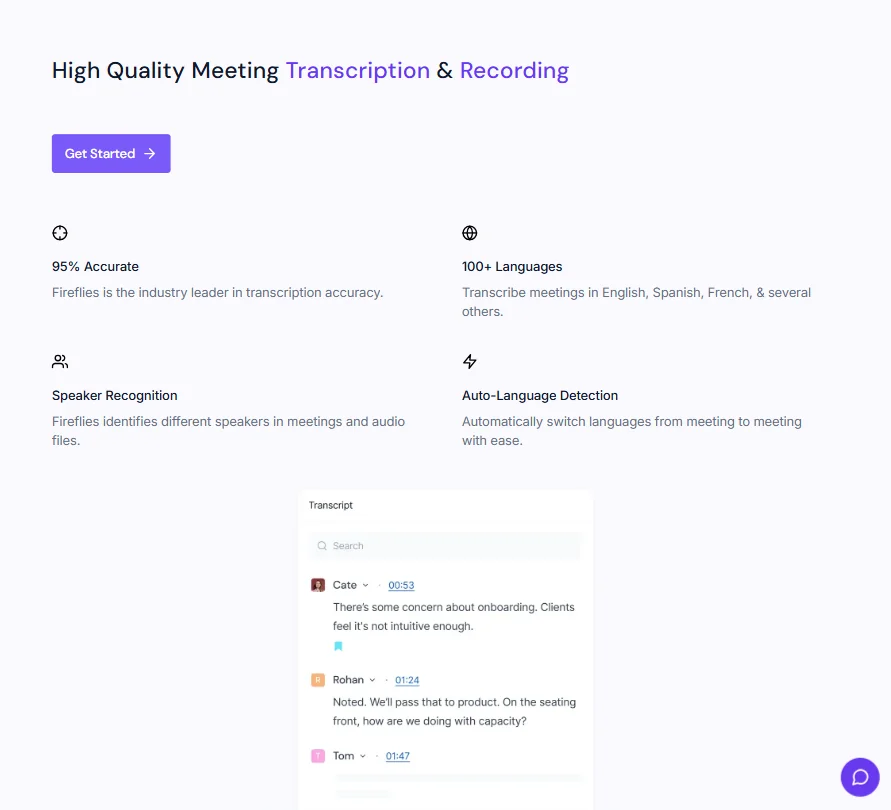
What it does on the audio side is transcription, and it does that well. 95% accuracy is the claimed figure across 100+ languages, with speaker recognition and auto-language detection built in. G2 and Capterra reviewers broadly back that up for English, though there are consistent complaints about accuracy dropping on multi-accent calls or when background noise is present.

Batch processing is there. You can upload MP3, MP4, WAV, and M4A files and process them outside of live meetings. That opens the door to podcast use cases, which Fireflies acknowledges through its Media and Podcasting AI Skills. Soundbite clipping is available too. Honestly, that surprised us. We didn't expect a meeting tool to go this far into podcast territory.

The 200+ AI Skills released in April 2025 cover a wide range of templates and automations. Two that show up in user discussions more than others: the meeting summary templates and the CRM auto-fill. A few others get mentioned but rarely praised in detail.

The API is available on Pro and above. Developers can pull transcripts and data into other workflows.

Fireflies.ai Audio Quality: How Natural Does It Sound?

This heading is a bit awkward for a transcription tool. Fireflies doesn't generate audio. It captures and processes it.

On transcription accuracy, though, this is where the product earns its reputation. Across G2 and Capterra reviews we cross-referenced, praise for English-language accuracy on clear audio came through consistently. That's a sustained signal, not isolated enthusiasm.

The complaints cluster in specific scenarios. Calls with heavy accents get flagged repeatedly. Speaker diarization fails more often in large group calls, where multiple people talk over each other. Technical jargon and industry-specific vocabulary cause errors unless you configure custom vocabulary, which is available but requires setup effort.

Reddit threads surface a recurring complaint that the Fireflies bot joining the call is visible to all participants, which some find awkward or intrusive. It's a known issue with the bot-participant model that most tools in this category share, including Otter.ai and tl;dv. Not unique to Fireflies. But it does come up enough that it's worth knowing.

Real-time transcription is available and works reasonably well per user reports, though a handful of users note a slight lag. Not great. Acceptable, probably, for most use cases.

Fireflies.ai Voice Cloning & Customization: How Deep Does It Go?

It doesn't. No voice cloning here. No voice styles. No audio generation of any kind. This section exists in our template because Fireflies is categorized alongside other AI audio tools, but it's not trying to do what ElevenLabs does. Different product entirely.

The customization that does exist is on the transcription and output side. Custom vocabulary helps with branded terms and technical language. Meeting templates let teams standardize how summaries are structured. AI Skills can be configured or selected based on meeting type.

That's the extent of it. Fine for what Fireflies is. Not a fit if voice generation is what you're after.

Is Fireflies.ai Easy to Use?

Mostly yes, with some friction at setup. The core experience once configured is genuinely low-effort. You invite Fred (the bot) to your calendar, it shows up to meetings automatically, and transcripts appear in your dashboard afterward. That part works consistently based on what we read.

Setup is where things get messier. Connecting Fireflies to your calendar, CRM, and team tools takes time. The integration list is long, with Salesforce, HubSpot, and Slack among the names that come up most. But "available integration" and "works well" are different things. G2 reviewers in sales roles specifically flag that Salesforce sync requires configuration work and doesn't always behave as expected out of the box.

The mobile apps for iOS and Android exist and get decent reviews. The Chrome extension is there for those who prefer browser-based access. Multiple ways in, which helps adoption across teams.

The AskFred search is one of the cleaner UX wins we noticed in reviews. Users like being able to search their meeting history by topic or keyword. That tracks.

One frustration that comes up more than once in 2024 and 2025 reviews: the dashboard gets cluttered as meeting volume grows. Filtering and organization tools are there but not intuitive. Not a dealbreaker, but annoying.

Fireflies.ai Pricing: Is It Worth It for Creators & Businesses?

Fireflies.ai pricing screenshot
Fireflies.ai — Pricing

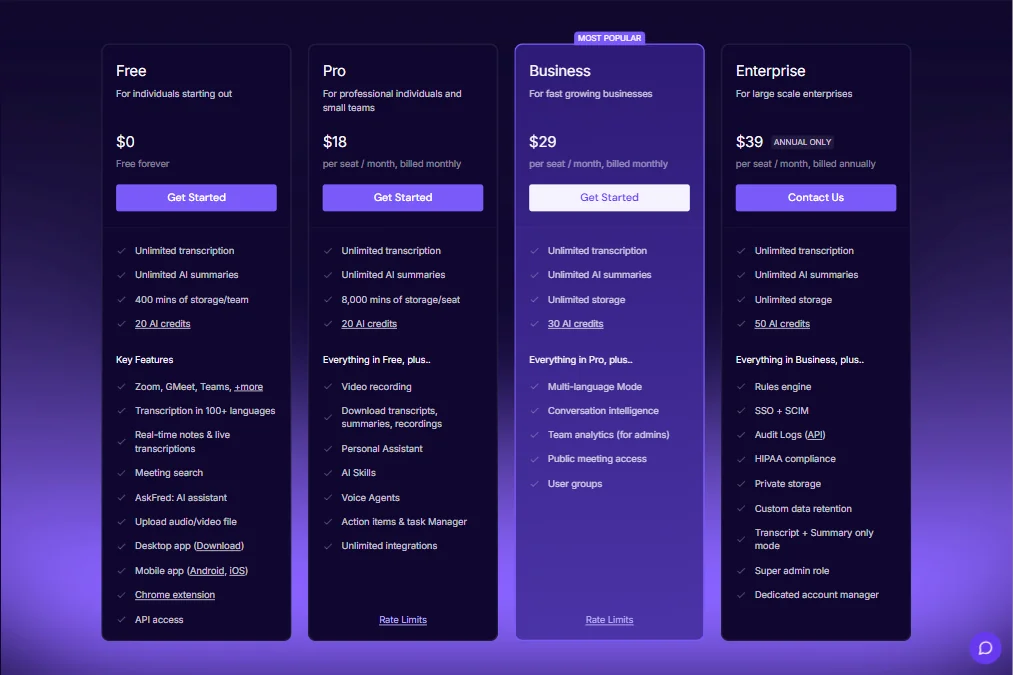
The free plan is genuinely useful. Unlimited transcription with 400 minutes of storage per team. Indefinitely. No trial clock ticking. That's a real free tier, not a demo. You also get 20 AI credits, which is enough to understand what the AI output layer actually does before paying for more.

Paid plans start at $18 per seat per month on Pro, billed monthly, with 8,000 minutes of storage per seat and 20 AI credits. Business runs $29 per seat per month, billed monthly, with unlimited storage and 30 AI credits. Enterprise sits at $39 per seat per month, annual-only, with 50 AI credits and a "contact us" path for custom arrangements. Enterprise also adds SSO with SCIM, HIPAA compliance, private storage, and a dedicated account manager, which matters for larger organizations with real procurement requirements.

We noticed the Enterprise plan is annual billing only. No monthly option at that tier. For smaller teams still evaluating, that's a meaningful commitment to make before the tool has proven itself in your workflow.

There's also no publicly stated refund policy, which we find annoying. Not deal-killing, but it should be there.

At $18 a month for Pro, how does that land competitively? Fathom is free for individuals. Otter.ai's Pro plan starts at $16.99 per month. So Fireflies isn't the cheapest option at the Pro tier anymore, and Fathom undercuts it hard at the individual level.

For teams wanting CRM sync and conversation analytics at Gong-adjacent functionality, the Business plan at $29 is still hard to argue with. Gong and Chorus.ai operate at meaningfully higher price points, often with annual contract minimums that dwarf what Fireflies charges.

Value depends on team size. A 10-person sales team running calls daily will get more out of the Business tier than a solo consultant on the free plan. The pricing math works out differently across those cases.

Fireflies.ai vs Otter.ai: Which AI Audio Tool Wins?

Both transcribe, summarize, and integrate with common meeting platforms. The question is where they diverge.

Otter.ai has a more polished free tier experience in some ways. Its live transcription during meetings is frequently cited as smoother. But Fireflies pulls ahead on integrations. The CRM connections, especially Salesforce and HubSpot, are deeper and more configurable than what Otter.ai offers. For sales teams tracking conversations in a CRM, Fireflies is the clearer choice.

Otter.ai has a simpler interface and a less cluttered dashboard. Users who want to get in and out quickly tend to prefer it. Fireflies has more features, which is good if you need them and friction if you don't.

Pricing is close enough that it probably doesn't decide the call for most buyers. Otter.ai Pro is $16.99 per month. Fireflies Pro is $18. That gap matters less than it once did, and neither tool competes purely on price at this point.

Fathom, which we'd also mention here, is free for individual use and has built a strong following among solo professionals. It doesn't have the team analytics or CRM depth. But if you're one person who wants reliable meeting notes without configuration overhead, Fathom is a serious alternative worth checking before committing to either.

On language support, Fireflies claims 100+ languages. Otter.ai's language support is narrower. That's a real differentiator for global or multilingual teams.

We're not calling a clear winner. The fit depends on whether you need CRM depth or a cleaner solo experience.

Who Should Use Fireflies.ai? (And Who Shouldn't)

Sales teams running high call volume with a CRM they actually use. That's the strongest fit. The combination of auto-transcription, conversation analytics, and CRM sync is where this product earns its keep.

HR teams and recruiters also show up regularly in positive reviews. The interview summary AI Skills get specific praise. Structured outputs from candidate calls save real time.

Remote and distributed teams who want a searchable archive of their meetings are another strong fit. AskFred becomes genuinely useful when you have six months of meetings to search back through.

Who shouldn't bother? Individuals who want a free, frictionless notetaker. Fathom does that with less setup. Teams who primarily need voice generation or audio production should look elsewhere entirely. A tool like AssemblyAI is worth a look if you're building transcription into a product or pipeline rather than using it for internal meetings.

Companies with strict data governance concerns should read the privacy documentation carefully before committing. The Business plan does include multi-language mode, conversation intelligence, and team analytics for admins, while Enterprise adds audit logs via API, HIPAA compliance, and custom data retention. That's a reasonable compliance stack for many organizations. But the bot-in-the-call model still raises flags in some regulated industries, and we haven't seen enough specifics from Fireflies on enterprise data handling to wave that concern away entirely.

Fireflies.ai Review Verdict

Fireflies.ai is a mature, well-built meeting transcription tool with real conversation intelligence on top. The core product works. The transcription accuracy is solid. The integrations are deep enough to matter.

Where it gets complicated is the gap between what the feature list promises and what users actually get in practice. Salesforce sync needs babysitting. Speaker diarization struggles in noisy or crowded calls. The dashboard gets unwieldy at volume. These aren't fatal problems. They're the kind of rough edges that come with a tool that has grown fast and added a lot.

The Business tier pricing is the clearest reason to recommend it for small sales or recruiting teams, getting conversation intelligence and CRM sync at $29 per seat per month when Gong operates at multiples of that cost is a real value proposition, even if it's not Gong-level depth.

The free plan is worth trying for anyone even mildly curious. 400 minutes of storage and unlimited transcription isn't nothing. You'll hit the storage ceiling eventually, but not before you've had a fair look at whether it fits your workflow.

We'd want to see a clearer refund policy and better out-of-the-box CRM configuration before pushing this harder. The Live Assist and Talk to Fireflies features from April 2025 are interesting, and we're watching how the user community responds as those mature.

Not the perfect tool. Close to the best option in its price range for teams who need CRM-connected meeting intelligence.

Frequently Asked Questions

Does Fireflies.ai work with all meeting platforms?

It works with Zoom, Google Meet, Microsoft Teams, and Webex natively. The bot joins as a participant, so it works wherever you can invite a calendar contact to a meeting. That said, some platforms have settings that block third-party bots, so check your enterprise meeting policies before assuming it'll work automatically.

Is the free plan actually usable long-term?

For light users, yes. Unlimited transcription with 400 minutes of storage per team is a real offering, not a trial trap. The problem is that 400 minutes fills up faster than you'd expect on a busy calendar. Once you hit the limit, you're looking at upgrading or deleting old recordings. Teams running daily calls will likely hit that ceiling within a few weeks.

How does Fireflies.ai handle ai meeting transcription accuracy in languages other than English?

The vendor claims 95% accuracy across 100+ languages with auto-detection. In practice, reviewer feedback on non-English accuracy is thinner than on English performance. What we kept seeing in the reviews we cross-referenced is that accuracy holds reasonably well for major European languages but degrades more noticeably with regional accents or less common languages. If multilingual accuracy is critical to your use case, test it on real call recordings from your team before committing to a paid plan.

Fireflies.ai is featured in

Alternatives to Fireflies.ai

See all Fireflies.ai alternatives →

Other AI Audio Tool options we've reviewed.

User reviews

Review Fireflies.ai

Your rating

Reviews are moderated and appear once approved.