SAASINSPECTOR
Asana logo

Asana Review

Teams managing projects and portfolios across departments

Visit AsanaFrom $13.49/mo

Research-based review. We analyzed vendor documentation, customer reviews on G2, Capterra, and Reddit, and live pricing — not hands-on testing yet. We update as our team puts tools through real workflows.

The verdict

Asana is a project management and workflow automation platform that has evolved from a simple task tracker into an enterprise-grade work operating system used by 150,000+ organizations including 85% of the Fortune 100. It's best suited for mid-size to large teams that need structured automation, cross-functional visibility, and increasingly, AI-assisted workflows. Based on aggregated reviews and vendor data rather than hands-on testing, Asana scores well for automation depth and platform maturity, though its free tier limitations and positioning complexity are genuine drawbacks.

Pros

  • Asana has been around since 2008 and serves 85% of the Fortune 100, demonstrating proven enterprise-grade reliability and maturity.
  • The Asana Work Graph connects tasks, people, goals, and dependencies into a unified map, giving teams strong structural visibility across projects.
  • Unlimited automations are available on paid plans with a no-code, point-and-click rules builder that operations teams consistently praise.
  • The platform supports 25+ languages and runs on web, iOS, Android, and Chrome extension, making it highly accessible across devices and regions.
  • The AI features represent a substantive product direction rather than a cosmetic pivot, with AI designed to perform work inside workflows.
  • The free plan offers unlimited tasks and projects with no time limit, providing a genuine entry point for small teams to evaluate the tool.
  • With 150,000+ organizations using Asana, the platform benefits from extensive third-party integrations and a large community of documented use cases.

Cons

  • The free plan is limited to only 2 users, which is far more restrictive than Asana's own marketing language suggests.
  • The 'human-agent teams' and AI positioning language reads as vendor-heavy, making it harder to assess what AI features actually deliver in practice.
  • The platform has grown beyond simple task tracking into something harder to categorize, which can create onboarding complexity for new teams.
  • User reviews on G2 and Capterra suggest real-world performance of the Work Graph concept doesn't always match the promise in vendor documentation.
  • The homepage has gone through multiple AI-driven repositioning rewrites, signaling potential inconsistency in product focus or messaging clarity.
  • Enterprise-scale pricing and feature gating may push smaller teams toward paid tiers quickly once they outgrow the two-user free plan.
From $13.49/moFree plan YesFree trial Yes

What is Asana?

Asana started as a task tracker. It's grown into something harder to categorize. Today it pitches itself as the operating system for what it calls "human-agent teams," which is vendor language for teams that want AI doing actual work inside their workflows, not just summarizing things after the fact.

Asana homepage screenshot
Asana — Homepage

The core concept is the Asana Work Graph, their name for how tasks, people, goals, and dependencies all connect inside the platform. Every piece of work gets linked to every other piece. That's the structural bet they've made. Not just a list of tasks but a connected map of everything happening across an organization. Whether that plays out as well in practice as it does in the docs is something user reviews address pretty directly, and we'll get there.

The platform runs on web, iOS, and Android. There's a Chrome extension too. It supports 25+ languages. The user base spans small teams and massive enterprises. The free Personal plan covers up to 2 users with unlimited tasks and projects, no time limit, and Asana also offers free trials of its Starter and Advanced tiers for teams that want to test before committing.

That free tier is more restricted than Asana's own marketing implies. Two users is tight.

Asana Features: Automation, AI Assistant & Workflow Capabilities

Asana features screenshot
Asana — Features

Task automation is where Asana has historically been strongest, and the newer AI layer hasn't changed that. Paid plans include unlimited automations. The rules builder is point-and-click, no code required. G2 reviewers in operations roles consistently flag this as one of the cleaner automation setups in the space, and we kept seeing that sentiment across enough reviews to take it seriously.

The AI features split into a few distinct things. There's AI Studio, a builder for creating custom AI workflows with 50,000 credits per billing account on Starter and 75,000 on Advanced. There's Asana Dash, which functions as a kind of personal command center pulling project context together. Then there are the AI Teammates, which are the headline feature right now.

Asana offers a larger library of pre-built AI Teammates, with the current lineup including a Launch Planner, a Workflow Optimizer, a Compliance Specialist, a Status Reporter, and a Data Quality Manager as notable examples. The Launch Planner converts goals into timelines. The Status Reporter generates executive-ready updates. Two of those feel immediately useful. The rest are more situational.

On the project management side, Asana covers a lot of ground. Timeline and Gantt views, portfolio dashboards, workload tracking, and capacity planning are all in there. Not a stripped-down tool. Genuinely deep on core project management functionality, which is both a strength and, for new users, a real source of friction.

Document creation comes through templates, project forms, and AI-generated status reports. No dedicated document editor. Spreadsheet-style work is handled through custom fields and integrations with Tableau and Power BI. Calendar view is built in. Meeting summaries aren't listed anywhere in their docs as a native feature, which is a gap if that's something you're counting on.

The free plan gets none of the AI features. That's not buried, but it's not exactly front and center either.

Asana AI Quality: How Smart and Useful Is the Assistant?

The AI layer is proprietary. Asana doesn't name a foundation model publicly. That makes independent benchmarking harder. What we can assess is user feedback and the scope of what's documented.

The AI Teammates concept is genuinely interesting. Most AI project tools bolt a chatbot onto an existing interface and call it AI. Asana is trying something different. The agents operate inside live workflows. They carry scoped permissions, audit trails, and cost constraints, managed through the same admin console that governs human users. That enterprise governance angle is real, and it matters for regulated industries in a way that softer AI implementations don't.

In our research across G2 and Capterra, we kept seeing two patterns. First, people who went deep on the AI features found them genuinely useful, especially the Status Reporter. Writing project updates is the kind of boring work that eats time without producing anything, and automating it got consistent praise. Second, a chunk of users didn't engage with the AI features at all, either because they didn't know they existed or because the features required plan upgrades they weren't on.

The shared memory concept, where agents carry forward context from past tasks and feedback, is one of the more credible AI claims on the homepage. We're a little skeptical of how well it actually works at the task level day-to-day, but the architecture supports it in ways that simpler tools don't.

Reddit threads from 2025 surface a recurring concern: the AI features feel less polished than the core project management. Users on r/projectmanagement mention that some AI suggestions are generic enough to be useless. That tracks with what we'd expect from a mature project tool that added AI on top rather than building AI-first.

Asana Integrations: What Does It Connect To?

The integration list is long. The headline connections are Slack and Google Drive. Beyond those, there's Microsoft 365, Salesforce, Jira, and a few others. Zapier access means anything not natively supported can usually be wired in.

The API is well-documented at developers.asana.com. That matters for teams that need custom connectors or want to build internal tools on top of Asana data. G2 reviewers in IT and engineering roles flag the API quality positively more often than any other single feature.

Tableau and Power BI integration makes Asana usable as a data source for reporting, which is a genuine advantage over lighter tools. If your finance or ops team lives in BI dashboards, this matters more than it might initially seem.

The Chrome extension covers basic task capture from the browser. Nothing exotic, but it works.

Honestly, the integration depth is probably Asana's second-strongest argument after the core project management. It's hard to find a common business tool it doesn't connect to.

Is Asana Easy to Use?

This is where reviews get complicated. Asana is not a simple tool. Never has been. The interface has improved over the years, but the sheer feature count means onboarding takes real time.

G2 reviewers in smaller teams consistently flag the learning curve. Not insurmountable. Just steeper than something like Notion for basic use. The Asana Academy, certifications, and tutorial library exist for a reason, and that training infrastructure is a sign of a product that knows it's complex.

For enterprise teams, complexity reads differently. Those users tend to rate ease of use higher, probably because they have dedicated ops people handling setup. Individual contributors in mid-size companies are the group that reports the most friction. The feature density that enterprise users love is the same thing that overwhelms a 10-person marketing team trying to track a campaign.

The mobile app gets mixed reviews. iOS and Android both exist. Functionality is solid for task management and updates. It's not where most power users spend their time. Capterra reviewers mention that complex workflow management on mobile is frustrating. Fair.

We don't think the complexity is a bug exactly. Asana made a deliberate choice to go deep on features. The tradeoff is real.

Asana Pricing: Is It Worth It vs Free Alternatives?

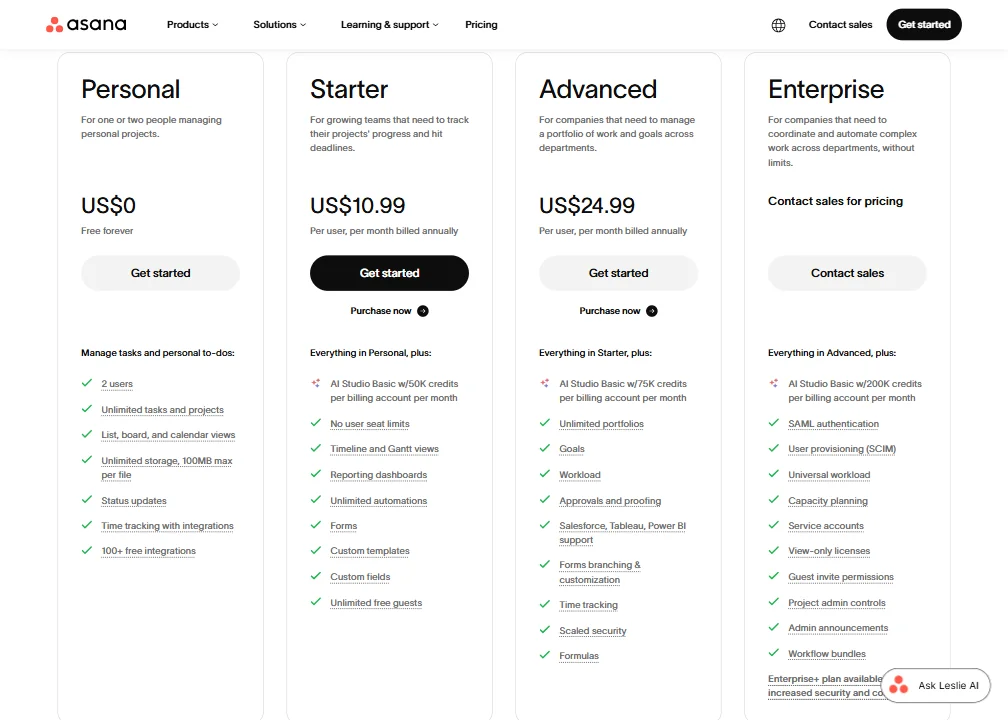
Asana pricing screenshot
Asana — Pricing

The free Personal plan is real and permanent. Two users max, unlimited tasks, unlimited projects. Useful for very small teams. Not useful for anything that needs automation or AI.

Paid plans start at $10.99 per user per month for Starter, billed annually. The Advanced plan runs $24.99 per user per month. Enterprise is custom, contact sales.

We dug through the pricing page and the AI features are split across plans in ways that aren't obvious upfront. AI Studio credits jump from 50,000 on Starter to 75,000 on Advanced to 200,000 on Enterprise. The more capable AI Teammates and governance features appear to be gated behind higher tiers. Exactly which agents land at which price point isn't entirely clear from public docs. That's a frustration several Capterra reviewers mentioned directly.

For a 10-person team on Advanced, you're looking at $250 per month billed annually. That's not outrageous for a mature enterprise-grade tool with deep integrations and automation. It's a lot if half your team doesn't use half the features.

The pricing problem isn't the price itself. It's that the value calculation requires knowing which AI features you'll actually use, and that's hard to answer before you're in the tool. We don't buy the idea that the free Personal plan adequately prepares most teams for that decision, given how much is locked behind paid tiers.

If the project management functionality alone is what you need, there are cheaper paths. ClickUp Brain² runs at a lower per-seat cost and covers similar core territory, so that comparison is worth running before committing at the Advanced tier.

Asana vs Monday.com: Which Productivity Tool Wins?

The most common comparison we see is Asana against Monday.com. Both are mature, both serve enterprise teams, and both have added AI features in recent years.

Monday.com's interface is generally rated more approachable. Its visual board style clicks faster for teams new to project management software. Asana's depth wins for organizations with complex multi-team dependencies. The Work Graph concept doesn't have a direct equivalent in Monday's architecture.

On pricing, they're roughly comparable at the entry level. Monday's AI features are more consumer-facing. Asana's governance angle, the scoped permissions and audit trails for AI agents, is more compelling for compliance-heavy environments. That tracks.

G2 reviewers who've switched from Monday to Asana tend to cite dependency management as the reason. Going the other direction, the reasons are usually about simplicity and visual clarity. Neither tool is wrong. They're solving slightly different problems at the same price tier.

Jira is a different kind of comparison. Jira wins for pure engineering team workflows. Asana wins when you need engineering work to connect to everything else the business is doing. Those aren't the same use case.

ClickUp is the scrappier competitor. More features, lower price, rougher execution in places. Notion is better for documentation-heavy teams that also want some project tracking. Asana is more opinionated about structure, which is a feature or a limitation depending on your team.

Who Should Use Asana? (And Who Shouldn't)

Cross-functional enterprise teams. That's the clearest fit. Marketing and product working off the same dependency map as engineering. Legal reviews connecting to launch timelines. Ops teams that need workflow automation without hiring a developer. Asana was built for this kind of coordination.

Companies with compliance requirements will find the enterprise governance features genuinely useful. Not every tool builds AI agent audit trails into the core admin layer. Asana does, and that's not a small thing.

Small teams on tight budgets. That's where it gets hard to recommend. Two users on the free plan is fine. Three users means paid. And paid at $10.99 per seat per month is reasonable, but you're giving up AI features until you hit a higher tier. The math doesn't favor small teams who need AI.

Solo operators. Wrong tool entirely.

Teams that primarily need meeting intelligence or note-taking aren't the target. Those workflows exist outside Asana's core loop. Something like Fathom AI Notetaker handles that piece specifically and connects to the rest of your stack through integrations.

Asana Review Verdict

Asana is a mature, well-built platform executing an ambitious bet: making AI agents first-class members of project teams rather than add-on features. The Work Graph architecture supports that in ways competitors haven't matched yet. The AI Teammates are more thoughtfully governed than most comparable offerings. The integration depth is real.

The concerns are also real. The pricing structure for AI features lacks transparency, and we kept seeing that complaint surface in enough Capterra and G2 reviews to treat it as a pattern rather than an outlier. The learning curve is steep enough to cause real friction for smaller or less technical teams. The AI layer, while architecturally interesting, isn't universally polished. Reddit and G2 both surface enough "this felt generic" feedback on AI suggestions to take seriously.

What keeps Asana near the top of this category is the combination of depth and governance. If your organization is big enough to need both, and you're looking at tools that can handle human-agent coordination at scale, few tools make a stronger case.

Not the simplest option. Not the cheapest. For the right organization, one of the best.

Frequently Asked Questions

Does Asana have a free plan?

Yes. The Personal plan is free forever, capped at two users with unlimited tasks and unlimited projects. The free plan doesn't include automation or any of the AI features, so it functions more like an extended preview for most teams even without a time limit. Asana also offers free trials of its Starter and Advanced tiers for teams that want to test the paid feature set before committing.

What are Asana AI Teammates?

Pre-built AI agents that work inside live Asana workflows. Asana offers a larger library of these, with the Launch Planner, Workflow Optimizer, Compliance Specialist, Status Reporter, and Data Quality Manager as documented examples. They operate with scoped permissions and audit trails, which makes them more enterprise-ready than most AI agents we've seen added onto project tools as afterthoughts. Availability depends on your plan tier, and the Enterprise plan's 200,000 AI Studio credits per month suggests the full feature set is gated pretty high.

How does Asana compare to ClickUp on asana pricing?

Asana's Starter plan runs $10.99 per user per month billed annually. ClickUp generally comes in cheaper at comparable feature levels, which makes the direct comparison worth doing before you commit. Asana's advantage is structural depth and the Work Graph architecture. ClickUp's advantage is price and feature breadth at lower tiers. Neither is clearly superior for every team. Not great if you're budget-constrained and Asana's governance features aren't relevant to your use case.

Asana is featured in

Alternatives to Asana

See all Asana alternatives →

Other AI Productivity Tool options we've reviewed.

User reviews

Review Asana

Your rating

Reviews are moderated and appear once approved.