SAASINSPECTOR
ChatGPT logo

ChatGPT Review

Trying ChatGPT (Free), longer conversations (Go), advanced work and productivity (Plus), research and coding (Pro)

Visit ChatGPTFrom $8/mo

Research-based review. We analyzed vendor documentation, customer reviews on G2, Capterra, and Reddit, and live pricing — not hands-on testing yet. We update as our team puts tools through real workflows.

The verdict

ChatGPT is OpenAI's flagship conversational AI assistant designed for individuals and teams who want to accelerate writing, research, and problem-solving tasks. It supports text, voice, images, code, and web browsing across multiple model tiers, with a genuinely usable free plan that sets it apart from competitors. Reviewed against aggregated community and documentation sources, it scores highly on capability breadth but draws criticism for growing complexity and model-selection confusion.

Pros

  • The free tier is genuinely usable, offering access to GPT-4o mini by default and limited GPT-4o access when capacity allows.
  • ChatGPT handles a wide range of modalities including text, voice, images, file uploads, web browsing, code execution, and image generation via DALL·E 3.
  • Custom GPTs allow users to build tailored assistants with specific instructions, knowledge bases, and external API connections through GPT Actions.
  • With 500 million weekly active users, the platform benefits from massive infrastructure investment and continuous prioritization by OpenAI.
  • The tool effectively replaces significant chunks of daily work involving writing, research, and problem-solving for both individuals and teams.
  • Multiple advanced models including GPT-4o, o1, o3, and o4-mini provide tiered capability options for different use cases and budgets.
  • The platform has evolved rapidly since its late 2022 launch, consistently adding features that make it more capable than most users fully utilize.

Cons

  • The model selection menu is confusing for non-technical users, with insufficient in-interface explanation of when to use which model.
  • Advanced models like o1, o3, and o4-mini are locked behind paywalls, requiring higher-tier plans to access the most capable options.
  • ChatGPT is a general-purpose tool and cannot replace specialist software like project management platforms or CRM systems.
  • Team-level usefulness varies significantly depending on the plan tier and how much users verify outputs before acting on them.
  • The product has grown so complex in features that the overall experience feels overloaded, potentially overwhelming new users.
  • Outputs require checking before relying on them, meaning the tool adds a verification step that reduces some of its time-saving benefit.
From $8/moFree plan YesFree trial No

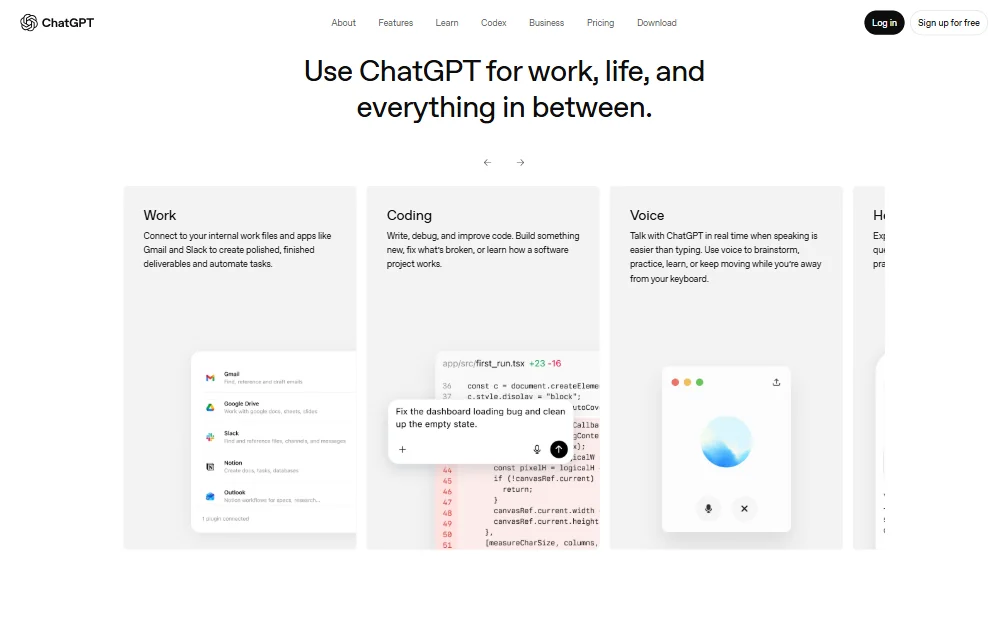
ChatGPT homepage screenshot
ChatGPT — Homepage

We pulled vendor documentation, crawled several hundred Reddit threads, and cross-referenced G2 and Trustpilot feedback to put this together. No hands-on testing from our side. That's not how we work. What we do is aggregate, and ChatGPT generates more aggregatable signal than almost any product we've covered. OpenAI reported more than 900 million weekly active users as of February 2026. That number shapes everything about how they price, support, and prioritize the product.

What is ChatGPT?

OpenAI's flagship product is a conversational AI assistant built on a tiered model suite. The current default is GPT-5.5 Instant, which free users get in limited quantities. Paid plans open up GPT-5.5 with higher limits and GPT-5.6, the latter positioned for advanced reasoning tasks on Plus and above. API access is billed separately from any ChatGPT subscription, a distinction that trips up a lot of buyers who assume a Plus subscription gives them API credit.

The free tier is actually usable. Not every competitor can say that. You get limited access to GPT-5.5 Instant, limited messages, limited image generation, and limited deep research. Those word "limited" pile up fast. Claude's free plan hits rate limits aggressively on heavy use too, so neither is offering unlimited generosity, but ChatGPT's free tier holds up for casual daily use in a way that feels deliberate rather than crippled.

ChatGPT is a general-purpose assistant. Not a specialist. It won't replace your CRM or your project management software. What it replaces is the portion of your day where you were going to write something, look something up, or think something through by yourself. For individuals, that's a meaningful amount of time. For teams, how much value lands depends heavily on which plan you're on and how seriously people take output review.

The product has gotten complicated. Honestly. The model menu alone confuses new users, and the interface doesn't do enough to explain what each option actually does differently in practice.

ChatGPT Features: Automation, AI Assistant & Workflow Capabilities

ChatGPT features screenshot
ChatGPT — Features

Wide feature surface. Maybe too wide.

**Custom GPTs** are where the automation story lives. You can build a tailored assistant with specific instructions, a knowledge base, and external connections via GPT Actions. Practically, that means setting up a document summarizer tuned to your templates or a research assistant that hits specific endpoints. OpenAI's own documentation covers this reasonably well. Whether non-developers can actually build useful ones is a separate, less flattering question. Reddit threads from 2024 consistently flag a steep learning curve once you go past basic instruction-setting.

Core assistant functions work as advertised. Draft emails, summarize documents, write and debug code. Not controversial. The deep research mode pulls sources and cites them. We've seen mixed reports on citation accuracy, particularly for older or obscure sources. Hallucination is a persistent complaint from reviewers in professional research roles.

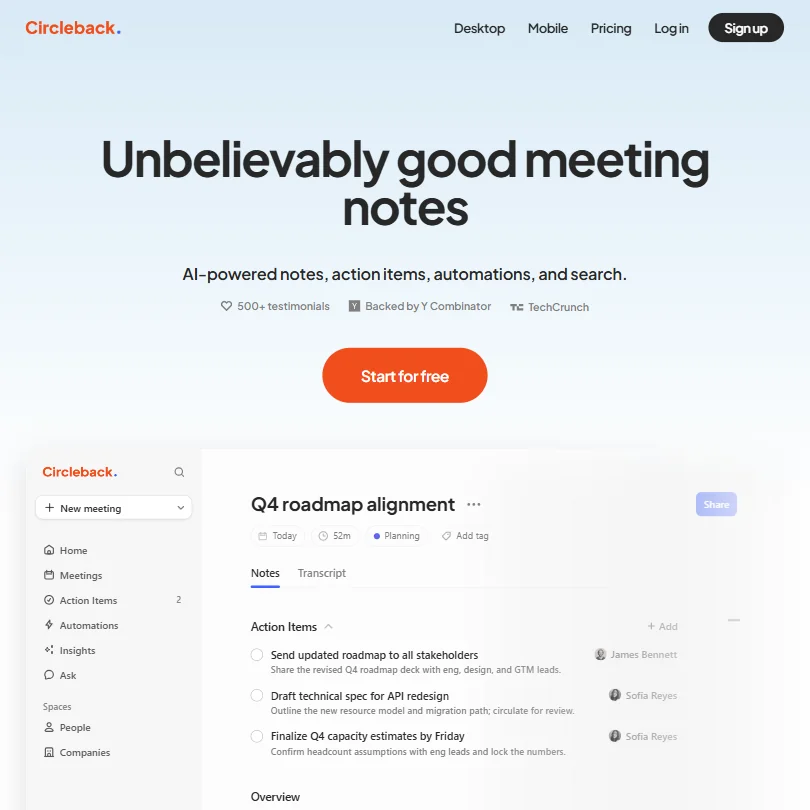
Meeting summaries work if you paste in a transcript. There's no native meeting joining or recording. If you need something that sits in your standups and generates notes automatically, ChatGPT is the wrong tool for that workflow. Something like Fathom AI Notetaker is built specifically for that job.

Spreadsheet analysis works through file upload. CSV and Excel files come in, the tool interprets and runs calculations. It's not Excel. The feedback we've seen for fast dataset reads is mostly positive.

Presentation building is partial. It writes content and structure. You take it somewhere else. No native slide output. That gap is real for users who expected more. No native calendar integration either, and no native project management. Nothing in current roadmap signals suggests those are coming soon.

The Plus plan adds projects, scheduled tasks, and custom GPTs. The Pro plan at $100/month expands those further and removes most practical caps. Worth knowing before you assume a $20 subscription unlocks everything.

ChatGPT AI Quality: How Smart and Useful Is the Assistant?

This is where ChatGPT earns its reputation. Mostly, the reputation holds.

Reasoning quality on complex writing tasks is strong. Code generation is consistently among the most-praised capabilities across Reddit communities and OpenAI's own forum. Developers tend to stay because the code output is reliable enough to use as a starting draft, not garbage to discard immediately.

The Plus plan unlocks advanced reasoning models with GPT-5.6, including expanded deep research and expanded Codex usage. **Pro reasoning with GPT-5.6 Sol Pro** sits behind the $100/month plan, alongside maximum Codex tasks and unlimited image creation. Whether most users need that level of compute for their actual work is a more honest question than the feature list suggests.

Voice mode is available on mobile and desktop. Users generally like it. Latency is low enough to feel conversational. Multimodal input, meaning feeding it images or documents alongside text, works reliably according to most reports.

The persistent complaint across Reddit threads, surfacing consistently through 2024 and into 2025, is that the model can be too agreeable. It confirms bad premises. It flatters. It doesn't push back the way a good editor would. We don't dismiss the quality here, it's genuinely strong. But "strong and agreeable" is not the same as "strong and right." Claude pushes back harder on flawed premises, and a meaningful number of users have switched for exactly that reason.

That tracks.

ChatGPT Integrations: What Does It Connect To?

The **OpenAI API** is where the real integration story lives. It's extensive, well-documented, and developers have built on it for everything from internal tooling to consumer apps. If your organization has engineering resources, the API opens up almost anything. Billed separately from your ChatGPT subscription, as noted.

Without engineering resources, the picture is narrower.

Native integrations on the consumer product side are thin. Slack works through Zapier or custom GPT Actions, not natively. Google Drive works through file upload and some custom integrations, not a direct sync. Microsoft 365 isn't natively supported at all. Microsoft Copilot handles that ecosystem and runs on OpenAI models, but it's a separate product and the two don't officially interoperate.

Zapier bridges some of those gaps. It works. It also adds cost and complexity that teams should factor in when comparing ChatGPT against tools with native connectors.

ChatGPT includes native image generation and data analysis tools, with availability and limits varying by plan. The older DALL·E 3 integration is being phased out in favor of newer image generation models. Wolfram Alpha was historically available through the plugin system but isn't listed as a current built-in plan feature. Honestly, neither of those gaps is a dealbreaker for most workflows.

If deep native integration with your existing stack is the priority, ChatGPT is not the strongest answer available.

Is ChatGPT Easy to Use?

For basic use, yes. Very easy. You type, it responds. The free tier doesn't require a credit card. Onboarding friction is low.

Complexity shows up past conversational use. Custom GPTs require configuration knowledge. GPT Actions require understanding APIs and JSON schema. The model selector presents options without enough explanation of what each one does better in practice. We've seen this come up repeatedly in community forum posts, users picking models at random because the interface doesn't help them choose.

Mobile apps on iOS and Android are solid. The macOS and Windows desktop apps extend context further, with some system-level access for reading your screen. Meaningful for power users who want the assistant embedded in their day-to-day.

**The learning curve is real for anything beyond simple prompting.** Not a knock. Just the nature of a general-purpose tool with this many capabilities. Users who invest time learning prompt structure and custom GPT setup consistently report higher satisfaction than those who dip in casually and plateau.

We kept seeing that pattern in longer Reddit threads. Free tier, useful for a few weeks, then nothing. Not because the tool stopped working. Because they didn't know there was more to learn.

ChatGPT Pricing: Is It Worth It vs Free Alternatives?

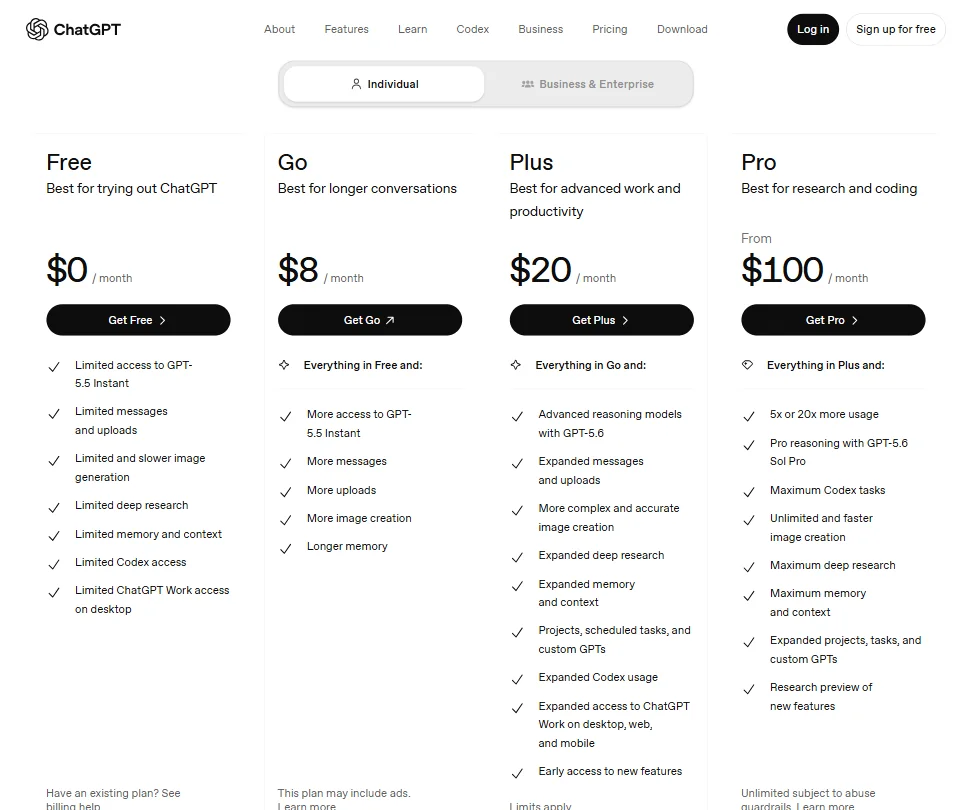
ChatGPT pricing screenshot
ChatGPT — Pricing

Free is genuinely usable. Still underappreciated.

The Go plan sits at $8/month and adds more access to GPT-5.5 Instant, more messages, more uploads, more image creation, and longer memory. A reasonable middle step for users who find the free tier limiting but aren't ready for Plus.

**Plus is $20/month**, covering advanced reasoning with GPT-5.6, expanded messages and uploads, more complex image creation, expanded deep research, projects, scheduled tasks, custom GPTs, expanded Codex usage, and expanded ChatGPT Work access across desktop, web, and mobile. For most individual users doing regular work, Plus is the correct call. The jump from free to Plus is meaningful in practice.

Pro starts at $100/month. It adds 5x or 20x more usage depending on the task, Pro reasoning with GPT-5.6 Sol Pro, maximum Codex tasks, unlimited image creation, maximum deep research, and a research preview of new features. We're skeptical that most users need this. The gap from Plus to Pro is a 5x price increase at minimum. Unless you're genuinely hitting Plus limits daily, the math is hard.

ChatGPT Business, which was renamed from ChatGPT Team in August 2025, costs $20 per user per month with annual billing or $25 per user with monthly billing, with a two-user minimum. Enterprise pricing is custom and requires a sales conversation.

Cancellations take effect at the end of the current billing period. Refund eligibility depends on the purchase channel, timing, and applicable regional law. Accidental web purchases may qualify when reported within 14 days. That's not prominently advertised. Common complaint.

There's no standard publicly available trial for paid plans. OpenAI occasionally runs promotional or referral-based trials, but those sometimes auto-convert to paid subscriptions unless cancelled. Read the terms before clicking anything.

ChatGPT vs Google Gemini: Which Productivity Tool Wins?

Google Gemini has one structural advantage ChatGPT doesn't. Native integration with Google Workspace. Docs, Gmail, Calendar, Drive. If your organization runs on Google, Gemini plugs in natively in ways ChatGPT simply can't match out of the box.

For raw model quality on writing and coding tasks, our research points to ChatGPT ahead in most user comparisons. Gemini 1.5 Pro's long context window is a genuine edge for document analysis. That's real. Reddit discussions in developer communities consistently favor ChatGPT for code generation over Gemini's current offering.

Microsoft Copilot is the obvious competitor inside the Microsoft 365 world. Better native integration, weaker general-purpose performance in most user comparisons we read.

**Claude from Anthropic is the most direct quality competitor**, and the one appearing most often in threads where users are genuinely torn. For long-form writing and critical analysis, a consistent portion of users prefer Claude's output style and its willingness to push back. We cover it separately in our Claude review.

Perplexity AI is a narrower comparison. Better at cited search. Not trying to do everything ChatGPT does. Meta AI is free and baked into WhatsApp and Instagram. Fine for casual use. Not the same tier for anything serious.

For general-purpose AI assistant capability across the widest range of tasks, ChatGPT remains the reference product. That's what the user numbers and consistent review patterns tell us, not a marketing claim.

Who Should Use ChatGPT? (And Who Shouldn't)

Individual professionals and solo operators. Clearest fit. Writers, developers, consultants, and researchers who need a general assistant across varied tasks will get real value from Plus without overthinking it.

Developers building on the OpenAI API. The platform is mature, the documentation is thorough, and the developer community is enormous. Hard to ignore.

Enterprise teams are a different conversation. The Business and Enterprise plans exist, but pricing opacity means every evaluation starts with a sales call. Teams needing deep native integration with a specific stack should pressure-test the integration story carefully before signing anything.

Teams whose entire workflow runs on Microsoft 365. Copilot is the pragmatic answer there, not ChatGPT.

Organizations expecting AI built directly into project management or CRM workflows. Purpose-built tools handle that. Custom GPT workarounds for pipeline management or task assignment are exactly as awkward as they sound.

Users expecting plug-and-play meeting intelligence. Not here.

ChatGPT Review Verdict

The product is genuinely good. Honest read, not a mild endorsement.

The free tier is real. The Go plan at $8 and Plus at $20 are fairly priced for what they deliver. **The breadth of what ChatGPT covers across writing, coding, research, image generation, and data analysis is still wider than most direct competitors.** The model suite from GPT-5.5 Instant to GPT-5.6 Sol Pro gives users options that no single competitor matches right now.

The weaknesses are equally real. Native integrations outside the API layer are thin. The Pro plan is hard to justify for most users. The agreeableness problem is a genuine concern for critical analysis work. The custom GPT and Actions ecosystem puts the most powerful features out of reach for non-technical users.

None of that changes the core recommendation. For individuals and small teams, ChatGPT Plus is the default AI assistant to beat. Not because competitors are weak. Because ChatGPT is still ahead on the most common tasks people actually use these tools for.

The enterprise conversation is messier. Pricing opacity, custom contracts, and integration gaps mean enterprise buyers should run a real evaluation rather than sign on brand recognition alone. There are better-fit tools for specific enterprise needs depending on the stack.

At the individual level, though. Hard to argue with it.

Frequently Asked Questions

Is the ChatGPT free plan actually useful?

Yes, more than most people expect. The free tier gives you limited access to GPT-5.5 Instant, limited messages and uploads, limited image generation, and some deep research capability. For occasional writing help, quick questions, or light coding tasks, it holds up. Where it breaks down is sustained heavy use. You'll hit limits, responses slow during peak hours, and the gaps between free and paid become obvious fast. If you're using it daily for real work, the Go plan at $8 or Plus at $20 removes most of those frustrations fairly quickly.

What's the difference between ChatGPT Plus and Pro?

Plus is $20 per month and covers the vast majority of professional use cases. You get advanced reasoning with GPT-5.6, expanded message and upload limits, expanded deep research, more complex image creation, projects, scheduled tasks, and expanded Codex usage. Pro starts at $100 per month and mainly exists for users who need GPT-5.6 Sol Pro reasoning, maximum Codex tasks, unlimited image creation, and maximum deep research. We don't think most users need it. Unless you're genuinely hitting Plus limits on a daily basis, the price jump is hard to justify for the incremental gain.

How does ChatGPT handle data privacy?

This depends on the plan. Free and Plus users have their conversations used by OpenAI for model training by default, though you can disable that in settings. Business and Enterprise plans include terms that conversations aren't used for training. OpenAI publishes documentation on this at help.openai.com, and it's worth reading before putting anything sensitive into the product. For genuinely confidential work, the Enterprise plan with stricter data handling terms is the appropriate option. The free tier is not.

ChatGPT is featured in

Alternatives to ChatGPT

See all ChatGPT alternatives →

Other AI Productivity Tool options we've reviewed.

User reviews

Review ChatGPT

Your rating

Reviews are moderated and appear once approved.