SAASINSPECTOR
Circleback logo

Circleback Review

Solo creators, small teams, and large organizations

Visit CirclebackFrom $25/mo

Research-based review. We analyzed vendor documentation, customer reviews on G2, Capterra, and Reddit, and live pricing — not hands-on testing yet. We update as our team puts tools through real workflows.

The verdict

Circleback is a meeting intelligence tool founded in 2023 that records calls, generates structured notes, assigns action items, and syncs with CRMs and project tools. It distinguishes itself from basic transcription software through strong AI accuracy and automated workflow integration, making it well-suited for sales teams, consultants, and client-facing professionals. However, the pricing gives the reviewer pause, and its short track record means some caution is warranted.

Pros

  • AI quality is a genuine differentiator, accurately capturing what was decided and who owns action items rather than just transcribing speech.
  • Automated action item tracking assigns ownership and pushes tasks into connected apps like CRMs and project tools automatically.
  • Supports 100+ languages with claimed technical-term accuracy and automatic speaker identification.
  • AI search layer spans your entire meeting history, letting you query past conversations for specific information.
  • In-person recording is supported, making it practical for sales teams and consultants in physical meeting rooms.
  • Available across web, iOS, Android, Mac, and Windows for broad accessibility.
  • Backed by Y Combinator and has accumulated 500+ testimonials, with consistent positive patterns across independent user reports.

Cons

  • Pricing is flagged as a concern by the reviewer, suggesting it may not suit all budgets.
  • The company has not disclosed user numbers, making it harder to gauge adoption and long-term viability.
  • Marketing language like 'unusually magical' raises credibility concerns that require independent verification.
  • Relatively new product launched in 2023, meaning long-term reliability and support track record is still limited.
  • Action item tracking works 'more often than not' but is not described as flawless, implying inconsistency.
From $25/moFree plan NoFree trial Yes

Half-expected another transcription layer with a prettier dashboard. That's mostly what this category is. Circleback isn't quite that, based on what we pulled from vendor docs, the G2 thread data, and a fairly consistent pattern of independent user reports going back to the 2023 launch. This circleback review gets into the specifics of what holds up and what doesn't.

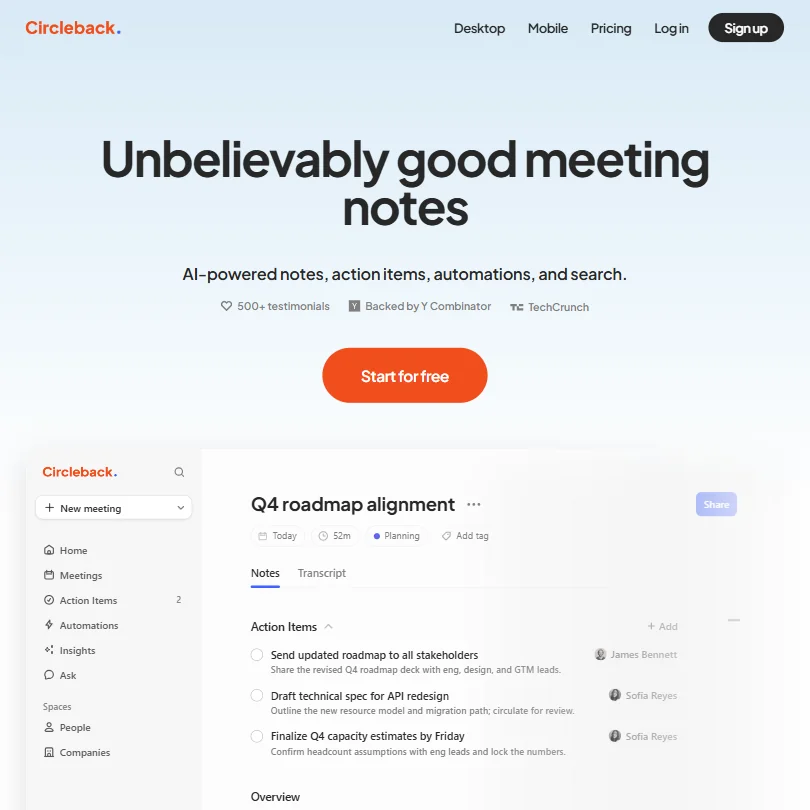
Circleback homepage screenshot
Circleback — Homepage

The AI quality appears to be the real story. Pricing is where we'd slow down.

What is Circleback?

Y Combinator-backed, San Francisco, founded 2023. Circleback records your calls, writes structured notes, captures action items, and pushes those items into your CRM or project tool. Web, iOS, Android, Mac, and Windows are all covered.

No disclosed user count. What they do have is over 500 testimonials on the homepage, including a quote from the CEO of Runway calling it "unusually magical." We're always suspicious of that kind of language. But when that pattern shows up consistently across independent Reddit threads and Capterra reviews, not just curated homepage pulls, it's harder to dismiss entirely.

The 100+ language claim with technical-term accuracy and automatic speaker identification is front and center in their positioning. Not a minor claim. We get into whether it holds up below.

Circleback Features: Automation, AI Assistant & Workflow Capabilities

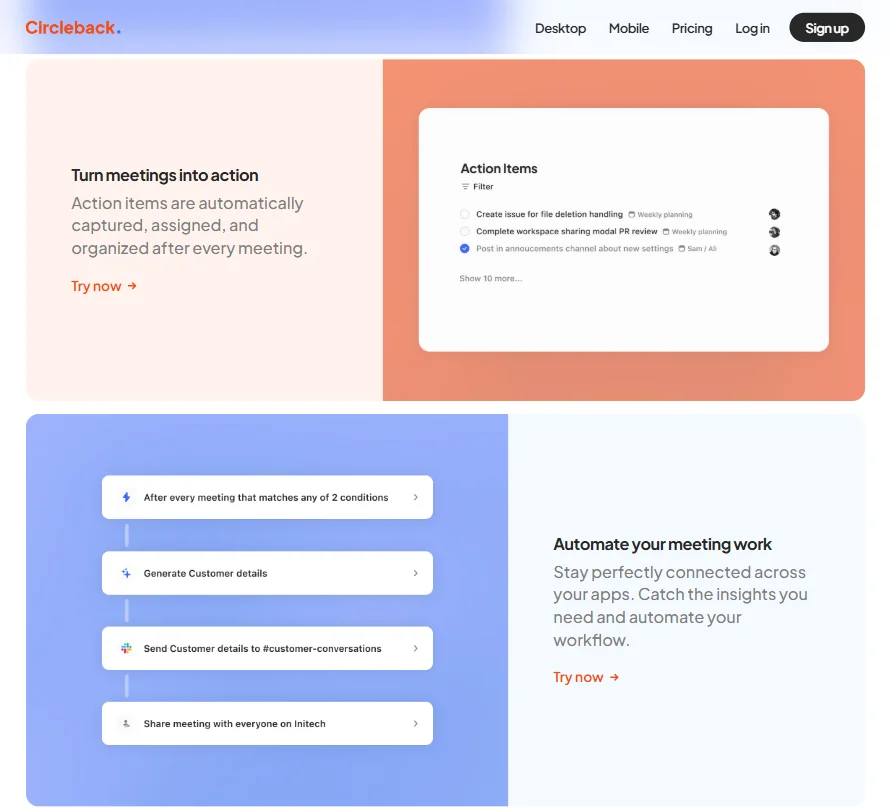
Circleback features screenshot
Circleback — Features

The core loop is simple enough. Circleback joins your call or records it in person, writes structured notes, pulls out action items, assigns them, and pushes everything into whatever app you're using. Straightforward on paper.

What separates it from basic transcription tools is the automated action item tracking, which doesn't just log what was said. It figures out what was decided and who owns it. Based on the user reports we cross-referenced, this works more reliably than most tools in the category. That's a low bar, honestly, but Circleback clears it.

There's an AI search layer sitting across your full meeting history. Ask it a question, get an answer drawn from actual conversation data. Genuinely useful for anyone managing long client relationships or ongoing projects where context accumulates across dozens of calls.

In-person recording is supported, not buried. Sales teams, consultants, anyone spending time in physical conference rooms without a URL to join will actually use this. Noted.

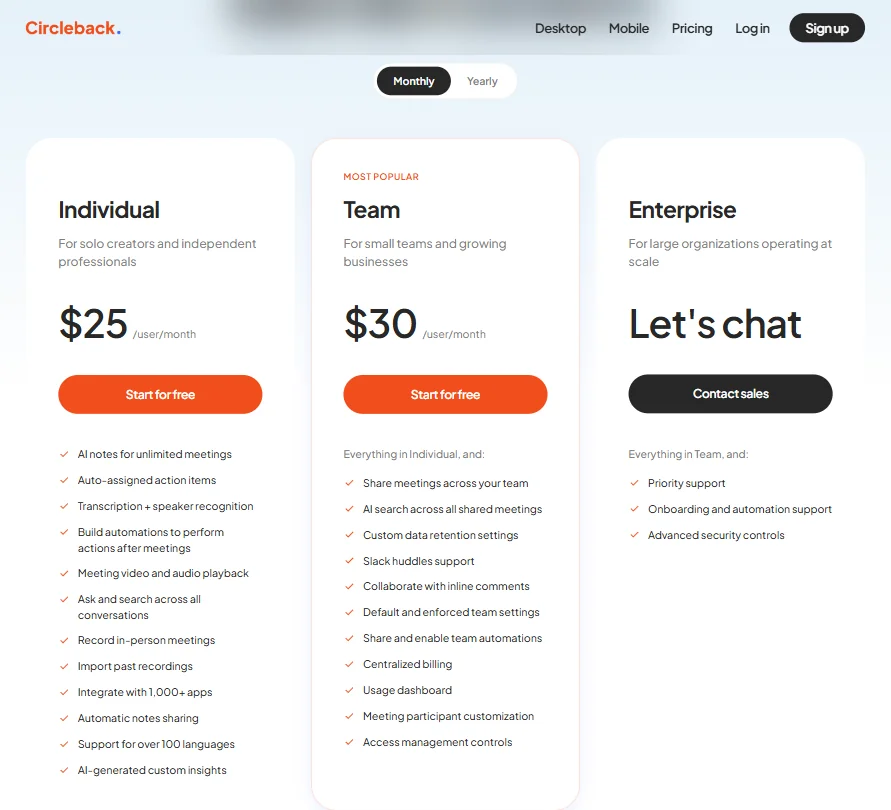
The Individual plan includes AI notes for unlimited meetings, transcription with speaker recognition, integration with 1,000+ apps, and import of past recordings, among a few others. The Team plan at $30 per user per month layers on shared meeting access, AI search across all shared meetings, custom data retention settings, and access management controls, plus a few others. That jump from Individual to Team is functionally significant, not just cosmetic.

Honestly, the feature set is dense without feeling cluttered. That's harder to pull off than it sounds.

Circleback AI Quality: How Smart and Useful Is the Assistant?

Proprietary model. No GPT-4 badge, no Claude branding on the transcription side. Worth flagging because it means you can't easily benchmark it against known models or set expectations based on public evals.

What we kept seeing in user reports is consistent praise for transcription accuracy, especially on technical jargon and non-native English speakers. Fathom is good in this area. Otter gets sloppy fast on anything domain-specific. Circleback apparently handles it better across both cases. We can't verify that claim hands-on, but the pattern across G2, Capterra, and independent Reddit threads is consistent enough to take seriously.

The MCP integration is the more interesting story here. Circleback connects meeting context directly into ChatGPT, Claude, and Cursor, letting those tools pull from your actual call history. That's a different kind of AI integration than "we have an AI assistant button." It's meaningful for anyone already living inside those workflows, not a novelty feature.

We're a little skeptical of the cross-meeting Q&A in practice. The quality of that feature depends entirely on transcript quality feeding into it. Confident wrong answers are worse than no answers. If the accuracy claims hold, it's a real research layer. If they don't, it isn't.

Circleback Integrations: What Does It Connect To?

Google Calendar and Outlook on the calendar side. HubSpot and Salesforce for CRM, and a few others worth verifying against their docs page.

Linear and Asana for task management. Zapier and Make for custom workflows, and a few others on that side as well.

There's also webhook access and a CLI. Most meeting tools don't bother with that. It signals Circleback is at least partly built for technical users who want to pipe meeting data into their own systems rather than just use the native dashboard.

Two-way CRM sync is the integration feature that keeps surfacing in user discussions. Not just "we push notes to Salesforce." Actually updating deal records based on what was discussed in the meeting. That distinction matters a lot to sales teams running active pipelines.

Browser capture is covered via a Chrome extension alongside the desktop and mobile apps. Not dependent on any single capture method. That's more flexible than Otter, which leans heavily on the extension and gets awkward outside of that.

Is Circleback Easy to Use?

We didn't find many onboarding complaints in our research. The flow appears to be connect your calendar, let it join your next call, read your notes. No configuration maze before you see something useful.

Mobile covers iOS and Android. In-person recording works from the phone, which is a real use case they've actually thought through rather than checked a box on.

The automation layer is where complexity enters. Setting up workflows between Circleback and a CRM or project tool requires configuration. Not code, but not a single "connect" click either. Users who push past the defaults generally report strong results. Users who stick to defaults still get usable notes, just without the deeper workflow payoff.

Fair. That's a reasonable tradeoff for a tool operating at this level of automation.

Circleback Pricing: Is It Worth It vs Free Alternatives?

Circleback pricing screenshot
Circleback — Pricing

The Individual plan sits at $25 per user per month based on the current pricing page. The Team plan is $30 per user per month. Enterprise is custom pricing, contact sales.

Context that matters: across AI productivity tools we've tracked, the category median sits around $14 per month. That gap is meaningful when genuinely competitive free alternatives exist. Fathom has a free tier that's not a stripped demo. It's an actual product at zero cost for core note-taking.

Circleback does have a free tier. No stated day limit, which is more honest than a countdown timer. The framing is essentially start free, subscribe when you believe in it. We prefer that structure. The problem is the free tier's specific feature limits aren't clearly documented on the public pricing page. That's a problem.

Not great. Users shouldn't have to sign up to find out what they're actually testing.

Fathom is the obvious benchmark for price-sensitive users who don't need the deeper automation layer. Circleback's value case is the action item automation and CRM integration. Clean notes alone don't justify $25. The refund policy also isn't publicly stated, which doesn't help the trust calculus here.

Circleback vs Otter.ai: Which Productivity Tool Wins?

Otter is cheaper. The free plan is well-known and the transcription is decent for standard English calls. For anything technical or anything involving accents and domain-specific language, Otter gets messy. We've seen that pattern repeatedly in the comparison threads we read across Reddit and G2.

Circleback's accuracy claims are more ambitious, and based on our research into independent user reports, those claims hold up better than Otter's in mixed-language and technical contexts. That tracks with what the product is positioning itself on.

The bigger gap is philosophy. Otter is a record-keeping tool. Circleback tries to close the loop by pushing action items into Linear, HubSpot, or wherever the actual work lives. That's a different product, not just a better version of the same one.

If your meetings generate work that has to land somewhere specific, Circleback wins the comparison. If you just want to search old transcripts, Otter is half the price and probably enough.

Who Should Use Circleback? (And Who Shouldn't)

Sales teams running HubSpot or Salesforce pipelines. The CRM integration and action item capture alone justify the price if manual logging is currently eating your reps' time. That problem is real. Circleback solves it better than most tools in this space.

Small businesses where the same people are on every call and nobody has bandwidth for notes. The cross-meeting AI search compounds in value quickly when a whole team's history is in one account.

Solo users who just want cleaner transcripts. Probably not the right fit at $25 per month. Something like Granola might be a better landing spot for lightweight AI notes without the automation overhead.

Users who want a pure extension-based workflow without installing a desktop app should verify the Chrome extension experience before committing. It's supported, but it's not the primary mode the product is built around.

Circleback Review Verdict

One of the better meeting tools we've researched this year. The transcription accuracy story holds up under scrutiny. The action item automation is the actual product, not a feature bolted on. The whole tool is built around it.

The pricing is the honest concern. At $25 per user per month for Individual and $30 for Team, it's above the category median, and the free tier lacks the documentation users need to make an informed decision before committing. The absent refund policy compounds that.

Not fatal flaws. The YC backing gives it runway. The integration depth is real. The MCP support suggests a team thinking about where AI workflows are going, not just chasing the meeting notes market.

Our research position: recommend it, but know exactly what you're paying for. The automation and CRM sync are what you're buying. If that doesn't match your actual workflow, the price doesn't hold up.

Frequently Asked Questions

Does Circleback work for in-person meetings?

Yes. The iOS and Android apps support in-person recording without a video call link. Useful for sales visits, client dinners, or any situation where there's no Zoom URL involved. It's been thought through as a real use case, not added as a checkbox feature.

How does Circleback handle languages other than English?

Circleback claims support for over 100 languages with speaker identification and technical-term accuracy. Independent user reports we found suggest the accuracy genuinely holds up on non-English calls, which is a real gap for several competing tools including Otter. We haven't tested it directly. But the pattern across independent reviews is consistent enough to take seriously.

Is there a free plan, and what are the limits?

There's a free tier with no stated time limit, which is better than most trial structures in this category. The specific feature limits on the free plan aren't clearly spelled out in public documentation. Frustrating. Our advice: sign up, run it on a few real calls, and assess from there before the paid plan becomes a decision you have to make under pressure.

Circleback is featured in

Alternatives to Circleback

See all Circleback alternatives →

Other AI Productivity Tool options we've reviewed.

User reviews

Review Circleback

Your rating

Reviews are moderated and appear once approved.