We've been tracking Murf AI across G2 reviews, Trustpilot threads, Reddit conversations, and their own documentation for this murf ai review, and the picture that comes together is pretty clear. This isn't a scrappy startup anymore. Founded in 2020 and now claiming over 10 million users, Murf has built something with real weight behind it. Our research kept surfacing the same word from users in different industries: reliable. That's not flashy. But for a voice generation platform, it's the right word to earn.

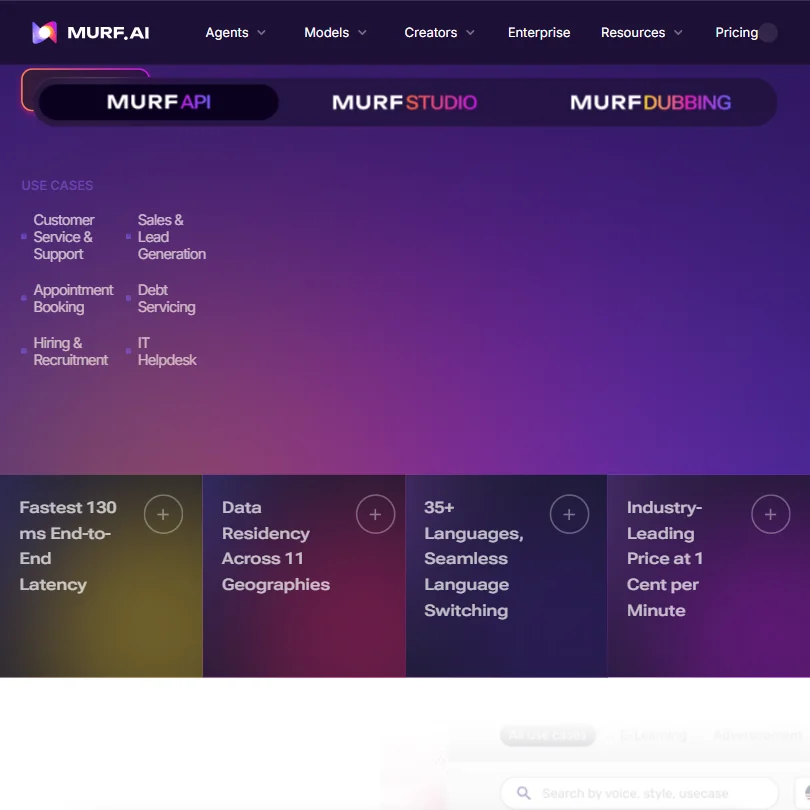
The Falcon model launched in November 2025. 130ms end-to-end latency for real-time TTS. That's a meaningful move, and it signals where the product is headed.
What is Murf AI?
Murf is a browser-based voiceover platform. The short version of what it does: you paste text, pick a voice, adjust it, and get audio out. That's the basic loop. But the full picture is larger than that.
There are two model tiers running the engine. **Murf Falcon** handles real-time, low-latency generation, which is the piece developers care about. Murf Gen2 handles content production, the kind where quality and naturalness matter more than speed. Two models, two jobs, and the distinction is actually meaningful rather than just marketing.
The platform runs on the web. There's also a Windows app, a Canva integration, and plugins for PowerPoint and Google Slides. No mobile app, which we'll get to. The integrations they've chosen make sense for their audience: presentation workflows and design tools, not DAWs.
The 35-plus language support and 200-plus voice library is where they make the volume argument. Whether that breadth holds up under scrutiny is a separate question from whether the library exists. It does exist.
Murf AI Features: Voice, Music & Audio Capabilities

The **murf ai text to speech** core is what most users touch first. Over 200 voices across more than 35 languages, with pitch controls, speed controls, intonation adjustments, and the ability to add emphasis at specific points in the script. On Business and Enterprise plans, you also get "variability controls," which essentially give you more randomness in delivery so the audio doesn't sound machine-stamped.
Honestly, the lack of music generation is worth flagging right away. If you're coming in expecting a full audio production suite, Murf isn't that. Voice is the product. Music is not on the roadmap as far as any documentation shows.
Transcription is available. It's bundled into Business and Enterprise plans, not the entry-level Creator tier. The feature converts audio to text, and it works in the expected direction for voiceover workflows: you have existing audio, you need a script, Murf gets you there. Useful, not remarkable.
The podcast editing angle is real, loosely speaking. The studio editor has timeline sync, which means you can lay voiceover against video or slide content and adjust timing without bouncing between tools. G2 reviewers in marketing roles consistently mentioned this as the feature that saved them the most back-and-forth with video editors.
Noise removal isn't publicly documented anywhere we found. That's a gap compared to tools like Auphonic, which makes noise cleanup a core feature. Worth knowing before you commit.
The API side is where things get interesting for developers. The Murf Falcon TTS API prices at **$0.01 per minute**. For context, that's aggressive. Real-time response at 130ms with data residency options across 11 geographies. Not great on third-party integrations beyond the core set, but the API itself is well-documented.
Murf AI Audio Quality: How Natural Does It Sound?
The vendor claims 99.38% pronunciation accuracy. We're skeptical of that number in the abstract, but the underlying pattern in user reviews does support the quality argument. A 4.7 out of 5 across nearly 1,400 G2 reviews is hard to dismiss as curated noise.
What we kept seeing in the G2 and Trustpilot reviews: users coming from other tools, specifically Play.ht and older versions of WellSaid Labs, consistently described Murf voices as more natural at the sentence level. Less robotic pacing. Fewer pronunciation stumbles on technical vocabulary.
**The Gen2 model is what they're pushing for content production**, and the user feedback mostly backs that up. Longer scripts, narration-style delivery, e-learning modules. These are the use cases where Murf performs well according to the people using it regularly. The Falcon model is a different beast, optimized for speed over richness, and several developer-focused reviewers on Reddit noted the quality tradeoff is real but acceptable for conversational agent use cases.
One recurring complaint in 2024 and 2025 Reddit threads: some voices sound good at default settings but fall apart when you adjust pitch aggressively. The customization ceiling is real. Push it too far and the output gets brittle.
That tracks. It's a known limitation of the TTS architecture, not unique to Murf.
Murf AI Voice Cloning & Customization: How Deep Does It Go?
Voice cloning is available. It's an Enterprise add-on, not something you can just buy on a Creator or Business plan. If **custom voice clones** are why you came to Murf, be ready for a sales conversation first.
The customization on the standard voices is genuinely good within its range. You can control pitch, speed, and intonation per sentence or per word. You can add pauses at specific timestamps. On Business and above, the emphasis and variability controls give you more texture. That's a reasonable toolset for most voiceover work.
What Murf doesn't do is let you fine-tune the underlying voice itself without the Enterprise tier. You're working with the preset voices and adjusting delivery parameters around them. For most creators and small teams, that's fine. For localization teams with brand-specific audio requirements, it's a bottleneck.
The murf ai voices library has 200-plus options across more than 35 languages. We cross-referenced the language list with their documentation and the count is credible. The quality distribution isn't even though. English voices are clearly where the most development time went. Some of the smaller language options in the library have fewer voice options and slightly more mechanical delivery. Users in non-English markets flagged this pattern more than once across G2.
Is Murf AI Easy to Use?
The web studio is clean. That's the consistent story across reviews regardless of user background. Non-technical users, marketers, HR teams building training content, freelance narrators: the learning curve doesn't dominate their first few sessions.
The timeline interface is the standout piece of the UI. It lets you sync voiceover timing against video or slide content directly in the browser. No export, no re-import. G2 reviewers with background in video production noted this reduces the iteration cycle significantly.
**The Canva integration is genuinely useful**, not just a checkbox. Murf Voices in Canva lets you add voiceover to a design directly, which is relevant for social media teams and content creators who live in Canva already.
The PowerPoint and Google Slides plugins extend the same logic. You're not leaving your existing workflow to add a voice layer. That's a practical call and the reviews reflect it positively.
There's no mobile app. This comes up enough in reviews to be worth a real mention, not a footnote. If you work on a phone or tablet, Murf isn't built for that. The browser experience on mobile is reportedly functional but not designed for it. Teams that route any part of their workflow through mobile should note this before signing up.
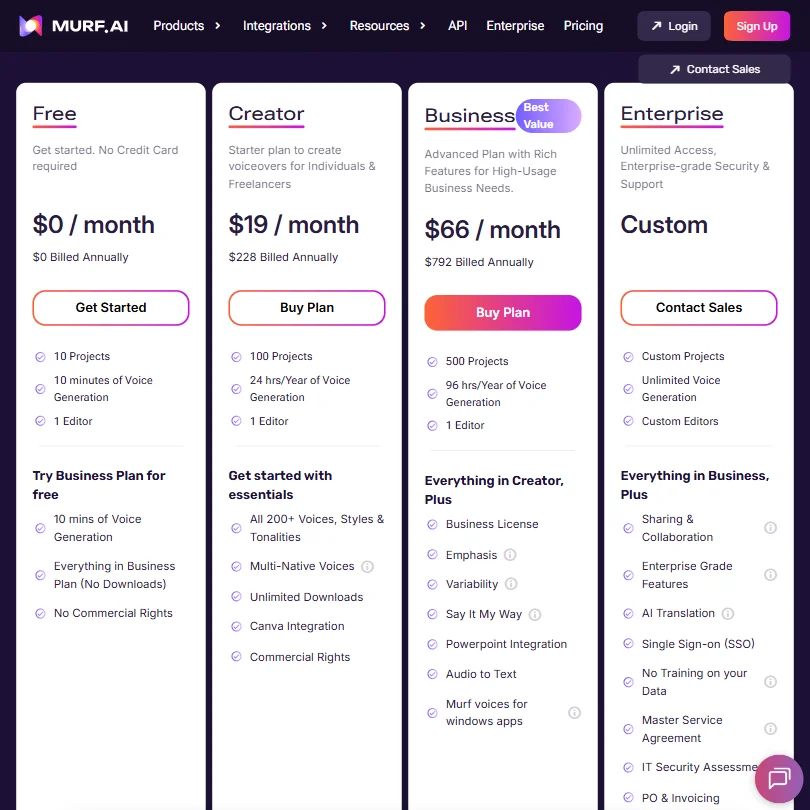
The free plan gives you 10 minutes of voice generation. No downloads. No commercial rights. It's enough to evaluate the quality honestly, and that's probably the point. Fair.
Murf AI Pricing: Is It Worth It for Creators & Businesses?

The Creator plan starts at **$19 per month**. That gets you commercial rights, which is the floor for most legitimate use cases. The Business plan is $66 per month, and that's where you unlock transcription, the emphasis and variability controls, and better collaboration features. Enterprise is custom, sales-led.
We dug through the pricing page and the structure is cleaner than most TTS competitors. You know what you're getting at each tier. No usage meters quietly ticking in the background for most features on the lower plans.
The API pricing at $0.01 per minute is where the enterprise and developer value story gets real. That's low for the category. ElevenLabs API pricing is structured differently and often more expensive per unit at scale. We compared several public benchmarks and Murf's murf ai api rate is competitive at volume.
The refund policy is tight: 24 hours, under 10 minutes of usage. That's not generous. If you need to evaluate the product at scale before committing, the free trial gives you 10 minutes, and you're expected to make a decision on that. Some users on Reddit said that wasn't enough to test complex scripts across multiple voices.
We don't fully buy the "no risk" framing on their site. Ten minutes and 24 hours is a thin window.
Murf AI vs ElevenLabs: Which AI Audio Tool Wins?
This comparison comes up constantly. Murf vs ElevenLabs is the matchup most buyers in this category eventually land on.
ElevenLabs is stronger on voice cloning. That's the honest answer. Their voice cloning tools are more accessible at lower plan tiers, and the quality of clones is widely considered better by the developer community. If voice cloning is the primary use case, ElevenLabs wins that argument.
Murf wins on the studio side. The integrated timeline editor, the presentation tool plugins, the clean web UI for non-technical teams: none of that exists in ElevenLabs in the same way. ElevenLabs is a voice API and a voice library. Murf is trying to be a production environment.
**The $0.01 per minute API rate is Murf's clearest competitive advantage** against ElevenLabs at scale. For developers building high-volume applications, that gap adds up fast.
The enterprise security story also favors Murf. Data residency across 11 geographies, which ElevenLabs doesn't match publicly in their documentation. For healthcare or finance teams with data localization requirements, that's not a small point.
Honestly, these are two different products with overlapping audiences. Creators who want a studio environment should lean Murf. Developers who want a voice API with deep cloning capabilities should look harder at ElevenLabs before deciding.
Who Should Use Murf AI? (And Who Shouldn't)
Localization teams. This is one of the strongest fits. Forty-plus languages for dubbing, 35-plus for TTS, multi-native voices, and an API that can handle volume. The dubbing feature in particular gets consistent mentions from teams managing multilingual video content.
Corporate learning and development teams. E-learning voiceover is a bread-and-butter use case, and the reviews from L&D professionals are among the most consistently positive in the G2 set. The script-to-voice workflow with timeline sync suits that content type well.
Developers building conversational agents. The Falcon model and its 130ms latency is a legitimate offering for real-time voice applications. The API documentation is solid. The pricing holds up at scale.
Who shouldn't use it. Podcasters who need serious audio post-production tools. Murf is not that. It generates voices; it doesn't clean, mix, or master audio. Also, anyone whose primary need is voice cloning at a non-Enterprise budget. The cloning capability is locked to enterprise pricing, which prices out solo creators and most small teams.
Teams that need mobile access. Not a minor gap. No app means no mobile workflow.
Murf AI Review Verdict
Murf AI is a well-built product. The quality of the voice output holds up. The studio interface is one of the better ones in the category. The API pricing is genuinely competitive. These are real strengths, and they show up consistently across user feedback in multiple review sources.
The gaps are real too. Voice cloning locked behind enterprise pricing frustrates users who expected it earlier in the plan structure. The refund window is short. The mobile absence is a genuine inconvenience for distributed teams. And the quality distribution across languages is uneven enough that non-English use cases need more scrutiny before committing.
**What makes Murf worth recommending is the combination of a usable studio and a serious API at the same product**, which is rare in this category. Most competitors are one or the other. Murf is trying to be both, and the 10 million user count suggests enough people find that combination worth paying for.
For creators building production workflows around voiceover, this is a strong tool. For developers who need low-latency TTS at scale, the Falcon model and the $0.01 per minute rate make it worth evaluating seriously. The enterprise features, including data residency and custom voice cloning, are genuinely competitive with the higher-cost players.
We'd recommend it without much hesitation for most voiceover production use cases. The cloning gap is the one thing that might send specific buyers elsewhere.
Frequently Asked Questions
Does Murf AI offer a free plan?
Yes, there's a free plan, but it's limited in ways that matter. You get 10 minutes of voice generation, no ability to download the audio, and no commercial usage rights. It's enough to hear the voice quality and try the editor. It's not enough to run a real production test at scale, and several Reddit users flagged that 10 minutes runs out faster than you'd expect when you're testing across multiple voices and scripts.
How does Murf AI pricing work for the API?
The Murf Falcon API is priced at $0.01 per minute of generated audio. That covers real-time TTS with 130ms latency and supports more than 35 languages. Data residency options span 11 geographies, which matters for enterprise deployments in regulated industries. Compared to most competitors in this space, that per-minute rate is on the lower end, which is why developer-focused buyers keep coming back to Murf when they run the numbers.
Is Murf AI's voice cloning available on standard plans?
No. Custom voice clones are an Enterprise add-on, which means you'll need a custom contract and likely a sales call before accessing the feature. This is one of the more common frustrations in user reviews, particularly from freelancers and small agencies who expected cloning to be part of a Business plan. If voice cloning is the primary reason you're evaluating Murf, be prepared for that conversation and budget accordingly.