Auphonic is a cloud service that cleans up podcast and video audio automatically: leveling, noise and reverb reduction, loudness normalization, and filler word and silence cutting, all run without an editor. Because pricing is metered by the hour of audio processed each month, how much you upload each month decides which tier fits.

What is Auphonic?
Auphonic is based in Graz, Austria, and was founded in 2013. It runs as an account based web app: you upload a file, Auphonic processes it on its own servers, and you download or publish the result. There is no installed software.
What Auphonic fixes
Noise and reverb reduction lets you choose whether Auphonic strips only static noise or fast changing noise too, and whether to keep or eliminate background music. Loudness normalization sets a target such as -16 LUFS for podcasts and produces the audio to match in one click. Filler words and silence, coughs and pauses are cut automatically in multiple languages.
Multitrack productions combine several speaker or microphone tracks into one mixdown with cross noise reduction, cross gating, automatic ducking and individual leveling per track. Multitrack productions are capped under 20 minutes each on the free tier and the base Monthly and One-Time plans; the cap lifts on the Yearly and Business tier. Batch productions and watch folders, for automating a show's workflow across many files, are reserved for paid accounts.
Speech recognition runs on Auphonic's own Whisper based engine or external services such as Google Speech API, Wit.ai, Amazon Transcribe and Speechmatics, covering over 100 languages, and can drive automatic shownotes and chapters. Multilingual speech recognition and automatic shownotes and chapters are Monthly and Yearly plan features, not part of the free tier. Auphonic also processes video files, adding chapters, waveform audiograms and burned in subtitles alongside the audio work.
Working with other people
A REST API and a command line client are included on the free tier and every paid plan, for building Auphonic into an automated pipeline. Finished productions can publish automatically to YouTube, Libsyn, Blubrry, Facebook, Spreaker, PodBean, Podlove and Soundcloud, and files can be pulled from or sent to Dropbox, Google Drive, OneDrive, Amazon S3 and SFTP, with a Zapier connection for wider automation. Team accounts are available on the Yearly and Business tier.
Auphonic pricing: what each plan gives
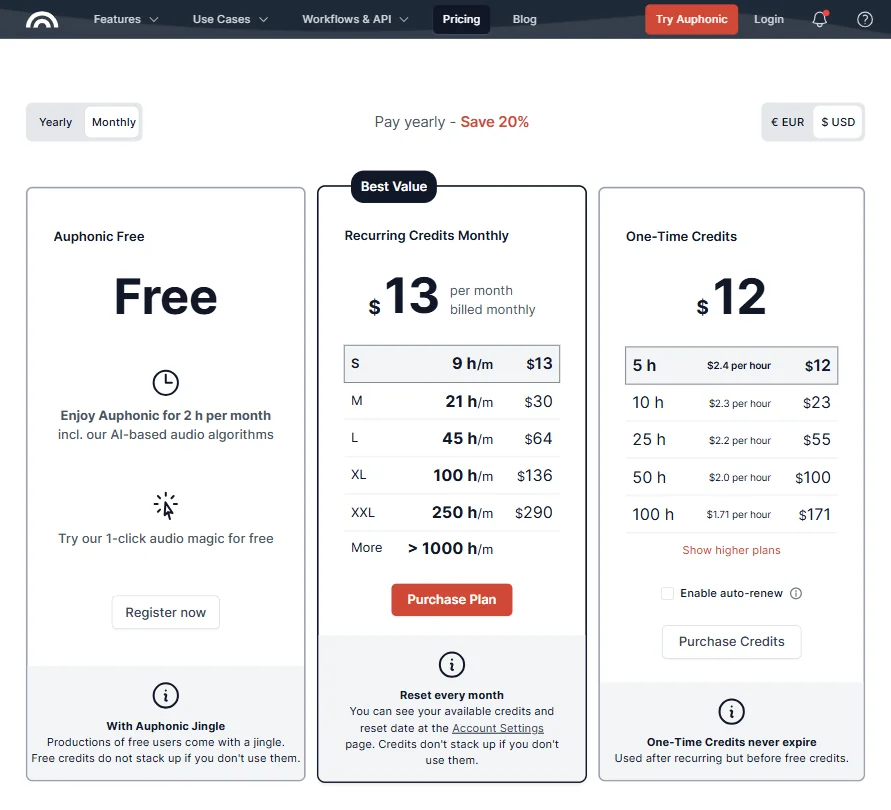
The free tier processes 2 hours of audio a month on an ongoing basis, not a time limited trial, though it resets every month rather than carrying hours over. Free productions carry an Auphonic jingle.
Auphonic S costs $13 a month ($11 a month billed yearly) for 9 hours. Auphonic M costs $30 a month ($25 billed yearly) for 21 hours. Auphonic L costs $64 a month ($52 billed yearly) for 45 hours. Auphonic XL costs $136 a month ($113 billed yearly) for 100 hours, and Auphonic XXL costs $290 a month ($245 billed yearly) for 250 hours. One Time Credits are also sold as a pay once alternative to a subscription, starting at 5 hours for $12, for anyone who would rather buy hours as needed.
Privacy and support
Auphonic is compliant with the EU's General Data Protection Regulation. Support runs by email, backed by a documentation help center.
Who Auphonic suits
Auphonic suits podcasters and video creators who want automated leveling, noise cleanup and loudness normalization plus direct publishing to their host, especially if their monthly output fits comfortably into one of the hour based tiers. The API and watch folders make it a natural fit for a show that wants the same cleanup applied automatically to every episode.
It suits less well anyone doing long multitrack sessions on the free tier or base plans, since those cap at under 20 minutes per production, and shows with unpredictable volume that could tip past a tier's hour allowance most months.
Screenshots

How Auphonic compares
Auphonic scores 7.2 out of 10 among the audio cleanup tools we rate. These three do the same job and are the closest to it, compared on what each vendor publishes.
Adobe Podcast
Auphonic cuts filler words and silence on every plan, including its free tier, while Adobe Podcast only supports manual transcript edits for that. Auphonic's cheapest paid plan is $13 a month against Adobe Podcast's single $19.99 a month tier, and Auphonic includes a REST API on every plan, which Adobe Podcast does not offer at all. Both fix loudness to a target and rebuild speech to sound studio recorded.
Pick Adobe Podcast if you already work in Adobe apps and want simple speech cleanup.
Pick Auphonic if you want filler and silence cutting free, plus an API.
Cleanvoice AI
Auphonic and Cleanvoice AI both cut filler words and silence automatically and process several tracks together. Auphonic publishes finished episodes straight to a podcast host, YouTube or cloud storage; Cleanvoice AI only lets you download or export the result. Auphonic keeps an ongoing free plan and its cheapest paid tier is $13 a month; Cleanvoice AI has no free plan, just a trial, but starts cheaper at $11 a month.
Pick Cleanvoice AI if you want the lowest paid price and don't need direct publishing.
Pick Auphonic if you want an ongoing free plan and direct publishing to your host.
iZotope
iZotope RX only cuts silence, on its Advanced tier, and does not mix several tracks into one; Auphonic cuts both filler words and silence automatically and mixes multiple tracks into one balanced file. iZotope is desktop software you install and can buy outright as a one-time purchase, with no free plan; Auphonic runs in your browser with an ongoing free plan and a $13 a month cheapest paid tier. iZotope adds DAW plugin formats that Auphonic does not offer.
Pick iZotope if you want a one-time purchase and don't mind manual editing.
Pick Auphonic if you want filler and silence cutting plus a free plan.
Frequently Asked Questions
What does Auphonic cost?
Auphonic is free for 2 hours of processed audio a month, on an ongoing basis. Paid tiers run from $13 a month for 9 hours up to $290 a month for 250 hours, with lower rates for yearly billing, plus One Time Credits from $12 for 5 hours for anyone who would rather not subscribe.
What file formats does Auphonic export?
Processed audio can be exported as mp3, wav, flac, m4a, aac or ogg, video as mp4, and Auphonic also outputs srt and vtt subtitle files and a json data file with the speech recognition results.
Can Auphonic handle multitrack podcast episodes?
Yes. It mixes down several speaker or microphone tracks with cross noise reduction, cross gating, automatic ducking and individual leveling. Multitrack productions are limited to under 20 minutes each on the free tier and base plans, and unlimited on the Yearly and Business tier.
Is Auphonic GDPR compliant?
Yes. Auphonic is compliant with the EU's General Data Protection Regulation.