Notevibes turns documents, topics and scripts into narration, podcasts and audiobooks through a chat-driven AI producer it calls Noty. Whether it suits you depends on how much you need commercial rights, since those sit on the top plan only.

What is Notevibes?
Notevibes runs Notevibes Studio as a browser-based app, with no desktop or mobile client. Notevibes started in 2018.
Making voiceovers with Notevibes
Notevibes offers 550+ voices in its top library, and 300+ on the entry plans, across 72 languages. Pro adds 80+ tagged emotions for delivery, and SSML support gives finer control over pronunciation and pacing.
Audio translation converts speech from one language into another while keeping the original speaker's tone, pacing and intonation rather than a flat robot voice, across 70+ language pairs; it comes with both the source and translated transcripts and is included on every paid plan. Notevibes does not offer a self-serve voice-cloning tool or a voice-changer for an existing recording.
For long-form projects, you can upload a PDF, EPUB, DOCX, MOBI, AZW3 or TXT file, or paste a URL, and Notevibes splits it into chapters, detects speaking characters and assigns each one a separate voice for multi-cast narration, with per-chapter editing. It can also convert PowerPoint files, images, videos and audio files to speech using OCR and transcription, and turn a pasted web article into audio. Multi-speaker dialogue from one script is available on the Personal plan and up; the entry Starter plan does not include it.
Working with other people
Notevibes offers team members on the Pro plan, up to five seats, with a shared workspace. An API is available only as part of a custom Organization plan sold by inquiry, alongside pooled credits and unlimited seats; no named third-party integrations are offered on Starter, Personal or Pro.
Notevibes pricing: what each plan gives
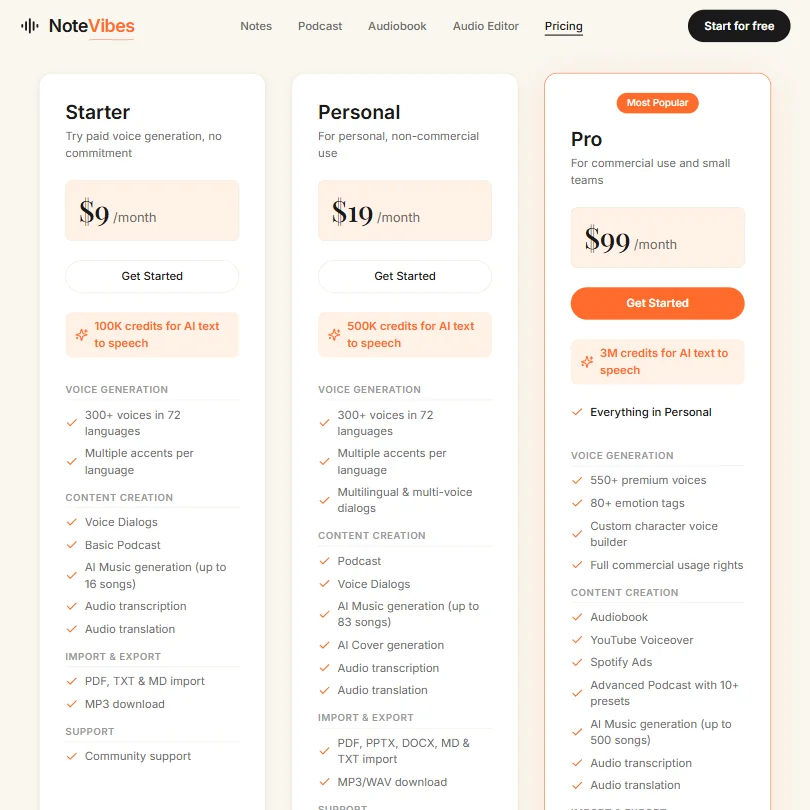
Notevibes has an ongoing free plan: no card is required and output carries no watermark, though the plan's own monthly allowance is not published.
Starter costs $9 a month, or $8 a month billed annually, and includes about one hour of audio a month (100,000 credits), 300+ voices, MP3 export and community support. Personal costs $19 a month, or $15.83 a month billed annually, and adds WAV export, multi-speaker dialogue and email support, though it remains restricted to personal, non-commercial use. Pro costs $490 a year.50 a month billed annually, and is the plan that adds full commercial usage rights, the full 550+ voice library, 80+ emotion tags, SSML control, a team workspace for up to five seats, and priority support. Custom Organization plans with pooled credits, API access and unlimited seats are available by inquiry.
Privacy and support
Notevibes' commercial usage rights are limited to the Pro plan; Starter and Personal are for personal, non-commercial use. Support runs through a community channel on Starter, email on Personal, and priority support on Pro.
Who Notevibes suits
Notevibes suits anyone who wants to turn documents, articles or a topic into narration, a podcast-style conversation or an audiobook without writing every line themselves, and who is fine working in a browser with ready-made voices rather than a clone of their own. The free plan and low-cost Starter tier make it easy to try before paying for commercial rights.
It suits less well anyone who needs their content used commercially right away without upgrading to Pro, wants to clone a specific voice, or needs an API, which comes only with a custom Organization plan.
Screenshots

Frequently Asked Questions
What does Notevibes cost?
Starter costs $9 a month, or $8 a month billed annually. Personal costs $19 a month, or $15.83 a month billed annually. Pro costs $490 a year.50 a month billed annually. A free plan is also available.
How many languages does Notevibes support?
Notevibes offers 72 languages and, on its Pro plan, 550+ voices.
Can Notevibes translate a recording into another language?
Yes. Its audio translation feature converts speech into another language while keeping the original speaker's tone, pacing and intonation, across 70+ language pairs, and it is included on every paid plan.
Can I use Notevibes output commercially?
Only on the Pro plan. Starter and Personal are for personal, non-commercial use only.