What is Resemble AI?
Most voice AI tools want to be one thing. Resemble AI wants to be three. It generates synthetic voices, watermarks audio so you can prove it's yours, and detects deepfakes across audio and video. That combination is rare, and few platforms do all three under one roof.

The generation side runs on their proprietary Chatterbox model family. There's a Turbo build for speed and a Multilingual build for broader language coverage. A Nano option handles lighter workloads, and DramaBox is aimed at expressive content. The detection side runs on DETECT-3B-Omni, which the docs describe as covering audio, image, and video deepfake identification. That's the part that separates Resemble from most of the TTS market.
The core user base skews developer-heavy. API access is the main draw. There's also a Chrome Extension built around deepfake detection, which tells you something about where they think the product is going.
Honestly, the security angle surprised us. Most voice AI companies add detection as an afterthought. Resemble appears to have built toward it deliberately.
Resemble AI Features: Voice, Music & Audio Capabilities

No music generation. That's the first thing to know. Not a sound design or music tool. If that's what you need, look elsewhere.
What it does have: text-to-speech across multiple Chatterbox variants, voice cloning at two fidelity levels, and speech-to-speech conversion. An AI voice changer is also listed. Emotion and tone control show up in the docs. The homepage mentions pitch and pacing controls. Audio output is listed at 44 kHz, which sits at broadcast quality.
The deepfake detection and audio watermarking features are the real differentiators. The watermarking works by embedding a signal into generated audio so origin can be verified later. Not a feature most enterprise voice platforms even attempt. Pindrop and Reality Defender both operate in the detection space, but neither wraps voice generation into the same product.
Batch processing isn't confirmed anywhere in the docs we reviewed. That matters for enterprise workflows. We'd push Resemble on it before committing to anything.
The Chrome Extension is a nice touch. It runs deepfake detection directly in the browser, which lowers the barrier for non-developer users to get something out of the platform without touching an API.
Resemble AI Audio Quality: How Natural Does It Sound?
The review trail is thin. There's no G2 presence, no Capterra page, and no Trustpilot profile. That makes third-party validation harder, and quality claims mostly rest on developer forums and the vendor's own docs.
What we could triangulate: their own documentation cites 44 kHz output, and the Chatterbox models have been benchmarked publicly against other TTS systems. The Turbo variant trades some fidelity for speed. The standard Chatterbox build appears to be the quality-first option.
Developer feedback on forums tends to be positive about naturalness, with particular praise for emotional range. A few threads flagged that results vary by language, which is expected at this stage of multilingual TTS. The Multilingual model covers 25 or more languages, but some languages clearly sit closer to the core of what the model was trained on. That's not a flaw unique to Resemble. It's just the honest picture.
We're cautiously positive here. The 44 kHz output and the Chatterbox architecture are credible signals. We've seen worse from platforms charging significantly more.
Resemble AI Voice Cloning & Customization: How Deep Does It Go?
Two tiers. Rapid voice clone is the faster, lighter option and Resemble's public documentation says it works from roughly ten seconds to three minutes of audio, or at least three recordings totalling around ten seconds. Professional voice clone goes deeper on fidelity and requires somewhere in the range of ten to twenty-five or more minutes of source audio. That's a meaningful difference in setup effort and it affects which tier makes sense for a given project.
Customization options across their documentation include pitch, pacing, and delivery style. Emotional control appears in the Chatterbox model spec. Speech-to-speech conversion is listed as a feature, which means you can feed in a voice sample and get output in a cloned voice without writing text at all. That's a genuinely flexible pipeline for real-time or near-real-time use cases.
The cloning stack looks more enterprise-oriented than creator-oriented. The API-first delivery, the fidelity tiers, the on-premise deployment option. This isn't aimed at the person making a YouTube channel. It's aimed at a team building a voice assistant or a dubbing workflow at scale.
Not a criticism. Just context.
Is Resemble AI Easy to Use?
Complicated answer. For developers, the story is fine. Full API access, SDKs, and documentation at docs.resemble.ai. The company also runs a Discord community, which means async developer support exists beyond the formal help center.
For non-developers, it's less clear. No mobile app. The main interface is web-based. The Chrome Extension is the most accessible non-API touchpoint, and that's specifically for detection, not generation. Teams that can't touch an API will find Resemble AI limiting, and that's not unfair criticism of the product. It's just not designed for the same audience as, say, Murf AI, which leans heavily into a no-code studio interface for voiceover work.
The learning curve for generation features is manageable with the docs. The learning curve for detection and watermarking features is steeper. Enterprises will likely lean on dedicated support from the Enterprise tier to get set up properly.
Developer-friendly, creator-unfriendly. Deliberate tradeoff, not a flaw.
Resemble AI Pricing: Is It Worth It for Creators & Businesses?
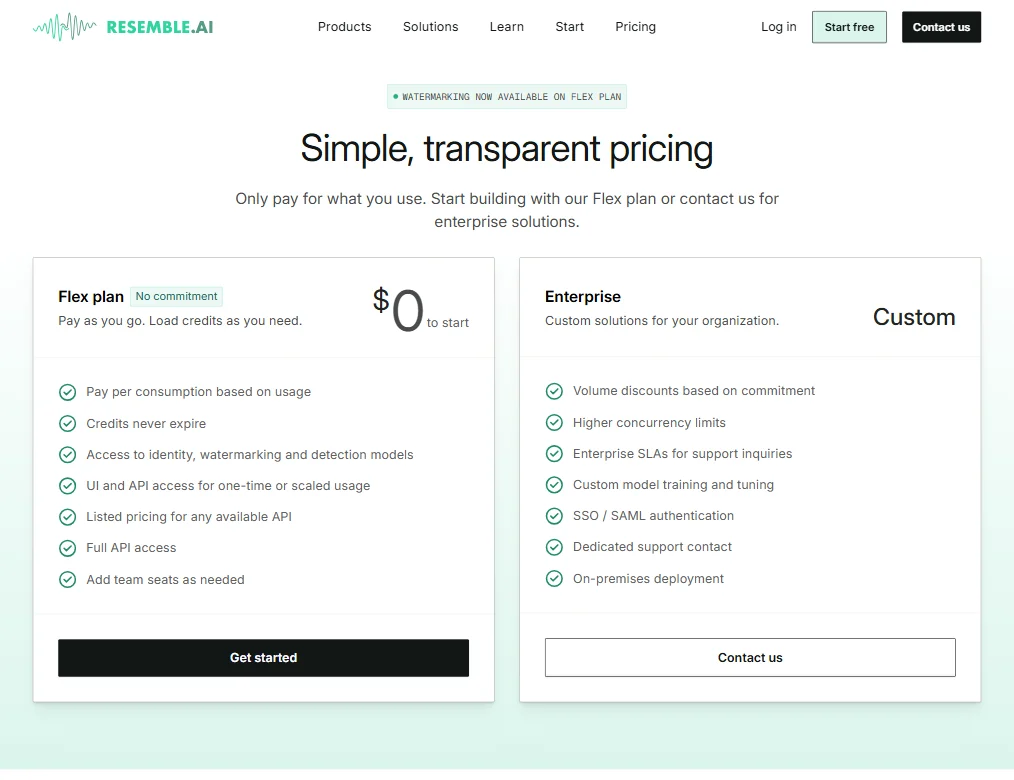
Two tiers. Flex and Enterprise. That's it.
The Flex plan starts at $0 with pay-as-you-go pricing from $0.0002 per second of audio. No minimum commitment, no upfront cost. For developers prototyping or teams with low volume, that's a reasonable starting point. Commercial rights are included, which matters.
Enterprise pricing is custom. Volume discounts apparently go up to 80% at scale, and on-premise deployment is part of the Enterprise conversation. Ask about the refund policy before you commit.
The two-tier structure will frustrate anyone in the middle. There's no fixed-price monthly plan between free and "call us." That's a real gap for growing teams who want cost predictability without a custom negotiation. We've seen this model work for API-first companies, but it creates friction for buyers who want a number before talking to sales.
At low volumes, the pay-per-use model is genuinely reasonable. At higher volumes, Enterprise terms are what matter, and you won't know what those are until you're already in a conversation with their team. That's fine for some buyers. Not for others.
Resemble AI vs ElevenLabs: Which AI Audio Tool Wins?
ElevenLabs is the obvious comparison. The products overlap on TTS and voice cloning. They diverge fast after that.
ElevenLabs has a larger public review base, more transparent pricing tiers, and a stronger creator-facing interface. It's the cleaner pick for content production at individual or small-team scale. The review trail is thicker and easier to trust. Worth noting, too, that ElevenLabs now offers on-premise deployment for GPU-enabled servers and on-device deployment for edge environments, with documentation covering air-gapped use and local data handling. That's a meaningful shift. It closes a gap that used to be one of Resemble's clearest advantages.
Don't assume the two deployments are equivalent in practice, though. ElevenLabs is newer to that capability, and Resemble has been building toward enterprise infrastructure longer. Still, buyers should verify specs directly rather than assuming Resemble has the only on-premise option.
Resemble AI wins on the security layer. Deepfake detection and audio watermarking aren't things ElevenLabs offers in any meaningful way. For enterprises building voice AI products and needing to prove authenticity or detect manipulation, Resemble AI's DETECT-3B-Omni and watermarking stack have no direct equivalent in ElevenLabs' current feature set.
Pick ElevenLabs for creator-focused workflows. Pick Resemble AI when security or detection is genuinely on the table. At the serious end of either category, they're not really competing for the same buyer.
Who Should Use Resemble AI? (And Who Shouldn't)
Developers building voice AI applications. That's the clearest fit. The API, the SDKs, the pricing model. It's built for that workflow.
Enterprise security teams also have a real use case here. The combination of AI audio watermarking and deepfake detection across media types is genuinely hard to find elsewhere. Companies worried about synthetic media fraud have a specific reason to look at this seriously.
Solo creators and small content teams. Not the target. The interface isn't there for them, and the pricing structure doesn't offer a comfortable mid-tier. Better options exist for that use case.
Teams that need confirmed batch processing or tight integrations with production tools like Adobe Audition. Resemble doesn't confirm either in its public docs, so don't assume.
Resemble AI Review Verdict
Resemble AI is doing something genuinely distinct. The voice generation is credible. The detection and watermarking layer is rare. The on-premise option exists, even if ElevenLabs is now moving into similar territory. That combination is still hard to replicate by stitching together other tools.
The limits are real. The review trail is thin, which makes third-party validation harder. The pricing structure has a middle-tier problem. Ease of use skews so heavily toward developers that non-technical buyers will struggle to get standalone value without dedicated support.
The platform earns its place on the enterprise and developer shortlist for voice AI with a security angle. It doesn't earn consideration for general-purpose creator voiceover work. Those are different markets and Resemble AI has clearly chosen one of them.
For any team where deepfake detection or audio provenance is part of the use case, we'd recommend it with real conviction. For pure TTS or voice cloning without that security layer, more accessible options are worth evaluating first.
Frequently Asked Questions
Does Resemble AI have a free plan?
Yes. The Flex plan starts at $0 with no minimum commitment and charges from $0.0002 per second of generated audio. Commercial rights are included on Flex, which makes it genuinely usable for production work at low volumes, not just testing.
What is Resemble AI's deepfake detection, and how does it work?
Resemble AI runs detection through their DETECT-3B-Omni model, which covers audio, image, and video content. It's designed to flag synthetic media across types, not just audio. That cross-media scope is unusual, and it's one of the reasons security teams look at this platform rather than general TTS tools.
How does Resemble AI compare to ElevenLabs for voice cloning?
Both offer voice cloning. ElevenLabs is better suited for creator-focused use cases, with clearer pricing tiers and a stronger no-code interface. Resemble AI has the edge when enterprise security features matter. Watermarking and deepfake detection are things ElevenLabs doesn't meaningfully offer, and for some buyers that gap is decisive. ElevenLabs has moved into on-premise deployment more recently, so that specific advantage is narrowing and worth verifying directly with both vendors before you decide.









