
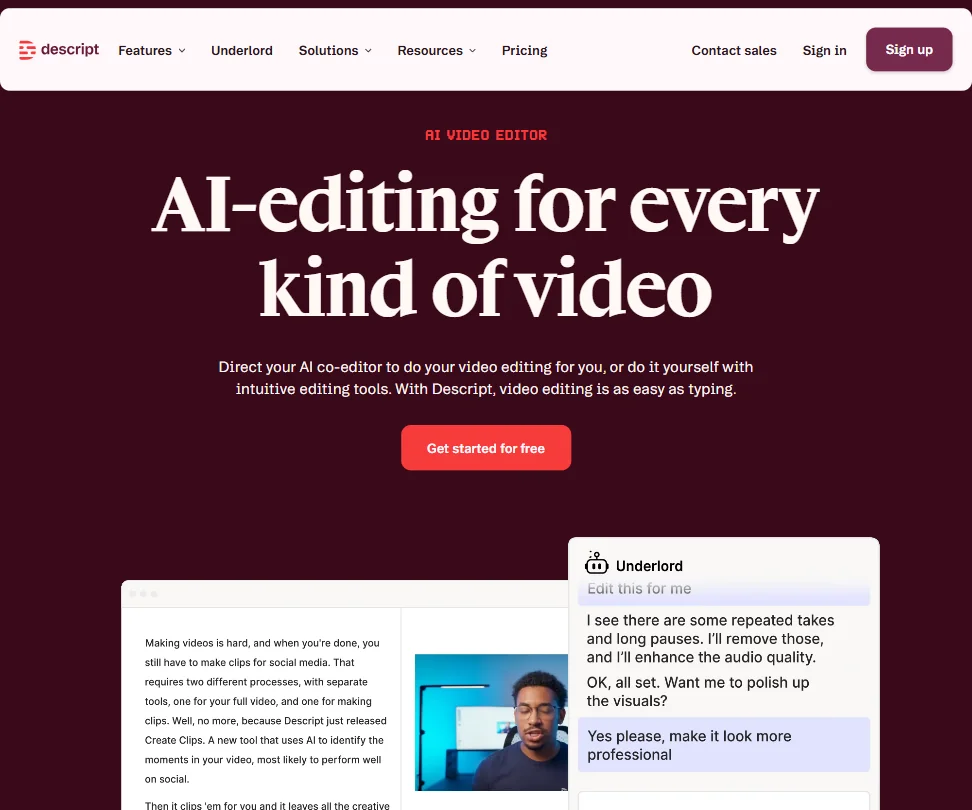
Four tiers visible in the pricing page. The free plan is genuinely usable. That's already more than you can say for most tools in this category.
Descript launched out of San Francisco in 2017. It's been long enough that some of the early complaints have been addressed. Not all of them.
What is Descript?
You record or import your media. Descript transcribes it. You edit the transcript, and the video follows. Delete a line of text, that footage disappears. That's text-based video editing, and Descript didn't borrow the concept from someone else. They built their entire product around it.
When they were pushing this in the early 2020s it was a real differentiator. Now it's table stakes for the category they created. Worth acknowledging before we get into the rest of it.
Underlord sits on top of that foundation. Not as a chatbot. As a co-editor that handles script writing, filler word removal, layout design, and B-roll generation from text prompts.
The platform runs on web, macOS, and Windows.
Descript Features: Video Generation, Editing & AI Capabilities
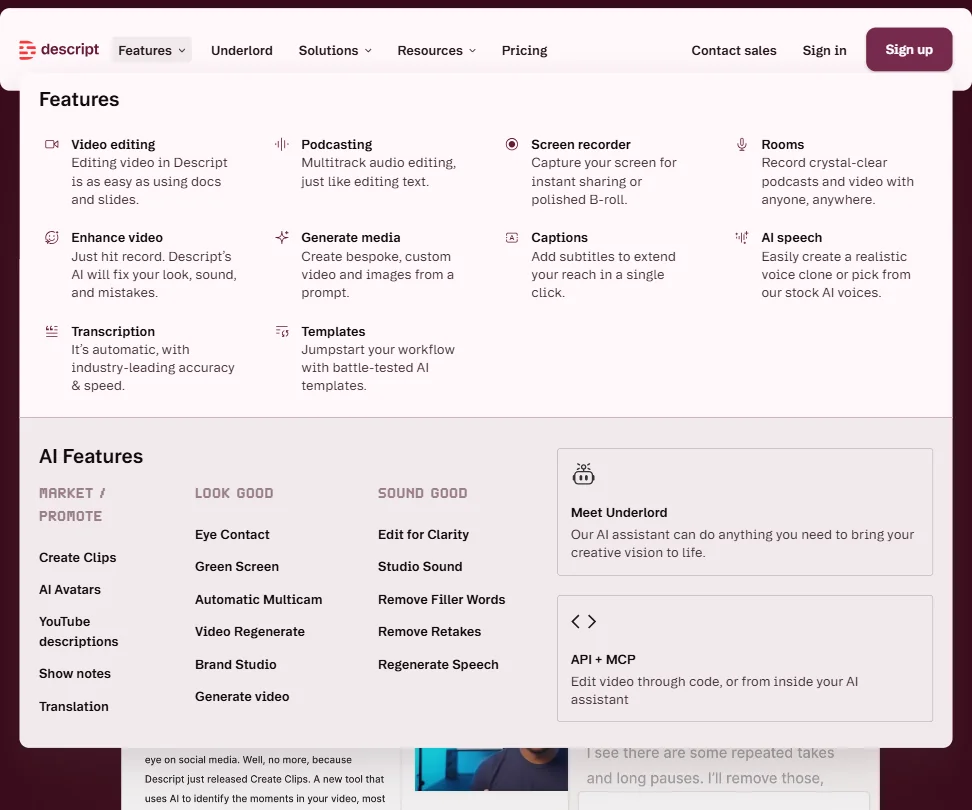
There's a lot here. More than most tools at comparable price points.
Underlord AI is the headline feature. It can generate a script from scratch, critique one you wrote, design your video layout, and create B-roll from a text prompt.
Filler word removal happens in one click. Every "um," "uh," and "you know" goes away. The Eye Contact correction is stranger, it uses AI to make you appear to be looking at the camera even when you weren't.
Studio Sound handles audio cleanup without expensive gear. AI Green Screen pulls your background. Neither is unique to Descript.
The Creator plan includes 800 AI credits per month and 30 media hours. Business moves that to 1,500 AI credits and 40 media hours, plus translation and dubbing across 30 or more languages with proofread output. Voice cloning is accessible from Hobbyist upward. The Regenerate feature uses your cloned voice to fix specific stumbled words post-recording. Not a novelty.
On integrations: Descript provides a public API and a Zapier integration for importing media, triggering Underlord edits, and building automated publishing workflows. Final Cut Pro and Adobe Premiere exports both work. Not every NLE is covered, but the ones that matter to the core user base are there.
Descript Video Quality: How Good Does the Output Actually Look?
Resolution scales with plan. Free tops at 720p. Hobbyist moves to 1080p. Creator and Business both unlock 4K, watermark-free. That's a clean ladder.
The free plan exports without a watermark, which is genuinely unusual in this category. Most competitors use watermarks as a blunt conversion tool. Descript doesn't, at least at 720p. That matters for anyone trying the tool on real work before paying.
Descript pulls from external generative video models for AI-generated B-roll.
Layout templates and Quick Design auto-formatting round out the editing toolkit. Business users can build custom layout packs, which matters for teams with brand standards. Brand Studio on Business tier extends this further with shared templates and company-wide guardrails.
Descript AI Avatars & Voiceover: How Realistic Are They?
Stock avatars are available on lower tiers. Custom avatar creation from a photo upload is locked to Business and above. Text-to-avatar generation is available across plans.
Quality lands somewhere in the middle of the market. Better than cheap tools. Not close to what HeyGen produces. HeyGen has spent years on hyper-realistic avatar rendering and the gap is visible. For internal content or low-stakes social clips, Descript's avatars are fine. For anything where realism is the point, they're not the right tool.
Voice cloning is a stronger story than avatars. The Regenerate feature, which reconstructs specific stumbled words using your cloned voice, removes re-recording sessions. That's concrete time saved, not a theoretical benefit.
Stock TTS voices number 25-plus on lower tiers and climb higher on Business. We don't buy that every voice in a library this size sounds natural, because that's never been true of any TTS library this size.
Is Descript Easy to Use?
Descript isn't trying to be Premiere.
The Underlord feature set is genuinely large, and figuring out its actual boundaries takes time. The documentation is thorough. It's also long.
Support access is tiered. Business gets live chat and priority support with an SLA. Free and Hobbyist users get email and the help center. For a product that markets heavily to solo creators, that's a gap worth knowing about before you need it.
Descript Pricing: Is It Worth It for Creators & Teams?
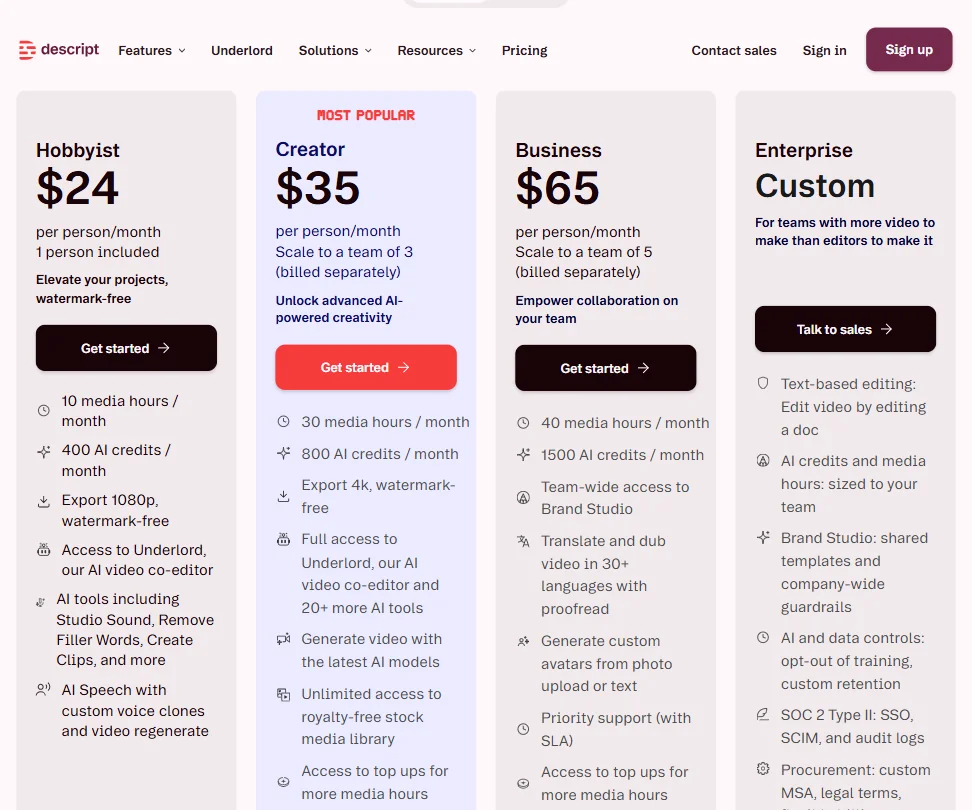
Hobbyist runs $24 per person per month at monthly billing, with 10 media hours and 400 AI credits. Creator sits at $35 per person per month, scaling to a team of three billed separately, with 30 media hours, 800 AI credits, and 4K watermark-free export. Business is $65, scales to five people, and adds translation and dubbing, custom avatar generation from photo upload, 1,500 AI credits, and priority support with an SLA. Enterprise is custom, with AI and data controls, SOC 2 Type II, SSO, SCIM, and audit logs.
The free plan gives you 1 media hour per month, a limited AI credit count, 720p export, and no watermark. It's a real tier.
The refund policy isn't publicly documented anywhere we could locate. That's a transparency gap. Not uncommon in the SaaS category, but it's the kind of thing that surfaces at the worst possible moment. We'd prefer to see it stated plainly.
Descript vs Adobe Premiere Pro: Which AI Video Tool Is Better?
Wrong comparison for most users. But Descript keeps inviting it by positioning itself against professional editing tools.
Premiere Pro is a non-linear editor built for complex, multi-track productions. Color grading, precise audio control, deep effects work. Premiere does all of that. Descript doesn't attempt it.
Where Descript wins is everything built around spoken content. Transcript editing, filler word removal, auto-captions, voice cloning, and script writing. A podcaster or talking-head YouTuber will move faster in Descript than in Premiere for that specific kind of work. Not close.
The Premiere export from Descript is actually a reasonable bridge. Clean up the transcript in Descript, finish in Premiere. It works.
Riverside.fm is a closer competitor on the recording and podcast side. Opus Clip overlaps on social repurposing. Neither has Descript's editing depth. For teams whose primary use case is multilingual corporate video or training content, Synthesia is the comparison that actually matters, even though the tools are structurally very different.
Who Should Use Descript? (And Who Shouldn't)
Solo podcasters. That's the clearest fit. The transcript editor, filler word removal, and voice cloning were clearly built with this user in mind.
YouTubers doing talking-head content. Eye Contact correction and text-based trimming are directly useful here.
Small marketing teams producing regular video content. The layout templates, Quick Design, and social clip creation handle the basics well. Brand Studio on Business adds enough for teams with real brand requirements.
Complex post-production work. Not the right tool. If you need multi-track timelines, precise color grading, or intricate audio layering, Descript will frustrate you. That's not a criticism of the product. It's just not what it was built for.
Developers looking for API-driven workflow automation are actually reasonably served here. Descript has a public API with documented endpoints for importing media, applying Underlord edits, managing projects, and publishing output. The Zapier integration includes built-in Import Media and Edit with AI actions, with additional API calls available through Zapier's API Request action.
Users on older hardware should check system requirements before committing to a paid plan.
Descript Review Verdict
One of the more coherent products in the AI video editing space. The core concept holds up. Text-based editing is genuinely faster for the workflows it's designed for, and Underlord does things that matter rather than just filling out a feature checklist.
Pricing is fair at most tiers. The free plan is one of the more generous in the category. Watermark-free exports at 720p on a free tier is not common.
The gaps are specific. No public refund policy. Avatar quality is competitive but not class-leading. Performance on large files needs work.
None of those are dealbreakers. They're friction.
Podcasters, solo creators, and small teams doing regular video content. Clear recommendation. Professional video editors and anyone running heavy multi-track post-production. Elsewhere. Not because Descript is weak, but because it was never trying to be that tool.
Frequently Asked Questions
Does Descript's free plan actually let you export without a watermark?
Yes. Most free tiers in this category watermark everything as a forcing function toward paid plans. Descript's free tier exports clean at 720p, with 1 media hour per month and a capped AI credit count. It's a real free plan. Start there before paying.
What is Underlord in Descript?
Underlord is Descript's AI co-editor layer. It handles script writing, layout design, B-roll generation, filler word removal, and social clip creation. It takes direction rather than prompts in a chatbot sense.
Is Descript good for professional video editing?
Depends on your definition. If professional means multi-track timelines, color grading, and complex effects, then no, Descript isn't built for that and doesn't claim to be. If professional means producing polished, clean content at speed for podcasts, YouTube, or marketing video, then yes, it competes well. The Adobe Premiere export is a genuine option for users who want to do transcript cleanup in Descript and finish in a full NLE.











