We pulled Krisp's pricing page, documentation, and a few hundred user reviews across G2, Capterra, and Reddit. The picture that came back is narrower than most AI audio tools, and that's not a complaint. Krisp picked a lane early and kept building inside it. The question we kept returning to: does that focus still hold up when free transcription tools are multiplying fast.
What is Krisp?
Founded in 2017, headquartered in Berkeley. Started as a single-purpose noise filter you dropped between your microphone and your call app. The processing runs on-device, no audio routed to a server, no bot account joining your meeting. That architecture was unusual in 2017 and it's still a genuine differentiator now.
The product has grown considerably since then. It now covers real-time noise cancellation, meeting transcription across 16 languages, AI summaries with action items, and accent conversion, which is a stranger feature than it sounds and we'll get to it. Krisp claims 50 million users publicly. We'd normally wave that number off, but the G2 review volume and Reddit thread density suggest this isn't astroturf. People actually use it, a lot of them in call centers or distributed enterprise teams rather than solo home offices.
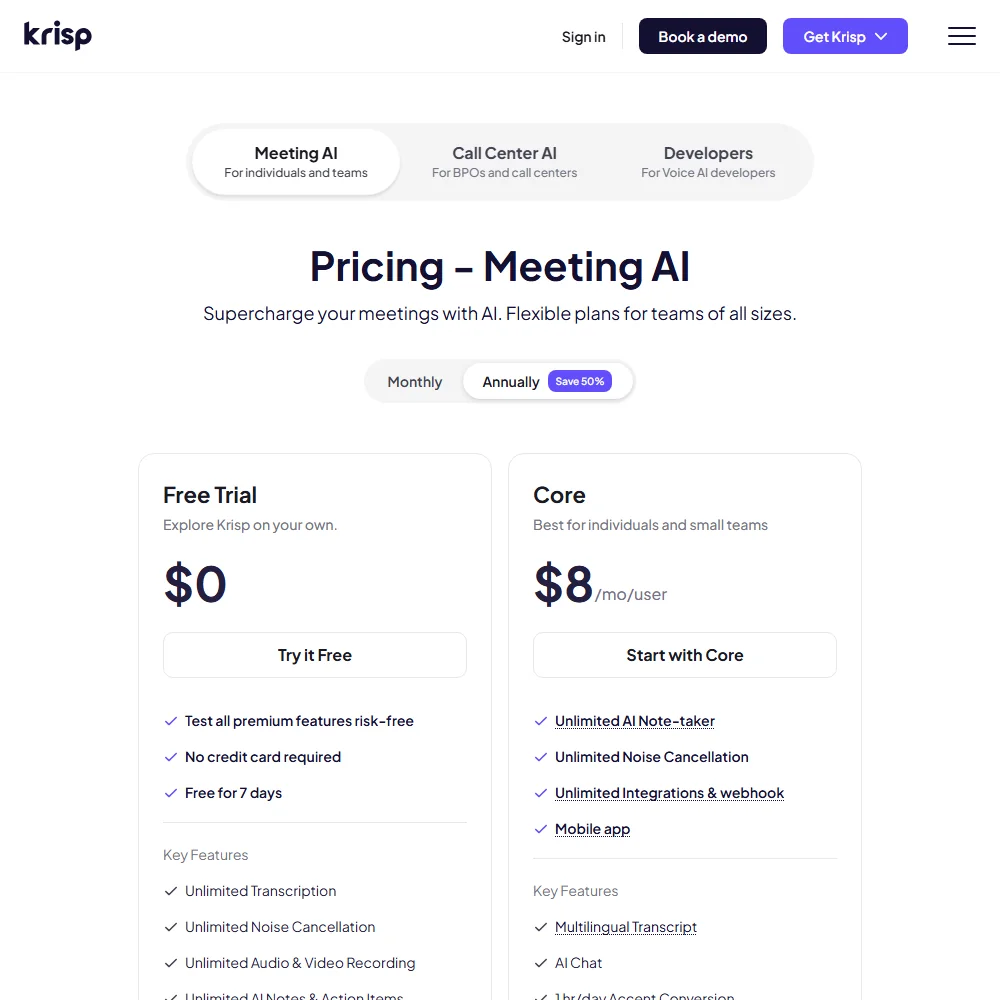
Worth knowing: the free trial runs seven days, includes all premium features, and requires no credit card. That's a fair way to evaluate a tool where your specific environment is the only real test.
Krisp Features: Voice, Music & Audio Capabilities

Two distinct buckets. Real-time audio processing and post-call intelligence. They don't overlap much but they feed each other.
Real-time side covers two-way noise removal, echo cancellation, and background voice suppression. Krisp registers as a virtual microphone at the OS level, so any call app that lets you choose a mic input can use it. Zoom, Google Meet, and a few others. No plugin per platform. That botless architecture is the thing that keeps coming up in enterprise procurement conversations, because a bot joining the call creates compliance questions some legal teams won't approve.
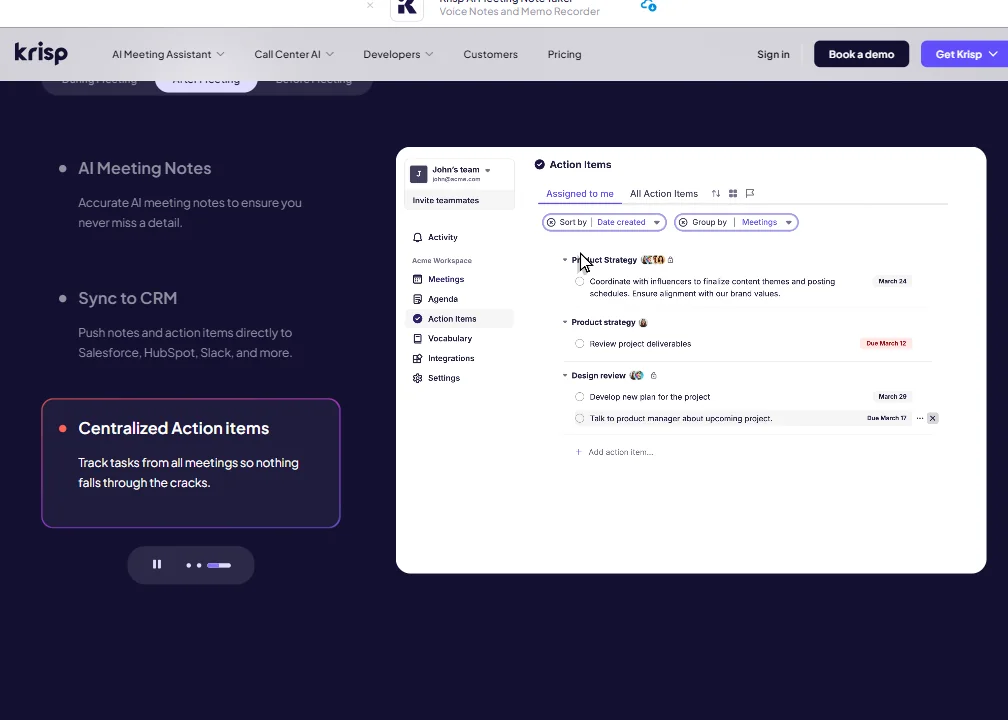
Post-call side handles transcription and AI summaries. Multilingual transcript is listed as a named feature on the Core plan. AI Chat is also there, meaning you can query the transcript after the meeting. From what we cross-referenced in G2 reviews, the summaries read as genuinely useful rather than just word dumps, which is not always the case with this category.
Then there's **accent conversion**, and this one is genuinely odd. Krisp processes a speaker's voice in real time and shifts the perceived accent toward a more neutral or target output. Their SDK documentation makes clear this is a full API layer, not just a cosmetic toggle. The Core plan caps accent conversion at 1 hour per day. Unlimited accent conversion requires the Advanced plan at $30 per user per month.
Developers get access to a Voice Isolation SDK, a Noise Cancellation SDK, and an Accent Conversion SDK. Not many tools in this category expose the underlying audio layer like that. Honestly, that surprised us.
What Krisp doesn't do: voice cloning, text-to-speech, podcast editing, music generation. It knows what it is.
Krisp Audio Quality: How Natural Does It Sound?
Noise cancellation is Krisp's clearest claim to category leadership. We're mildly skeptical of self-awarded rankings, but the user evidence mostly tracks. Keyboard clatter, HVAC noise, a dog, a baby two rooms over. Those scenarios repeat across G2 reviews with consistent outcomes. NVIDIA RTX Voice comes up regularly in Reddit comparisons, and Krisp tends to win on reliability across hardware configurations rather than peak performance on any single rig.
Accent conversion is where the audio quality story gets complicated. Their documentation says the converted output preserves the speaker's intent while improving clarity. **What we kept seeing in user reports is that quality varies** a fair amount depending on the source accent and the gap between that accent and the target. A few reviews used the word "robotic." That tracks. We'd want to hear it in a real environment before recommending it for daily use on a whole team.
Echo removal and cross-talk suppression get quieter praise but consistent praise. Call center users in particular flag those two features as the reason they renewed rather than leaving.
Krisp Voice Cloning & Customization: How Deep Does It Go?
Not deep. At all.
Krisp doesn't do voice cloning. The accent conversion feature is the only thing that touches voice character, and it's a real-time processing layer rather than a creative authoring tool. For anything in the voice cloning space, ElevenLabs is a different category entirely. Krisp's version of customization is selecting which accent output profile the conversion maps to. Multiple options exist per their documentation, but we don't have a clear count.
Transcription customization is where there's more to work with. **Sixteen languages** for transcription and summaries. That's a specific number, not a vague multilingual claim. We cross-referenced it against user reports from non-English markets and found a few notes that accuracy drops for certain languages, which is normal for any transcription system but worth knowing before you deploy it to a multilingual team.
Is Krisp Easy to Use?
Install it. Select it as your mic input. That's the setup for a solo user.
G2 reviewers from non-technical roles, sales reps and support agents specifically, consistently mention having it running before IT got involved. That says something. A lot of meeting tools require calendar permissions, a bot account, and someone with admin access before they feel functional. Krisp doesn't. It works out of the box because it operates at the audio device level rather than the application level.
The meeting intelligence side requires more configuration if you want CRM sync. Salesforce and ConnectWise integrations are named features on the Advanced plan at $30 per user per month. HubSpot connects via integrations listed on the Core plan. The MCP integration is also listed explicitly on Core, which is notable for teams building on top of AI infrastructure.
**The desktop experience on Windows and macOS is clearly where the product is built.** Mobile apps exist for iOS and Android, and they get minimal coverage in reviews, which usually means they work fine without being anyone's primary use case. The mobile app is listed as a named feature on the Core plan, so it's not an afterthought, just not the main event.
Fair. Ease of use is a genuine strength. We'd put Krisp ahead of most competitors on raw setup speed for a first-time user.
Krisp Pricing: Is It Worth It for Creators & Businesses?
Four tiers visible on the pricing page. Free Trial at $0, Core at $16 per user per month, Advanced at $30 per user per month, Enterprise at custom pricing. The starting price listed in vendor documentation references $8 per user per month billed annually for Core, which is the annualized equivalent.
The free trial covers all premium features for seven days, no credit card required. That's a reasonable evaluation window for a noise cancellation tool where your environment is the only real test.
We looked for a public refund policy and didn't find one. That's a gap. Capterra reviews had a couple of comments about billing friction, nothing widespread, but noted.
**The Core plan at $16 per user per month** covers unlimited noise cancellation, unlimited AI note-taking, and unlimited integrations including webhook access. The 1 hour per day cap on accent conversion and the 10 GB storage limit are the meaningful constraints at that tier. Advanced at $30 removes the accent conversion cap, adds Salesforce and ConnectWise integrations directly, and bumps storage to 60 GB. Enterprise adds SSO, SCIM, private on-device transcription and recordings, and a dedicated account manager.
We're skeptical of that $30 price point against Fathom, which covers significant transcription and summary territory on a free tier. Krisp's noise cancellation is better. Fathom's free tier is free. That tension is real for budget-conscious teams, and we don't have a clean answer for every situation.
Krisp vs Otter.ai: Which AI Audio Tool Wins?
Otter.ai is a transcription-first product. It captures what's said, stores it, makes it searchable. The AI summaries are decent and the collaborative notes feature gets real use in team settings. But Otter doesn't touch audio quality. If your call sounds bad going in, the transcript reflects that.
Krisp solves the input problem before the transcript starts. **The combination of noise removal and transcription in one layer** is what makes Krisp difficult to replace for call center teams or anyone working from a noisy home environment. Otter.ai assumes you're already working with clean audio. Reasonable for office setups. Not reasonable for most remote workers.
For asynchronous note-taking and transcript search, Otter.ai is a reasonable choice. For live call quality combined with post-call intelligence, Krisp is the better fit. They're not really competing for the same primary user. We'd only put them head-to-head when budget forces a single tool decision.
Fireflies.ai is a closer threat on the meeting intelligence side. Fireflies has more integration depth and a more polished bot-based recording flow. Krisp's advantage is the botless approach, and that matters in enterprise deals where a bot joining the call creates compliance questions legal teams won't approve.
Who Should Use Krisp? (And Who Shouldn't)
Call center teams. That's the clearest fit. The two-way noise removal, accent conversion tooling, Salesforce sync, and ConnectWise integration on the Advanced plan read like a product roadmap built around contact centers. Not remotely accidental.
Remote workers in genuinely noisy environments are the other obvious group. If you've apologized for background noise on a client call more than twice this month, the seven-day trial is worth your time.
**Developers building on top of audio infrastructure** should look at the SDK offerings seriously. The Voice Isolation SDK and Noise Cancellation SDK aren't marketed loudly on the homepage but they give developers a clean API layer for audio processing. For teams needing deeper transcription API access rather than audio isolation, AssemblyAI is the more developer-native option.
Podcasters. Creators wanting voice styling or audio production tools. Anyone needing text-to-speech output. Krisp isn't for you, and it never claimed to be.
Teams already running Zoom's native AI companion or a comparable built-in transcription feature should honestly pressure-test whether Krisp adds enough on top to justify a separate subscription. Sometimes it does. Depends on how bad the noise problem actually is.
Krisp Review Verdict
Krisp does its core job better than most things in the category. The noise cancellation holds under bad conditions. The transcription and summary layer is useful rather than just present. The botless architecture is a real feature, not a marketing line.
Accent conversion is the wildcard. It's either a meaningful tool for international contact centers or an uncomfortable product bet. Probably both, depending on the team. We'd treat it as experimental until the user evidence across source accents gets more consistent.
**The Core plan at $16 per user per month** is defensible for remote workers with a real noise problem. The Advanced plan at $30 is harder to justify unless you're actively using the Salesforce sync or the unlimited accent conversion. The missing refund policy is a small friction point, but it's there, and it's worth knowing before you commit a whole team.
This is a focused product with a clear use case and genuine depth in that lane. We'd recommend the trial without hesitation. Whether you convert to paid depends on how much your meetings actually suffer from noise.
Frequently Asked Questions
Does Krisp work with any video conferencing app?
Yes, because it registers as a virtual audio device at the OS level. Any app that lets you choose a microphone input can use Krisp. Zoom, Google Meet, Microsoft Teams, and most VOIP tools are covered without requiring a specific plugin per platform.
What is Krisp's accent conversion feature, and is it reliable?
Krisp's **accent conversion** processes a speaker's voice in real time and shifts the perceived accent toward a more neutral or target output for the listener. It's designed for international customer support teams where intelligibility is a real operational problem. Reliability varies based on what we read in user reports. It performs better on some source accents than others, and several users described the output as slightly processed or robotic. Worth testing in your specific environment before deploying it to an entire team.
Is there a free version of Krisp?
There's a seven-day free trial that includes all premium features. No credit card required to start. After the trial, a limited free tier exists, though the Core paid plan starts at $16 per user per month on the monthly rate, with lower pricing available billed annually. Use the full seven days under your actual working conditions before deciding.