
n8n is a workflow automation software for solo builders and teams, with unlimited steps per execution on every plan.

Start with n8n's GitHub numbers: 197,000+ stars. That puts it in genuinely rare company. G2 reviews, Reddit threads across r/selfhosted and r/n8n, and the vendor docs all paint a consistent picture: this is a tool that technical teams love hard and non-technical teams bounce off fast. That tension is what this review is really about.
Founded in Berlin in 2019, n8n has grown without making the usual compromises. It didn't dumb down the interface to chase the Zapier market. It didn't lock everything behind a cloud-only model. The community edition is genuinely free, self-hosted, and unlimited. That's not common. That matters.
What is n8n?
n8n is a workflow automation platform built for technical teams. The core idea is a visual canvas where you connect nodes. Each node is a step: an API call, a transformation, an AI agent action, a webhook trigger. You can see every step. You can trace what happened and why. That visibility is what separates it from most tools in this space.
It runs on your infrastructure or theirs. Docker, on-prem, or cloud. You pick. The self-hosted community edition costs nothing and has no workflow limits. The cloud plans start at $24 a month on the Starter tier. That range is unusual. Most tools force you to the cloud and charge accordingly.
The 200,000+ community members aren't just a vanity number. We kept seeing references to the forum in G2 reviews, people solving real problems there when support tickets were slow. That community is doing real work.
n8n Features: Workflows, AI Agents & Automation Capabilities
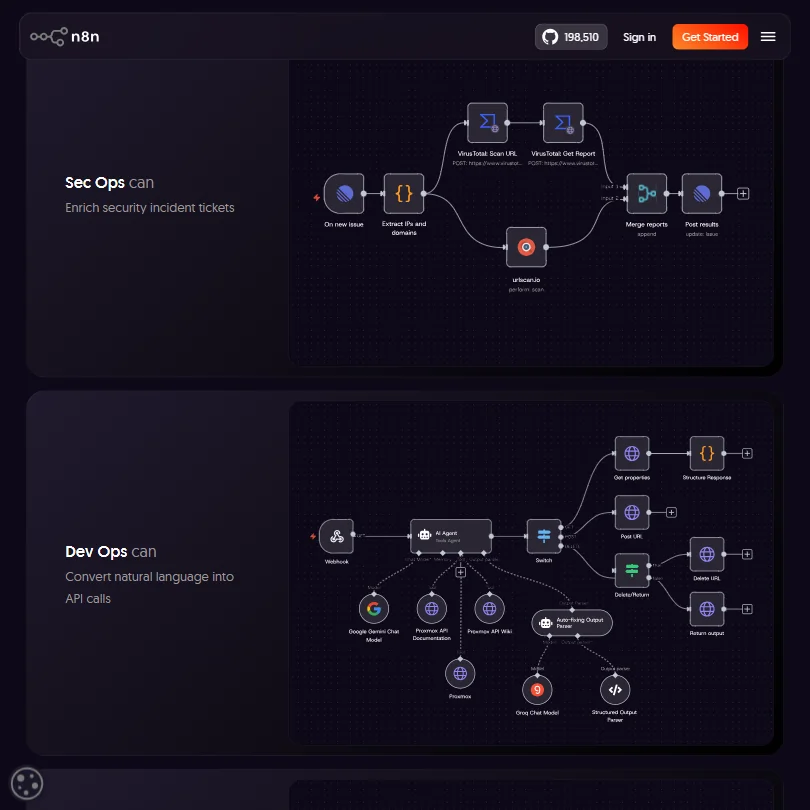
The drag-and-drop canvas is the starting point. You build flows visually, connect nodes, branch on conditions, and watch executions play out step by step. But the canvas isn't trying to hide complexity from you. It's trying to show you the complexity clearly. That's a different design goal than what Make or Zapier are after.
Code nodes are a big deal here. JavaScript or Python, dropped anywhere in the workflow. You're not hunting for a workaround when the visual node doesn't do what you need. You just write the logic. G2 reviewers who work in DevOps roles mention this constantly. The phrase we kept seeing was some version of "I never feel boxed in." That tracks.
Trigger types cover the usual ground. Webhooks, schedules, HTTP requests, and manual runs are all there. So is queue-based triggering for more demanding setups. Error handling is solid too: automatic retries and dedicated error workflows. When we cross-referenced the docs with user reports, the error handling held up. Few complaints there.
Data transformation is where things get genuinely interesting. Merging, bulk operations, and streaming are all built in. This is not a tool that expects you to massage your data before it arrives. It handles messy inputs. That's a real differentiator for teams pulling from multiple sources.
Team features land differently depending on your plan. The Starter plan includes unlimited users, one shared project, and 5 concurrent executions. Pro bumps that to 3 shared projects and 20 concurrent executions, and adds admin roles, global variables, workflow history, and execution search. SSO, SAML, and LDAP show up on Business tier and above. Git-based version control is in there too. Honestly, that surprised us. Most tools treat version control as an afterthought. n8n built it in.
n8n Automation Power: How Complex Can Your Workflows Get?
Pretty complex. That's the short answer.
We dug through Reddit threads from 2024 and 2025 where engineers described workflows that would break most no-code tools. Multi-branch conditional logic with fallback paths. Bulk operations across thousands of records. n8n handles these without special configuration. The code nodes are the escape hatch, and they're always available.
The 2,174+ integrations cover the obvious apps: Slack, GitHub, and Google Workspace, and a few others. Custom API connections handle everything else. The HTTP node is flexible enough that if a node doesn't exist for a service you need, you're not stuck. You build a quick HTTP call and move on. We've seen other platforms charge for that kind of flexibility. n8n treats it as table stakes.
Execution logs are detailed. Full history, audit trails, and log streaming to external tools like Datadog or a SIEM. For SecOps teams, that last part matters a lot. It's not just "did it run." It's "show me everything that ran, where, and what it touched."
One thing to flag: workflow complexity scales with skill level. The ceiling is high. But reaching that ceiling requires someone who knows what they're doing. Non-technical users who stumble in expecting a Zapier-like experience will hit a wall. Not a bug, exactly. Just a reality.
n8n AI Agent Capabilities: What Can It Actually Do Autonomously?
This is where n8n has moved aggressively in the last year or two. The AI agent tooling is not bolted on. It's built into the canvas model.
Multi-agent setups and RAG systems are supported natively. You can connect OpenAI or Anthropic Claude, or bring in other models through the integration layer. Every decision the agent makes is traceable on the canvas. You see the reasoning steps. You see where it branched. That transparency is rare in agent frameworks, and it matters when something goes wrong.
Human-in-the-loop is a real feature here, not just a checkbox. You can build workflows where AI handles the first pass and a human approves before anything consequential happens. Combined with rule-based guardrails, it gives teams a way to deploy AI without just hoping it behaves. MCP support is in there too, which positions n8n for where agent tooling is heading.
We're a little skeptical of "autonomous" as a word in this context. The agents work within the bounds you define. They don't wander. That's probably a good thing. But teams expecting out-of-the-box AGI-style behavior will need to invest real effort in the setup.
For teams building AI pipelines on their own data, the self-hosted option matters here too. Your data doesn't leave your infrastructure. That removes a lot of conversations about compliance and vendor risk that cloud-only agent platforms create.
Is n8n Easy to Set Up Without Code?
No. Not really. We're not going to dress that up.
The visual builder lowers the floor compared to writing raw API integrations from scratch. But n8n's mental model requires you to understand data flow, node configuration, and how outputs from one step become inputs to the next. That's not the same as "no-code." It's closer to low-code, and it rewards people who are comfortable thinking in systems.
G2 reviewers in non-technical roles flag the learning curve consistently. The onboarding isn't terrible. The docs at docs.n8n.io are thorough. But the tool doesn't hold your hand. It shows you a canvas and expects you to have a rough idea of what you're building before you start.
The community fills some of this gap. The forum has 200,000+ members and real activity. Someone has probably already built a workflow close to what you need. Template libraries and community-shared workflows cut setup time significantly for common use cases. That helps. It's not a substitute for product-level onboarding, but it's something.
For Docker-based self-hosting, the setup is cleaner than you'd expect. The docs walk through it clearly. But you still need someone who's comfortable with containers. That's the honest prerequisite.
n8n pricing: what each plan gives

The self-hosted community edition is free. Unlimited workflows, no restrictions. That's the offer. For any team with the technical capacity to run it, that's an extraordinary deal.
Cloud plans start at $24 a month for the Starter tier, which includes 2,500 workflow executions and forum support. The Pro plan runs $60 a month, or $50 billed yearly, and gets you 10,000 executions, 30 days of insights, and admin roles. Business costs $960 a month, or $800 a month billed yearly, on cloud or self-hosted, and Enterprise is custom pricing. Moving up from Pro to Business buys SSO, SAML, LDAP, different environments, scaling options, and Git-based version control. That's a steep cliff. There's nothing in between.
Compared to Zapier, the value math looks different depending on what you're doing. Zapier Professional starts at $19.99 a month when billed annually, with pricing increasing according to the monthly task allowance, and collaboration features like shared workspaces and advanced governance require higher plans. n8n's Pro plan doesn't throttle you on workflow runs the same way. For high-volume automation, n8n wins on cost. For plug-and-play simplicity with 9,000 app connectors, Zapier wins on ease. The self-hosted option is where n8n's pricing becomes genuinely hard to beat.
Ask about the refund policy before you pay.
The free cloud trial requires no credit card. That's the right call. Try it before you commit.
n8n vs Zapier: Which Automation Platform Wins?
Depends what you're optimizing for. But let's be specific about it.
Zapier wins on integration count. 9,000+ apps versus n8n's 2,174+. For business teams who need a pre-built connector for some obscure CRM or HR tool, Zapier's library is a real advantage. n8n's custom API nodes cover a lot of that gap, but covering a gap isn't the same as having the connector.
n8n wins on depth. The code nodes, the self-hosting option, and the agent transparency are the main reasons. Zapier's logic is still relatively linear. n8n can build things Zapier can't. That's not a close call.
Make sits in an interesting middle position. More visual flexibility than Zapier and cheaper for high-volume use. But Make doesn't offer self-hosting, and its AI agent features aren't as developed as n8n's. For teams that don't need self-hosting but want more power than Zapier, Make is worth a look.
For purely technical teams? n8n. Not a competition.
The real question is whether your team can run it. That answers most of the comparison questions faster than any feature checklist.
Who Should Use n8n? (And Who Shouldn't)
DevOps, SecOps, and IT teams. That's the core fit. Teams who think in systems, understand APIs, and have someone who can manage a Docker container. For those teams, n8n is probably the best tool in this category right now.
Developers building AI-powered workflows on internal or sensitive data. The self-hosting option and the agent transparency make this a strong pick. Nothing else in this category combines both of those at this price point.
Small technical startups who want automation without Zapier's task limits. The free self-hosted tier is a serious option for early-stage teams that have the capacity to run it.
Now for who shouldn't.
Non-technical marketing or ops teams who need something running by Friday. The learning curve is real. If you don't have someone who can think through node configuration and data flow, n8n will frustrate you. There are better starting points for that profile.
Teams needing 5,000+ pre-built app connectors out of the box. n8n's 2,174+ integrations are solid, but the gap is real. You'll be building custom API connections for anything outside the main list. Fine if you have the skills. A blocker if you don't.
n8n Review Verdict
n8n is genuinely excellent at what it's designed for. The canvas model is well thought out. The agent transparency is rare. The self-hosting option is real, not just a bullet point. The community is active and actually useful. For the right team, this is the strongest pick in the category.
The gaps are real too. The step from Pro to Business, with nothing in between, is the most frustrating thing about the pricing structure. The learning curve is steep enough to block adoption in non-technical teams entirely. And with 2,174+ integrations versus Zapier's 9,000, you'll be writing custom API connections more than you might want.
But here's the thing. Most tools in this space ask you to trust their black box. n8n shows you what's happening and lets you intervene at any step. That's not a small thing when you're running AI agents on production data or building automation that affects real business processes.
We'd recommend it without hesitation to technical teams. For everyone else, the fit depends almost entirely on whether you have someone on your team who can run it. That's not a flaw in n8n. It's just an honest prerequisite.
Frequently Asked Questions
Is n8n really free to use?
The self-hosted community edition is genuinely free, with no workflow limits and no expiry. You host it yourself, which means you need the infrastructure and someone comfortable with Docker or a similar setup. The cloud plans start at $24 a month on the Starter tier, and there's a free trial on those with no credit card required.
How does n8n compare to Zapier for AI automation?
n8n goes deeper on AI agent features, including multi-agent setups, model flexibility across OpenAI and Anthropic Claude, and step-by-step tracing of what an agent actually did. Zapier has far more pre-built connectors and is easier for non-technical users to get running fast. The right answer depends mostly on your team's technical depth, not on which feature list looks better.
Can non-technical users use n8n?
They can try. The visual canvas lowers the barrier compared to raw API work, and the community template library helps. But the honest answer is that n8n rewards people who already think in systems and understand data flow. Someone with zero technical background will likely struggle past the basics. There are tools better suited to that profile.








