
Twenty-six years of iteration produces a product that's genuinely hard to summarize. Salesforce has been in CRM longer than most of its current competitors have existed. That history shows, sometimes in good ways, sometimes in the form of accumulated complexity that nobody's fully cleaned up yet.

What is Salesforce?
San Francisco, 1999. The pitch was simple: CRM in a browser, no CD required. That was genuinely radical then. The product it's become is something else entirely, a platform covering sales, service, marketing, commerce, and IT workflows, all stitched together by a data model and permission system that takes months to really understand.
The AI layer is called Einstein AI, and it sits across every cloud. The newer piece is Agentforce, their autonomous agent platform, which can execute tasks across sales and service workflows without waiting for a human to intervene at each step. Salesforce claims over 150,000 customers. That figure spans the Starter Suite at one end and U.S. federal government deployments on Government Cloud at the other. They are not getting the same product. Worth keeping in mind.
Salesforce Features: Workflows, AI Agents & Automation Capabilities
The core automation canvas is Flow Builder, drag-and-drop, no code required for a wide range of common workflows. Branching logic, scheduled runs, API events, record-triggered actions. Teams that need more reach for Apex, Salesforce's Java-adjacent proprietary language. MuleSoft handles the serious integration work underneath.
Trigger types are broad. Webhooks, schedules, email events, record changes, user actions. Nothing there is unusual for enterprise tools, but the execution is more complete here than what Microsoft Dynamics 365 or Zoho CRM manage at comparable tiers.
AppExchange lists over 3,000 apps. Google Workspace and Slack are the ones most teams actually use. And a few others. Whether the connectors your specific stack needs are in there is a separate question worth answering before you sign anything.
Error handling is real. Fault paths in Flow, debug logs, retry logic, a dedicated debug mode. G2 reviewers in operations roles mention the debug tooling more than almost anything else, usually positively. That tracks. Weak error handling is the thing that drives admins out. Salesforce has clearly invested here.
Salesforce Automation Power: How Complex Can Your Workflows Get?
Pretty complex. Honest answer.
Sub-flows let you nest logic inside logic. Batch Apex handles heavy data processing on a schedule separate from your live workflows. The combination of Flow Builder, Apex, and the Platform Events API means there's almost no automation pattern that's structurally off-limits, given enough time and the right person building it. That last part is doing a lot of work in that sentence.
Reddit threads from 2024 and 2025 surface the same theme repeatedly. Organizations that attempted self-implementation without a certified Salesforce admin hit walls fast. The tool can do almost anything. The gap between "can do" and "does do" is filled by expertise, and expertise costs money. We kept seeing this from smaller teams on Capterra, especially in the 50-to-200 employee range.
Data transformation inside Flow and Data Cloud is genuinely capable. Mapping and enrichment happen natively, without bolting on a third-party ETL tool. For teams already paying for Data Cloud, that matters.
We cross-referenced the official docs with G2 reviews on automation depth. The docs are accurate. What they skip is how long it takes a new admin to become actually confident with the tooling. Several months is realistic. Not several weeks.
Salesforce AI Agent Capabilities: What Can It Actually Do Autonomously?
Agentforce is the piece Salesforce has been pushing hardest since late 2024. Agents handle customer service conversations, lead qualification, commerce tasks, and marketing actions without someone manually triggering each step. The underlying model is Einstein AI. It also connects to external LLMs through Model Builder, including OpenAI's models via Einstein GPT. Build a proprietary layer for CRM-specific tasks, but don't lock customers into only that. Sensible architecture.
We're cautiously optimistic. Cautiously. The documentation is thorough, but the customer review base for Agentforce specifically is still thin compared to the broader Salesforce pool. The cases that do appear on G2 and in Salesforce's own materials skew heavily toward large organizations with real implementation support behind them. That's context, not a knock.
Human-in-the-loop escalation is built in natively. An agent handles the first several steps of a service workflow, then hands off to a person when defined conditions trigger it. More lightweight agent tools often skip this entirely. Salesforce didn't. Fair.
Is Salesforce Easy to Set Up Without Code?
No. Not really.
Flow Builder is drag-and-drop and genuinely handles a wide range of workflows without code. But "no-code" and "easy" aren't the same thing. Salesforce's data model is complex. The permission system, built around role hierarchies and sharing rules and permission sets, takes real time to understand. You can get something running quickly. Getting it running correctly is a different project.
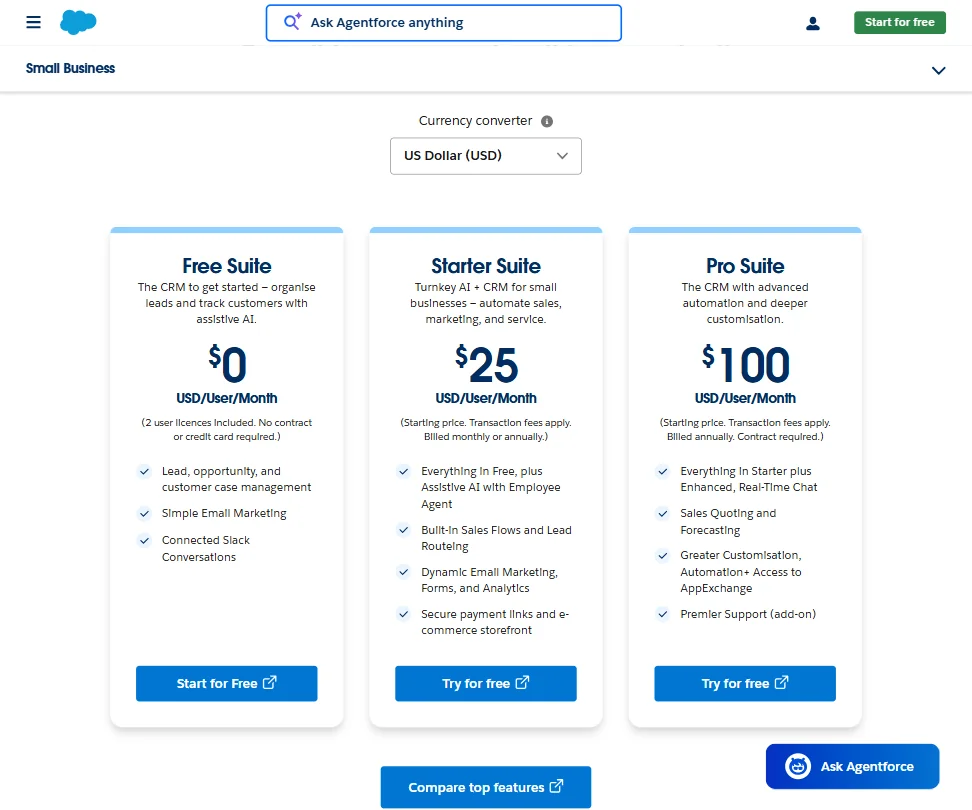
The Starter Suite at $25 per user per month is designed to soften this. Capterra reviews from teams who started there describe a reasonable onboarding experience, followed by a specific moment when they needed something the Starter tier doesn't support and suddenly had to confront the rest of the platform. That moment arrives sooner than most expect.
Trailhead, Salesforce's own learning platform, is genuinely good. Structured paths, hands-on challenges, certifications tied to specific product areas. It's the best vendor-run education platform in CRM. Probably in SaaS broadly. For teams willing to put time into it, it pays back. For teams that won't, this setup is brutal. That pattern shows up on G2 too often to dismiss.
Salesforce pricing: what each plan gives
This is where things get uncomfortable.
Starter Suite opens at $25 per user per month. That sounds approachable. It isn't the product most mid-market or enterprise teams are actually buying. Salesforce currently lists Enterprise at $175 per user per month and Unlimited at $350 per user per month, both billed annually. Agentforce and Government Cloud sit above those on custom quotes.
A 50-person sales team on Enterprise is $8,750 a month before a single add-on. Add Data Cloud or Marketing Cloud and you're stacking multiple line items fast. Contracts are the norm. There's no standard public refund policy. Getting out is not straightforward.
Now, the comparison. Zapier and Make handle workflow automation between apps at a fraction of the cost. Faster to set up, cheaper by a wide margin. But they're not CRMs. They have no native data model for sales pipelines or customer records. No AI agent layer. If all you need is automation glue between apps, those tools win on price, no contest. If you need what Salesforce actually is, the comparison is mostly irrelevant.
The pricing concern that actually matters is add-on opacity. Reddit threads from 2024 are full of ops and finance people surprised by line items that weren't visible at the point of sale. API call limits on lower plans, support tier gates, feature walls that push you toward upsells. Salesforce isn't unique in this. They do it at a scale that amplifies the frustration considerably.
Salesforce vs HubSpot: Which Automation Platform Wins?
HubSpot is the obvious comparison. Both are CRM platforms with automation layers. Both have added AI. The surface area is wide, so we'll stay specific.
HubSpot is faster to set up. Meaningfully faster. The free tier exists and is functional. Onboarding rarely requires a consultant. For teams under 100 people who want to be running in weeks rather than months, HubSpot wins that argument cleanly.
Salesforce wins on depth. Flow Builder and Apex go further than HubSpot's workflow tools at the same complexity tier. The permission system is more granular. Agentforce has no real HubSpot equivalent yet. For organizations with genuinely complex sales processes or regulatory requirements, HubSpot can't replicate what Salesforce does.
The crossover point, based on what we kept seeing in G2 reviews of teams switching in either direction, is roughly 200 to 500 users. Below that, HubSpot is defensible. Above it, Salesforce's depth tends to justify the cost. Above 1,000 users, there's almost no argument. Salesforce is the default.
Microsoft Dynamics 365 shows up in the same enterprise conversations. SAP CRM too, mostly in manufacturing contexts. Neither is simpler to operate. Salesforce has a more mature third-party ecosystem than both, and a larger community when something breaks at 2am.
Who Should Use Salesforce? (And Who Shouldn't)
Enterprise sales and service teams. Core fit. Organizations with dedicated admins, the budget for Enterprise or Unlimited, and workflows complex enough to actually need what Flow Builder and Agentforce deliver.
Mid-market companies in a growth phase. Specifically ones that know they'll be significantly larger in two years and want to avoid a painful CRM migration later. Starting on Salesforce early is hard. Migrating to it from HubSpot or Zoho at 500 employees is harder.
Small businesses. Not the fit. The $25 Starter plan exists, but the platform penalizes teams without dedicated admin support. There are better tools at that price and scale.
Developers building custom internal tooling on top of a CRM. Worth a look. The REST, SOAP, Bulk, and Streaming APIs are well-documented, and the developer community is large. If the technical resources are there, the platform is extensible in ways that consumer-oriented CRMs aren't.
Teams expecting to deploy AI agents without a real implementation project. Not yet. Agentforce is promising. It is not plug-and-play.
Salesforce Review Verdict
Twenty-six years in, Salesforce remains the most complete CRM and AI automation platform available at enterprise scale. We'd make that statement without much hesitation after the research we did. The depth of Flow Builder, the AppExchange breadth, and the Agentforce agent layer together form something no single competitor has fully matched.
That doesn't make it the right choice for everyone. Pricing scales aggressively. Setup demands real resources. The add-on model surprises finance teams who didn't read the fine print carefully enough.
The cracks are real. Pricing transparency, setup complexity, and Agentforce still being early-stage at smaller scales. None of those are fatal for the buyer this product is actually designed for. The enterprise or serious mid-market team, with admin resources and a realistic implementation plan, will find Salesforce hard to walk away from. Everyone else should think carefully before signing.
Frequently Asked Questions
Does Salesforce have a free plan?
No. A Free Suite tier exists at $0 per user per month. Salesforce offers a 30-day free trial, enough time to poke around but not enough for a real implementation test. Budget for the paid tier from day one.
What is Agentforce and how is it different from Einstein AI?
Einstein AI is the broader layer embedded across Salesforce products, handling predictive scoring and automated insights. Agentforce is newer, a platform specifically for deploying autonomous AI agents that can take actions and complete tasks across sales and service workflows without human input at each step. They sit on top of each other, not beside each other.
Is Salesforce worth the price for a company under 100 people?
Probably not, unless the sales process is genuinely complex and at least one dedicated admin is in the picture. The Starter Suite is accessible on paper. The platform rewards organizations that can invest in configuration and training. A team under 100 without those resources will hit friction early and spend more on consultants than they planned. HubSpot or Zoho CRM deserves a serious look first at that scale.








