
Dify is an AI agent platform for building production AI applications, available as managed cloud, self-hosted enterprise, or open source.

151,000 GitHub stars by mid-2025. That number is real, and it's the first thing that puts Dify on the radar.
What is Dify?
Dify is a platform for building AI agents and automated workflows, aimed at development teams who want to ship production-ready AI applications without rebuilding infrastructure from scratch every time. A visual workflow builder sits on top of a multi-model backend. That means you can connect to OpenAI or Anthropic Claude, swap in Mistral, or run a local Llama model, and the builder stays consistent either way. Over 100 models supported, per their documentation.
The RAG pipeline support is where Dify does something most tools in the category skip entirely. You can ingest documents, chunk them, embed them, and wire the retrieval step directly into your workflow, all inside the same builder. Not common at this price point.
Deployment is the other real differentiator. Cloud, VPC, or fully self-hosted via Docker or Kubernetes are all officially supported. Most tools force a choice and leave you on your own for the rest. That matters for teams with data residency requirements or enterprise security reviews. Honestly, if we were on their marketing team, this is what we'd lead with.
The company claims 500,000 users. The GitHub activity broadly tracks with a tool that's not a side project.
Dify Features: Workflows, AI Agents & Automation Capabilities
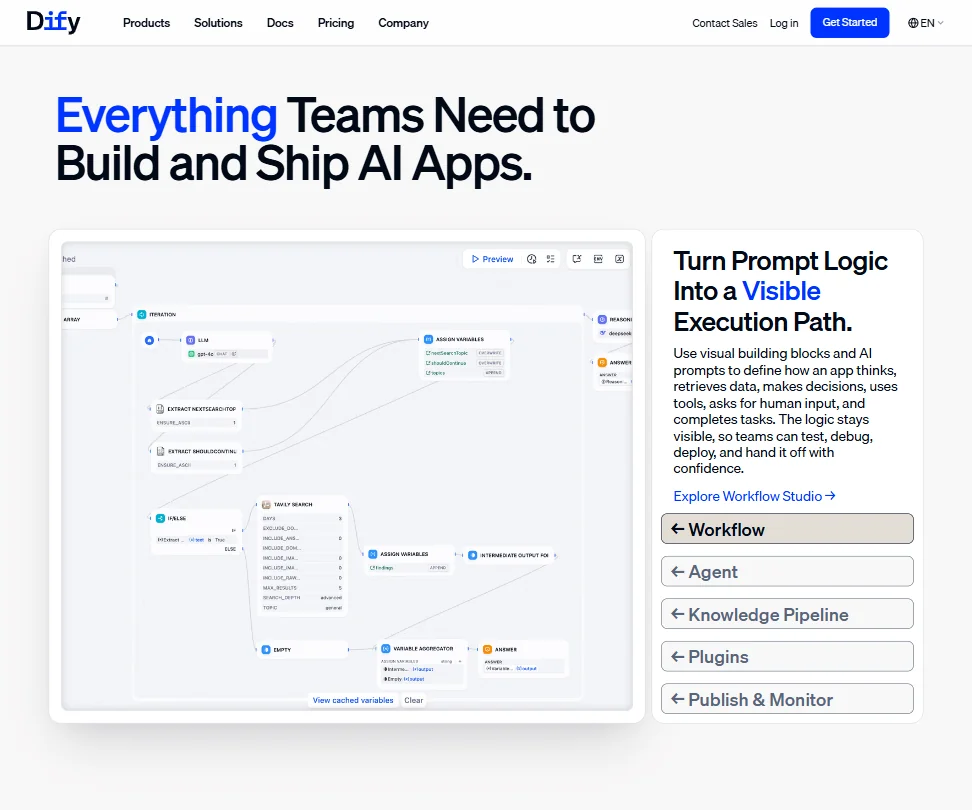
The visual builder is the center of everything. Drag-and-drop nodes cover the main building blocks: agents, RAG steps, decision branches, and human input checkpoints. Python and JavaScript code nodes are supported directly inside workflows, so you're not blocked when the no-code layer runs out of road.
Data transformation nodes sit inside the pipeline too. So does error handling with retry logic. We cross-referenced the docs against Reddit threads and the Discord community, and the general consensus is that these features work. Not perfectly every time, but they work. That tracks with what the GitHub issue history shows.
The trigger system covers webhook triggers and scheduled execution. API publishing is built in, so you can expose a workflow as a REST endpoint without writing a wrapper. No Dify API rate limits on paid plans, according to their documentation. A quiet killer for anyone running high-volume processes, worth knowing before you commit to a tier.
On integrations, the plugin marketplace handles tools like Slack and Google Workspace. The model connections are the real headline. OpenAI and Anthropic are the obvious two, with Azure OpenAI available for teams already locked into Microsoft infrastructure, and a few others beyond that.
Execution logs go back 30 days on the free Sandbox tier. Unlimited log history on paid plans is a small thing that becomes genuinely annoying when you're debugging a workflow that's been running for two months and something breaks on a Tuesday night.
Dify Automation Power: How Complex Can Your Workflows Get?
Reddit threads from 2024 into 2025 show teams running genuinely complex multi-step pipelines in production. Not toy demos. Real document processing pipelines, customer-facing chatbots with retrieval backing, and internal tools chaining several agent steps before returning a result.
Multi-step agent reasoning with tool use is supported natively. The agent runtime can plan across steps, call external tools, pull from a knowledge base, and hand off to a human when it hits something ambiguous. That's a meaningful chunk of the agentic workflow stack covered in one place.
We're a little skeptical of how well the error handling holds at scale. The docs describe retry logic and error nodes. Community reports describe some flakiness in more complex pipelines when models return unexpected outputs. Not unique to Dify, frankly. Category-wide problem. But going in with realistic expectations matters here.
The self-hosted deployment option changes the math for teams with heavy automation needs. No per-execution pricing, no cloud egress costs, full control over the model backend. For teams running thousands of workflow executions per day, that calculus gets favorable quickly.
Dify AI Agent Capability: What Can It Actually Do Autonomously?
The agent runtime is built around the idea that agents should plan, not just respond. Multi-step reasoning, tool calls, and RAG retrieval are all wired into the same execution context. You can build an agent that pulls a document, searches it for relevant context, calls an external API based on what it finds, and routes to a human reviewer before returning a result. All inside a single workflow graph.
Tool use is handled through the plugin marketplace and native integrations. The library isn't as deep as a mature automation platform, but it covers the common cases. Custom tools via API calls fill the gaps. That's where the code nodes matter.
The human-in-the-loop step is one of the better implementations we've seen documented in this category. Native node in the builder, not an afterthought. You can pause execution, present a result to a human, collect a decision, and resume. Teams building anything in a regulated environment will want this specifically.
The fully autonomous end of the spectrum doesn't look mature yet. Community reports suggest agents still need careful prompt engineering and guardrails to stay on track. True of the whole category right now. Dify isn't behind the curve, but it's not ahead of it either.
Is Dify Easy to Set Up Without Code?
Depends on what you're building. Simple chatbot with a knowledge base? Probably achievable without writing code. Multi-step agentic pipeline with custom tool calls? You'll be writing code nodes. Not a criticism. Just accurate.
The documentation at docs.dify.ai is genuinely good. Actually organized, with workflow examples and model configuration guides that reflect how people use the tool in practice. It's one of the better self-serve docs in this category.
The Sandbox free plan limits you to 5 apps and 50 knowledge documents, with 50MB of storage. Enough to test the builder and poke at a basic RAG pipeline. Not enough to run a real workload, which is probably intentional. Live chat support isn't confirmed on free tiers. The Discord community is active enough to get answers, but that's not a support model. Enterprise plan users get 24/7 support and SSO, per the pricing page. A big jump from what everyone else gets.
Self-hosted setup via Docker is documented thoroughly, and Kubernetes deployment is supported too. Not a beginner path. We don't buy the "beginner-friendly" framing that shows up in some of the marketing copy. This is a developer tool that non-developers can use for basic tasks. Different thing entirely.
Dify pricing: what each plan gives
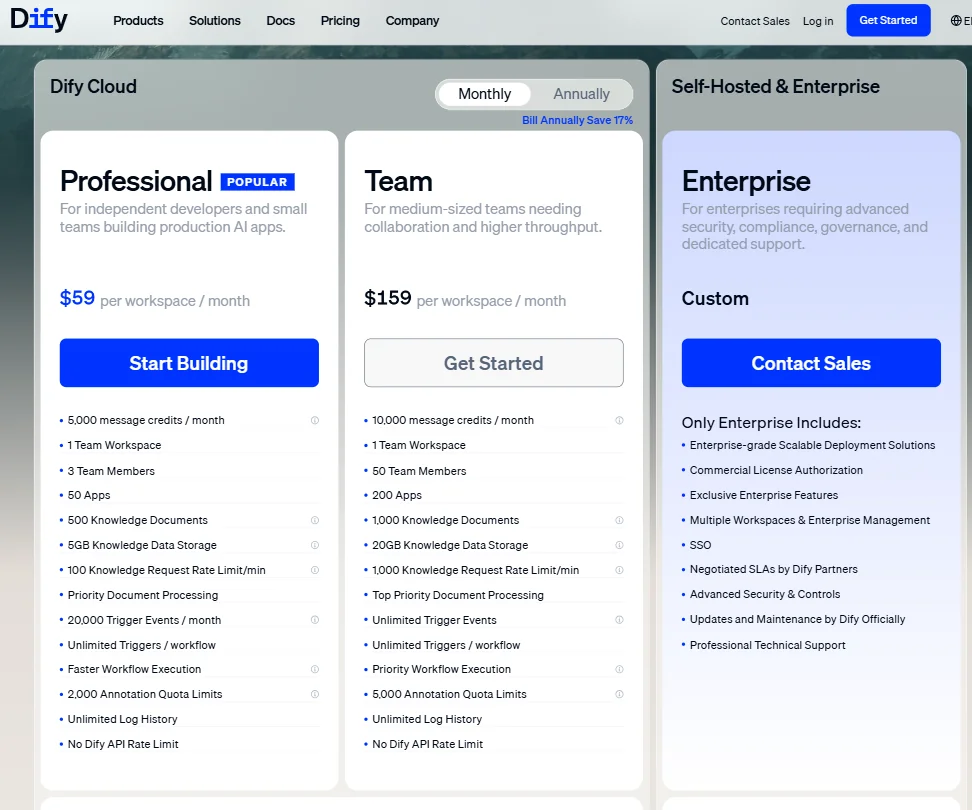
The Sandbox plan is free and permanent. 200 message credits, 1 workspace, 1 team member, 5 apps, 50 knowledge documents, 50MB storage. Fine for evaluation. Not for production.
Professional starts at $59 per workspace per month. That puts it above the category median entry price by a meaningful margin. Our database of reviewed tools in this space puts that median around $25. More than double at the door.
Team runs $159 per workspace per month billed annually, with 50 team members, 200 apps, and 20GB knowledge data storage. Enterprise pricing is custom, contact sales required. RBAC, SSO, and negotiated SLAs are locked to Enterprise, per the pricing page. Predictable gate. Still annoying for mid-size companies that need access controls without a custom contract.
Ask about the refund policy before you commit to an annual billing cycle. Small friction point, but worth knowing.
Compared to n8n, which has a more accessible entry price and solid workflow automation capability, Dify costs more but covers the AI agent and RAG use cases more deeply. Doesn't need the RAG pipeline or the agent runtime? n8n probably makes more sense at a lower price. Does need them? The $59 entry starts to look more reasonable.
Against Make, Dify loses on pure integration breadth. Make has a larger app library and a lower starting price for teams that just want to connect services. Dify isn't trying to be that tool. Decide before you pay whether you actually need what Dify is.
Dify vs Flowise: Which Automation Platform Wins?
Flowise is an open-source AI-agent platform available through self-hosted deployment and a managed cloud service, with Free, Starter, and Pro cloud plans. Natural comparison to Dify. Both are open-source-first, both target developers building LLM-powered applications. The differences are real, though.
Flowise stays closer to a pure LLM chain and agent builder. More narrowly focused, and for some teams that's exactly right. Dify goes wider. The RAG pipeline tooling is more developed, the workflow builder is more complete, and collaborative workspace features actually exist in a meaningful way. Flowise's multi-user story is thinner.
Dify's three deployment paths, cloud, VPC, and self-hosted, are all treated as equally supported. That's a real difference for teams without dedicated DevOps time who still need options. Flowise's managed cloud is a newer addition compared to Dify's cloud-native foundation. Fair.
The community size compounds over time. Dify at 151K-plus GitHub stars generates more plugins and third-party examples. Flowise has a solid community too. Just smaller.
Flowise wins on simplicity for quick prototypes. Dify wins on production readiness and collaboration. Not a close call if you're building something that needs to ship and stay running.
Who Should Use Dify? (And Who Shouldn't)
Development teams building AI-powered products. That's the fit. Teams with engineers who will read documentation, configure model backends, and manage a pipeline that runs in production.
Companies with data residency requirements get real value from the self-hosted and VPC deployment paths. Not a use case many tools serve well at any price.
Solo builders on a budget. Not the right tool. The $59 entry is steep relative to the category, and the Sandbox plan is too limited to carry a real solo project past the evaluation stage.
Non-technical teams expecting a no-code experience throughout. Dify will frustrate you once the basic tasks are covered. The ceiling is high, but you'll need code to reach it.
Dify Review Verdict
Dify is one of the more serious tools in this category. Not because the marketing says so. Because the GitHub activity, the community threads, and the architecture support that claim. The RAG pipeline implementation is genuinely differentiated. The deployment flexibility is rare. The agent runtime is functional and getting more capable with each release.
The price is the friction point. $59 per month to start is above category median by a meaningful margin. For a team that needs what Dify actually delivers, the cost is justifiable. For a team still figuring out what they need, it's a lot to spend before you have answers.
The biggest unresolved issue is support below the Enterprise tier. Free and Professional plan users are largely on their own outside of documentation and the Discord community. That community is active. But when something breaks in a production workflow at 2am, "check Discord" isn't a support model.
G2 and Capterra don't have enough reviews yet to draw real conclusions from. The review trail is thin for a tool with this many claimed users. Reddit and GitHub are where the actual feedback lives, and it's mostly positive with consistent complaints about early-stage rough edges and the support gap below Enterprise.
Worth recommending for the right team. That team knows who they are.
Frequently Asked Questions
Does Dify offer a free plan?
Yes, the Sandbox plan is free and permanent, covering 200 message credits, 1 workspace, 5 apps, 50 knowledge documents, and 50MB storage. Enough to test the builder and run a basic RAG pipeline. Not enough to support a real production workload, so plan for an upgrade if you're building something serious.
Can Dify be self-hosted?
Yes, and this is one of the features that makes Dify genuinely different from most tools in this category. Docker and Kubernetes deployment are both officially supported and documented. Teams with data residency requirements or enterprise security policies will find this path more practical than most competitors offer. That said, self-hosting isn't a beginner task. You'll want an engineer comfortable with container infrastructure before going down that road.
How does Dify compare to Flowise for building AI agents?
Flowise is the closer architectural cousin, both being open-source tools with self-hosted options and managed cloud services. Dify has more complete RAG pipeline tooling and a stronger collaborative workspace. Flowise tends to be faster for simple LLM chain prototypes. If you're building something that needs to run reliably in production with multiple team members, Dify's feature set is more mature at this point.





