
Workato has been around since 2013 but still flies under the radar outside enterprise IT circles. The short version of this Workato review: it is genuinely impressive at what it does, genuinely opaque about what it costs, and not remotely aimed at the market segment that compares it to Zapier.

That last point matters more than anything else on this page.
What is Workato?
Founded in 2013, Workato is currently headquartered in Palo Alto, California, and claims more than 12,000 global customers. The product sits at the intersection of iPaaS and AI agent orchestration. Most platforms pick one lane. Workato wants both, and its core argument is that running them separately creates a gap where things go wrong. Govern access but not actions, and you've only solved half the problem. That framing resonates. We've seen the sprawl it's describing in enterprise environments.
Honestly, the positioning is sharper than most competitors manage. It's not trying to be a Zapier for big companies. It's trying to replace three or four separate tools with one governed platform. Whether it actually pulls that off is where it gets complicated.
The platform covers recipe-based workflow automation, multi-agent AI orchestration, and what it calls composable MCP servers. Real-time data and event orchestration, plus API management, round out the core surface area. One login.
Workato Features: Workflows, AI Agents & Automation Capabilities

The recipe builder is the foundation. Low-code, visual, and oriented around the kind of enterprise workflows that would make a Zapier zap look like a sticky note. Conditional logic lives inside the recipe itself. Error handling is baked into the orchestration engine rather than bolted on.
Trigger types are broad. Webhooks, scheduled runs, real-time business events, API calls. The platform can listen and react, not just run on a clock. That matters for enterprise use cases where something happening in Salesforce needs to immediately touch Workday without a 15-minute polling delay.
On the integration side, Workato claims 10,000-plus app and system integrations in its library, with pre-built connectors for the core enterprise targets. Salesforce, SAP, and ServiceNow are well-documented and regularly referenced positively in user reviews. For anything more niche, custom connectors via REST or SOAP are supported. Ask how many of those thousands of integrations are truly production-ready versus nominally available. Complaints about the headline connectors specifically are rare.
Team features are genuinely enterprise-grade. RBAC, unlimited workspaces on higher tiers, dedicated dev and test environments. That's not standard across the iPaaS category.
The AI Gateway handles routing across multiple LLM models, including OpenAI. It controls which models each team can access. Combined with data masking and residency controls, it's clearly aimed at compliance-heavy industries where you can't let every agent call whatever model it wants. Financial services. Healthcare. Anything with an auditor. That's a real problem Workato is solving, not a manufactured one.
Workato Automation Power: How Complex Can Your Workflows Get?
Complex. Very complex.
Across G2 and Capterra, we kept seeing enterprise IT and ops teams describing multi-step workflows crossing eight to twelve systems in a single recipe. Approval chains, dependency graphs, rollback logic. The kind of automation that would require a developer team to maintain in most other tools. Workato handles it with fewer custom scripts, according to reviewers who'd made the comparison directly.
The orchestration engine is described in vendor docs as ensuring reliable execution, exactly once, every time. That's a meaningful promise. Double-processing a financial transaction because a webhook fired twice is not a minor inconvenience. Customer reviews don't seem to contradict the exactly-once guarantee, though it deserves testing at edge cases.
Event streams and real-time triggers give it reactive capability, not just scheduled batch runs. That puts it in a different category from tools that are fundamentally cron-job runners with a nice UI. We cross-referenced this against what users were actually building. Real-time data syncs, cross-system approvals, automated escalation chains. Not demo recipes.
The data pipeline capabilities, covering ETL, ELT, and what Workato calls a data hub for MDM, are worth flagging separately. A lot of iPaaS tools gesture at data transformation without committing. Workato has gone further than most. Harder to evaluate from research alone, but we'd call it a meaningful differentiator provisionally.
Workato AI Agent Capabilities: What Can It Actually Do Autonomously?
Agent Studio is the product name. It lets you build custom agents, wire them into multi-agent workflows, and deploy across channels including Slack via something called Workbot. The any-agent runtime framing means you can buy pre-built agents, build your own, or bring third-party agents into the same governed environment. Sensible architecture for enterprises that already have AI tooling they're not ready to abandon.
The governance layer is what makes this interesting. Guardrails and human-in-the-loop approvals for consequential agent actions are built into the platform, not added as an afterthought. An agent that wants to update a record in your ERP can be configured to require human sign-off first. Audit logs capture the decision chain. That's the pitch to a CISO or compliance team, and it's a credible one.
We're somewhat skeptical of the "production-grade multi-agent orchestration" framing, only because that space is moving fast and production-grade means different things to different teams. What we can say from reviews is that users who've deployed Workato agents in production describe them as more reliable than what they'd cobbled together with point solutions. Not nothing.
The composable MCP servers are newer. Workato is positioning itself as an MCP platform, which lets agents expose and consume tools in a standardized way. Genuinely forward-looking architecture. Whether the market follows is a real question. We don't know yet.
For teams comparing this to CrewAI, the key difference is governance and integration depth. CrewAI is more developer-native and more flexible at the agent logic layer. Workato wraps the whole thing in enterprise controls and a pre-built integration library. Different tradeoffs, not a clear winner.
Is Workato Easy to Set Up Without Code?
Relative to what? Relative to MuleSoft, yes. Relative to Zapier, no.
The low-code recipe builder is genuinely accessible to non-developers who understand business processes. G2 reviewers in IT operations roles consistently describe getting basic recipes running in hours. Multi-system workflows with complex logic take longer. Significantly longer, by some accounts.
What we kept seeing in reviews from mid-market companies was a pattern: the first five recipes were easy, then they tried to do something the pre-built connectors didn't quite cover, and they needed either a developer or Workato's professional services team. Not a deal-breaker for enterprise customers who have both. Matters more for smaller teams that don't.
The learning curve for Agent Studio is steeper than for the recipe builder. Multi-agent orchestration with governance layers isn't something most business users will intuit quickly. Workato offers training, certification, office hours, and a community forum, which is more than many platforms in this tier provide. But there's no getting around the fact that this is a complex platform for complex use cases.
Honestly, the "low-code" label is doing some work here. Workato is low-code compared to writing integrations from scratch. It isn't low-code in the way that Make is low-code, where a non-technical marketer can ship a workflow before lunch.
Workato pricing: what each plan gives
Nobody knows what it costs. That's the short version.
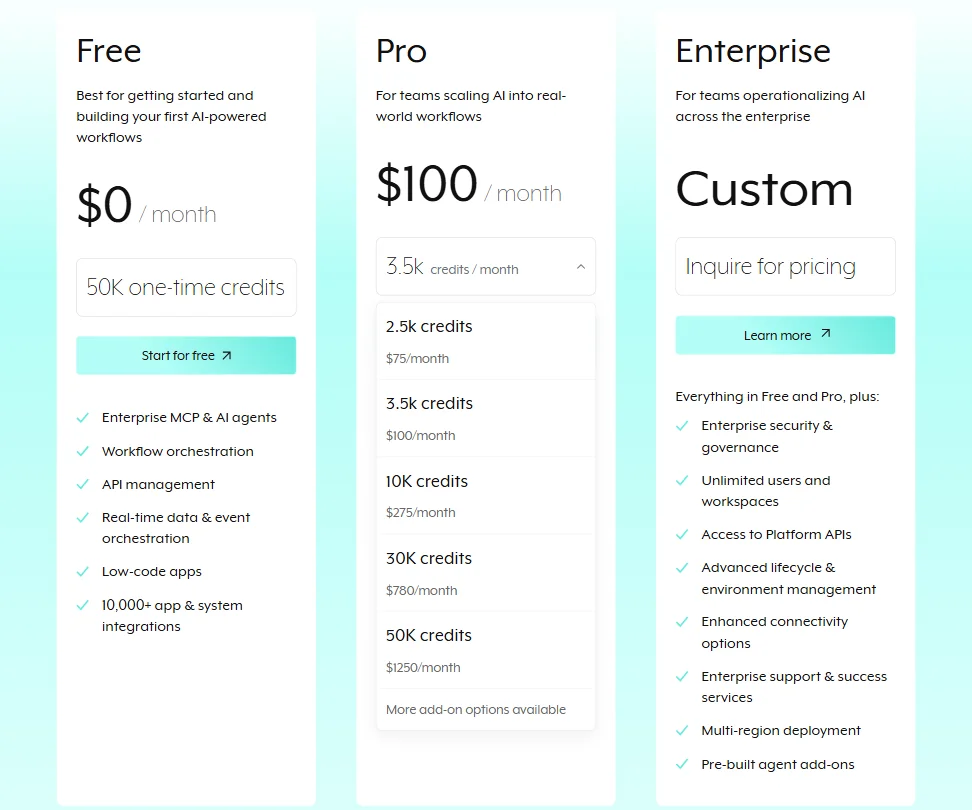
The pricing page lists three plans. Free at $0 per month with 50K one-time credits, Pro starting at an undisclosed rate for 2.5K credits and scaling to a custom quoted rate for 50K credits, and Enterprise at custom pricing with inquire-for-pricing as the only CTA. The Free tier includes Enterprise MCP and AI agents, workflow orchestration, and 10,000-plus app integrations. Pro adds credit volume. Enterprise adds unlimited users, platform API access, multi-region deployment, and pre-built agent add-ons, plus what Workato calls advanced lifecycle and environment management.
Fair. The Free tier is more generous on features than we expected. But the moment you need serious credit volume or enterprise governance, you're in custom-pricing territory with no floor published.
Reddit threads surface a recurring complaint that Workato is expensive, full stop. Users who'd moved from the Zapier tier often reported sticker shock. Users who'd come from MuleSoft sometimes described it as better value. That context matters. If your baseline is MuleSoft or Boomi, Workato looks reasonable. If your baseline is Zapier at the lower price points, the comparison is absurd because these are not the same product category.
Workato does not publish a general self-service refund policy, although limited refund provisions appear in its Terms of Service, covering unused prepaid fees after certain qualifying terminations or unresolved warranty failures. Not great for a platform at this price point, but not unusual for enterprise software either.
Pro plan credit tiers go up to 50K credits at a custom quoted rate, with more add-on options noted as available. Beyond that, Enterprise pricing requires a sales conversation. Same as everyone else without a call on the calendar.
Workato vs MuleSoft: Which Automation Platform Wins?
This is the comparison that matters most for Workato's actual market. Not Zapier. Not Make.
MuleSoft, owned by Salesforce, is the incumbent in large enterprise integration. Deep, powerful, and historically expensive to implement. It requires significant developer investment and professional services engagements that often cost more than the software. Its AI capabilities are newer and largely bolted onto an architecture that predates the current AI wave.
Workato was built after the cloud era was already underway, and the platform reflects that. Faster time to value is a consistent claim from reviewers who'd used both. The low-code builder lowers the barrier compared to MuleSoft's developer-first approach. And Workato's governance layer for AI agents is frankly more mature than what MuleSoft currently ships for that use case.
The place where MuleSoft still wins is deep enterprise API management at scale. Organizations with thousands of internal APIs and decades of integration debt sometimes find MuleSoft's architecture better suited to that specific problem. The legacy install base and consulting ecosystem around MuleSoft doesn't disappear overnight. That tracks.
Boomi is a closer comparison in the mid-market. Both are cloud-native, both offer low-code builders, both cover iPaaS well. Workato's AI governance layer gives it a meaningful edge for teams actively building agents. Boomi is more conservative on AI. Whether that remains a differentiator depends on how fast Boomi moves.
Microsoft Power Automate is in the conversation for Microsoft-heavy shops where the tooling decision is already half-made by the existing stack. Workato beats it on connector depth and governance architecture. Power Automate beats it on cost, since it's included in many Microsoft 365 plans. Different buying decision entirely.
Who Should Use Workato? (And Who Shouldn't)
Enterprise IT teams managing cross-system automation at real scale. That's the core fit. Organizations with Salesforce, SAP, Workday, and ServiceNow all talking to each other, compliance requirements that mean every agent action needs an audit trail, and a need to govern AI across multiple teams.
Operations teams in regulated industries. Financial services and healthcare especially, anywhere with external auditors. The data masking, residency controls, and RBAC aren't differentiators for a startup. They're table stakes for a bank.
Mid-market companies building toward enterprise complexity. Not yet at scale, but running out of what Zapier can handle. The jump is large, in cost and complexity. Worth it for teams that need it, brutal for teams that don't.
Small teams and individual builders. Not the fit. Pricing alone rules it out for most.
Developers who want maximum agent customization without governance overhead. They'd probably prefer something more flexible at the code layer. The governance is a feature to some and a constraint to others.
Workato Review Verdict
Serious platform. Serious automation problems. That's not faint praise. Most of what Workato claims about governed AI agent orchestration on a single platform is credible. The combination of enterprise iPaaS and a real governance layer for AI agents is genuinely differentiated from what MuleSoft, Boomi, and Zapier offer.
The pricing opacity is the biggest practical frustration, not because enterprise buyers can't handle custom pricing, but because "talk to sales" at every significant tier slows down every internal conversation. A published floor price wouldn't kill the deal structure. It would accelerate the sales cycle. We don't buy the argument that full opacity serves buyers here.
The learning curve is real and shouldn't be undersold. This platform rewards investment. Teams that go in expecting to be productive in a week on complex multi-agent workflows will be disappointed. Teams that treat it like an infrastructure project and invest in training will get returns the platform is capable of delivering.
The AI agent story is compelling and moving fast. Agent Studio, the AI Gateway with multi-model routing, the composable MCP server architecture. It's a lot of surface area to ship credibly. The fact that reviewers are actually deploying agents in production rather than just demoing them is meaningful. We've seen plenty of platforms where the agent capabilities exist on the website but not in real customer workflows.
Enterprise teams juggling multiple core business systems and actively trying to deploy AI agents with governance controls should get on the phone with sales and push for real numbers. Don't let the pricing opacity stop the evaluation. For everyone else, the platform is overkill and priced accordingly.
Frequently Asked Questions
Does Workato have a free plan?
A Free tier exists at $0 per month, with 50K one-time credits and access to core features including Enterprise MCP and AI agents, workflow orchestration, API management, and low-code apps. It's a one-time credit allocation, not a recurring monthly grant. If you need ongoing free usage beyond those initial credits, that's not what's on offer. The Pro plan starts at an undisclosed rate for 2.5K monthly credits, with higher credit tiers going up from there.
How does Workato handle AI agent governance?
The governance capabilities sit in what Workato calls the Control Plane. That covers RBAC across teams and workspaces, human-in-the-loop approval gates for consequential agent actions, data masking, and model access controls through the AI Gateway. The AI Gateway specifically handles which LLM models each team or agent can call, including routing across providers like OpenAI. Audit logs capture the decision chain throughout. It's the most fully developed governance architecture in this category, though edge case behavior deserves testing.






