We pulled vendor documentation, G2 and Capterra threads, Reddit discussions, and pricing pages across several weeks. We have not sat down with a Wrike account ourselves. What we have done is read through hundreds of user reports, cross-referenced feature claims against what customers actually say, and tried to figure out whether a tool founded in 2006 has genuinely kept up. The short answer is yes, mostly. The long answer takes a while.
What is Wrike?
Founded in 2006, headquartered in San Jose. In SaaS years, that's practically ancient, and longevity matters here. The product has had time to add layers that newer tools simply haven't shipped yet.
The space is crowded. Asana, Monday.com, ClickUp, Smartsheet, and Microsoft Project are all real competitors, and Wrike doesn't pretend otherwise. What they push instead is a claim about scale, roughly 30,000 organizations, complex cross-functional workflows, and AI built into the platform rather than bolted on afterward.
The core pitch is that Wrike handles the whole project lifecycle, from planning and resourcing through to reporting and what they frame as "learn and adapt." What that means practically is **Gantt charts, Kanban boards, request intake forms, and a growing layer of AI features** sitting across all of it. More on that below.
They've recently pushed something called Wrike Strategic Portfolio Management, connecting strategy to execution in one place. Whether that's genuinely differentiated or just good marketing is a fair question. We're not sure yet.
Wrike Features: Automation, AI Assistant & Workflow Capabilities

Start with automation, because that's where Wrike has real depth. No-code workflow automations show up across plans, not locked behind the enterprise tier. You can build repeatable triggers and actions without writing anything, and that came up consistently in our research. G2 reviewers in operations and marketing roles flagged this as one of the reasons they stayed.
The **Wrike Copilot** assistant is built directly into projects. It answers questions about your work, summarizes what's happening across tasks, and can hand off repeatable jobs to what Wrike calls AI agents. Those agents are positioned as doing real work in actual customer workflows, not just answering chat questions. We're somewhat skeptical of the framing. The category is early and most "AI agent" claims from any vendor deserve scrutiny. But the underlying capability, summarizing work, surfacing blockers, handling intake, seems credible based on what we read in user forums.
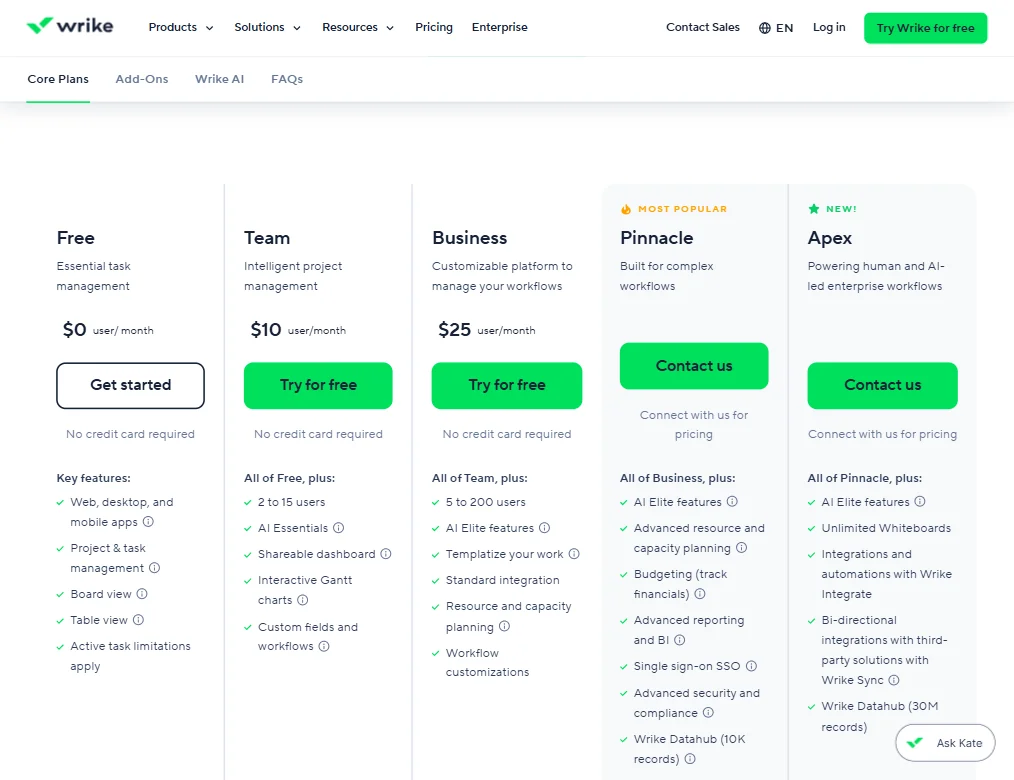
On the project management side, the feature set is genuinely complete. Resource planning and budget tracking sit alongside the standard views. Wrike Whiteboard handles visual collaboration. The Datahub feature connects external data into your workspace for reporting. On the Pinnacle plan that's 10K records, and on Apex it scales to 30M. That's a meaningful gap between the two tiers.
Honestly, that breadth is also the criticism. Dense, not confusing exactly, but layered in a way that requires real setup time before you get value from any of it.
Document creation lives inside tasks. Note-taking happens through comments and task descriptions. There's no standalone doc editor the way Notion has one, but the functionality covers the basics for most teams.
The mobile apps cover iOS and Android. Worth noting here: Wrike does have dedicated official documentation for offline work on both platforms. Users can access cached content, create or edit certain items offline, and sync changes after reconnecting. That's more than we expected, and it's a genuine differentiator for field teams.
Wrike AI Quality: How Smart and Useful Is the Assistant?
Wrike's AI runs on what they call the **Work Intelligence Graph**, a proprietary model trained on over 500 billion data points pulled from how teams actually work. That's a specific, testable claim, and it's the part of their AI story we find most credible.
Most AI assistants in project management tools are GPT wrappers with a coat of paint. Wrike Copilot might be partly that too. But the Intelligence Graph framing suggests contextual awareness about your specific workspace, not just generic language model output. When we cross-referenced their documentation with G2 reviews, users described AI insights that felt relevant to their actual projects rather than generic summaries. That tracks.
The AI agents angle is newer. Wrike positions these as handling repeatable tasks with accountability and governance built in. We read that as an enterprise-facing feature aimed at buyers who need audit trails and controls, not just speed.
What the AI doesn't do well, based on review patterns: it doesn't replace a meeting. It summarizes work status. There's no meeting transcription built in natively. For that you'd want something like Fathom AI Notetaker running alongside it. Different problems.
The MCP Server feature, which connects Wrike to external AI assistants, is interesting. It suggests Wrike is less interested in being the only AI in the stack and more interested in being the data layer. We think that's a smart positioning call, particularly for enterprise buyers who already have AI tooling they're not giving up.
Wrike Integrations: What Does It Connect To?
Four hundred integrations is a big number. The ones that matter for most teams are a shorter list. Slack and Microsoft 365 are there, and so is Google Drive.
Salesforce and Jira are supported, which matters for sales and engineering teams respectively. Adobe Creative Cloud is worth calling out specifically. Marketing teams show up consistently in Wrike's customer base, and that connection matters for creative workflows.
Zapier coverage means that **anything not on their native list can be reached indirectly**, which is the standard safety net at this tier. The Wrike API is fully documented, which matters for teams that need custom connections. The Pinnacle and Apex plans add Wrike Integrate and Wrike Sync for deeper automation and bi-directional third-party integrations, though both are contact-us pricing.
We went through the integrations page and found no obvious gaps relative to what the marketing claims. Fair, actually. That's rarer than you'd think at this price point.
Is Wrike Easy to Use?
Not really. Not at first.
This came up in almost every G2 and Capterra review we read that wasn't a five-star entry. The interface is powerful and also layered in a way that takes time. New users described feeling overwhelmed by the number of options before they'd set up a single project.
Wrike knows this. Their help infrastructure is extensive. There's a full Help Center, an active community forum, interactive training, and regular webinars. The onboarding materials are genuinely good from what we read.
That said, support access is tiered in ways worth understanding before you sign up. The Help Center chat starts with an AI bot and can escalate to a live agent, but **in-workspace live chat, the Help Center request form, and direct phone support** are restricted to Premium and Premium Support Plus packages. If you're on Team or Business and you get stuck, you're going to the Help Center or the community forum. That matters more for smaller teams than for enterprises with a dedicated ops contact.
The learning curve is the most consistent friction point in their review data. Capterra reviewers in SMB settings flagged this more than enterprise users, which makes sense. A 10-person team doesn't have an IT or ops person to set Wrike up properly. An enterprise team usually does.
Wrike Pricing: Is It Worth It vs Free Alternatives?

There is a free tier. It covers basic task management, board and table views. Active task limits apply, so it's not unlimited. It's a real tier, not a demo.
Paid plans start at **$10 per user per month on the Team plan**, supporting 2 to 15 users. Business runs $25 per user per month and opens up to 200 users. The Pinnacle and Apex tiers are both contact-us pricing, which we don't love. When two of your four paid tiers have no public number, that's friction for buyers who just want to compare.
Compared to the competition: Asana's comparable plan lands in the same range. ClickUp undercuts on price at smaller team sizes but carries its own complexity reputation. Monday's top-end pricing is similarly opaque.
The refund policy isn't publicly stated anywhere we could find. Not a dealbreaker, but worth asking before committing.
We're not going to call $25 per user per month cheap for a mid-tier plan. For larger teams getting real use from resource planning, budgeting, and the AI Elite features that unlock at Business, the math probably works. Small teams managing basic projects have cheaper options. ClickUp and Asana both offer more accessible entry points at that scale.
Wrike vs Asana: Which Productivity Tool Wins?
This comparison comes up constantly. Both tools have been around long enough to have real depth. The differences matter at the edges.
Asana tends to win with teams that want a cleaner interface and faster onboarding. Wrike tends to win with teams managing genuinely complex work, heavy reporting needs, or multiple concurrent cross-functional projects.
Wrike's resource planning and budgeting features are deeper than Asana's at equivalent plan tiers. That's a real advantage for project managers running large programs. Asana has its own AI features now, but the Work Intelligence Graph gives Wrike a more specific story around contextual AI, and it's a more convincing one based on what we read.
**Portfolio management is where Wrike pulls ahead most clearly.** The Strategic Portfolio Management feature is aimed directly at buyers who need to connect high-level strategy to individual tasks. Asana has portfolio views, but the depth isn't the same.
Where Asana wins: speed to value for new teams. Easier to set up, fewer decisions required on day one. Not a close call there.
Who Should Use Wrike? (And Who Shouldn't)
Enterprise project management teams. That's the core fit. Organizations running cross-functional programs with multiple stakeholders, complex dependencies, and reporting requirements that go beyond a simple dashboard.
Mid-size teams in marketing, operations, or professional services also show up heavily in Wrike's customer base. The creative workflow integrations make sense there, as does the request intake system, which is genuinely useful for teams fielding work from multiple internal clients.
Who shouldn't use it? Small teams. Honestly. A 5 or 10-person team is going to spend more time configuring Wrike than they'll save using it, at least in the first several months. The product rewards organizations that have someone who can actually set it up and maintain it.
Solo freelancers. Not the product.
Teams on a tight budget that just need tasks tracked. The $25 per user per month Business tier is hard to justify if you're not using the deeper features it unlocks, and the free tier's task limits will bite you faster than you'd expect.
Wrike Review Verdict
Wrike is a serious tool. It earns that.
Eighteen years in market and 30,000 organizations later, the product has genuine depth that newer alternatives are still building toward. The automation capabilities are real. The AI story, particularly the Work Intelligence Graph and the agent framework, is more credible than most comparable vendor claims we've read. The integration coverage is wide and the offline mobile capability is better documented than we expected going in.
**The weak spots are pricing transparency and the initial learning curve**, and neither is minor. When your top two paid tiers are contact-us pricing and your refund policy isn't published, that's friction that costs them buyers. When reviews consistently describe onboarding as steep, that's a retention risk for teams without dedicated setup resources. And when live chat support requires a Premium package, small teams on the base plans are largely on their own.
The free tier is usable but limited. The 14-day trial is a reasonable window to test the core workflows. We'd suggest doing exactly that before committing to the Business plan.
For the right organization, this is a strong pick. Enterprise teams and complex project environments. That's not a criticism. That's just what the product is.
Frequently Asked Questions
Does Wrike have a free plan?
Yes. The free tier includes basic task and project management with board and table views. Active task limits apply, so you'll hit a ceiling with larger workloads. It's a real working tier, but it's designed more as an entry point than a long-term option for growing teams.
How does Wrike's AI work compared to other project management tools?
Wrike's AI runs on the Work Intelligence Graph, trained on over 500 billion data points from real work patterns. That's a more specific foundation than most competitors are claiming. Wrike Copilot handles summaries and questions within your workspace. The AI agents handle repeatable tasks with governance built in, which matters for enterprise buyers who need accountability. Most other tools in this space are adding AI as a feature layer. Wrike is pitching it as part of the underlying data model, which is a different claim and a more interesting one.
Is Wrike better than ClickUp?
Depends on what you're optimizing for. Wrike has stronger resource planning and portfolio management at the mid and enterprise tiers. ClickUp is often cheaper at smaller team sizes and has a broad feature surface at the base level. The trade-off is that ClickUp carries its own complexity reputation, and the two tools are more similar in that regard than their marketing would suggest. In our research, teams managing large programs with real reporting needs tended to favor Wrike. Teams that wanted flexibility and lower cost at smaller scale leaned ClickUp. Neither is universally better.