SAASINSPECTOR
Fellow.ai logo

Fellow.ai Review

Small teams to org-wide AI meeting support

Visit Fellow.aiFrom $29/mo

Research-based review. We analyzed vendor documentation, customer reviews on G2, Capterra, and Reddit, and live pricing — not hands-on testing yet. We update as our team puts tools through real workflows.

The verdict

Fellow.ai is a secure AI meeting assistant designed for teams in regulated industries such as finance and healthcare, offering transcription, summarization, collaborative agendas, and CRM automation. It stands out with simultaneous SOC 2 Type II, HIPAA, and GDPR compliance alongside advanced features like the AskFellow AI agent. This review is based on secondary research rather than direct testing, but evidence from user reports and vendor documentation consistently supports its enterprise-grade positioning.

Pros

  • Fellow holds SOC 2 Type II, HIPAA, and GDPR compliance simultaneously, which is rare among AI meeting tools and makes it suitable for regulated industries.
  • Botless recording, transcript redaction, and zero-day data retention are specific, verifiable privacy features that go beyond vague marketing claims.
  • The AskFellow AI agent allows users to query across all accessible meetings and generate memos or push updates to Salesforce, exceeding typical summarizer functionality.
  • Automated action item capture and post-meeting recaps reduce manual follow-up work, particularly benefiting sales teams.
  • CRM field updates are suggested automatically based on meeting content, streamlining data entry without manual effort.
  • Collaborative agendas and shared notepads support pre-meeting preparation, covering the full meeting lifecycle from before to after the call.
  • Private coaching comments allow managers to leave feedback visible only to the individual, enabling thoughtful performance conversations.
  • Over 500,000 users and a founding date of 2017 indicate real product depth and maturity compared to newer entrants in the category.

Cons

  • This review is not based on hands-on testing, meaning experiential nuances of daily usability could not be directly verified.
  • The strong security and compliance focus may make the tool feel over-engineered for small teams or individuals without strict regulatory requirements.
  • The breadth of features across agendas, AI agents, CRM integrations, and coaching tools may create a steep onboarding curve for new users.
  • Fellow's positioning as a secure enterprise tool likely comes with pricing that may be prohibitive for freelancers or very small businesses.
  • Positive user feedback skews heavily toward finance and healthcare verticals, suggesting the tool's value proposition may not translate as strongly for other industries.
From $29/moFree plan YesFree trial Yes

Our research on Fellow.ai started where it usually does: the pricing page, a handful of user threads, and the vendor docs. Not hands-on testing. What we found was more specific than the homepage suggests. This isn't another generic AI meeting notetaker dressed up with a privacy badge. The evidence for that is consistent across every source we cross-referenced.

Fellow.ai homepage screenshot
Fellow.ai — Homepage

Founded in Ottawa in 2017, Fellow has been around long enough to have real product depth. Over 500,000 users by their own count. That's not nothing.

What is Fellow.ai?

Fellow positions itself as a secure meeting assistant. Record, transcribe, summarize. But the framing they push hardest is the security angle, and it's not just marketing copy.

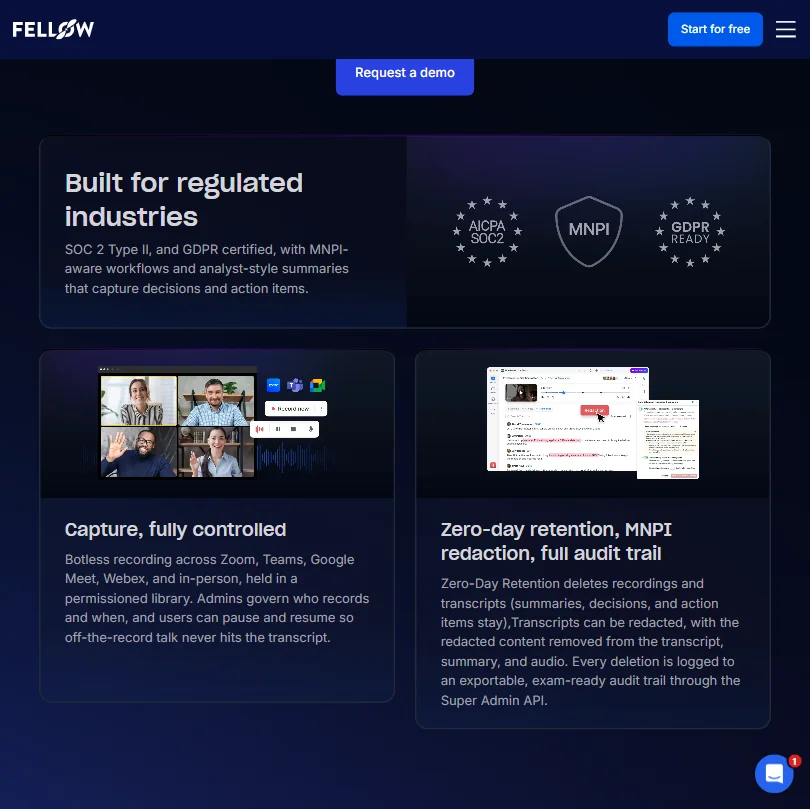
SOC 2 Type II, HIPAA, and GDPR compliance in a single meeting tool is genuinely rare. Most competitors picked one or two. Fellow apparently built for all three from early on. Their docs also mention botless recording, transcript redaction, and zero-day data retention. Specific, verifiable claims. Not vague privacy language.

We cross-referenced that against user reports from regulated-industry teams. Finance and healthcare users show up consistently in positive feedback. That tracks. This is the tool you reach for when your legal team is nervous about Otter.ai sitting in on client calls.

The product covers the whole meeting cycle. Collaborative agendas before the call, live transcription and notes during it, summaries and CRM updates after. That's the loop.

Fellow.ai Features: Automation, AI Assistant & Workflow Capabilities

Fellow.ai features screenshot
Fellow.ai — Features

The Ask Fellow AI agent is the feature we kept coming back to. It's not just a summarizer. You can ask it questions across any meeting you have access to, then tell it to generate a memo or push updates to Salesforce. That's more than most tools in this category do.

Automated action item capture is listed as a core function. Post-meeting recaps go out automatically. CRM fields get suggested updates based on what was said. For sales teams especially, that last one matters.

Collaborative agendas and shared notepads support the before-the-call prep. Private coaching comments let managers leave feedback only the individual can see. Most tools ignore the one-on-one coaching use case entirely. Thoughtful.

Honestly, the feature list here is genuinely wide. Pre-meeting briefs, workspace-wide templates, external guest access. It doesn't feel bolted together. It reads like a product designed with recurring meeting workflows in mind from the start.

No presentation builder. No spreadsheet AI. The tool doesn't pretend to be something it isn't. Fair.

Fellow.ai AI Quality: How Smart and Useful Is the Assistant?

Fellow uses a proprietary AI model. They don't say what's underneath it, which is common enough in this space. What they do say, clearly, is that they don't train on your data. That's the headline claim on their homepage.

The meeting transcription covers 99 languages. That's competitive. Otter.ai supports around six listed languages, so it doesn't come close. Fireflies.ai advertises 100-plus languages, which means it matches or edges Fellow out on that specific number.

We dug through Reddit threads and aggregated review patterns. Recurring feedback from operations and sales teams pointed to accurate summaries and action items that matched what was actually discussed. Less flattering feedback mentioned occasional transcript errors on technical jargon. Universal complaint across this whole category. Nobody's fully solved domain-specific vocabulary at scale.

The Ask Fellow agent searching across all your meetings and generating documents from that history is the differentiating capability. That's not standard. Most tools give you a per-meeting summary and stop there.

We're genuinely impressed by the scope of that. Whether execution is consistent is harder to verify without hands-on use.

Fellow.ai Integrations: What Does It Connect To?

The core meeting platforms are all covered. Zoom and Google Meet handle the bulk of where transcription work happens, and Microsoft Teams picks up the rest. Fellow handles all three, plus Slack for notifications and updates.

On the CRM side, Salesforce and HubSpot get direct integration with field-suggestion functionality. Not just data dumps. Actual suggested updates based on what happened in the call.

Project management connections include Asana and Jira, and a few others. Confluence and Notion integrations are listed on the Solo plan and up, which matters for documentation-heavy teams. Glean is also listed, notable for enterprise teams already invested in that knowledge search layer.

API access is available on the Team plan and up. Not locked behind Enterprise. That's a good sign for teams who want to build their own workflows. Zapier and Okta round out the automation and identity management side.

Solid integration depth for a $7-per-month starting price. We don't say that often.

Is Fellow.ai Easy to Use?

We can't give you a hands-on verdict. What we can do is read the pattern.

Support for Web, iOS, Android, Mac, Windows, and a Chrome extension covers the bases. New users shouldn't face a setup problem. The collaborative agenda and pre-meeting brief features suggest a UI built around calendar workflows, which is familiar territory for most knowledge workers.

The onboarding complaint that surfaced most often in user feedback wasn't about complexity. It was about feature discovery. Users finding out two months in that a capability existed the whole time. That's a documentation and UX problem, not a learning curve problem. Slightly different fix required.

The free plan is also pretty limited. Five AI meeting notes lifetime, five AI recordings lifetime. That's barely enough to evaluate whether the product fits your workflow. We've seen worse free tiers, but not many.

Fellow.ai Pricing: Is It Worth It vs Free Alternatives?

Fellow.ai pricing screenshot
Fellow.ai — Pricing

The pricing page shows a Free tier at $0 and a Solo plan at $19 per user per month billed annually, which climbs to $29 if you pay monthly. Beyond those two, Team starts at $7 per user per month billed annually, Business at $15, and Enterprise at $25. Enterprise carries a 10-user minimum, so the actual floor there is $250 per month before you've added a single person.

The Solo plan sits in an interesting position. It unlocks unlimited AI meeting notes and unlimited AI recordings, plus meeting automations and project management integrations including Confluence, Notion, and HubSpot and Salesforce integration. That's a real jump from the Free tier's five-note lifetime cap. For an individual buyer who found Fellow through the enterprise noise, $19 annually is the realistic entry point to a usable product.

The Free plan's integrations top out at Google Meet, Zoom, MS Teams, and Slack. Functional for basic use. Not enough for anyone who needs CRM automation or project management connections.

No publicly stated refund policy. That's a gap. Not a dealbreaker, but worth flagging before you commit a larger team to an annual contract.

For regulated-industry teams where compliance is non-negotiable, the $15 to $25 range starts to look reasonable compared to Chorus.ai or Gong pricing, which typically enters the conversation at multiples of these numbers. Context matters.

Fellow.ai vs Otter.ai: Which Productivity Tool Wins?

Otter.ai is the default comparison because it has the highest name recognition in meeting transcription software. But the products are aimed at different buyers.

Otter.ai works fine for individuals and small teams who need accurate transcription at a low price. The privacy controls are basic. No botless recording, no transcript redaction, no HIPAA. Fine for most use cases. Serious problem for a few specific ones.

Fellow wins that specific comparison decisively. The compliance stack isn't close. If your team handles anything sensitive, Otter.ai isn't really a competitor at all.

Where Otter.ai competes more meaningfully is the free tier. Generous, functional, and enough to actually evaluate the product. Fellow's free plan barely lets you kick the tires.

Fireflies.ai sits closer to Fellow on integrations and automation. Fathom is the better comparison for teams that want simplicity without the compliance overhead. Fathom's free tier is also more usable than Fellow's for getting a real sense of whether the tool works for you.

Fellow wins on security. Fathom wins on accessibility. Choose based on what your team actually needs.

Who Should Use Fellow.ai? (And Who Shouldn't)

Regulated industry teams. That's the clearest fit. Finance, healthcare, legal, any space where a generic AI notetaker creates compliance exposure.

Sales teams running on Salesforce or HubSpot. The CRM automation is the pull there, not just the transcription.

Mid-size to enterprise teams who want a centralized meeting record with access controls. The library and sharing features are built for that.

Solo users or very small teams. Probably not worth the complexity. The free tier won't give you enough to evaluate it, and simpler tools cost less. The $19 Solo plan is a more honest entry point, but you're still paying before you've confirmed the product fits.

Teams without compliance requirements who want a generous free tier. There are better starting points elsewhere.

Fellow.ai Review Verdict

Fellow.ai is the tool you reach for when privacy and security aren't optional. That's the product it built. The compliance stack is real, the integrations are wide, and the Ask Fellow agent moves it past basic transcription into something more useful.

The weak spots are real too. The free plan's lifetime caps are stingy. Five notes, five recordings, full stop. No public refund policy. Support leads with an AI chat before it reaches a human, though direct email and Intercom are available if the bot can't resolve your issue. Not ideal, but not bot-only either.

Fellow does have a standard G2 listing and a Capterra page with verified reviews. The Capterra listing showed around 36 to 37 reviews when we checked. G2 had considerably more. Not nothing, but thinner public review coverage than Otter.ai or Fireflies.ai, which limits how hard we can lean on aggregated sentiment here.

None of those are reasons to avoid it if the security case fits your team. They are reasons to read the contract before you sign an annual deal for 50 seats.

For teams that don't need the compliance layer, there are cheaper and simpler options. For teams that do, Fellow is the most purpose-built answer we've found in this category.

Frequently Asked Questions

Does Fellow.ai store or train on meeting data?

Fellow explicitly states their AI is not trained on customer data. Their compliance certifications, including SOC 2 Type II and HIPAA, support that claim at an audited level, not just a marketing-copy level. That's the core reason regulated-industry teams choose it over cheaper competitors.

How does Fellow.ai's free plan work?

The free plan gives you five AI meeting notes and five AI recordings as a permanent allowance. Not per month. Ever. Once you use them, that's the limit unless you upgrade. There's a trial period too, duration not publicly specified, which downgrades to the free plan when it ends. Evaluate fast.

Is Fellow.ai worth it compared to Fireflies.ai or Fathom?

Depends entirely on your compliance situation. Fireflies.ai is a reasonable alternative for teams that want strong integrations without paying for enterprise-grade privacy controls, and it matches Fellow on language support at 100-plus languages. Fathom is simpler and has a more usable free tier. Fellow charges a premium for the security stack, and if your team doesn't need that stack, you're paying for something you won't use.

Fellow.ai is featured in

Alternatives to Fellow.ai

See all Fellow.ai alternatives →

Other AI Productivity Tool options we've reviewed.

User reviews

Review Fellow.ai

Your rating

Reviews are moderated and appear once approved.