Canva is a browser-based design platform built around a template canvas, with an AI suite layered on top for generating and editing images, video and copy. Whether it fits depends on whether you want breadth across social graphics, presentations, video, print and brand assets in one tool, rather than precise vector control or an interface design workflow.

What is Canva?
Canva is an Australian company with its registered legal address in Sydney. It runs in the browser and as a desktop app for Windows and Mac, alongside mobile apps for iOS and Android, so the same project can move between a laptop and a phone without a separate export step.
A Canva Connect API is published for teams that want to bring Canva's editor into their own products, and a separate Apps SDK lets developers build tools that run inside the editor itself. Canva does not name the specific AI models behind its image generator; it says only that it updates them as improved models become available.
What you can make with Canva
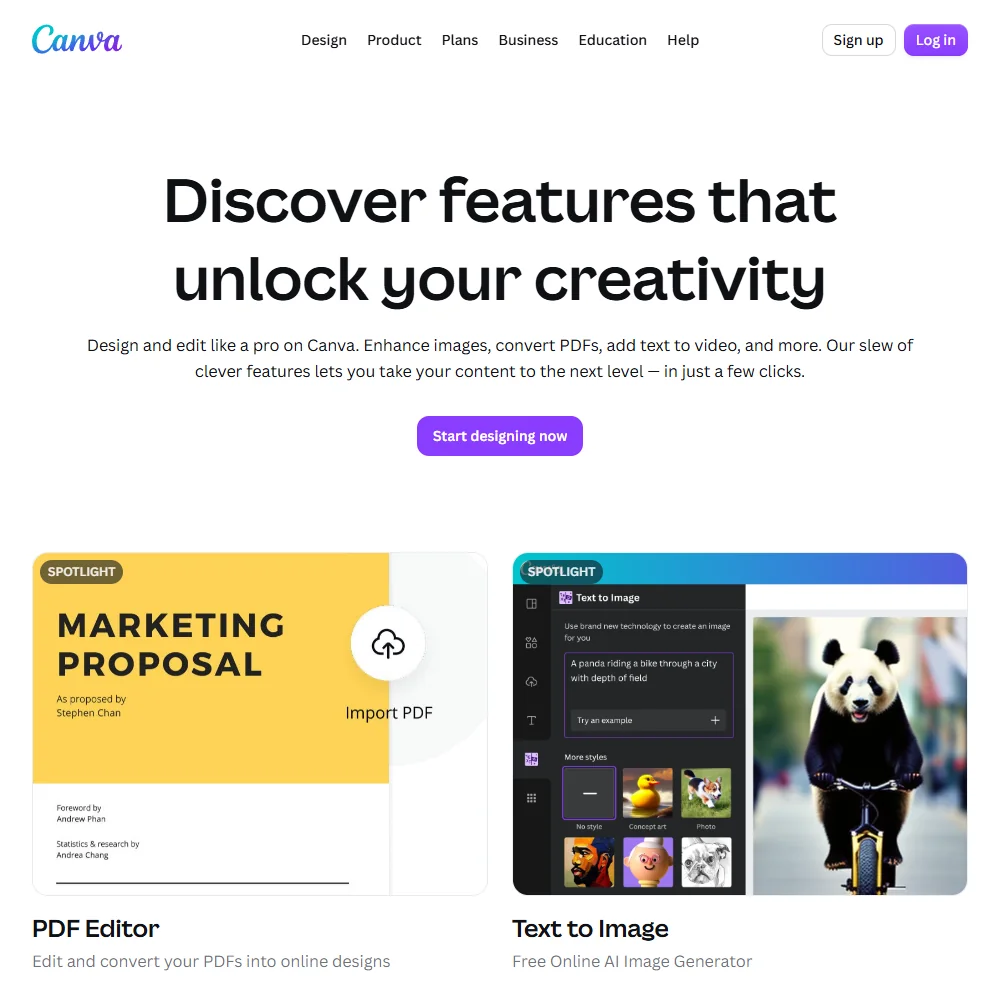
The free plan alone opens with over 1,000 design types, more than 1.6 million templates and more than 4.7 million photos, videos, graphics and audio clips to build from. Magic Design turns a written prompt into a starting design, and the same prompt-to-design approach extends to presentations and video, not just single images.
The AI Image Generator creates an image from a prompt directly on the page, in a style and aspect ratio you choose. Magic Eraser removes unwanted objects from a photo, Magic Edit adds to or replaces part of an image from a short written prompt, and Magic Expand extends an image beyond its original edges. One of the style options offered for generated images is labelled Vector, but it produces a raster picture with a vector-like look rather than an editable vector file you could open in a path-based editor.
Beyond still images, Canva includes a drag-and-drop video editor, a mockup generator for presenting products on packaging or screens, and Canva Print, its own service for turning a finished design into a physical order. A content planner on the Pro plan schedules social posts once a design is ready to publish.
Working with other people
A Brand Kit stores colours for reuse across every design in an account. The free plan includes one kit limited to three colours, Pro raises that to 5 kits, and Business raises it again to 100 kits with an approvals step added on top, useful once more than one person is signing off on finished work. Canva's Connect APIs describe a native comments feature for leaving feedback directly on a design.
An apps marketplace connects Canva to other services, including Google Drive for accessing files stored there, Brandfetch for pulling in brand logos, a Figma to Canva export, YouTube video embeds, an Instagram publishing flow and Google Maps. Between the API, the apps marketplace and the five supported platforms, Canva is built to sit inside a wider set of tools rather than stand entirely alone.
Canva pricing: what each plan gives
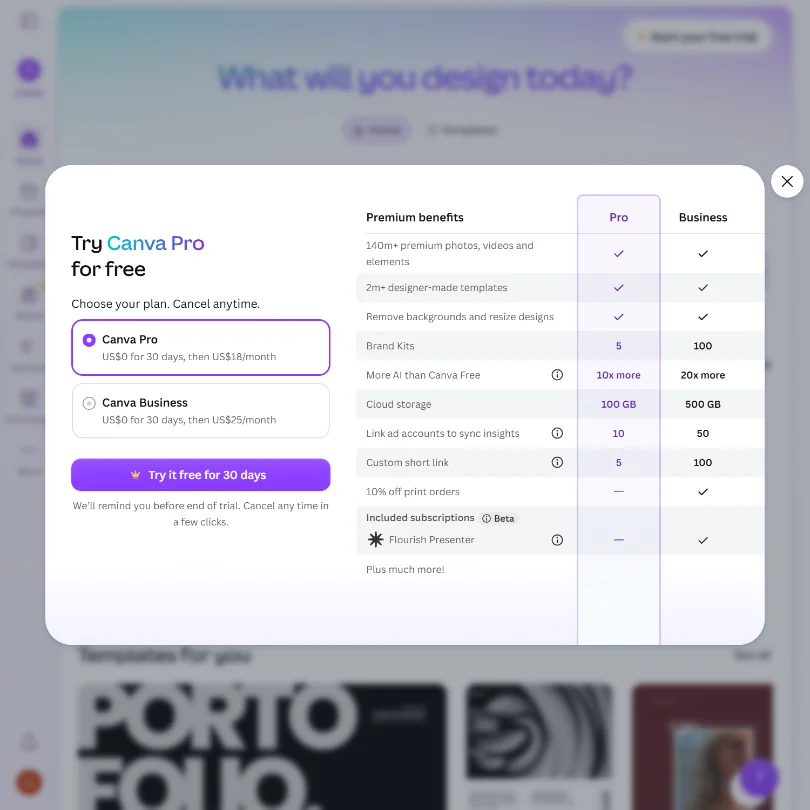
Free gives the full drag-and-drop editor, the template and stock library described above, one three-colour Brand Kit, access to Affinity, 5GB of cloud storage and up to 20 standard or premium AI uses.
Pro costs $18 a month for one person, or $12 a month billed yearly. It describes its AI allowance as roughly 10 times the Free plan's usage rather than a flat published number, and a separately priced AI Pass add-on is available for anyone who needs more than that. Pro also lifts storage, template access and the Brand Kit count.
Business costs $25 a month per person, or $20.83 a month billed yearly. It adds up to 100 Brand Kits with approvals, a larger premium stock library of more than 141 million photos, videos, graphics and audio clips against the free plan's 4.7 million, and a 10% discount on Canva Print orders, where Canva Print is offered. Enterprise pricing is not published and requires talking to Canva directly. Both Pro and Business list a free trial on the pricing page, though how long it runs is not stated there.
Privacy and support
Canva's privacy policy says it uses uploaded content to train its algorithms, models and AI products, and general accounts can turn this off from their own privacy settings. Education accounts get a stronger guarantee: Canva states outright that it will not use Education accounts' content for AI training at all, with no opt-out needed.
Under Canva's AI product terms, you keep ownership of what you upload and of what the AI produces from it, and you may use that output for any lawful purpose. Canva holds SOC 2 and SOC 3 reports alongside ISO 27001 and PCI DSS certification, states it helps accounts meet GDPR obligations, and offers single sign-on and multi-factor authentication options for individual and enterprise accounts.
Support runs through a help center and an account recovery request form, with a community forum available for peer discussion and feature requests.
Who Canva suits
Canva suits anyone who wants one tool for social graphics, presentations, video, print and brand assets, backed by a free plan that already carries a large template and stock library. Small teams that need a shared Brand Kit and a lightweight approval step will find that covered from the Business plan up, and the built-in print service removes a separate vendor for anyone ordering physical materials.
It suits less well anyone who needs a genuinely editable vector output, since the Vector style option only changes how a generated image looks, not its underlying file structure. Anyone concerned about their uploads training Canva's models should check the opt-out in privacy settings before working with sensitive material, since training is on by default outside Education accounts.
How Canva compares
Canva scores 7.8 out of 10 among the AI graphic design tools we rate. These two do the same job and are the closest to it, compared on what each vendor publishes.
Picsart
Picsart's cheapest paid plan is $15 a month against Canva's $18, and both include a free tier. Canva includes mockup tools for products and print, which Picsart does not, though both let you order printed products. Canva exports to 4 file formats against Picsart's 2, and Canva lists a comments and approval workflow. Both support single sign-on and include AI image editing, video tools and stock photos.
Pick Picsart if you don't need mockup tools and want the lower price.
Pick Canva if you want mockups for products and print built in.
Kittl
Kittl can generate editable vectors from a prompt and includes a vector editor; Canva's AI generator does not produce an editable vector file. Canva runs on 5 platforms against Kittl's web-only editor, and Canva has single sign-on and publishes directly to social, which Kittl does not. Canva has a public API; Kittl connects to AI agents through MCP instead. Both offer a free plan, though Kittl's free designs are for personal use only until you upgrade, and both include brand kits and stock content.
Pick Kittl if you need real vector output and don't mind working from the browser.
Pick Canva if you want single sign-on, social publishing and apps beyond the browser.
Frequently Asked Questions
Is Canva free to use?
Yes. The free plan includes the drag-and-drop editor, over 1,000 design types, more than 1.6 million templates, more than 4.7 million photos, videos, graphics and audio clips, one three-colour Brand Kit, access to Affinity, 5GB of storage and up to 20 standard or premium AI uses.
What does Canva cost?
Pro is $18 a month for one person, or $12 a month billed yearly. Business is $25 a month per person, or $20.83 a month billed yearly. Enterprise pricing is not published and is arranged directly with Canva.
Does the free plan really include Affinity?
Yes, Canva lists access to Affinity as part of what the free plan includes, alongside the standard editor and template library, with no separate charge mentioned for it.
Does Canva train its AI on what I upload?
By default, yes, for general accounts. Canva's privacy policy states it uses uploaded content to train its algorithms and AI models, and you can turn this off yourself in your account's privacy settings. Education accounts are the exception, since Canva states it will not use their content for AI training at all.