The first thing you notice, digging through the NotebookLM documentation and the review threads, is how consistent the reaction is. Not enthusiastic exactly. More like quiet surprise that it actually works. We cross-referenced Reddit posts, Product Hunt comments, and whatever Capterra and G2 data surfaces publicly, and the picture that came back was specific enough to be useful.

NotebookLM launched out of Google in 2023. It's been moving fast since. Google added NotebookLM Plus to Google One AI Premium in February 2025. That subscription was later renamed Google AI Pro. Google is clearly treating this as something more than an experiment, and the pricing structure has gotten complicated enough that it warrants its own section.
What is Google NotebookLM?
You bring the sources. NotebookLM reads them. You ask questions, and it answers using only what you gave it, with citations pointing back to the exact passage. That constraint is the whole product.
Powered by Google Gemini, which matters because Gemini's document handling is legitimately capable. You can feed it PDFs, Google Docs, audio files, video files, URLs, and plain text. The free tier handles up to 50 sources per notebook. Ultra supports 500 sources on the 20 TB plan and 600 on the top 30 TB plan. That's a real ceiling for serious document work.
The feature that gets the most attention is Audio Overviews. Two AI voices discuss your source material in podcast format. It sounds gimmicky. It isn't, based on what we kept seeing in user threads. Students running through dense academic papers, researchers clearing a backlog of reports. The reactions were consistently warmer than we expected going in.
Video Overviews arrived more recently, same concept in visual format with AI narration. Flashcards, study guides, and slide generation are also present. The slide and infographic output feels like NotebookLM pushing slightly past its core identity, and we'll see how that develops. For now the document Q&A is still the thing people are actually using.
Google NotebookLM Features: Search, Synthesis & Research Capabilities
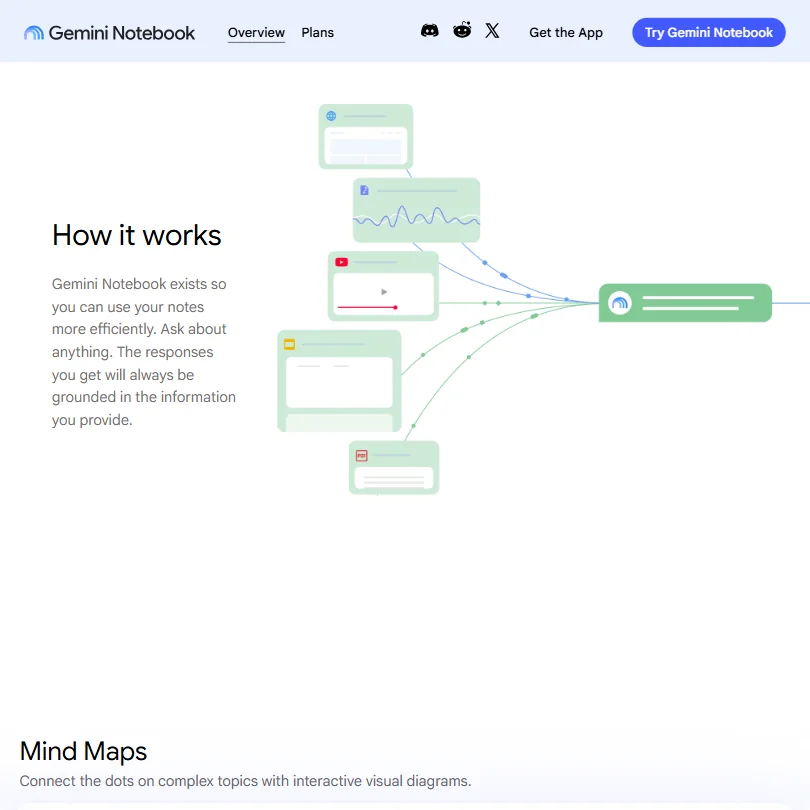
The Q&A loop is simple. Upload sources, ask a question, get a grounded answer with inline citations, click the citation, land on the relevant passage. That's it. It works.
Synthesis across multiple documents is where most AI tools fall apart. NotebookLM handles it better than competitors we cross-referenced, including Notion AI and standard ChatGPT. The free plan's 50-source limit covers most research projects. The Google AI Pro plan, at $179.99 per year on the current annual pricing, raises that to 300 sources per notebook. Serious number.
Source Discovery and Deep Research are the newer additions, and they represent a meaningful shift. The original product was fully closed to the web. These features let NotebookLM pull in external content. Grounding still applies to whatever ends up in the notebook, so the citation behavior holds, but we'd treat those features with more caution than the core Q&A until there's more user data.
Mind Maps let you visualize topic connections across sources. We saw mixed reactions in Reddit threads. Useful for some, cluttered fast for others. Fair. Visual organization tools live or die on implementation, and the reviews weren't uniform.
Mobile apps for iOS and Android are a relatively recent addition. App store reactions leaned positive for basic use. Researchers doing heavy work still seemed to default to the web interface, which tracks.
Google NotebookLM Research Quality: How Accurate and Trustworthy Is It?
The citation model is doing real work. Every response links to the source passage it draws from. You're not trusting the AI. You're verifying it.
The most common complaint across user reports wasn't inaccuracy within sources. It was the tool occasionally flattening complex arguments or missing nuance in synthesis. That's different from hallucination. Hallucination risk is dramatically lower here than with general AI tools, because the model works from what you uploaded rather than reaching into its training data. ChatGPT doesn't constrain itself to your documents by default. No real comparison needed on this specific dimension.
Audio and video source processing is where things get trickier. Users uploading dense technical video have reported that transcription quality affects answer quality downstream. Bad source in, imprecise output out. Expected behavior, not a flaw, but worth knowing before you feed it a two-hour conference recording and expect precision.
Be careful with the Deep Research and Source Discovery features in their current form. The documentation on how rigorously external sources get grounded is thin. Wait for more user data before relying on those features for anything high-stakes.
Google NotebookLM Source Coverage: What Does It Actually Search?
PDFs are the most common use case. Google Docs import directly. URLs get scraped. Audio and video files get transcribed and processed.
YouTube videos can feed into a notebook, which means conference talks and interviews sit alongside PDFs. Few tools do that as cleanly. The audio ingestion pipeline is one of the more practical differentiators relative to something like Elicit, which is built around academic literature rather than mixed-format source sets.
For academic research, the limitations get real fast. No Zotero integration. No direct connection to academic databases. You're downloading papers and uploading them manually. Researchers who've used Elicit's direct literature search will feel that gap immediately. Source Discovery helps at the margins, but it's not a replacement.
No official NotebookLM browser extension either. Google doesn't document one, though several third-party Chrome extensions exist. If you're reading something online and want to add it to a notebook, you're copying a URL or downloading a file. Not a dealbreaker, but unnecessary friction.
Is Google NotebookLM Easy to Use for Researchers and Professionals?
Honestly, yes. The notebook metaphor is intuitive, the learning curve is minimal, and the interface hasn't become cluttered despite a significant feature expansion in the last year. Audio Overviews, Video Overviews, Mind Maps, flashcards, slide generation. A lot of features, and they're organized well enough that casual users aren't confronted by everything at once.
The free tier is where most users start, and Google hasn't paywalled the core experience. 50 sources per notebook, full Audio Overview access, citations, Q&A. That's a real choice, and it's the reason NotebookLM has reached millions of users without much traditional marketing.
Professionals using it for knowledge work have flagged one consistent friction point across Reddit threads: getting output into other tools is harder than it should be. You can export to Google Docs. You can generate Google Slides. That's the integration story. No Notion connection. Google publicly documents a preview API for Gemini Notebook Enterprise, but not a general consumer API. For users whose workflows sit outside the Google ecosystem, that's a genuine wall.
Google NotebookLM Pricing: Is It Worth It vs Free Alternatives?

Free is the starting point. Not a stripped-down tier designed to frustrate you into upgrading. The free plan is substantively usable at 50 sources per notebook.
The current paid structure, based on the pricing page, runs three tiers. Google AI Plus comes in at $44.99 per year for the first year, $49.99 per year after, and includes 400 GB of storage. Google AI Pro costs $179.99 per year for the first year, $199.99 per year after, and includes 5 TB of storage with 300 sources per notebook. NotebookLM Plus was included in the former $19.99 AI Premium plan in 2025, and under the current structure Google AI Pro costs $19.99 per month and provides Gemini Notebook Pro access. Worth tracking, because the naming has changed enough to create confusion in older reviews.
Google AI Ultra is a different situation. Currently $99.99 per month, monthly billing only, and it bundles Gemini Notebook Ultra with 20 TB of storage and 500 sources per notebook. Google also has a higher tier above that. Gemini Notebook Ultra is bundled with Google AI Ultra rather than sold separately, and the top configuration runs $200 per month with 30 TB storage and 600 sources per notebook.
That's a lot. For most users, irrelevant. For organizations running large-scale document analysis, the source ceiling might justify it.
Enterprise goes through Google Workspace and Google Cloud. Custom pricing, nothing public. We dug. Couldn't find specifics.
Relative to competitors: Perplexity Pro runs $20 per month for search-focused research. Notion AI is included in Notion Business and Enterprise, with Business starting at roughly $20 per member monthly on annual billing. NotebookLM at $0 for real functionality is hard to argue with on price alone.
Google NotebookLM vs Notion AI: Which AI Research Tool Is Better?
Different tools. Not really a head-to-head.
Notion AI is a writing and knowledge management assistant. It lives inside your existing Notion workspace, helps you write, summarizes pages, generates content from what's already there. It doesn't ground responses in citations. It has no Audio Overview equivalent. It wasn't built for research synthesis.
The citation-grounded Q&A is NotebookLM's differentiator, and Notion AI simply doesn't have an equivalent. If your primary need is asking questions across a document set and getting verifiable answers, this comparison isn't close.
Where Notion AI has the edge is workflow integration. If your team already lives in Notion, the AI features are right there. NotebookLM requires manual source management and sits outside most existing workflows. That friction accumulates.
The comparison to Perplexity is more interesting. Perplexity searches the live web and returns cited answers from internet sources. NotebookLM searches only your uploads. One is for discovering new information. The other is for going deep on information you already have. Genuinely complementary for most users, not competitive.
Against Elicit specifically, NotebookLM doesn't have native academic database access. Elicit is built for scientific literature review in a way NotebookLM isn't trying to replicate. Different problems.
Who Should Use Google NotebookLM? (And Who Shouldn't)
Students doing research-heavy coursework. Clearest fit. Upload course readings, lecture notes, reference papers, then run Q&A across all of them. The Audio Overview feature alone changes how review sessions work, and the free tier covers everything they'd need.
Knowledge workers synthesizing reports, contracts, or internal documentation. The citation grounding means output is trustworthy enough to act on. That's more than most AI tools offer.
Researchers who've already gathered their sources. NotebookLM is excellent at working through what you have. Not great at helping you figure out what you should be looking for.
Academic researchers doing systematic literature review. Not the fit. No database integration, no Zotero connection, painful at scale. Look at Elicit for that workflow.
Teams embedded in non-Google tools. The integration story is thin, the consumer API isn't publicly documented, and NotebookLM will feel isolated from anything outside the Google ecosystem.
Google NotebookLM Review Verdict
Genuinely good tool. Not a hedged statement. It does what it promises, the free tier is real, and the citation model works. Those three things together are rarer than they should be in this category.
The Audio Overviews are the unexpected standout, and we went in skeptical of a podcast-format feature. The user reaction data changed our read on it. It's a different way to process dense material, and for the right user it's faster than reading. We don't say that lightly.
The gaps are real. No consumer API means you can't build around it. No official browser extension adds friction. No academic database integration creates a wall for systematic review workflows. Enterprise pricing is opaque.
None of those are dealbreakers for the core audience. Students and knowledge workers who need to move through a pile of documents get genuine value here, for free, without fighting the tool. The paid tiers, from Google AI Plus at $44.99 per year up through Ultra, add capacity more than capability. That's a reasonable model.
NotebookLM is a closed-source research assistant. Not a general-purpose AI, not an academic search engine. Stay inside that definition and it holds up well. We'd recommend it for the right use case without much hesitation.
Frequently Asked Questions
Is Google NotebookLM free to use?
Yes, and the free tier is substantive. You get the core Q&A, Audio Overviews, citations, and up to 50 sources per notebook at no cost. The paid upgrade under the current structure is Gemini Notebook Pro access via Google AI Pro at $19.99 per month, which raises usage limits and adds priority features. The free version isn't crippled into uselessness. That's a real distinction from how most freemium AI tools are structured.
How accurate is Google NotebookLM?
Within its design constraints, more reliable than most AI tools in the category. Because it draws answers only from your uploaded documents, the hallucination risk that runs through general-purpose tools is significantly reduced. It's not infallible. Synthesis across complex arguments can flatten nuance, and output quality depends on source quality. A poorly transcribed audio file produces imprecise downstream answers. Not a flaw in the tool, but worth knowing before you trust it with high-stakes material.
Can Google NotebookLM access the internet?
The original design was fully closed to the web. That's changed. Source Discovery and Deep Research now let it pull in external content. The core behavior still applies: NotebookLM reasons from what's in your notebook, with citations, not from the live internet directly. So it can reach out to find sources, but it works from what ends up inside your notebook. The distinction matters if citation grounding is the reason you're using it over something like Perplexity.