
What is HeyGen?
Web-based. Script in, video out. That's the core loop, and it works. HeyGen gives you a talking avatar, a synced voiceover, and whatever background you point it at. Beyond that baseline, it handles video translation across 175+ languages with lip-sync matched to the dubbed voice, custom digital twin avatars built from a short recording of yourself, and team collaboration tooling that puts it closer to enterprise territory than the $29 entry price implies.

HeyGen launched in 2020 out of Los Angeles and has moved fast enough that the product barely resembles what shipped in 2022.
L&D teams building training modules. Marketing departments running localized product videos. Solo creators who want a face on their content without being on camera.
HeyGen Features: Video Generation, Editing & AI Capabilities
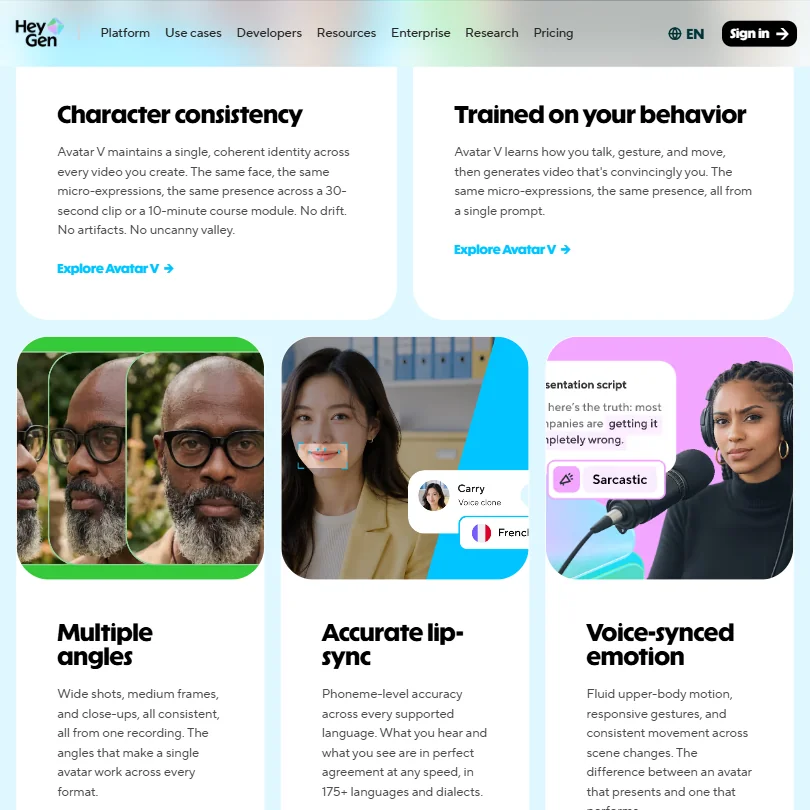
Write a script, pick an avatar, choose a voice, render. That's the loop most users live in. The AI Studio editor then lets you adjust tone, delivery, gesture timing, and emotional register through text controls rather than re-recording anything. Simple enough to get started without reading documentation.
Beyond that, the feature set gets busy. HeyGen introduced generative B-roll using Veo 3 and Seedance 1.0. Veo 3.1 integration followed shortly after. Kling handles another slice of generative video. ElevenLabs powers much of the voice quality. HeyGen isn't building all of this from scratch, they're integrating the strongest available models and building a workflow layer on top. Honestly, that's a defensible strategy. Whether it holds as those model providers build their own editors is a question nobody can answer yet.
Video translation gets its own mention. The system doesn't just dub audio. It re-renders lip movements to match the new language, which is where the localization value actually sits. A marketing team adapting a product video for five markets is cutting a meaningful amount of production work.
Batch processing exists, but it sits behind the API. Not a point-and-click feature for most users. Enterprise teams with developer resources can auto-translate and scale programmatically. Everyone else works video by video.
Templates number 75+. Screen recording was added in a recent update. PowerPoint and PDF import are both supported. SCORM export is in there for L&D users. The content pipeline inside HeyGen is fairly complete. No Adobe Premiere integration though, and no DaVinci Resolve bridge. If you're editing in those environments, you're mostly importing rendered files manually.
HeyGen Video Quality: How Good Does the Output Actually Look?
Resolution gates sit at the plan level. Creator plan users export at 1080p, while Pro unlocks 4K. That's a real ceiling. If you're producing for high-resolution displays and you're on the $29/month Creator plan, you will hit that wall.
The generative B-roll uses Veo 3 and Seedance 1.0. Not replacing custom footage for anyone serious about brand specificity.
HeyGen AI Avatars & Voiceover: How Realistic Are They?
This is where HeyGen has the clearest distance from most of the category. The Avatar IV engine ships with 500+ stock digital twins on the free plan alone. Creator and Pro plans access Extended Avatar IV generation. You can also build a custom digital twin from a recorded video of yourself. Not perfect. But genuinely impressive for the technology category.
Photo avatar options and face swap extend the range further. You don't need to record yourself to get a personalized-feeling presenter.
Voice quality is where the ElevenLabs integration pays off. The translation system maintains speaker identity across dubbed languages rather than swapping to a generic voice. Voice cloning is included on Creator and Pro plans, with the free tier limited to one clone. The 1,000+ AI voices cover accent and regional variation, which matters when a Spanish-language video for a Mexican audience doesn't want a Castilian voiceover. That level of specificity is there.
Fair. The avatar realism is class-leading in this category right now. Synthesia has made visible progress on the same problem over the past two years, but Avatar IV has a clear edge.
Is HeyGen Easy to Use?
The free plan is accessible enough to get a first video out without reading documentation. That's the product experience.
Their own documentation is thorough. The help center covers most workflows. Live chat exists, but it's listed as a feature of paid plans. Free tier users with a broken workflow have limited options. That's a friction point.
HeyGen Pricing: Is It Worth It for Creators & Teams?
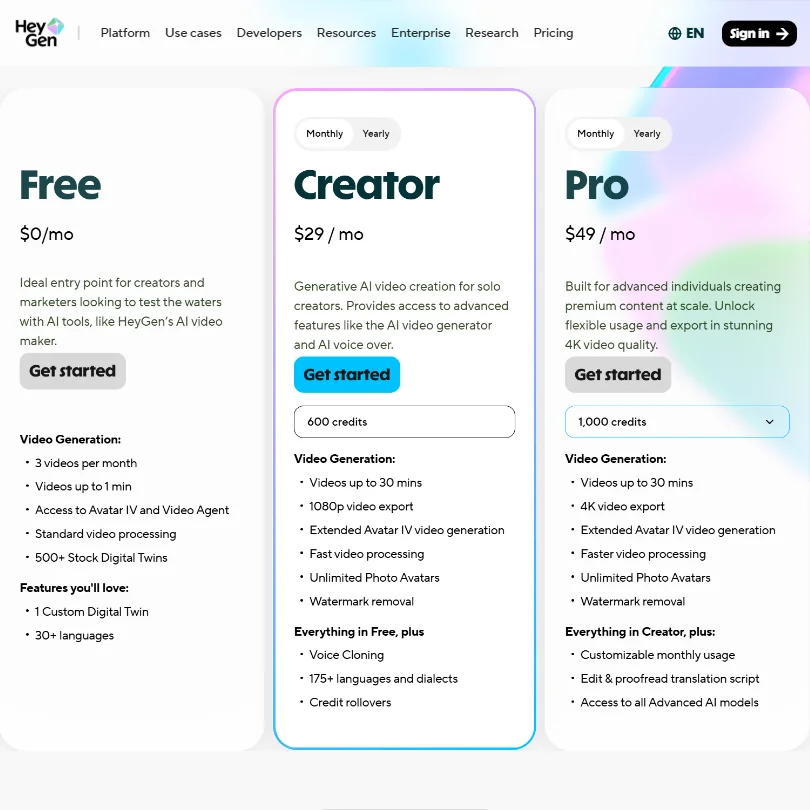
The free plan is permanent. Three videos per month, watermark on output, one voice clone, 500+ stock digital twins to work with. It's a real trial tier. Worth acknowledging.
Paid plans start at $29/month for Creator, which comes with 600 credits, 1080p export, Extended Avatar IV generation, fast video processing, unlimited Photo Avatars, watermark removal, voice cloning, 175+ languages and dialects, and credit rollovers. Pro runs $49/month and bumps to 1,000 credits, 4K export, faster processing, and adds customizable monthly usage, translation script editing and proofreading, and access to all Advanced AI models. Both plans offer monthly and yearly billing.
On monthly billing, Synthesia starts at $19 against HeyGen's $29, and Synthesia also has the lower annual entry price. That gap is worth running through the math on before committing to an annual plan.
The credit system deserves a direct mention. A Premium Credits overhaul changed what "included" means in practice.
Refund policy isn't publicly stated. It's not there. The absence of a visible refund policy is a friction point when you're weighing an annual commitment.
HeyGen vs Synthesia: Which AI Video Tool Is Better?
Both solve the same core problem: video with AI avatars, no camera required. The execution differs in a few places that matter.
Synthesia is built more explicitly for enterprise L&D pipelines. Its SCORM export, LMS integrations, and compliance-friendly content controls make it a natural fit for large training operations. HeyGen has SCORM export too, but it positions itself more broadly across marketing and content creation rather than anchoring in L&D specifically.
Both HeyGen and Synthesia now provide access to Veo models, although their implementations, credit costs, and workflows differ. For teams that need generative video beyond talking-head clips, that difference in implementation is worth testing before committing.
The support infrastructure gap is the real differentiator for enterprise buyers. Synthesia's enterprise tier comes with a more developed support structure.
Large enterprise L&D teams with procurement resources will probably be fine with either tool. Smaller teams that want generative video flexibility and can tolerate lighter-touch support will lean HeyGen.
Who Should Use HeyGen? (And Who Shouldn't)
Marketing teams producing localized video content at volume. The translation engine and lip-sync quality make it genuinely useful for multinational campaigns where re-shooting in every language isn't feasible.
Solo creators who don't want to be on camera. The digital twin option and the quality of the stock avatars handle this well, and HeyGen does it better than most tools in the category.
L&D teams needing multilingual training content quickly. SCORM export and the translation depth make the case.
Who shouldn't bother. Teams that need deep integration with existing editing workflows will hit a wall fast. Rendered files only, no Premiere or DaVinci bridge. Also, anyone needing predictable monthly costs should read the Premium Credits terms carefully before committing. The Premium Credits overhaul changed what "included" means.
Free tier users with real production needs will outgrow three videos per month immediately. The free plan is a genuine trial, not a production tool.
HeyGen Review Verdict
Strongest product in this category. That's not a hedged statement. Across the AI video tools we track, nothing else combines output quality, avatar realism, and multilingual capability at this price point in the same way.
The concerns are real though. The credits overhaul adds pricing unpredictability that budget-conscious teams should take seriously. The invisible refund policy is a minor friction that adds to the general "figure it out yourself" feeling around billing.
None of that changes the core finding. For teams that need realistic AI avatar video, multilingual dubbing that actually works, and generative B-roll built into the same editor, there isn't a better option right now. Clarify the credit system and this recommendation gets easier to make without caveats.
Frequently Asked Questions
Is HeyGen free to use?
Yes, there's a permanent free plan. Not a trial. Three videos per month, watermark on output, one voice clone, and access to Avatar IV and Video Agent. For anyone evaluating before paying, it's a genuine way to test the core workflow. You'll hit the ceiling fast if you're producing content at any real volume, but it's enough to know whether the avatar quality and editor suit your needs.
What languages does HeyGen support for video translation?
The HeyGen video translator covers 175+ languages and dialects. That's not just audio dubbing. The system re-renders lip movements to match the new language, which is where the real localization value sits. Worth checking specific dialect coverage for your target regions before committing. 175+ is a broad headline number and depth varies by language.
How does HeyGen compare to other AI avatar video tools?
On avatar realism and multilingual capability, HeyGen leads the category. Where it loses ground is on customer support reliability and billing transparency. Teams considering Synthesia specifically will find a comparable product with a more structured enterprise support model, though both HeyGen and Synthesia now provide access to Veo models with differing implementations and credit costs. Which tradeoff matters more depends entirely on your team's priorities.











