Google's AI assistant question that kept coming up in our research wasn't about capability. It was about whether the ecosystem story holds up when you actually use the thing. We pulled vendor docs, G2 reviews, Reddit threads from 2025, pricing data, and whatever Google makes publicly legible about the product. Here's what we found.

What is Gemini?
Launched in 2023 out of Mountain View, Gemini is Google's answer to the AI assistant category. It runs on Google's proprietary model stack, currently Gemini 3.5 Flash and the Pro tier, and it's designed to live inside the Google stack. Gmail, Docs, Sheets, Meet, Drive. That's the pitch, and it's a coherent one.
What separates it from most AI assistants is the real-time Search grounding. When you ask Gemini something, it can pull live information from the web rather than working from a fixed knowledge cutoff. That's not nothing. A lot of tools in this category are stuck in the past by design, and it shows.
Available on web, iOS, Android, and through a Chrome extension. Over 100 million users, according to available data. Whether that number means much in a world where Google pre-installs things on a significant portion of Android devices is a fair question. The number is probably real. The context is missing.
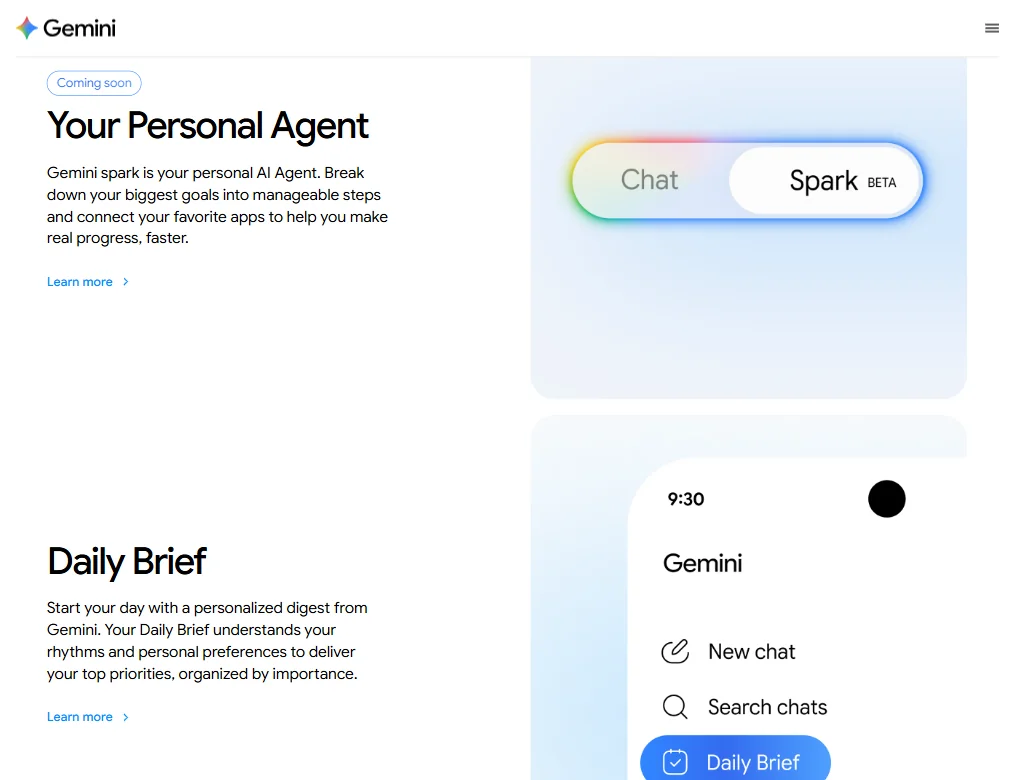
May 2026 brought Gemini 3.5 Flash, along with broader video generation capabilities and generative UI widgets. Worth flagging: the video features in that update ran on Gemini Omni, not Veo 3.1, which had already shipped back in October 2025. Deep Think, the extended reasoning mode, is also not a May 2026 arrival. Gemini 3 Deep Think got its major update in February 2026. Google's announcement cadence makes this confusing, and we'd rather be precise about it.
Gemini Features: Automation, AI Assistant & Workflow Capabilities

The feature set is wide. Maybe too wide. Google has bolted Gemini into so many surfaces that the product sometimes feels more like a platform than a single tool.
Start with task automation across Google Workspace. Gemini can draft email in Gmail, build out a doc, write Sheets formulas, and drop into Slides to help with content. G2 reviewers in enterprise roles describe it as working well, not perfectly, but well. Marketing-role reviewers consistently flag the Docs and Gmail integration as the two that actually save time, while noting Slides feels thinner. That pattern repeated enough to mean something.
Meeting summaries come through the Google Meet integration. Calendar scheduling too. The note-taking story runs through Docs, which is functional rather than elegant. Honestly, we kept wishing Google had built something more purpose-built there. Tools like Fathom AI Notetaker do a more focused job for meetings specifically, and they don't ask you to accept a large platform in exchange.
On the multimodal side, Gemini accepts text, images, audio, and video as inputs. The 1 million token context window is genuinely large. It matters for teams feeding in long documents or big data files, and it's one of the areas where Gemini has a real structural advantage over several competitors.
Custom Gems are configurable AI agents. You build a version of Gemini that behaves a certain way for specific tasks. Interesting concept. User feedback suggests the configuration takes real effort and the results are uneven. Not great.
NotebookLM deserves a mention. Technically a separate Google product, but bundled under the Gemini umbrella now. The audio overview feature, where NotebookLM turns your documents into a podcast-style conversation, keeps coming up in user reviews as a standout. Oddly specific. Genuinely useful.
No offline mode. Real gap if you work anywhere with unreliable connectivity.
Gemini AI Quality: How Smart and Useful Is the Assistant?
G2 has a meaningful sample of reviews, and the pattern that shows up most in the positive ones is reasoning quality on complex tasks and the strength of Search grounding. People in research-heavy roles lean on the live web access hard, and the complaints when it fails are correspondingly sharp.
The negative patterns are more scattered, but a few repeat. Hallucinations still happen. Users who push Gemini on niche topics report confident-sounding wrong answers. That tracks for any large language model right now, but Google's users seem to expect more given the Search integration. That expectation gap shows up in frustrated reviews, and it's not unreasonable.
Deep Think, the extended reasoning mode that got its major update in February 2026, is Google's version of the pattern that OpenAI and Anthropic also ship. Early user reports suggest it's useful for multi-step logical problems and less useful for casual tasks where the overhead slows things down without a clear payoff. Fair.
Code generation gets mixed but mostly positive marks. Not the first tool people reach for on raw coding tasks, but competent for Sheets formulas and Docs scripting, which is probably the right scope anyway.
The multimodal input handling is genuinely good. Image analysis, video understanding. The 1 million token context window means you can feed in a full product requirements document or a long call transcript without hitting limits. Honestly, that surprised us. Most tools in this price range cap out well before that.
Gemini Integrations: What Does It Connect To?
This is where Gemini's argument gets strongest, and also where you need to pay attention to what's actually included versus what requires a workaround.
The native integrations cover Gmail, Docs, Sheets, Slides, Drive, Meet, Calendar, and YouTube. Google built those. They're not third-party connectors. That matters for reliability in a way that most integration lists don't capture.
Beyond the Google stack, the story gets thinner. No native Microsoft 365 connection. That's not a complaint exactly, since Gemini isn't trying to be a Microsoft tool, but it does mean that anyone running a mixed environment needs to think carefully before committing. Slack works through third-party connectors, which is fine but not the same thing as a direct integration.
The Gemini API through Google AI Studio is the developer-facing piece, and it's well-documented and actively maintained. Teams that want to build on top of Gemini's models have a real path to do that.
Zapier support is there, which extends the practical reach considerably. The Chrome extension adds browser-level utility. Those help. We'd still push back on anyone calling this integration story open. Deep inside Google's walls and genuinely excellent there. Outside those walls, workmanlike at best.
Is Gemini Easy to Use?
Most G2 reviews that mention ease of use are positive. The interface is clean. The conversational model is familiar. Reddit threads from 2025 generally describe the onboarding as low-friction, at least for people already using Google products daily.
That last part matters. Living in Chrome, Gmail, and Docs already, Gemini fits in without asking much of you. The context-switching cost is low. For someone outside that ecosystem, the setup story changes. Installing a Chrome extension, authorizing Workspace permissions, and learning which features live where. Still manageable. Less effortless.
Custom Gems get called out as a friction point. The concept is clear enough. The execution asks more from users than you'd expect from a Google product. Some reviewers describe spending real time tuning them before getting useful outputs. We don't think that's acceptable for a consumer-grade feature on a Google product, but here we are.
The mobile apps on iOS and Android cover the basics. Not the most polished AI mobile experiences we've seen, but functional for quick queries and voice input. The web experience is better.
Gemini Pricing: Is It Worth It vs Free Alternatives?

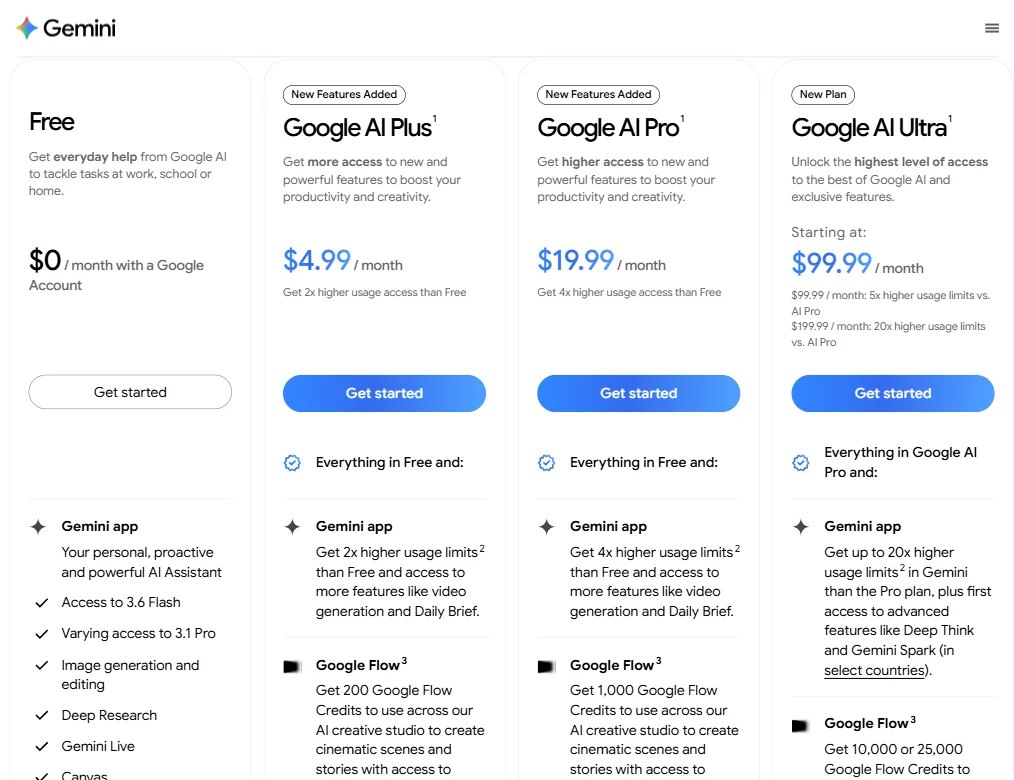
Google offers four tiers, all visible in the current pricing layout. Free is $0, functional, and gives you access to 3.6 Flash with varying access to 3.1 Pro, image generation, Deep Research, Gemini Live, and Canvas. Real starting point for individuals.
Google AI Plus runs $4.99 per month, claims 2x higher usage limits than Free, and adds 200 Google Flow Credits for AI creative work, along with video generation and the Daily Brief feature. Google AI Pro sits at $19.99 per month, 4x higher usage limits than Free, and bumps Google Flow Credits to 1,000. Google AI Ultra starts at $99.99 per month, with usage limits up to 5x higher than Pro at that base price, jumping to 20x higher usage limits at $199.99 per month. Ultra also includes 10,000 or 25,000 Google Flow Credits and first access to features like Deep Think and Gemini Spark in select countries.
Enterprise pricing runs through Google Workspace as a custom add-on. No public rates. We dug through the pricing page and found the usual enterprise wall. You contact sales, you get a number, you sign a contract. Not unusual for this category. Still frustrating when you're trying to compare costs before talking to anyone.
Here's our concern with the value story. The free tier is good enough that a lot of users never convert. The jump to $19.99 per month feels significant if the main thing you're unlocking is better Workspace integration. That should be a selling point. Google undersells it. We're skeptical of that choice.
Gemini vs ChatGPT: Which Productivity Tool Wins?
The honest answer depends on which apps you already use, and that's not a dodge.
ChatGPT is stronger in raw conversational flexibility. The plugin ecosystem is larger. Code Interpreter is more developed for data work. Users who don't live in Google's apps find ChatGPT more natural to extend across different surfaces.
Gemini wins on Google Workspace depth. Not a close race. If you're spending your day in Gmail and Docs, Gemini is the better fit and it's not subtle. The native context-awareness, knowing what's in your Drive or what's on your calendar, is something ChatGPT can't match without workarounds.
On reasoning tasks and writing quality, the two tools are close enough that picking one on those grounds alone is a mistake. Both have improved fast, and the 2026 updates on Gemini's end narrow the gap further.
Claude deserves a mention for anyone whose main use case is long-form writing and nuanced reasoning. Claude's writing output has a different character than both Gemini and ChatGPT, and some users find it more useful for editorial and research work specifically.
Microsoft Copilot is the direct structural competitor. Same idea: an AI wired into your productivity suite. Copilot owns the Microsoft 365 space the way Gemini owns the Google space. You pick based on which stack you live in.
Who Should Use Gemini? (And Who Shouldn't)
Google Workspace power users. Full stop. That's the center of gravity.
Daily loop involving Gmail, Docs, and Meet. Gemini is the obvious tool to add. The integration isn't approximate. It's native, and that changes how much it actually helps versus how much it approximates helping.
Researchers and people who need current information will find the real-time Search grounding genuinely useful. Not many AI assistants do that at this level, and the ones that try don't always do it cleanly.
Teams running on Microsoft 365. There's no real integration story there, and forcing one via Zapier adds friction without matching what Copilot does natively. Wrong tool for that environment.
Developers who want a flexible, model-agnostic setup might find the API interesting, but they'd probably explore it via Google AI Studio directly rather than the consumer product. Different surfaces, different conversations.
Anyone wanting a focused meeting notes tool should look elsewhere. Gemini's meeting features work, but they're a side function of a large platform. Something purpose-built will serve that use case better and won't ask you to carry the rest of the platform with it.
Gemini Review Verdict
Google built something genuinely useful here. Not perfect. Not the right tool for everyone. But if the Google ecosystem is where you work, Gemini is the strongest AI layer you can add to that environment right now, and the gap over its competitors in that specific context is real and not closing quickly.
The multimodal input, the long context window, the Search grounding, and the native Workspace integrations all pull in the same direction. That's coherent product design. The custom Gems and NotebookLM add depth for users willing to put in the setup work.
The gaps are also real. No offline mode. Pricing transparency for enterprise is nonexistent. The Gems configuration is rougher than Google's usual UX polish. Outside the Google stack, the integration story drops off fast.
The free tier is worth trying for anyone already using Google products. The $19.99 per month Pro plan earns its price if the Workspace integrations are the things you'll actually use. Ultra at $99.99 or $199.99 per month is a harder sell for anyone who isn't a heavy AI creative or power user who specifically needs the Flow Credits and early feature access. If you're evaluating Gemini hoping for a general-purpose AI assistant that works equally well across all your tools, the answer is more complicated than the marketing suggests.
We'd recommend it to the right user without much hesitation. Finding that user is the whole exercise.
Frequently Asked Questions
Is Gemini free to use?
Yes, the free tier is available on the web without a paid plan. It gives you access to Gemini with access to 3.6 Flash, varying access to 3.1 Pro, image generation, Deep Research, and Gemini Live. The full Workspace integration and higher usage limits require a paid plan, starting at $4.99 per month for Google AI Plus and $19.99 per month for Google AI Pro.
How does Gemini compare to ChatGPT for work tasks?
If your work happens inside Google's apps, Gemini has a clear edge on drafting in Docs, summarizing Gmail threads, and pulling context from Drive. ChatGPT has a larger plugin ecosystem and tends to feel more flexible outside any particular app stack. The two tools are genuinely close on raw language quality. The right choice comes down to which tools you already live in, and that answer is usually obvious once you ask the question honestly.
Does Gemini work with Microsoft Office or Slack?
Not natively with Microsoft 365. No direct integration there. Slack works through third-party connectors rather than a built-in connection, so it's possible but not as tight as the Google-native features. If your team runs on Microsoft tools, Copilot is the more natural fit. Gemini would be working against the grain, and you'd feel that friction quickly.