What is Synthesia?
Founded in 2017 and headquartered in London, Synthesia is an AI video platform built around one idea: you type, an avatar talks. No camera. No microphone, no studio time. The avatar delivers your script in one of 160+ supported languages, and you export the result as an MP4 or a SCORM file for your LMS.

That's the core pitch. The platform has grown well past it.
The current product includes a full in-browser video editor, a screen recorder with AI transcription, a Bulk Personalization feature for generating multiple video variants at once, and an AI Video Assistant that can draft a script and build slides from a document or a URL. Voice cloning is on the table. Recent updates added customizable avatar actions and access to an AI Playground running Veo 3.1. Honestly, the pace of feature additions has been aggressive.
The SOC2, GDPR, and ISO 42001 certifications are real and matter to enterprise buyers. That compliance story is a big reason Synthesia wins procurement over tools with equivalent output quality but thinner credentialing.
Synthesia Features: Video Generation, Editing & AI Capabilities
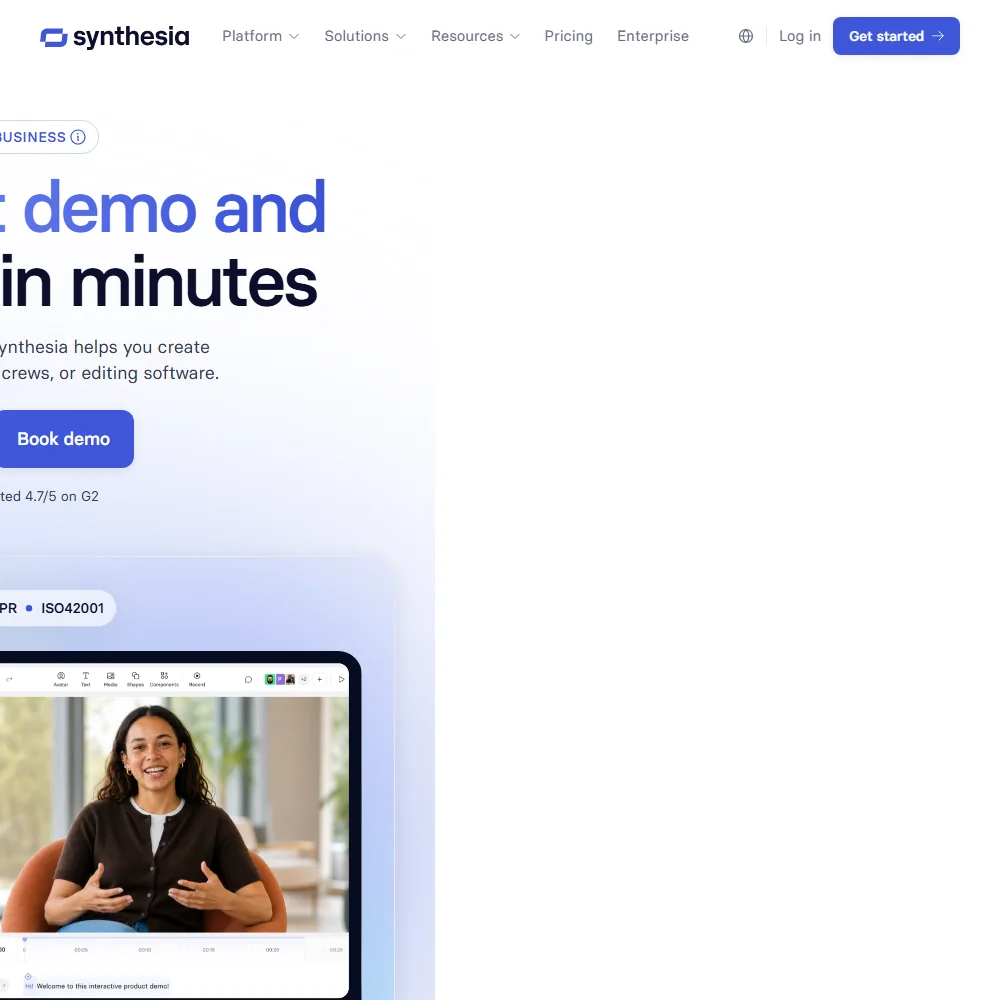
The text-to-video workflow is straightforward. You paste a script, pick an avatar, choose a language and voice, and hit generate. The AI Video Assistant can skip even the scripting step by pulling content from a document or a link. For teams that spend half their day writing video scripts, that's genuinely useful.
Editing happens in-browser. No download required, no third-party timeline software. You can update a single slide without re-rendering the whole video. Version control is included. One-click updates are available for when your company rebrands and you need to swap a logo across 40 training videos. That tracks.
The AI Screen Recorder is a newer addition. It records, transcribes, and lets you clean up the video by editing the transcript directly. Cut a sentence from the text, the footage disappears. We've seen that mechanic in tools like Descript, and it works well when implemented cleanly. PowerPoint import got a notable upgrade in a recent release.
Voice cloning is available, though documentation doesn't get specific about which plans include it. We'd push support on that before upgrading. Auto-generated closed captions are standard.
Templates sit at 60+. Not a huge library by some competitors' standards. API access opens on the Pro plan, though usage is capped. Enterprise buyers get additional usage as a paid add-on. The API connects into LMS platforms and supports SCORM export, which is a real differentiator for L&D teams. Most AI video tools don't touch SCORM.
The integrations picture beyond that is narrower than you'd expect. Getty Images and Pexels for stock assets, Soundstripe for audio, and a few others. No Zapier, no Adobe Premiere. If your workflow involves either of those, the gap is worth factoring in before you commit.
Synthesia Video Quality: How Good Does the Output Actually Look?
Export resolution isn't clearly stated in Synthesia's public documentation, which is a minor frustration. MP4 download is standard. Not great.
Synthesia AI Avatars & Voiceover: How Realistic Are They?
240+ stock avatars on the Enterprise plan. 9 on the free tier. Starter and Pro sit somewhere in the middle, though the exact counts vary depending on which documentation page you're reading. Synthesia's pricing shows 125+ AI avatars on the Starter plan and 180+ on Pro. Treat those numbers as approximate until confirmed with support.
Eye movement and micro-expressions are where the gap between Synthesia and human-filmed footage still shows.
Custom personal avatars are available. Studio avatars are a paid add-on. If you want an avatar that looks like you, or like your company spokesperson, you'll pay extra. The base plans use stock avatars. Fair.
The voice side is stronger. 160+ languages with text-to-speech voices. Voice cloning is on the table for teams that want a consistent speaker identity across videos.
Language coverage at 160+ with accurate lip sync is genuinely hard to match elsewhere. HeyGen offers dubbing, but Synthesia's depth of language support inside a full LMS-ready workflow is a real advantage for global training teams.
Is Synthesia Easy to Use?
The free plan requires no credit card. That's a good sign. It means Synthesia is confident enough in the product experience to let you find out before paying.
The interface is browser-based and doesn't require any video production background. That matters for the core use case.
Where the learning curve shows up is in the more advanced features. Bulk Personalization, API setup, and SCORM configuration require more time. The Synthesia Academy, their tutorial library with certifications, helps.
Support is tiered. Free plan users get an AI chatbot. Starter and Pro plans get chat and email. Enterprise gets priority support. That structure is standard and not surprising.
Community access is listed as a feature. The docs reference a dedicated community platform.
Synthesia Pricing: Is It Worth It for Creators & Teams?
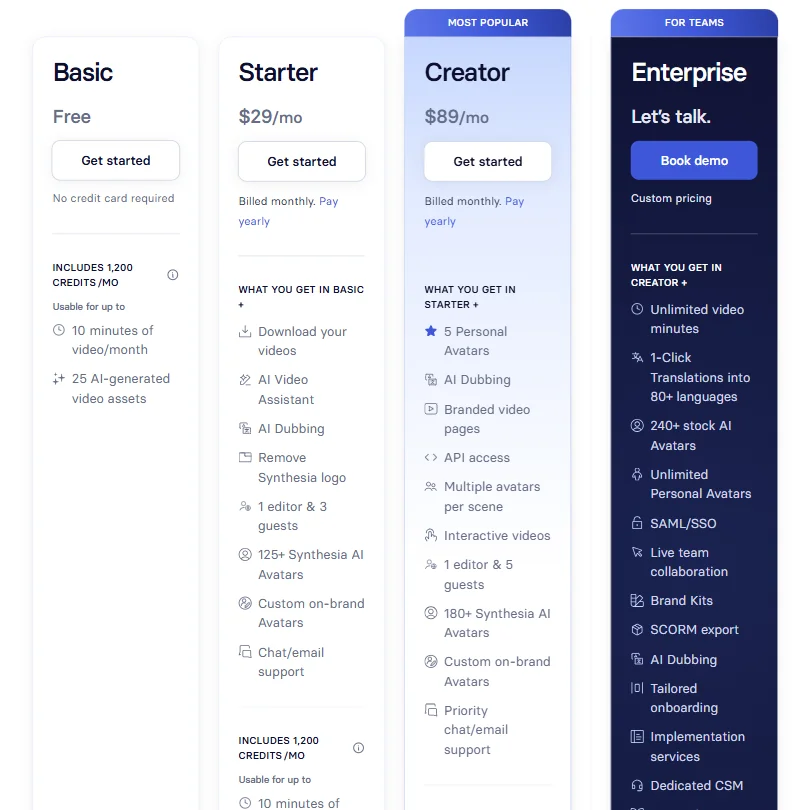
The free plan gives you 10 minutes of video per month, 9 avatars, no credit card. That's a workable amount for someone who wants to evaluate the tool seriously, not just click around the homepage.
The pricing page we reviewed shows Starter at $19 per month billed monthly, Pro at $89 per month billed monthly. Annual billing brings those numbers down, and the pricing page shows $14 per month as the Starter entry point on yearly plans. The Synthesia logo is removed at Starter. Commercial rights are included in paid plans.
The API opens on the Pro plan. If you need the API and you're not on an annual Pro plan, you're at $89 per month billed monthly, minimum. For an individual creator, that's steep for a text-to-video tool. For a team with a video backlog, it starts to make more sense.
Where pricing gets murky is Enterprise. Ask what custom means in dollars. The features unlocked at Enterprise, including live team collaboration and 240+ avatars, are significant. But "book a demo" pricing after two public tiers is a friction point for buyers who want to budget without getting on a call, and a hard sell at this price level.
Studio avatars are a paid add-on. Voice cloning plan access isn't clearly documented. At $89 per month billed monthly, buyers expect fewer surprises.
The refund policy isn't publicly stated. Not unusual for SaaS. Worth asking before you commit to an annual plan.
Synthesia vs HeyGen: Which AI Video Tool Is Better?
HeyGen's face-swap and real-time avatar technology integrate more flexibly with social-first workflows.
Synthesia wins on depth of enterprise infrastructure. SCORM export, LMS integration, SOC2 and ISO 42001 compliance, and a structured API are where Synthesia pulls ahead. These are not features most marketers need. They are features that L&D teams and enterprise IT buyers need to get a purchase approved.
Pricing is comparable at the entry level. Both tools have free tiers and mid-tier plans in a similar range. Both wall off the best features behind enterprise pricing.
The use case divide is pretty clean. Marketing and sales teams making external-facing content tend to drift toward HeyGen. Training and onboarding teams with LMS requirements tend to land on Synthesia. We'd put it that simply.
Who Should Use Synthesia? (And Who Shouldn't)
Corporate L&D teams. That's the clearest fit. The SCORM export, multilingual capability, and bulk generation are purpose-built for training programs at scale.
Global organizations with content that needs to exist in more than two or three languages. The 160+ language coverage with synchronized lip sync is not something most tools can match at this level of workflow integration.
Mid-size to large enterprise teams who need compliance documentation for procurement. The SOC2 and GDPR credentials matter here. A lot.
Solo creators and freelancers. Harder case. At Pro pricing, you're paying for infrastructure you probably won't use. If you want text-to-video without LMS requirements or bulk processing, there are cheaper options worth looking at. Lumen5 and Fliki operate at lower price points for lighter use cases.
Small teams building product demos or marketing videos. Synthesia can handle this, but the feature set is weighted toward scale. You'll pay for features you won't touch. Not a dealbreaker. A consideration.
Anyone who wants a quick, casual AI video creator. The tool isn't difficult, but it's also not what you'd pick for weekend content projects. There are faster, cheaper options in that lane.
Synthesia Review Verdict
Synthesia is a mature product that does exactly what it says for a specific type of buyer. The AI video generation works. The avatar quality is good, not perfect, and it's getting better. The language coverage is genuinely impressive. The enterprise compliance story is real, not just marketing copy.
What holds it back from a stronger recommendation across the board is the pricing structure. The gap between Pro and Enterprise, where the price jumps from a published number to "let's talk," is wide. The features sitting behind that wall are significant. Studio avatars as a paid add-on, voice cloning with unclear plan access, and resolution specs buried in support docs all leave buyers with questions they shouldn't have to ask.
For enterprise L&D teams managing multilingual training at scale, Synthesia is probably the right call. The workflow depth, compliance certifications, and SCORM support are hard to replicate elsewhere in one product.
For everyone else, the fit depends on whether you actually need what the platform is built for. The tool works well. The pricing structure assumes you're buying it for work, at scale, inside an organization that has a budget approval process. That's not a criticism. That's just who the product is for.
Frequently Asked Questions
Does Synthesia have a free plan?
Yes. The free plan gives you 10 minutes of video per month with 9 stock avatars, and it doesn't require a credit card to start. That's enough to run a real test of the core workflow. It's not enough to use the tool seriously in production, which is probably by design.
Is Synthesia good for training videos?
It's arguably built specifically for that use case. The SCORM export, LMS integration, multilingual avatar support, and bulk video generation are the features that corporate L&D teams care about, and Synthesia has invested heavily in all of them.
How does Synthesia compare to HeyGen?
HeyGen tends to win on social-first workflows. Synthesia tends to win on enterprise infrastructure, compliance documentation, and LMS compatibility. They're priced similarly at the entry level. The right choice depends almost entirely on what you're making and who approves the purchase. Marketing teams lean HeyGen. L&D and enterprise procurement teams lean Synthesia.











