Founded in 2009, Grammarly is the closest thing the writing tool space has to a household name.

What is Grammarly?
Grammarly is an AI-powered writing assistant built around real-time corrections. The core idea hasn't changed much since 2009: you write something, it tells you what's wrong. What's changed is the scope. It now covers grammar and spelling, obviously. But also tone detection, plagiarism checking, full sentence rewrites, and a brand voice layer for enterprise teams.
It runs everywhere, which is genuinely impressive. Chrome, Safari, Firefox, and Edge all have extensions. There are desktop apps for Windows and Mac. Mobile apps for iOS and Android. It hooks into Microsoft Word and Google Docs. Their own marketing says it works across over 500,000 apps and websites. We didn't verify that number. But the platform coverage is real.
It's the dominant player here by a wide margin. Whether that market position still reflects product quality is a fair question, and one we'll get into.
One notable development: Grammarly became part of the Superhuman product family. That's a significant ownership change, and it's worth watching what it means for the product long-term.
Grammarly Features: What You Actually Get

The free plan gives you grammar corrections, spell checking, basic punctuation fixes, tone detection, and 100 AI prompts a month. That's it. The good stuff sits behind the Pro plan at $12 a month billed annually, which is where most users actually live.
Pro unlocks a few things that matter. The plagiarism checker is one. It's built directly into the editor, not a separate tool you export to. Also on Pro: full sentence rewrites, the tone suggestions, and more style clarity options.
Brand voice is where the enterprise pitch gets interesting. Free users get one brand tone. Enterprise teams get unlimited. The enterprise tier also includes style guide enforcement and something Grammarly calls Knowledge Share, which lets teams store terminology and approved content. For distributed content teams, that's a real problem to solve. We're a little skeptical of how well it works in practice at scale, but the functionality exists and the enterprise market clearly buys it.
On the AI writing side, there's text generation via prompts, an AI chat interface, and what they call a humanizer agent in the content editor. Paraphrasing and one-click rewrites are also in there. No templates, which is a gap compared to tools like Jasper AI. No bulk generation either.
No SEO optimization features. No image generation. That's fine. Grammarly doesn't pretend to be a content creation suite. It's an editing and writing assistance layer. The question is whether that's enough.
Grammarly AI Output Quality: Is It Good Enough?
The grammar and spell checking side is genuinely good. Hard to argue with that. It catches things most people miss, especially in longer documents where attention drifts.
The AI writing side is more complicated. The rewrite suggestions and paraphrasing tool get mixed reviews. Grammarly works well as a correction layer, though the AI-generated suggestions can be occasionally bland.
The tone detection feature gets a lot of attention in marketing, and it tends to work well for emails and short business writing. Where it starts to struggle is longer, more stylized content. Grammarly can push suggestions that would flatten that voice toward something more generic. The tool optimizes for clarity and correctness. If that's not your priority, it can feel like a fight.
The humanizer agent is newer and there's limited independent information about it yet. Grammarly positions it as a way to make AI-generated text feel less robotic. Plausible. We just don't have enough review signal to say how well it works in practice. Honest.
Is Grammarly Easy to Use?
Yes. Genuinely. This is one of the areas where Grammarly earns its reputation. The browser extension installs in minutes and starts working without configuration. Corrections appear inline as you type. There's nothing to learn.
The Google Docs integration works, though it can be slow to sync in long documents. Not broken. Just not as snappy as typing directly in Grammarly's own editor.
The mobile experience is smoother than most competitors in this space. iPhone and Android apps are solid options. For people writing emails or messages on the go, it's probably the most capable option available without having to think about it.
Non-native English speakers seem to be particularly well-served here. That's a more useful teaching loop than most competitors offer.
Honestly, ease of use is probably Grammarly's strongest card. It's everywhere, it works quietly, and it doesn't demand much from the user. That's not trivial.
Grammarly Pricing: Is It Worth the Cost?
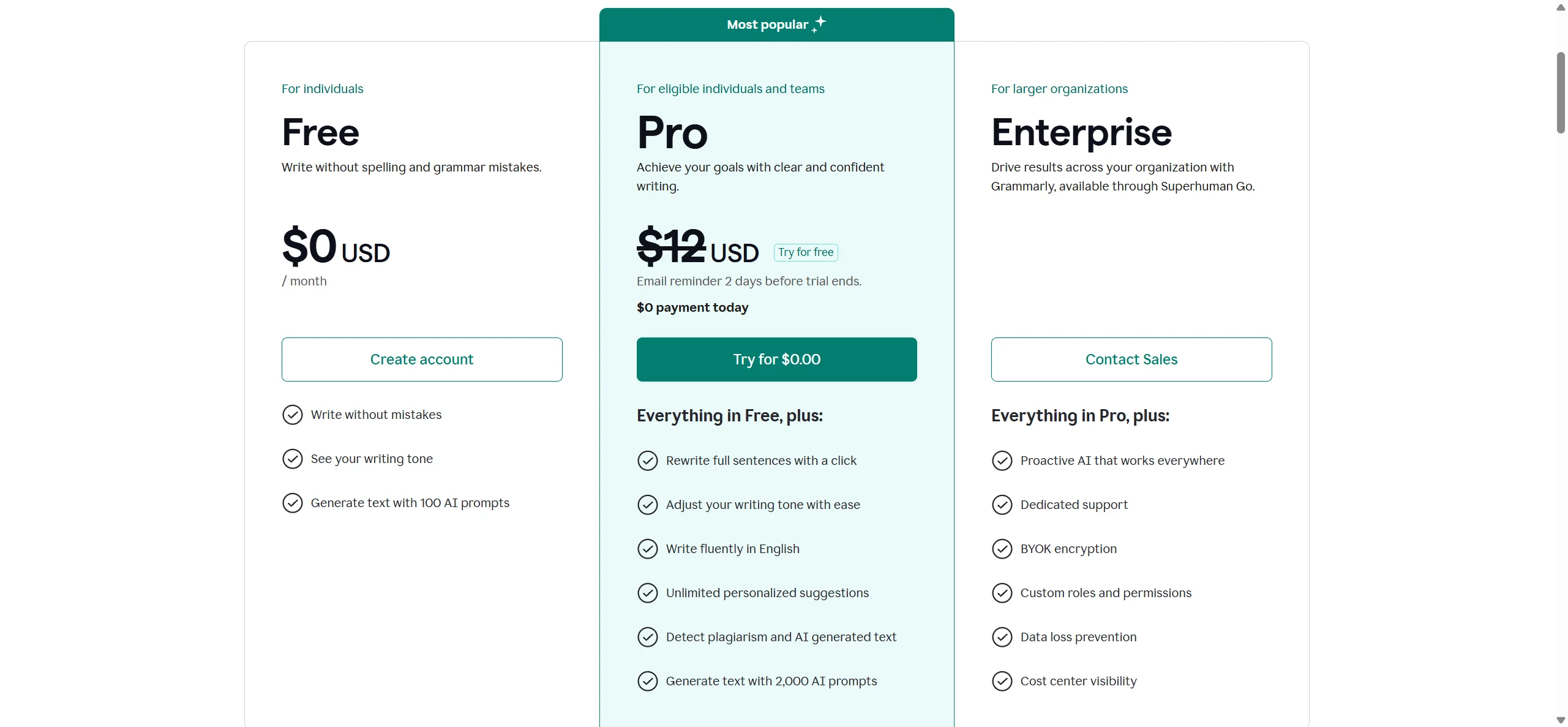
The free plan is real and functional. For basic grammar and spelling, it holds up. The Pro plan sits at $12 a month billed annually, which comes out to $144 a year. Monthly billing is more expensive, though Grammarly isn't the only tool that does that.
The enterprise tier is custom pricing, which means you're talking to a sales rep. Ask about the refund policy, since none is published. Not a dealbreaker.
For individuals, $12 a month is defensible. The plagiarism checker alone justifies the cost for students or anyone producing content that needs originality checking. For casual users who just want grammar fixes, the free plan might be enough. The jump from free to Pro is significant in terms of feature access, but not painful in terms of price.
For teams, the calculus changes. At enterprise scale, with custom pricing and a sales conversation, the value depends entirely on how well the brand voice and style guide features actually reduce editing overhead. Pressure-test that before signing a large contract, and ask what changed after the Superhuman acquisition.
Compared to ProWritingAid, which offers a lifetime license option, Grammarly's annual subscription starts to look less flexible. That's a real consideration for budget-conscious buyers.
Grammarly vs Hemingway Editor: Which Is Better?
Different tools solving different problems. Not really a fair fight, but people ask the comparison constantly.
Hemingway Editor is a focused readability tool. It flags passive voice, complex sentences, and adverb overuse. No AI generation. No plagiarism checking. No browser extension that follows you around the internet. It's a static editor you paste text into.
Grammarly does all of those things and more. The feature gap between them is enormous. If you want comprehensive writing assistance that works across every app you use, Grammarly isn't close to losing this comparison.
Where Hemingway wins is price and philosophy. It's cheap (around $20 one-time for the desktop app). It's also opinionated in a way that some writers prefer: blunt, simple, no AI suggestions trying to rewrite your sentences. Some writers find Grammarly's constant suggestion stream exhausting. Hemingway doesn't have that problem because it barely speaks.
Our take: most people asking this question would be better served by Grammarly. The Hemingway Editor is for writers who know exactly what they want and mostly want someone to yell at their sentence length. Fair.
Who Should Use Grammarly? (And Who Shouldn't)
Non-native English speakers doing professional writing. That's probably the clearest fit. The explanations behind corrections, the tone suggestions for emails, the clarity improvements. All of that serves this group particularly well.
Students and academic writers are another fit, though primarily for the plagiarism checker and grammar layer. The AI generation features may be counterproductive depending on academic integrity policies. Worth thinking about.
For enterprise content teams, the case for Grammarly gets more complicated. The brand voice features and style guide enforcement are real. But if your team is primarily generating long-form content rather than editing it, something like Writer is built more specifically for that workflow. Grammarly is still fundamentally an editing layer dressed up with some generation features. That's not a criticism. Just a scope distinction.
Casual writers who only need basic corrections. The free plan serves them fine. They probably don't need Pro.
Writers with strong, distinctive voices should go in with eyes open. The suggestion engine is tuned toward clarity and convention. It will push you toward the center. If that's useful, great. If you're writing anything where voice matters more than correctness, it's something to manage carefully.
Grammarly Review Verdict
Grammarly is good at what it does. The grammar checking is the best in its class. The platform coverage is unmatched. The integrations into Word and Google Docs work. Forty million users aren't all wrong.
But the AI generation layer is where things get thinner. The rewrites are often technically fine but lack personality. The tone detection is useful for business writing and less useful outside it. And the homogenizing effect on distinctive writing voices is a real and consistent complaint, not a fringe one.
The $12 a month Pro plan is worth it for most working writers. The plagiarism checker, the sentence rewrites, and the tone suggestions add up. The free plan is a reasonable starting point for anyone not sure they need more.
The Superhuman acquisition is the thing we're watching. It could mean better integration into email workflows, which would make sense given Superhuman's focus. It could also mean product priorities shift in ways that don't benefit the current user base. We don't know yet. Nobody does.
For now, Grammarly remains the default choice in this category. Not because it's perfect. Because it's everywhere, it works, and nothing else has clearly beaten it across the full range of what it does.
How Grammarly compares
Grammarly scores 8.3 out of 10 among the AI writing assistants we rate. These two do the same job and are the closest to it, compared on what each vendor publishes.
ProWritingAid
Grammarly writes new text from a prompt, detects AI-written text and rewrites AI text to read as human; ProWritingAid does none of those three. Both charge $30 a month for their cheapest paid plan, so the difference is what you get for it. ProWritingAid has no phone keyboard app and no team plan, where Grammarly covers both plus Slack, Outlook and Gmail add-ins. ProWritingAid says it does not train its AI on your writing; Grammarly lets individual users opt out but defaults training on.
Pick ProWritingAid if you only need grammar and plagiarism checks, not AI generation.
Pick Grammarly if you want AI writing, detection and humanizing in one tool.
QuillBot
QuillBot's Premium plan costs $19.95 a month against Grammarly's Pro at $30 a month. Grammarly holds SOC 2 Type II and ISO 27001 certification; QuillBot's trust center lists neither. Grammarly also works inside Word, Google Docs, Outlook, Gmail and Slack, where QuillBot's add-in list is Word alone. Both check grammar and plagiarism, generate new text from a prompt, detect AI writing and rewrite AI text to read as human.
Pick QuillBot if you want a cheaper plan and don't need extra add-ins.
Pick Grammarly if you want SOC 2, ISO 27001 and wider app coverage.
Frequently Asked Questions
Is Grammarly free to use?
Yes, there's a genuine free plan. It covers grammar, spelling, and basic punctuation corrections. The Pro plan at $12 a month (billed annually) adds the plagiarism checker, tone suggestions, full rewrites, and the more advanced AI features. Most power users will eventually want Pro, but the free tier isn't a stripped-down demo. It's functional.
Does Grammarly work in Google Docs and Microsoft Word?
It does, and this is one of Grammarly's genuine strengths. The Google Docs integration and the Microsoft Word add-in are both available. Performance can lag in very long documents, but for typical use it works well. The browser extension also covers a huge range of web-based writing environments, which is hard to replicate.
Is Grammarly good for non-native English speakers?
Yes. The tool doesn't just flag errors. It explains why something reads as wrong, which helps writers understand the underlying rule rather than just accepting a correction blindly. That teaching element is especially useful for users writing in English as a second language, and it's a meaningful differentiator from tools that just underline mistakes and move on.