Anara isn't listed on G2 or Capterra. That's not a knock. It's just where the company is. Feedback elsewhere is specific enough to warrant a close look.
What is Anara?
Scientific literature is a mess to work with. Papers are scattered, PDFs pile up, and general-purpose AI hallucinates citations or invents them outright. Anara is built specifically to fix that problem, positioning itself as the assistant that stays tethered to source material rather than improvising around it.
The product lets researchers upload large document libraries, then query across them in plain language. It searches the web and academic databases alongside your own uploads. Every answer points back to the specific passage it drew from. That's the core value. Not just AI answers, but traceable ones, for people who can't afford to cite something wrong.
The company doesn't publicize a founding date or headquarters. Unusual for a SaaS in this space, but not disqualifying.
Anara Features: Search, Synthesis & Research Capabilities
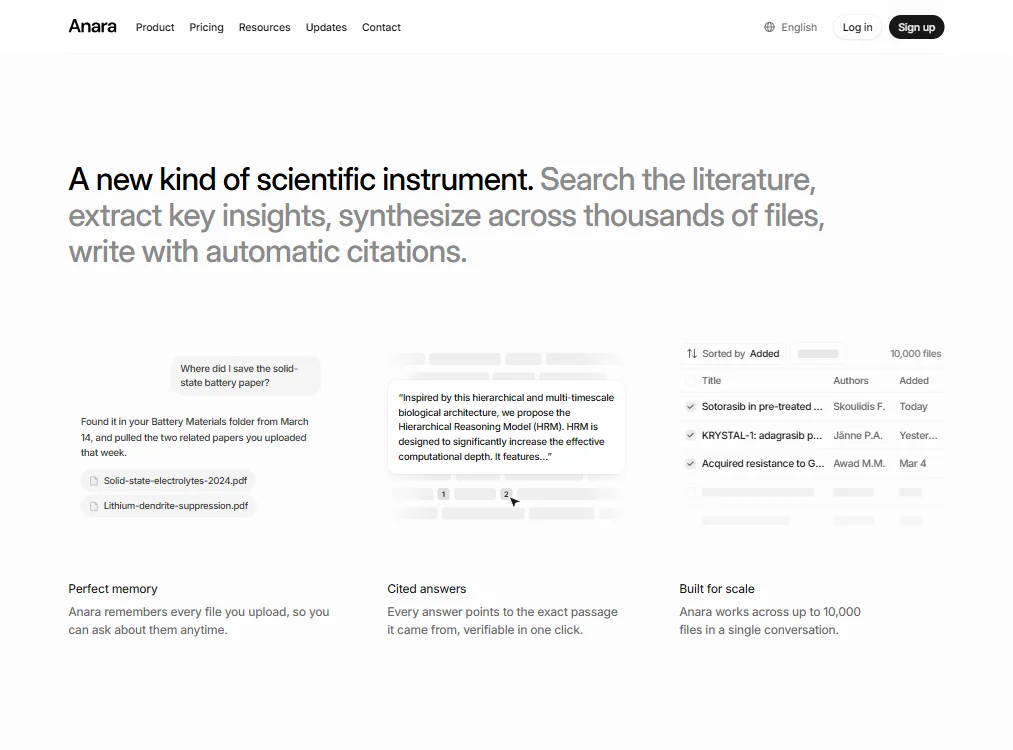
The library can hold up to 10,000 pages per upload. That's a real number. Most comparable tools cap out well below it. Multi-source synthesis at that scale is genuinely uncommon, and it's what separates Anara from lighter tools like Google NotebookLM, which works well for smaller document sets but isn't built for a biopharma team managing thousands of PDFs.
The AI layer isn't a single model. On Pro, users can select from GPT 5.6 Terra, Claude Sonnet 5, Gemini 3.1 Pro, and Grok 4.5, among others. Max adds GPT 5.6 Sol and Claude Opus 5. Anara says you can switch models mid-conversation and the next message will use the newly selected one, which is a sensible implementation. One help article still references Claude Opus 4.8, while the pricing page lists Opus 5, so the documentation trails the product a little.
The citation tooling claims support for over 10,000 styles with automatic suggestions. Honestly, that number is marketing. What matters is whether the ten styles you actually use work reliably, and we don't have enough user reports to confirm either way.
On integrations, Zotero and Mendeley connectors cover reference management. Cloud storage connects via Google Drive, OneDrive, and a few others. Benchling and Synapse connectors cater specifically to life sciences workflows. That last pair is unusual, and it signals that someone made deliberate choices about who this product is actually for.
Anara Research Quality: How Accurate and Trustworthy Is It?
Anara claims to be four times more accurate than general-purpose AI at finding information in documents. We can't verify that. No methodology is published. No third-party audit is cited. It's a vendor claim, and we'd treat it as directional rather than precise.
What we can say is that the underlying approach is sound. Grounding every answer in a clickable source passage is the right architecture for research use. It's also what Scite does well in its own lane, though Scite focuses on citation credibility scoring rather than document synthesis. Different tools, different angles.
The fact-checking mechanism is the most defensible feature here. If the AI surfaces a finding and you can click through to the exact sentence it drew from, that's categorically different from an LLM making its best guess. Especially for clinical or regulatory work, where a wrong citation has real consequences.
Anara Source Coverage: What Does It Actually Search?
PubMed and arXiv are the obvious ones. But Anara also connects to bioRxiv and medRxiv for preprints, ClinicalTrials.gov for trial data, and the Protein Data Bank and ChEMBL for structural and chemical biology work. Open Targets and ChemRxiv round out the life sciences stack.
That's not a generic academic database list. Someone assembled it for a specific audience. That tracks with everything else about how the product is positioned.
JSTOR and PLOS extend coverage into humanities and open-access publishing, so it's not purely biomedical. But the center of gravity is clearly biopharma and clinical research, and nobody should be surprised by that.
Is Anara Easy to Use for Researchers and Professionals?
The interface appears organized around folders and conversations, with a library view showing titles, authors, and upload dates. Familiar enough if you've used a reference manager before. The free tier is a real free tier, not a trial. You get 2,000 AI words per day, five uploads per day, and a 20MB or 120-page import limit. You can actually use it.
The desktop app is a meaningful addition for researchers who spend hours in the tool daily. An iOS app exists, though there's no Android app or dedicated tablet experience, which is still a gap for anyone who reads papers on a tablet.
OCR for scanned PDFs and images is gated to Pro and above. Free users uploading image-heavy documents will hit that wall. Not great if you're dealing with older literature in scanned format.
Anara Pricing: Is It Worth It vs Free Alternatives?

Four tiers exist: Free, Plus, Pro, and Max. The screenshot shows Plus at $12 per month and Pro at $24 per month, with Max at $200 per month, all billed monthly. A 20% discount applies to annual billing. The team documentation states $36 per seat per month for team accounts. So pricing information does exist across Anara's various pages, it's just not all in one place. Saying Anara publishes no pricing at all would be too absolute. Saying it's easy to find would also be too generous.
Pricing scattered across multiple pages is a real friction point for individual researchers on a budget. PhD candidates aren't going to dig through team documentation to find a per-seat number. Elicit posts its Plus, Pro, and Scale prices directly on one page. That's not a small difference.
The free tier is genuinely useful for light evaluation. For large document libraries or any team collaboration, the limits arrive fast. Plus unlocks 10 uploads per day and up to five collaborators per folder. Pro removes upload caps entirely and adds OCR, Notion, and access to the broader model roster. Max adds the Deep Search agent, advanced models like Claude Opus 5, and early access to new features.
Anara vs Elicit: Which AI Research Tool Is Better?
Elicit is the most direct comparison. Both tools target systematic research workflows. Both surface academic sources with citations. Both aim at PhD-level and professional users.
Where they diverge is library synthesis at scale. Elicit is stronger on structured literature review workflows and extraction tables across many papers. Anara is stronger if you're working from a large uploaded document collection and need that collection connected to platforms like Benchling or Synapse.
Elicit publishes its pricing directly. Anara distributes it across multiple pages. That shapes the decision for a lot of researchers before they even try the product. Elicit also has a longer review trail, which means more real-world signal about how it holds up under pressure. Fair advantage, and one Anara hasn't earned yet.
For biopharma teams specifically, Anara's life sciences integrations make a case Elicit can't easily match. For academic researchers doing systematic reviews on a budget, Elicit is probably the safer bet right now.
Who Should Use Anara? (And Who Shouldn't)
Biopharma R&D teams. Specifically ones managing large document libraries and needing outputs connected to Benchling or Synapse. That's where Anara is most clearly differentiated from anything else in this category.
Clinical practitioners and medical writers who need citation-grounded AI outputs and can't risk fabricated references. The verified-passage approach matters more here than anywhere else.
PhD candidates on a tight budget should test the free tier and be honest about whether 2,000 AI words a day and five daily uploads actually cover their workflow. If they do, it costs nothing.
General-purpose researchers who mostly query the web rather than their own document libraries. There are cheaper, more transparent options for that use case, and Anara isn't trying especially hard to win them over.
Anara Review Verdict
Most AI research tools promise accuracy and then quietly hallucinate when you push them. Anara's architecture is built around not doing that. Every answer is traceable. The source coverage for life sciences is genuinely good. The 10,000-file document scale is real.
The scattered pricing is the one thing most likely to cost them users they'd otherwise convert. Researchers, especially academic ones, won't dig through team documentation or request a demo just to find out if they can afford a tool. They'll move on. That's a fixable problem.
What exists is a well-constructed, purpose-built research assistant for a specific kind of user. Not everyone. But for the people it's designed for, finding a direct match is hard.
Frequently Asked Questions
Does Anara work for non-scientific research?
It can. The tool supports general web search and connects to academic databases outside life sciences, including JSTOR. But the product is clearly designed around scientific and clinical workflows, and the integrations reflect that. Researchers in humanities or business will likely find it more than they need and pay for features that don't apply to them.
Is Anara safe for sensitive research data?
According to vendor documentation, Anara holds SOC 2 Type II certification alongside ISO 27001, HIPAA, and GDPR compliance. They also state that uploaded data isn't used to train their models. That's a solid set of commitments for a tool handling proprietary or clinical data. We'd still recommend reviewing the current terms directly before uploading anything sensitive. Commitments can change.
How does the free tier compare to paid plans?
Free gives you 2,000 AI words per day and five uploads. It's enough to evaluate whether the core experience works for you. Plus at $12 per month doubles the daily word limit to 4,000 and allows up to five collaborators per folder. Pro at $24 per month removes upload caps, adds OCR for scanned documents, and unlocks the full model selection including Grok 4.5 and Claude Sonnet 5. Max at $200 per month adds the Deep Search agent, Claude Opus 5, and early feature access. The annual discount brings each tier down by 20%, which matters more at the Max level than anywhere else.