Visme is a browser-based visual content platform, made by Easy WebContent in Rockville, Maryland, that turns a prompt, an outline or an uploaded document into a presentation, infographic or social graphic. Whether it fits depends partly on what you plan to do with the result, since commercial use of anything you make is limited to the Pro plan and above.

What is Visme?
Visme is made by Easy WebContent, LLC. It runs in the browser; no desktop or mobile app is listed for it.
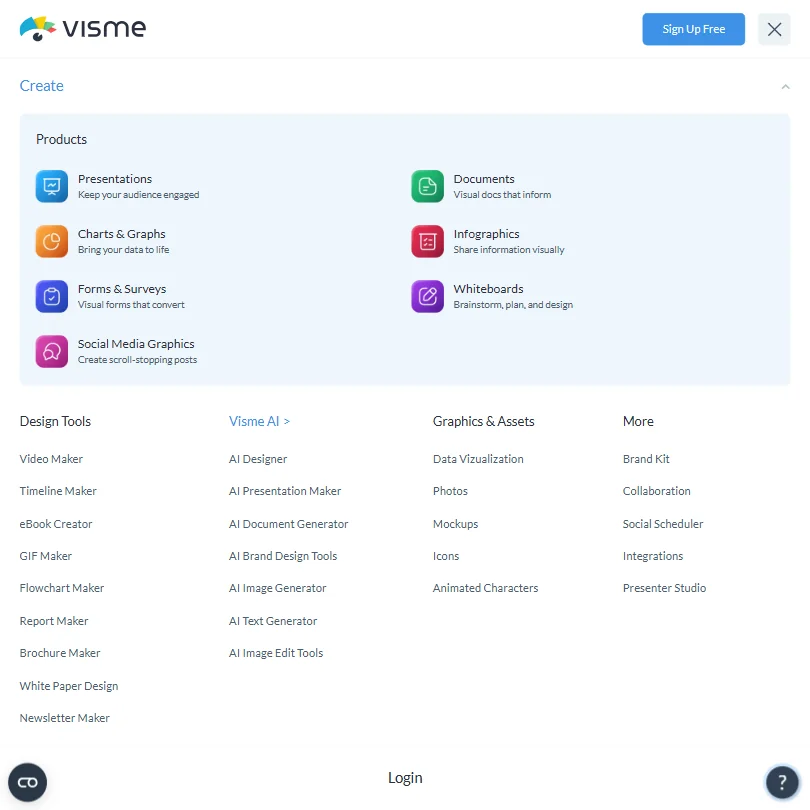
Beyond presentations, Visme covers infographics, documents, social graphics and data visualizations from the same prompt-based and template-based flow.
Making a deck with Visme
Visme's AI Presentation Maker turns a written prompt into a complete deck, choosing a style and generating text, images and icons to match. A source document can be uploaded, or a link pasted in, for the AI to build a presentation from instead of starting with a blank prompt.
PowerPoint files import, though Starter limits an import to 10 slides, a limit that higher plans raise or lift. A finished deck downloads as PPTX, HTML5, video or GIF from the Pro plan up, or publishes as a live link, HTML5, PDF or JPEG; Visme does not export to Google Slides. Sharing a deck as a live link on the Pro plan comes with analytics on who has viewed it.
Working with other people
Comments can be left directly on a design, with replies and collaborator tags to route feedback. A brand kit for keeping colors and fonts consistent is a Pro-plan feature.
Visme does not offer a public API; it connects instead to Mailchimp, Loom, Google Maps, Vimeo, Dropbox, SurveyMonkey, Jotform, Brandfetch, Salesforce, Widen, Google Drive, YouTube, Slack, HubSpot and Monday. It runs in the browser only, and single sign-on is available on the Enterprise plan.
Visme pricing: what each plan gives
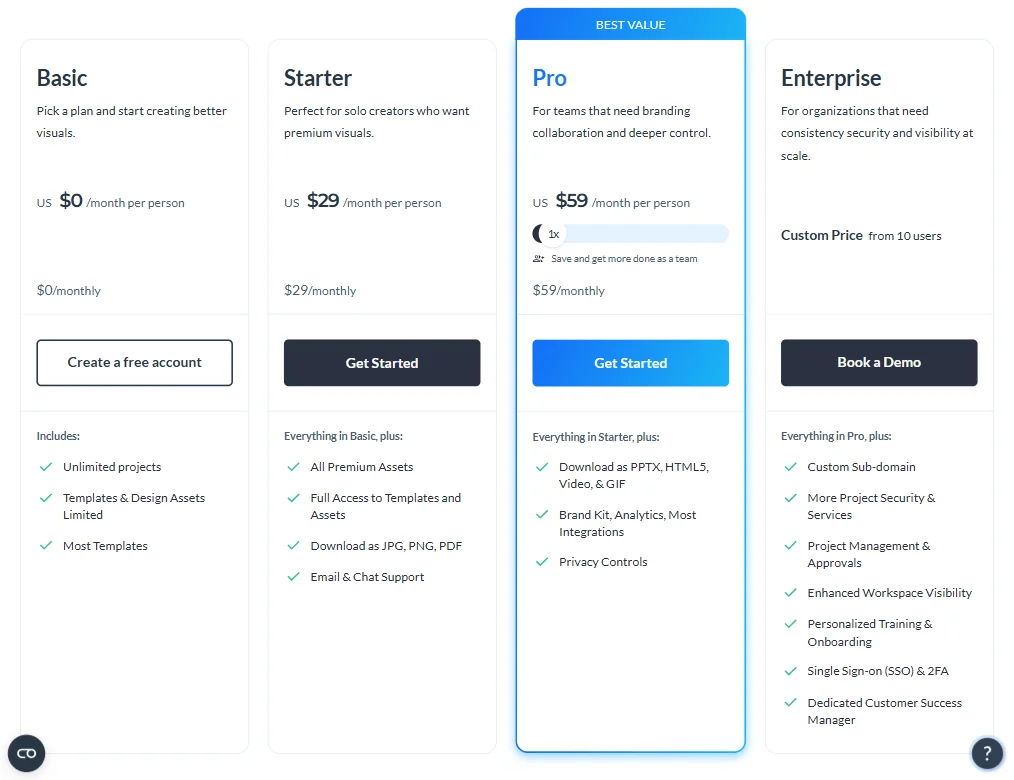
The free Basic plan gives unlimited projects, 500 MB of storage, up to 50 slides or pages per project, most templates in a limited form, limited charts and data widgets, the file manager and regular support, though projects carry Visme's logo. Visme does not publish a time-limited trial; the free Basic plan stands in for one instead.
Starter is $29 a month per user, or $12.25 a month billed yearly, with 200 AI credits a month and Visme's logo removed from projects; output on Starter is for personal use only. Pro is $59 a month per user, or $24.75 a month billed yearly, and adds the brand kit, viewer analytics, PPTX, HTML5, video and GIF export, and the right to use what you create commercially.
Privacy and support
Visme's terms state that using its services grants Visme permission to host what you input and generate on its platform to improve its products, without describing an opt-out. It states compliance with GDPR, and single sign-on with two-factor authentication is listed on the Enterprise plan.
Support runs through email and chat, alongside a help center.
Who Visme suits
Visme suits anyone producing presentations, infographics and social graphics from the same account, who wants AI image editing tools such as background removal, upscaling and erase-and-replace built into the same editor rather than a separate app. It also suits teams comfortable working entirely in the browser on a per-seat plan.
It suits less well anyone who needs to use the output commercially on a Basic or Starter budget, since that right only starts on Pro. It also suits less well anyone who wants to export to Google Slides, attach a custom domain to a shared deck, connect through a public API, or avoid having their uploads used to improve Visme's own products.
Screenshots
How Visme compares
Visme scores 6.9 out of 10 among the AI presentation makers we rate. These three do the same job and are the closest to it, compared on what each vendor publishes.
Beautiful AI
Beautiful AI keeps your uploads out of AI training outright, while Visme's terms allow that training on the content you upload. Beautiful AI costs more for it though, $45 a month against Visme's $29, and it has no free plan where Visme offers one. It also does less with the deck itself: 2 export formats and 5 integrations against Visme's 7 and 15, and no AI image editing. Both track who viewed a shared deck and support single sign-on.
Pick Beautiful AI if keeping your uploads out of AI training matters more than price or export options.
Pick Visme if you want more export formats, more integrations, and AI image editing at a lower price.
Gamma
Visme does more with a finished deck: 7 export formats against Gamma's 3, 15 integrations against 8, and AI image editing that Gamma lacks. Gamma costs less though, $12 a month against Visme's $29, and it lets you share a deck on your own domain, export straight to Google Slides, and use an API, none of which Visme offers. Gamma also runs on 3 platforms against Visme's 1. Both publish a deck as a web page, track who viewed it, and support single sign-on.
Pick Gamma if you want a lower price, your own domain for shared decks, and an API.
Pick Visme if you want more export formats, more integrations, and AI image editing.
Decktopus AI
Decktopus AI keeps your data out of AI training by default, where Visme's terms allow that training, and it lets you share a deck on your own domain, which Visme does not. It costs less too, $24.99 a month against Visme's $29. Visme answers back with far more once a deck is built: 15 integrations against Decktopus AI's 1, 7 export formats against 3, AI image editing that Decktopus AI lacks, a free plan, and GDPR compliance.
Pick Decktopus AI if you want your data kept out of AI training by default and a lower price.
Pick Visme if you want more export formats, more integrations, and AI image editing with GDPR compliance.
Frequently Asked Questions
Does Visme have a free plan?
Yes. The Basic plan is free with unlimited projects, 500 MB of storage and up to 50 slides or pages per project, though projects carry Visme's logo and most templates are limited.
What does Visme cost?
Starter is $29 a month per user, or $12.25 billed yearly, and removes Visme's logo. Pro is $59 a month per user, or $24.75 billed yearly, and adds the brand kit, analytics and commercial-use rights.
Can Visme edit an image, not just generate one?
Yes. Its AI image tools include a background remover, an upscaler, an unblur tool for low-quality or motion-blurred photos, and an erase-and-replace tool for removing unwanted objects.
Can I use what I make with Visme commercially?
Only from the Pro plan up. Visme's terms state that the Basic and Starter plans are for personal use, and commercial use is included starting on Pro and Enterprise.