
What is Submagic?
Short-form only. That's the whole product philosophy, and Submagic doesn't pretend otherwise. Upload raw footage or drop in a YouTube link, and the AI-automated editing loop runs: captions, silence removal, B-roll insertion, auto-zoom, direct publish to TikTok or Reels or YouTube Shorts. That's what you're buying.
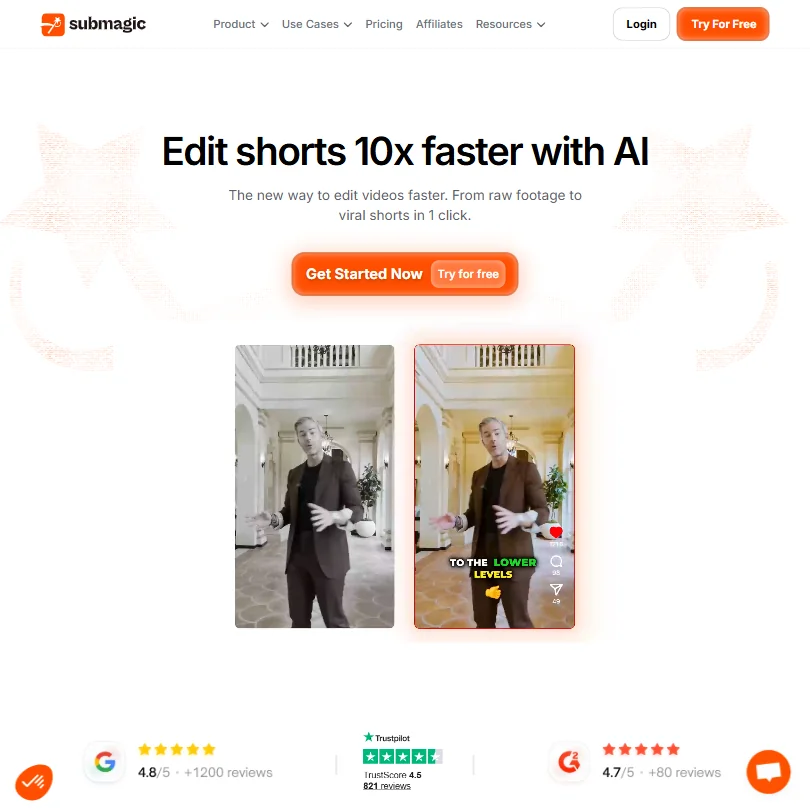
There's also an AI avatar capability, which is a separate use case from the editing workflow. Keep those two things mentally separate. The editing side is the core product. Avatars are adjacent, and the documentation treats them that way.
Submagic is based in Paris.
Submagic Features: Video Generation, Editing & AI Capabilities
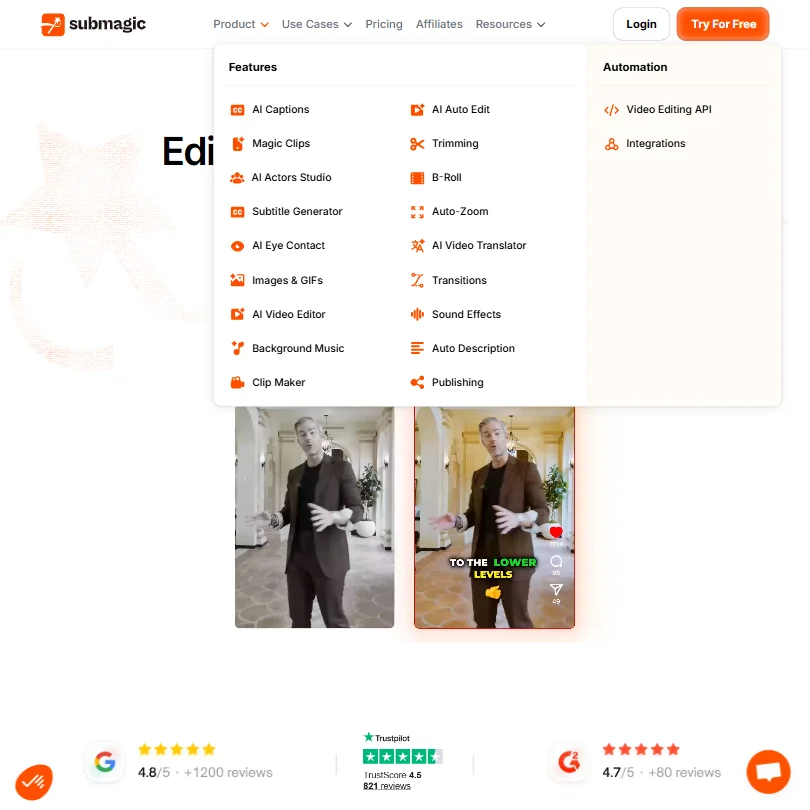
Magic Clips is the feature that shows up most in positive reviews. It pulls multiple shorts from a single long-form video, finds the key moments, cuts them, and packages them for publishing. For anyone repurposing podcast recordings or hour-long YouTube videos, that's genuinely useful. Not a gimmick. We saw it praised consistently enough to take seriously.
Auto-captions are the other headline. Submagic claims 99% accuracy across 123 languages, and the caption styles are clearly modeled on what already performs on TikTok. Animated text, color-coded words, viral presets. It's tuned for retention, not just readability, and that design decision shows up in the output.
The AI also handles silence removal and filler word cuts. B-roll gets inserted automatically. Auto-zoom adds motion to static talking-head footage. None of these are exclusive to Submagic, but the pitch is that they all happen without touching a timeline. Honestly, that holds up for straightforward footage.
Eye contact correction appears in the plan feature list, which is a useful addition for creators recording without a teleprompter. Not every competitor includes it at this price. Worth noting as a differentiator, not a selling point on its own.
Voice cloning and text-to-speech are absent from the public docs entirely. If your workflow depends on either, Submagic isn't going to cover you. HeyGen handles both and is the more appropriate comparison for that specific need.
Submagic Video Quality: How Good Does the Output Actually Look?
Export resolution scales by plan. Starter and Pro both export at 1080p and 30fps. Business unlocks 4K at 60fps, which is the only tier where resolution becomes a real differentiator. For short-form content on TikTok or Reels, 1080p is fine. Nobody's inspecting Reels at full resolution on a monitor.
Caption rendering is where Submagic's output earns its reputation. A badly styled caption kills engagement. Submagic's prebuilt styles are clearly built around what already works algorithmically.
B-roll is AI-matched stock footage. Functional. We'd describe it as "good enough to not notice" rather than something that adds production value. Agencies doing client work should review every B-roll insert before publishing. That's our honest take, not a warning, just a workflow note.
Not a dealbreaker for the core use case. But worth knowing before you feed it a messy interview recording.
Submagic AI Avatars & Voiceover: How Realistic Are They?
The public documentation on avatars is thin. No detail on which avatars are available. No information on customization depth. We couldn't find specifics on voice cloning or text-to-speech, because neither appears to exist in the current product.
We're skeptical of the avatar quality here. The feature is clearly secondary to the editing workflow, and the documentation reflects that. Teams needing realistic avatars for training content or multilingual sales material should look at Synthesia, which is purpose-built around avatar quality and has the enterprise track record to back it up.
Voiceover doesn't appear in the feature set at all. That's a notable gap. Without voice generation or cloning, the avatar feature has limited utility for teams who need to produce content without on-camera talent.
Is Submagic Easy to Use?
Web-only. No desktop app, no mobile editor. That's a deliberate architectural choice, and it mostly works for the intended workflow. The loop is short: drop in footage, let the AI run, review, publish.
Team collaboration features appear on paid plans. Brand templates and shared workspaces are included at the Pro tier, which isn't always standard at $23 a month billed annually. Agencies managing multiple accounts will find that useful.
No community forum. Priority support is listed as a Business plan feature, but what "priority" means in practice isn't spelled out anywhere we could find. That ambiguity becomes a real problem when something breaks mid-project at scale.
Submagic Pricing: Is It Worth It for Creators & Teams?
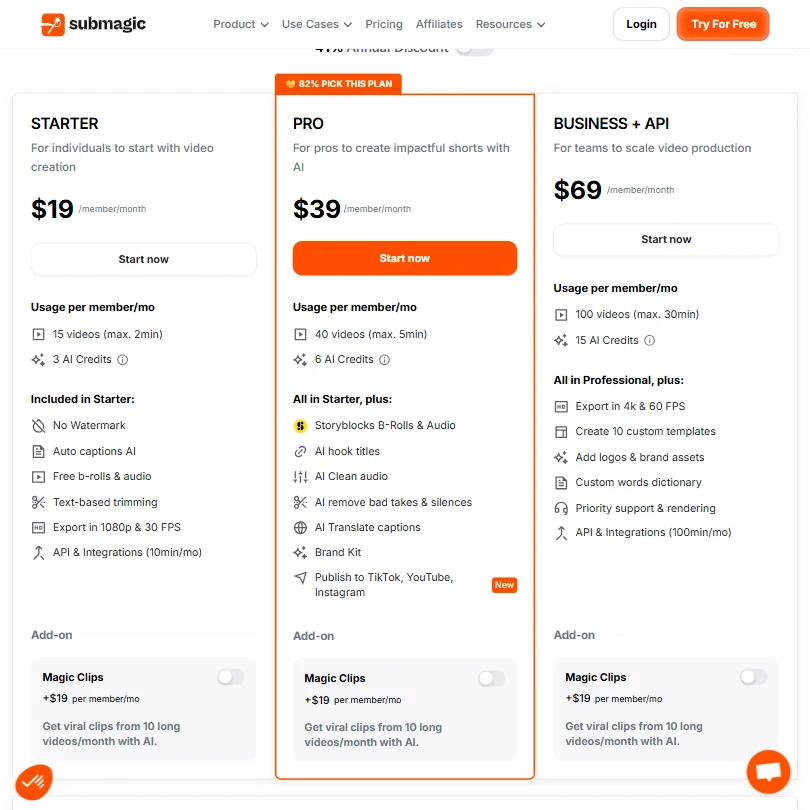
Three paid tiers. Annual billing runs $12 a month for Starter, $23 for Pro, and $41 for Business. Monthly billing is also available and clearly displayed: $19 per member per month for Starter, $39 for Pro, $69 for Business. The free plan includes three videos with no credit card required. No stated expiry on the trial.
At $19 monthly or $12 annually, the Starter plan sits at or below the category median for AI short-form video tools. No watermark is included on Starter, which matters. Some competitors gate that behind a paid upgrade.
The API access is the interesting wrinkle. Starter includes 10 minutes of API usage per month. Business includes 100 minutes. That's an unusual offering at this price tier, and it's relevant for agencies or developers building automated video pipelines. Not many tools in this category expose an API below the enterprise tier.
Refund policy. We couldn't find one. Submagic doesn't publish it. Not a fatal issue, but a meaningful one if you're committing to an annual plan. Test the free plan hard before going yearly on any tier. Fair warning.
Submagic vs Opus Clip: Which AI Video Tool Is Better?
Opus Clip is the closest direct comparison. Both tools clip long-form video into shorts automatically. The difference is in what each one prioritizes.
Opus Clip leans into virality scoring and clip ranking, telling you which clip is likely to perform before you publish. Submagic doesn't do that. Submagic prioritizes caption quality and publishing speed, and it's better at both.
If polished, on-brand captions at volume is the priority, Submagic wins that head-to-head. If clip-scoring and performance prediction matter more to your workflow, Opus Clip is the better fit.
On price, Submagic's free plan gives three full videos. Opus Clip's free tier is more restricted. That's a meaningful difference when you're evaluating both before spending anything.
Direct publishing to TikTok, Instagram, and YouTube Shorts is on both tools. Neither has a real edge there.
Who Should Use Submagic? (And Who Shouldn't)
Content creators publishing multiple shorts per week. The fit is obvious. Fast workflow, good captions, low price, no timeline to manage.
Marketing teams managing high-volume social content will find the shared workspace and brand templates at the Pro tier useful. Not every tool at $23 a month includes both.
Agencies at scale. The Business plan at $41 annually was designed for this. Ten custom templates, 4K at 60fps, 100 minutes of API access per month. Workable for multi-client publishing operations.
Podcasters needing transcript-level, word-by-word editing. Not here. Descript is built around that workflow and Submagic isn't trying to compete with it.
Voice cloning users. Same answer. Wrong tool entirely.
Long-form video producers. Nothing in Submagic is designed for you. The feature set is short-form by architecture, not by omission.
Submagic Review Verdict
Submagic does a specific thing and does it well. Caption-forward, fast, short-form video editing at a price that doesn't require a budget conversation. For that use case, the product holds up.
What holds it back is the gaps. No voice cloning. Thin avatar documentation. A refund policy that doesn't exist publicly. Support quality that scales by plan rather than staying consistent. The help center being described as basic is a real concern for teams that hit edge cases.
Caption quality remains the strongest argument for Submagic, and we kept seeing it praised across reviews in a way that felt genuine rather than coordinated. For short-form content where caption style directly affects retention, that's not a minor feature. It's the product.
We're comfortable recommending it for the core use case. Don't go in expecting a full production suite. This is a speed tool for short-form content, priced like one, built like one. It knows what it is. That's more than we can say for a lot of tools in this category.
How Submagic compares
Submagic scores 7.8 out of 10 among the clip repurposing tools we rate. These two do the same job and are the closest to it, compared on what each vendor publishes.
Opus Clip
Opus Clip has a free plan and Submagic does not, and its cheapest paid tier is $15 a month against Submagic's $19 a month. Opus Clip also accepts videos up to 600 minutes long, well past Submagic's 30 minute cap, and holds SOC 2, which Submagic does not state. Submagic answers with lip sync and 123 languages against Opus Clip's 20, plus single sign on that Opus Clip does not offer.
Pick Opus Clip if you want a free plan and room for long videos.
Pick Submagic if you want lip sync, more languages and single sign on.
Vizard.ai
Vizard.ai accepts videos up to 600 minutes long and has a free plan, while Submagic caps videos at 30 minutes and offers no free tier. Submagic is cheaper on its paid plan at $19 a month against Vizard's $29 a month, and only Submagic scores clips by predicted performance, adds AI voiceover and includes lip sync. Vizard posts to YouTube, TikTok and Instagram; Submagic reaches those plus Facebook and LinkedIn.
Pick Vizard.ai if you have long videos and want a free plan.
Pick Submagic if you want clip scoring, AI voiceover and a lower price.
Frequently Asked Questions
Does Submagic have a free plan?
Yes. Three videos, no credit card required, no stated time limit. That's enough room to run real footage through the core workflow before paying anything. Use all three on actual content before deciding on a plan. Don't waste them on test clips.
Can Submagic generate captions in languages other than English?
Submagic supports 123 languages for auto-caption generation. The 99% accuracy claim is a vendor figure and almost certainly reflects clean, standard speech. Accented speakers and fast delivery are where users flag the most manual corrections, so expect some cleanup depending on your footage quality. Not a dealbreaker, just a workflow reality.
Is Submagic suitable for agencies?
The Business plan at $41 a month annually was clearly designed with agencies in mind. It includes team collaboration, 10 custom brand templates, 4K export at 60fps, and 100 minutes of API access per month. That's a workable stack for multi-client publishing. The main caveat is that priority support isn't transparently defined anywhere public, which becomes a meaningful gap at scale if something breaks during a client deadline.