
Riverside launched out of Tel Aviv in 2019, and its product roadmap has moved faster than most in this category since.

There's real nuance in what Riverside does well, where it cuts corners on free-tier users, and whether the pricing holds up against alternatives.
What is Riverside?
Browser-based. No software install required. That's the entry point. Riverside captures audio and video locally on each participant's device, then uploads the files after the session ends. Your internet connection can fall apart mid-recording and the quality doesn't drop, because the high-quality feed never travels over the network in the first place.
From there it's grown into something broader. The platform now covers editing, AI-generated clips, show notes, captions, translation, podcast hosting, and live streaming. That's a lot of surface area for a tool that started as a remote recording app. Whether all of those additions are equally polished is a separate question.
Honestly, the all-in-one angle is both the pitch and the risk. Tools that do everything tend to do some things worse than specialists. Riverside's bet is that podcasters and marketers would rather stay in one tab than juggle four tools.
Riverside Features: Video Generation, Editing & AI Capabilities
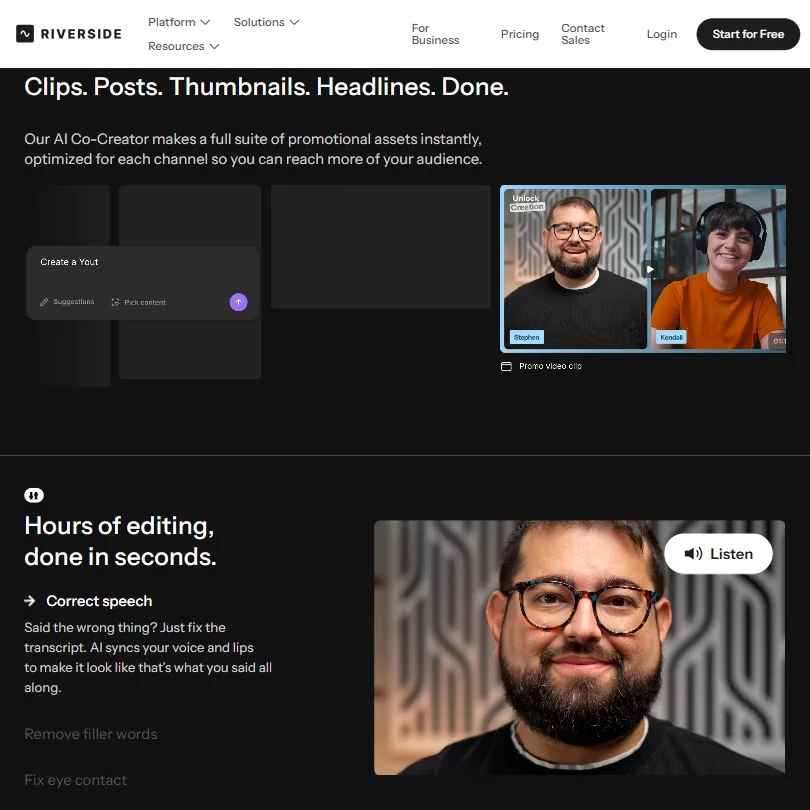
The recording side is where Riverside built its reputation. Local 4K recording with separate tracks per participant is the foundation, and it's genuinely good. Every speaker's audio and video gets captured independently, which makes post-production significantly cleaner. No bleed, no merged tracks that require surgery later.
The AI editing layer has grown considerably. The text-based editor lets you cut a recording by deleting words from a transcript. That part works much like Descript. On top of that, Riverside adds automatic filler word removal and silence trimming. It also includes what they call eye contact correction, which adjusts where a speaker appears to be looking on camera.
Worth testing on your own footage before committing to it.
Magic Clips is probably the most-used AI feature after basic editing. It scans a long recording and generates short clips optimized for social formats. Caption generation, animated subtitles, and auto-sizing for vertical formats all come bundled. The AI Co-Creator handles show notes and chapter summaries. Two functions that used to eat an hour of a producer's week now take a few clicks.
B-roll generation is listed in their feature set. Useful as a fallback, not a replacement for real footage.
Screen recording and virtual backgrounds round out the toolkit. Custom branding, logo placement, intro and outro overlays. Standard at this point. Riverside executes them without friction, which is more than some competitors manage.
Riverside Video Quality: How Good Does the Output Actually Look?
The local recording approach pays off here. Most remote recording tools compress heavily over the wire. Riverside doesn't, because the quality never travels over the network in the first place. The result is 4K video at the desktop level on Pro and higher plans, with separate track downloads up to 15 hours on Pro and 20 hours on Grow. For podcast video or professional interview content, that's a meaningful gap over tools still relying on stream-based capture.
Free plan users cap out at 720p, which is fine for testing but shows Riverside's watermark on exported files. Something to know before you record a client session on the free tier.
Riverside can't fix poor source conditions. A bad microphone still sounds bad. A backlit room still looks murky. The platform's AI audio enhancement helps at the margins, noise reduction and leveling, but it's not a miracle worker.
On mobile, the situation is more nuanced than the pricing page makes obvious. The mobile app supports exports up to 4K on Mobile Plus and other eligible paid access. Current documentation does not restrict mobile 4K export to Business. Worth checking the plan comparison carefully before assuming.
Riverside AI Avatars & Voiceover: How Realistic Are They?
Straightforward answer here. Riverside doesn't offer AI avatars. No voice cloning. No text-to-speech voices. If you need to generate a presenter from scratch without filming anyone, Riverside isn't the tool. That's a deliberate product choice, not an oversight.
What Riverside does offer is AI translation and dubbing for recorded content. Multiple languages supported. The dubbing feature attempts lip-sync matching, which user feedback describes as functional but imperfect. Passable for internal content. Probably not good enough for anything where a mismatch would look unprofessional.
For teams that specifically need avatar-based video, Synthesia handles that side of the market much more completely. Different product entirely, different use case. But if your workflow is real-person recording rather than generated presenters, Riverside's gap here won't matter.
We're not concerned about the absence of avatars. Riverside knows what it is.
Is Riverside Easy to Use?
No downloads required on the guest side is a real advantage. You send a link, they click it, they're in. That removes a friction point that kills remote recording sessions before they start.
The text-based editor has a learning curve if you're new to that workflow. Not steep. More of a ten-minute adjustment than a training problem. Users coming from Descript adapt quickly. Users coming from no prior editing background occasionally need a session or two.
Producer mode, available on the Business plan, lets a third person manage the session without appearing on camera. That's useful for professional productions where someone needs to monitor levels, manage guests, and handle logistics without being in the frame.
Where it gets less smooth: exporting. Riverside uploads the locally recorded files after the call ends, and for a two-hour interview that can mean waiting. Not a bug, just physics.
Riverside Pricing: Is It Worth It for Creators & Teams?
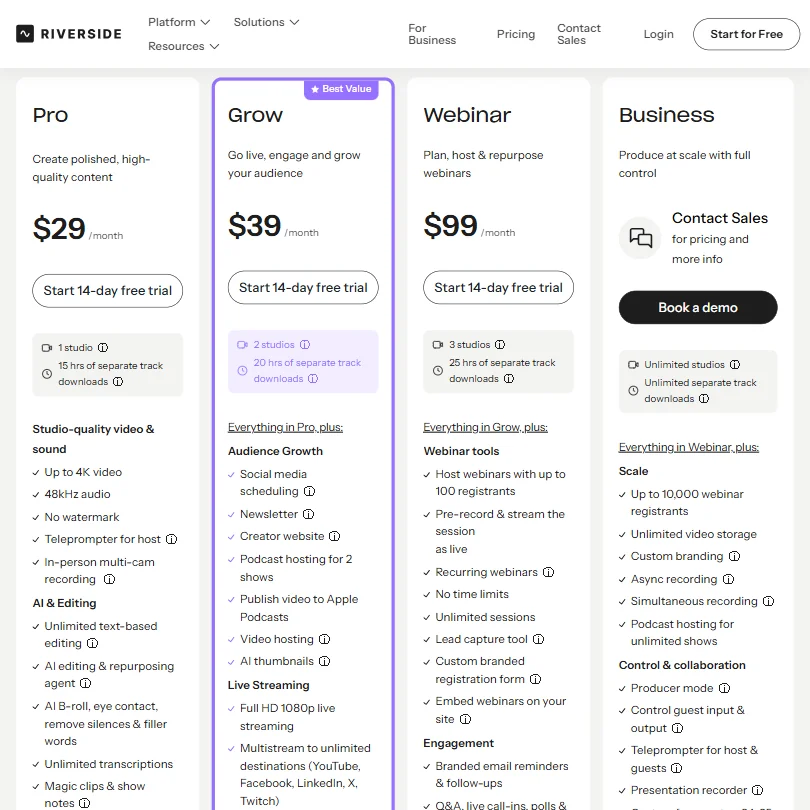
Four public tiers, plus Business on request. Free, then Pro at $29 a month (or $24 on annual billing), Grow at $39, and Webinar at $99. Business requires a sales call and a demo booking.
The free plan is more useful than most free plans in this category. Unlimited recording hours, capped at 720p, with separate track downloads limited to two hours total. The watermark is the real constraint. For professional output, it's a problem.
Pro is where most individual creators land. That covers 4K desktop recording, 1 studio, 15 hours of separate track downloads, and the core AI features. At $29 a month on monthly billing, Riverside sits above the category median for comparable tools, though the annual rate brings it closer to parity. The quality and feature depth justify some premium. But it's not the budget option.
Grow at $39 adds 2 studios, 20 hours of separate track downloads, social media scheduling, newsletter tools, a creator website, podcast hosting for 2 shows, and full HD 1080p live streaming with multistream to unlimited destinations including YouTube, Facebook, LinkedIn, and Twitch. Webinar at $99 brings in live webinar hosting for up to 100 registrants, recurring sessions, a lead capture tool, and a custom branded registration form. Worth it if you're running webinars. Overkill if you're not.
Riverside publishes a refund policy offering limited refund windows for eligible new monthly and annual subscriptions. New monthly Pro or Grow subscribers may qualify within 24 hours of purchase. Annual subscribers have a 14-day window. Mobile purchases run through Apple or Google and follow their respective policies. AI credit purchases are non-refundable. Not buried, but not prominently surfaced either. Worth reading before you commit.
API access sits behind the Business tier. Ask whether Zapier integration is supported. Both of those limit workflow automation for teams on lower plans.
Riverside vs Squadcast: Which AI Video Tool Is Better?
Squadcast is the most direct head-to-head. Both started as remote recording tools focused on podcast-quality audio. Both do local recording to avoid internet quality issues.
The gap has opened since 2022. Riverside added a full AI editing layer, clip generation, captions, show notes, podcast hosting, and live streaming. Squadcast has stayed closer to its core. Cleaner in some ways, leaner in others.
If you want a recording-only tool without the AI noise, Squadcast is still a reasonable choice. Simpler interface, lower price point. For users who want to go from raw recording to published episode or social clip without leaving the platform, Riverside covers more ground.
The AI editing features are where Riverside pulls clearly ahead. Squadcast doesn't have a comparable text-based editor or clip generation layer.
Fair. Descript also competes here and is often compared to Riverside directly. Descript's editing suite is arguably more mature, but its recording infrastructure isn't as strong. Different tradeoff depending on where your bottleneck is.
Who Should Use Riverside? (And Who Shouldn't)
Solo podcasters who care about audio and video quality. That's the clearest fit.
The platform handles everything from recording through distribution without requiring additional tools. For a one-person operation, the Pro plan covers most needs. Marketing teams running regular interview content or customer stories will get value from the AI clip generation and the branding features. The HubSpot integration is real and documented. Salesforce and Marketo are Business-tier only.
Video producers managing multiple guests and multiple shows will find the workspace and collaboration features worth paying for. Producer mode on Business is a genuine production tool, not a checkbox.
Teams looking for AI avatar generation. Not the right tool. Riverside isn't that, and it's not trying to be. Anyone who needs heavy-duty post-production editing with timeline tools will also hit Riverside's limits fast. It's a text-based editor, not Premiere, not Resolve. The export doesn't go to Adobe or DaVinci natively.
Budget-constrained creators who need free output without watermarks will find the free plan doesn't stretch far enough.
Riverside Review Verdict
Riverside is one of the better-built tools in the remote recording space. The local recording infrastructure is solid. The AI editing layer has real utility, not just checkbox features. The transition from recording to finished clip is faster here than it is in most alternatives.
The product works consistently, and that's not a small thing.
The pricing is fair for what you get, though above median for the category. The refund windows exist but are narrow. The post-session upload wait for long recordings is a real but predictable limitation.
The AI translation and dubbing features are functional. Not best-in-class. Good enough for most use cases. If multilingual content is your primary output, test those specifically before committing.
We'd recommend Riverside without much hesitation for podcasters, video producers, and marketing teams running regular recorded content. The free plan is worth using to test your setup. Then move to Pro once you confirm it fits your workflow. That's the sensible path.
Frequently Asked Questions
Does Riverside record in 4K on all plans?
No. The free plan maxes out at 720p video. Desktop 4K recording starts at the Pro plan, at $29 a month on monthly billing or $24 on annual. For mobile, the picture is more nuanced. The mobile app supports exports up to 4K on Mobile Plus and other eligible paid access. Current documentation does not restrict mobile 4K export to Business. Read the plan comparison carefully before recording anything you need in full resolution.
Is Riverside good for remote podcast recording with guests who aren't tech-savvy?
Generally yes. Guests don't need to create an account or download anything. They click a link and join from a browser. That's a genuine friction reduction compared to tools that require software installation.
How does Riverside's AI editing compare to Descript?
Both use a text-based editing approach where you cut video by editing a transcript. Descript has had that workflow longer and is arguably more polished on the pure editing side. Riverside's advantage is that it's built on top of a better recording infrastructure, and the AI features for clip generation and distribution are tighter. Which one wins depends on whether recording quality or editing depth is your bigger priority.











