SAASINSPECTOR
Kling AI logo

Kling AI Review

Filmmakers, content creators, and creative professionals seeking high-quality AI video and image generation with cinematic control

Visit Kling AIFrom $8.80/mo

Research-based review. We analyzed vendor documentation, customer reviews on G2, Capterra, and Reddit, and live pricing — not hands-on testing yet. We update as our team puts tools through real workflows.

The verdict

Kling AI is a multimodal AI creative platform by Kuaishou Technology that combines text-to-video, image generation, and audio into a single architecture, targeting creators and developers who want an all-in-one production environment. Launching in 2024 and now on version 3.0, it scored higher than 38 of 40 tools in its category on SaaSInspector. It is best suited for content creators, filmmakers, and developers who need broad platform support and cinematic video generation capabilities.

Pros

  • Kling AI ranked above 38 of 40 tools reviewed in the AI video generator category, indicating exceptional competitive performance.
  • The Kling 3.0 series integrates video generation, image generation, and audio into a single unified architecture rather than bolting features together.
  • Available across web, iOS, Android, macOS, and Windows, giving it broader platform coverage than most competitors.
  • An API platform is available for developers who want to build custom applications on top of Kling AI.
  • The 'Omni Narrative' system generates cinematic multi-shot sequences rather than a single continuous clip, a meaningful advantage over most text-to-video tools.
  • Deep multimodal instruction parsing allows the system to understand prompts across text, image, and audio simultaneously.
  • Kling AI is more accessible than key competitors like Sora and Runway ML, lowering the barrier to entry for users.

Cons

  • Kling AI is developed by a Chinese company (Kuaishou Technology), which may raise data privacy or geopolitical concerns for some users or enterprises.
  • Whether the 'deep multimodal instruction parsing' feature delivers on its ambitious framing in real-world output remains an open question.
  • The rapid version update pace, while impressive, may create instability or inconsistency in features between releases.
  • No hands-on testing was conducted for this review, meaning real-world performance conclusions are drawn from third-party and community sources.
  • Competitors like Runway ML and Sora are still active in the same conversation, meaning Kling AI is not without serious challengers despite its high ranking.
From $8.80/moFree plan YesFree trial Yes

Kuaishou Technology built this. That matters. Kling AI is a multimodal creative platform developed by the Chinese company behind one of the country's largest short-video platforms, and the pace at which it has moved since its 2024 launch reflects exactly that kind of institutional muscle. We pulled vendor documentation, Reddit threads, Product Hunt discussions, and third-party coverage before writing any of this. No hands-on testing. That happens separately. What we kept seeing was a tool that made most Western competitors look like they were waiting for a meeting to end.

Kling AI homepage screenshot
Kling AI — Homepage

The 3.0 release changed the conversation in this category. We'll explain why, and where the cracks are.

What is Kling AI?

Kling AI is a multimodal creative platform developed by Kuaishou Technology, the Chinese company behind one of the country's largest short-video platforms. It launched in 2024 and has moved through version updates at a pace that most Western AI labs would struggle to match. The current flagship is the Kling 3.0 series, which folds video generation, image generation, and audio into a single architecture rather than bolting features together as afterthoughts.

The product runs on web, iOS, Android, macOS, and Windows. Broad coverage. There's also an API platform for developers who want to build on top of it.

What Kuaishou is pitching with Kling 3.0 is an all-in-one production environment. Not a video tool with some AI features. Not an image generator with a video tab. The whole thing is designed around what they call "deep multimodal instruction parsing," meaning the system is supposed to understand a prompt across text, image, and audio simultaneously rather than treating each as a separate job. Whether the output lives up to that framing is worth asking.

Its competitors include Runway ML, Pika Labs, and Hailuo AI. Sora sits in the same conversation too, though Sora's actual availability remains limited. Kling is more accessible than most of them.

Kling AI Features: Video Generation, Editing & AI Capabilities

Kling AI features screenshot
Kling AI — Features

Text-to-video is the headline feature, and it's genuinely capable. You feed it a prompt, and the system parses the instruction with what Kling calls "Omni Narrative," a 15-second multi-shot control system that generates cinematic sequences rather than a single floating clip. That's a meaningful distinction. Most text-to-video tools give you a continuous clip with one implied camera position. Kling gives you a storyboard.

The All-in-One Reference system is where things get interesting. You upload a short 3 to 8 second character video, or a set of reference images, and the model locks in that identity across scenes. Not just visually. The system also supports voice assignment for those characters, binding a specific vocal tone to a specific face. That's dual identity binding across visual and audio channels, and it's more sophisticated than what most tools in this category offer.

Honestly, that feature surprised us.

On the editing side, there's motion control and multi-scene transitions. Secondary element stabilization too, which sounds technical but basically means you can anchor supporting elements in a shot while letting the main subject move. The kind of thing that previously needed proper post-production software.

IMAGE 3.0 Omni is the image generation arm. It targets cinematic output specifically, with composition control, lighting and tonal mood, and depth of field through aperture simulation. The target users are clearly film storyboard artists and previs teams, not casual social content creators. Native 2K and 4K output.

Batch processing is supported. The SmartLab workspace ties multiple models and workflows together in one place. An API platform exists for programmatic access. No integration with Adobe Premiere or DaVinci Resolve, though. No Zapier either. The integration story is thin, and for anyone running an existing production stack, that's a real friction point.

Kling AI Video Quality: How Good Does the Output Actually Look?

This is where Kling pulls away from most of its direct competitors, at least based on what we kept seeing across Reddit threads and third-party comparison videos from 2024 and early 2025. The outputs look cinematic. Not in a marketing-copy way. In a "this could plausibly appear in a film pitch deck" way.

The multi-shot control is a big part of that. A 15-second clip with intentional shot changes and consistent lighting reads very differently from a 15-second clip that's just one continuous AI fever dream. Kling 3.0 is much closer to the former.

Reddit users comparing Kling directly to Runway ML consistently noted that Kling handles motion physics better. Fabric moves like fabric. Water looks like water. Runway has strong output too, but several threads from early 2025 called Kling the sharper tool for anything involving realistic human movement. We cross-referenced that with a few YouTube comparison breakdowns and the pattern held.

What we're less certain about is consistency at scale. A single impressive generation doesn't prove the model is reliable across varied prompts and complex scenes. That's the kind of thing you only learn through extended use, which we haven't done. Our honest read is that the ceiling is high, but the floor is unknown. We'd want to see more structured user testing before calling it a guaranteed performer.

The 2K and 4K image output from IMAGE 3.0 Omni reads as production-ready based on the samples available publicly. Storyboard and previs use cases look like the genuine sweet spot.

Kling AI AI Avatars & Voiceover: How Realistic Are They?

More developed than we expected from a tool that launched in 2024. The character reference system locks in appearance across multiple scenes using either a short video clip or a set of reference images. That's the visual side.

The audio side is called Native Audio Output. It handles text-to-speech voices with multi-language support and allows character voice referencing. So you're not just generating a video of a person. You're generating a video of a person who sounds like that person, or at least like a defined vocal profile assigned to that character.

Lip-sync driving is included. Static characters can be given a matched voice and then animated to speak. That puts Kling in territory that overlaps with dedicated AI avatar tools. It's not as purpose-built as something like HeyGen for pure avatar-based video at scale, but it's more integrated. Video, image, and avatar capabilities share one environment rather than requiring separate tools.

We're skeptical of one thing. Native audio from AI models tends to sound plausible in demos and uncanny in real use. We haven't heard enough output samples to call Kling's audio genuinely convincing at the character-voice level. The vendor documentation is confident about it. User reports are sparser on this specific feature than on the video quality side. That gap is worth acknowledging.

Voice cloning is listed in the feature set. The docs mention dual binding of visual identity and vocal tone. What we don't have is real-world confirmation that the cloning holds up across varied speakers or accents.

Is Kling AI Easy to Use?

Web, iOS, Android, macOS, and Windows. Solid coverage. The SmartLab workspace is designed to consolidate multiple generation tasks in one place, which should help with navigation. That said, the depth of Kling 3.0's feature set is not small.

For a casual user who wants to type a prompt and get a clip, it's probably fine. For someone trying to use character reference binding, multi-shot storyboard control, and secondary element stabilization in the same project, there's a learning curve. How steep that curve is depends heavily on your production background.

The help documentation is basic. A Quick Start guide and a blog. No community forum, no live chat. Email support at support@kling.ai is the primary contact method. That's a thin support infrastructure for a tool with this much technical complexity. We kept seeing the pattern in product discussions: users figuring things out through YouTube tutorials and Reddit threads rather than official documentation.

Filmmakers and creative professionals with existing production experience. The interface will probably feel intuitive for them. For someone without that background, the terminology alone requires orientation time, "secondary element stabilization" and "aperture-driven depth of field" aren't phrases casual users reach for.

Ease of use is not where Kling competes. That's fine. The tool knows its audience.

Kling AI Pricing: Is It Worth It for Creators & Teams?

Kling AI pricing screenshot
Kling AI — Pricing

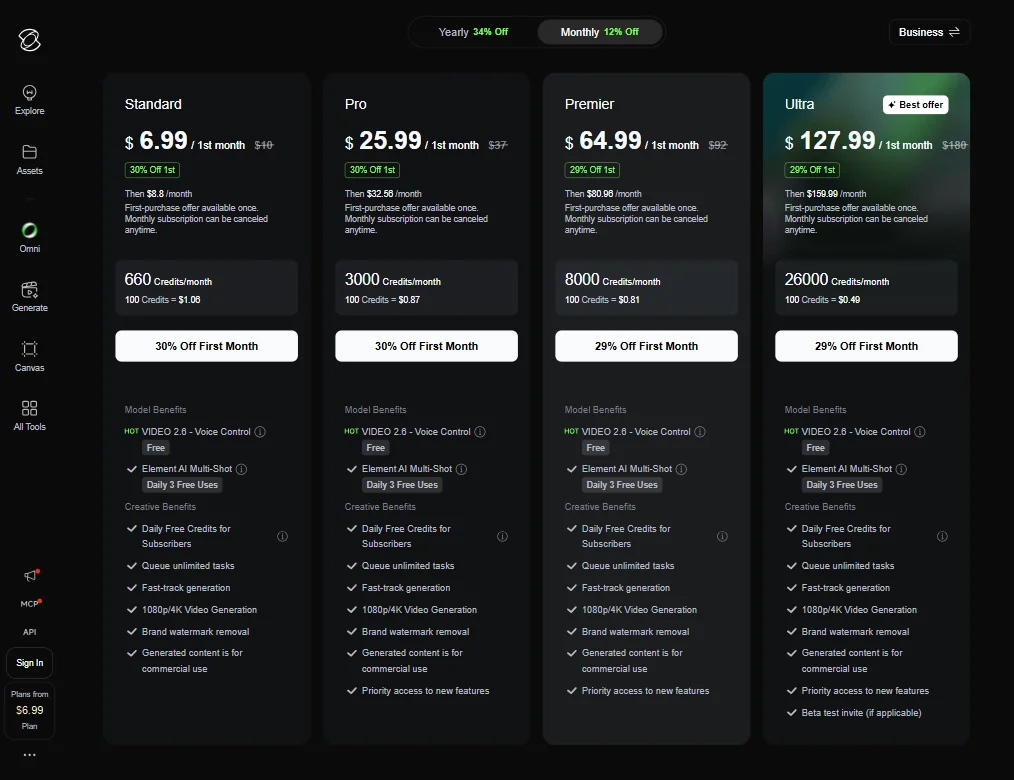
The pricing page actually shows more than most sources suggest. Four plans are listed publicly. Standard comes in at $6.99 for the first month, then $8.80 per month after that. Pro is $25.99 for the first month, renewing at $32.56. Premier runs $64.99 initially, then $80.96. Ultra sits at $127.99 for month one, then $150.99 ongoing. Both Standard and Pro carry a 30% first-month discount. Premier and Ultra are discounted 29%.

The credit economics are worth spelling out. Standard gets 660 credits per month, with 100 credits costing $1.06 at that tier. Ultra gets 26,000 credits per month, with 100 credits dropping to $0.49 at scale. That's a meaningful difference for anyone doing volume work.

All plans include VIDEO 2.6 Voice Control at no additional credit cost. Element AI Multi-Shot is available at daily 3 free uses across all tiers. The Premier and Ultra plans add priority access to new features, which is a real differentiator if Kling's update pace continues at its current rate.

For context, Pika Labs' entry-level paid tier is currently $10 per month. Kling's Standard plan at $6.99 for the first month is lower on paper, though per-video cost would require a like-for-like generation comparison to say anything meaningful. Credit economies differ too much for a clean headline comparison.

What's still missing: a published refund policy. API pricing isn't listed publicly. Enterprise tier information doesn't appear on the pricing page. Those gaps matter for teams making larger budget commitments.

Fair. The base pricing is at least visible now. The surrounding terms are not.

Kling AI vs Runway ML: Which AI Video Tool Is Better?

Runway ML is the standard Western reference point for professional AI video editing software. It's been around longer, has more developed documentation, and has built a reputation with production studios. Kling arrived later and moved faster.

On raw video quality, the threads we read consistently put Kling 3.0 ahead of Runway for motion realism, especially human movement. Runway holds its own on creative stylization and has stronger integration with professional workflows. No direct Adobe or DaVinci connections on Kling's side.

The multi-shot storyboard control in Kling is a genuine differentiator. Runway's approach to sequencing is more clip-by-clip. That matters for anyone trying to build a coherent scene rather than a single impressive moment.

Where Runway wins: transparency. Pricing is visible. Documentation is more thorough. The support infrastructure is better developed. For a team that needs to know what they're paying and needs help when things break, that's meaningful.

Kling wins on output capability. Runway wins on operational reliability. That's the honest split based on what our research surfaces. Which matters more depends on the project type, not on which company has better marketing.

Pika Labs is an option for simpler generation needs at comparable price entry points, though per-video economics differ enough that a straight price comparison doesn't settle much. Hailuo AI overlaps with Kling on the Chinese-market multimodal approach. Neither competes at the same ceiling on cinematic quality, at least not based on the 2025 comparison data we found.

Who Should Use Kling AI? (And Who Shouldn't)

Filmmakers doing previs and storyboard work. This is the clearest fit. The IMAGE 3.0 Omni model is explicitly built for this, and the cinematic controls in the video generation side support it.

Creative professionals who want character consistency across multiple scenes. The All-in-One Reference system solves a real problem for anyone producing serialized or narrative content.

Developers who want API access to a capable multimodal generation model. The output quality justifies building on it.

Social content creators who need quick, cheap turnaround. Not the fit. The tool is more complex than that use case requires, and the credit-based pricing takes some math to evaluate at casual volume.

Enterprise teams that need structured support, clear SLAs, and published pricing. Also not the fit, at least not yet. The support infrastructure isn't there. Synthesia is a better-documented option for enterprise video production at scale.

Anyone whose workflow depends on Adobe or Zapier connections. The integrations simply don't exist. Hard stop for some stacks.

Kling AI Review Verdict

Kling AI 3.0 is the most capable multimodal video generation platform we've reviewed in this category outside of tools with access restrictions. The output quality is genuinely high. The multi-shot storyboard control is ahead of most Western competitors. The character reference and voice binding system is more developed than we expected from a tool this new.

The problems are real too. A refund policy isn't publicly stated. Enterprise tier information is absent. API pricing isn't listed. For teams that need budget predictability before committing, those are structural gaps, not minor omissions.

Support is thin. Basic documentation, email only, no community. For a tool with this level of technical depth, that creates friction.

The integration story is also weak. No Premiere, no DaVinci, no Zapier. If you're running an established production stack, Kling sits outside it.

Despite those gaps, Kling AI sits well above the median in this category. The generation quality is hard to argue with based on everything we found. The 2024 launch date and the pace of model updates suggest the product is still accelerating. That's a good sign for anyone willing to adopt early. It's also a reason to stay cautious if you need stability over excitement.

The tool works. For the right use case, it works better than most alternatives at a comparable price point, and the tiered credit economics at least give you something to calculate once you're inside the platform.

Frequently Asked Questions

Is Kling AI free to use?

There's a free tier with limited generation credits. It's enough to evaluate the tool but not enough for sustained production work. Paid plans start at $6.99 for the first month on the Standard tier, renewing at $8.80 per month, and commercial use rights are granted on paid plans. The refund policy isn't published publicly, so verify terms before committing.

How does Kling AI compare to Runway ML?

On video output quality and cinematic control, Kling 3.0 has an edge based on the comparison data we found in 2025. Runway is more transparent on pricing and has stronger documentation and support infrastructure. They're targeting similar professional users but with different strengths.

Can Kling AI be used for commercial projects?

Yes, according to their terms. Commercial use rights are granted on paid plans. The feature list shown publicly confirms this across Standard, Pro, Premier, and Ultra tiers. Verify your specific plan covers commercial use before relying on it for client work, given that the broader terms aren't fully published.

Kling AI is featured in

Alternatives to Kling AI

See all Kling AI alternatives →

Other AI Video Tool options we've reviewed.

User reviews

Review Kling AI

Your rating

Reviews are moderated and appear once approved.