Our research on Krea started with vendor docs, then moved to Trustpilot threads, G2 submissions, and Reddit discussions before we wrote a word. No hands-on session. What we kept seeing was a product that's genuinely ambitious, occasionally overpowering, and priced in a way that requires more homework than it should. Founded in 2022 out of San Francisco, Krea has moved fast. Their changelog tells you most of what you need to know: the proprietary Krea 2 model launched in 2026, Krea 2 Turbo followed in June 2026, and they now claim 40 million users across 191 countries. We'd want to verify that number independently. But the growth arc matches what we see in community discussions, and there's real adoption here.

What is Krea?
Krea is an AI creative platform generating images, video, and 3D assets from text or image inputs. Short version. The longer version is messier and more interesting.
Rather than betting on a single proprietary model, Krea runs access to a wide collection of third-party models alongside its own. Flux is in there. So are Veo 3.1 and Kling, and a few others. They're not building one model to rule them all. They're building a front end to the best models available, layered with their own inference infrastructure and a real-time canvas nobody else has matched at the same speed.
That positioning is worth taking seriously. It's basically a bet that model quality will commoditize and that workflow, speed, and breadth will be the actual moat. Not a crazy bet. We've seen the model arms race eating itself for two years now.
The platform covers image generation, video creation, and node-based workflow automation alongside upscaling and LoRA fine-tuning. On paper it replaces at least four separate subscriptions. Whether it replaces them well is a different question.
Krea Image Quality: How Good Are the Results?
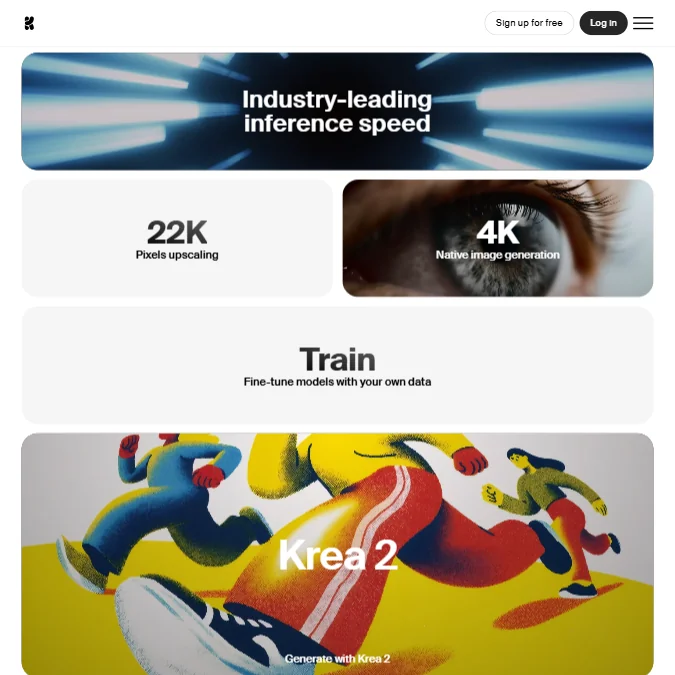
Their docs advertise native 4K output with generation speeds around 3 seconds for 1024px Flux at FP16. Specific claim. We paid attention to it.
The real-time canvas keeps coming up in user discussions. Sub-50ms latency for real-time generation is what Krea claims, and the people who've written in detail about using it describe the experience as genuinely different from batch-generation tools. You sketch, the model responds in near real-time. Photorealistic output from rough primitives. That's not marketing copy doing tricks. It seems to be a real capability.
Upscaling is another area where Krea stands out. Image upscaling up to 22K resolution comes up frequently in photography and post-production forums as a legitimate reason people subscribe, with Topaz Photo and Topaz Gigapixel both integrated. Video upscaling goes to 8K with frame interpolation up to 120fps. Those numbers surprised us, honestly.
The G2 review pool is thin, just two submissions, so we can't lean on that. Trustpilot tells a more complicated story. 114 reviews, polarized. The positives are enthusiastic and specific. The negatives focus less on output quality and more on billing surprises and support responsiveness. That pattern matters. It suggests the actual generation quality isn't the sticking point. The surrounding experience is.
Krea Features: Text-to-Image, Video & Editing Tools

The feature list here is genuinely long. Maybe too long to absorb in one sitting.
On the image side, text-to-image runs alongside access to all image models at every paid tier. Inpainting is available through multiple editing models, with Flux Kontext handling object addition and removal. Background removal is built in. So is image-to-3D generation. Style transfer works across images and video.
The video side is where the model roster gets serious. Veo 3.1 and Sora handle text-to-video. Kling handles image animation, and a few others fill out the roster. This is a lot of video capability for a platform that started life as an image tool. Not sure all of it is equally polished, but the breadth is real.
LoRA fine-tuning is available at every paid tier, which is the right call. LoRA training scales with the plan, capping at 50 source images on Basic and Pro, then jumping to 2,000 files on Max and 20,000 images on Business. That range accommodates solo creators and agency workflows without forcing everyone into the same ceiling. We'd like to see independent benchmarks on LoRA output quality, but the architecture is sensible.
Krea Nodes, the workflow automation layer, lets users chain models together and share those workflows as Node Apps. That's a useful enterprise-facing feature most competitors haven't shipped yet. Whether the node editor is intuitive is something we'd need to test directly. Reddit hasn't given us a clear signal there.
Commercial licensing is included from Basic upward. Correct default. We'd have flagged it hard if it wasn't.
Is Krea Easy to Use?
This is where the research gets murkier. The platform runs on a web interface and an iOS app. No desktop client, no Figma plugin, no Photoshop integration that we found documented.
The interface tries to do a lot. Sixty-four models, node-based workflows, LoRA training, real-time canvas, video generation, 3D conversion. Not a simple product. Not trying to be. The question is whether the UI keeps it navigable or just dumps complexity on the user.
Honestly, based on what we read, the answer is mixed. New users in community threads describe a real learning curve. Not a wall, a slope. People who stuck with it seem to find it productive. People who bounced early weren't always sure what they were doing with the compute units, and that specific friction point comes up enough that it's worth flagging. Knowing how fast you burn through 100 free daily units requires experimentation, and there's no obvious in-product guide on what operations cost what.
The compute unit model is the biggest usability question mark, abstracting cost in a way that's opaque until you've already spent credits. That's a design choice that benefits the vendor more than the user.
The iOS app expands access, which matters. Power users are generally on web, and that's where the interface complexity lives. Not a dealbreaker. Just context.
Krea Pricing: Free Plan vs Paid — Is It Worth It?

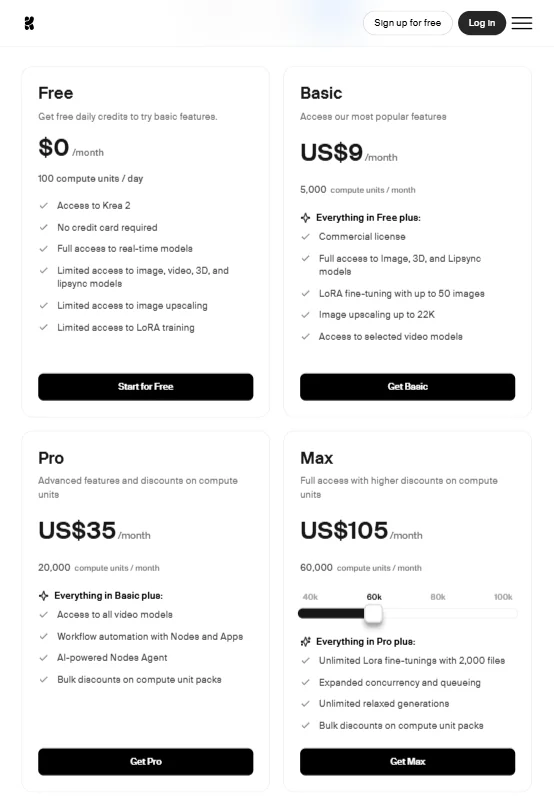
Free plan first. 100 compute units per day, access to Krea 2 and the real-time models, and limited access across image generation, video, 3D, lipsync, upscaling, and LoRA. Legitimately generous for exploration. We mean that.
Paid plans start with Basic at $9 a month, covering 5,000 units monthly with selected video models and LoRA training included. Pro runs $35 a month with 20,000 units, all video models, and image upscaling up to 22K. Max starts at $70 a month on the low end and scales to $165 a month at the high end, with 40,000 units shown at the base. Business starts at $50 a month and can run to $2,850 a month depending on unit volume, adding up to 50 seats, custom user roles, and fine-grained controls for model access. The plan page shows estimated generation equivalents, Nano Banana 2 generation counts and Seedance 2.0 video counts, to help users gauge monthly unit spend. We're not fans of that approach. Full stop.
Enterprise is custom, which is expected. Priority support, SLA, per-member spend limits, and indemnification are all on that tier. Real enterprise offer. The feature set matches what larger teams need.
What we can say is that Krea sells compute unit top-up packs separately, with bulk discounts on compute unit packs mentioned across paid tiers. That implies monthly allowances run short for heavy users, which is worth knowing before committing. The Trustpilot billing complaints aren't all about unexpected charges, but enough are that we'd read the terms carefully before subscribing.
Refund policy isn't publicly documented. That's a gap.
Krea vs Midjourney: Which AI Image Generator Wins?
This comparison depends entirely on what you're optimizing for.
Midjourney is a focused tool. It does one thing at very high aesthetic quality. The output style is recognizable, often gorgeous, and the community around it is enormous. But it doesn't do video. It doesn't do real-time generation, upscaling, LoRA training, or node workflows. Specialist tool.
Krea is a generalist tool with specialist ambitions. Different product entirely. The image quality from Krea's best models is competitive with Midjourney for photorealistic output. For Midjourney's signature painterly aesthetic, Midjourney still wins. That tracks with what we see in community comparisons.
Speed is where Krea makes a clear case. Three-second generation at high resolution and a real-time canvas that responds in under 50ms is a different working experience than batch-generating in Midjourney's web app or Discord interface. Whether that speed matters depends on your workflow.
Pricing transparency: neither tool is great here, but Midjourney at least shows plan tiers publicly. Midjourney wins that round. Feature breadth: Krea wins, not even close.
For teams that need image generation alongside video and editing in one subscription, Krea is the more practical choice. For individual artists who care primarily about image quality and aesthetic, the comparison is genuinely close, and trying both free tiers before committing is the right call.
Adobe users working inside an existing Creative Cloud setup are probably better served by Adobe Firefly, which has the native Photoshop integration Krea currently lacks.
Who Should Use Krea? (And Who Shouldn't)
Designers who need image and video generation under one subscription without stitching together separate tools. Clearest fit.
Agencies doing creative production at scale will find LoRA fine-tuning and Krea Nodes worth exploring, especially at Max or Business tier where the training limits get serious. The 20,000-image LoRA ceiling on Business is genuinely useful for brand consistency at volume.
Solo creators with time to climb the learning curve and a use case spanning more than one media type. If you're only generating images, you're paying for capacity you won't use.
Enterprises needing audit logs and usage controls. The Enterprise plan addresses that directly, and API access makes integration into existing pipelines possible.
Who shouldn't use Krea? Anyone who finds opaque pricing genuinely off-putting should pause before subscribing. The compute unit model rewards experimentation and punishes casual users who don't track usage. Also: anyone whose core workflow runs through Photoshop or Figma. Those integrations don't exist yet. Not a small gap for design teams who live in those tools.
Krea Review Verdict
Krea has built something real. The model breadth is impressive, the real-time canvas is genuinely differentiated, and the upscaling capability is stronger than most competitors ship. The 2026 launch of Krea 2 and the June 2026 Krea 2 Turbo release show a team that's actually shipping, not just iterating on marketing copy.
The biggest unresolved frustration is pricing opacity. For a platform claiming 40 million users, obscuring plan costs behind a checkout flow is a choice, not an oversight. We're skeptical of that approach. They could fix it without hurting conversions.
Support is thin for the user volume they claim. Two G2 reviews is not a review trail. The Discord community covers some of the gap, but users reporting slow email responses on Trustpilot have a fair complaint. Real problem when billing questions arise.
The free plan is worth trying. 100 daily compute units gives you enough to form a real opinion about the interface and output quality before handing over a card number. Do that first. Read the billing terms before upgrading. Then decide.
For teams that need image, video, and editing in one place, and who are willing to trade some pricing clarity for raw capability, Krea is one of the stronger options available right now. Not perfect. It's also not pretending to be something it's not, which is more than we can say for most of the field.
Frequently Asked Questions
Does Krea have a free plan?
Yes. The free plan gives you 100 compute units per day and access to Krea 2, the real-time generation models, and limited versions of the image, video, 3D, and upscaling tools. Real free tier, not a two-day trial. The limits will push you toward paid plans if you use it heavily, but casual exploration is genuinely possible without a credit card.
How does Krea compare to Midjourney for image quality?
For photorealistic output, Krea is competitive. For Midjourney's signature painterly style, Midjourney still has an edge. The more relevant difference is that Krea runs video, upscaling, LoRA training, and node workflows alongside image generation. Midjourney doesn't. If image quality in isolation is the only variable, the gap is smaller than it was a year ago. If workflow breadth matters, Krea is the different product.
Is there a Krea API?
Yes, the API is available at krea.ai/api. Enterprise accounts also get access to an Analytics API for usage tracking. The Krea Nodes workflow system lets you build and share automated pipelines, extending API-level control through a visual interface. We haven't tested the API directly, but the documentation exists and developer discussion in the community suggests it's functional rather than token.