
Creatify is a tool with a narrower ambition than most in this space. Not a general editor. Not a clip repurposer. An ad production platform, pointed specifically at performance marketers who need volume without a production team.

Founded in San Francisco.
The core pitch: paste a URL, get a video ad. Or pick an avatar, write a script, batch out 50 variants, push them live. That's the loop. Whether it holds up in practice is where things get more complicated.
What is Creatify?
Most AI video tools hand you a clip and walk away. Creatify is trying to cover the whole cycle, from finding what's working in your niche to making ads, testing variants, and checking results without leaving the platform. Ambitious scope.
The centerpiece is URL-to-video. Drop a product page link and the system reads it, pulls visuals, generates a script, picks an avatar, and assembles a video ad. Honestly, that surprised us when we first read about it. Most tools in this category still require you to upload assets and do a lot of manual assembly. Creatify is trying to skip most of that.
Beyond URL-to-video, there's AI-generated avatars for talking-head ads, batch creation for spinning up variants, and a built-in ad intelligence layer showing what's already working for competitors in your category. There's also a direct ad launcher for pushing to Meta or TikTok without downloading and re-uploading files. The design logic is sound, though.
Creatify is built for throughput, not craft. DTC brands and performance marketing agencies are the obvious fit. Solo creators exist on the platform, but that distinction matters when you're evaluating it against something like Pictory or HeyGen.
Creatify Features: Video Generation, Editing & AI Capabilities
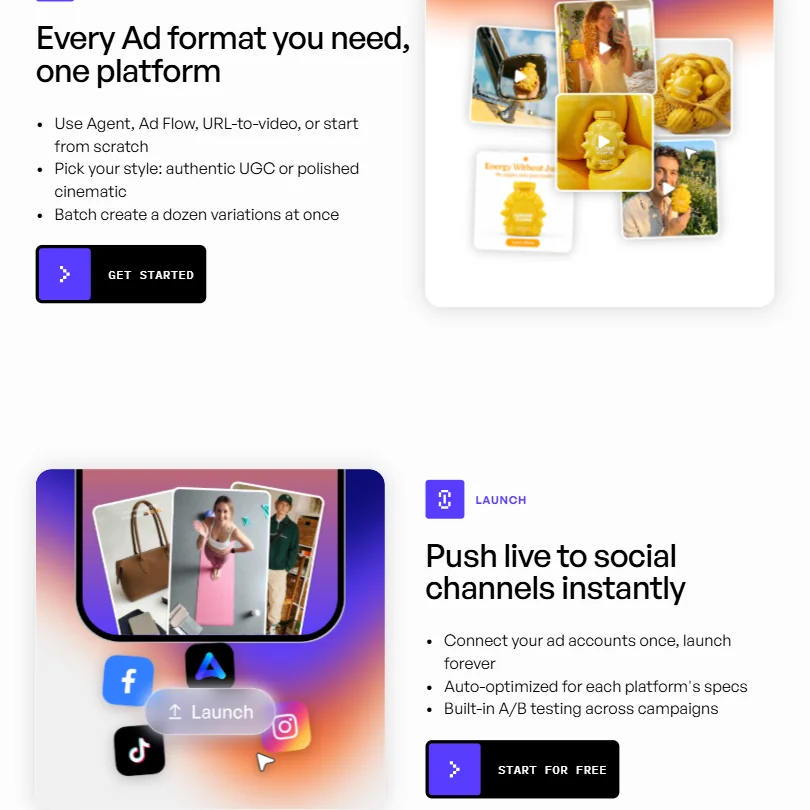
There's more here than most tools in this category. We'll focus on what stood out rather than cataloguing everything.
URL to Video is the headline. Paste a product URL and the platform attempts to generate a ready-to-run video ad from it.
Ad Flow is a node-based editor for building more custom ads. Visual logic blocks rather than a linear timeline. It's unconventional.
Batch Generation allows up to 50 video variants in one go. For anyone running A/B testing at scale, that changes how you operate. No more exporting one version at a time.
There's also an AI Shorts feature for TikTok-style clips from text, and a Product Ads tool for cleaner product visuals. The platform also claims a built-in ad intelligence layer for browsing competitor creative strategies. We're somewhat skeptical of how deep that intelligence actually goes, but the concept is genuinely useful if it's populated with real data.
What's missing is worth noting. No screen recording. Auto-subtitles aren't confirmed in the documentation either, which is a gap for a tool aimed at social video. Most short-form ad formats on TikTok and Instagram assume captions. If you're adding those in post, that's extra work the platform isn't absorbing.
Creatify Video Quality: How Good Does the Output Actually Look?
Cinematic quality. That's not the goal. This isn't competing with Runway for film-grade output. It's competing with your intern and a Canva template. Framed that way, the quality picture looks considerably better.
Creatify AI Avatars & Voiceover: How Realistic Are They?
The Starter plan includes 300 AI actors. That's the number sitting in the screenshot we reviewed, and it's on the free plan too. The avatars cover both a polished cinematic style and a more casual UGC look, which is smart product design. Cinematic for brand ads, UGC for conversion campaigns.
Voiceover runs through a text-to-speech engine with support for 75+ languages. Creatify supports voice cloning, although plan-level availability in the self-serve interface is less prominently documented than its API support. Worth knowing if you were planning to upload your own voice and expecting a straightforward setup.
On avatar realism, this is where Creatify draws the most competitive comparisons to HeyGen. HeyGen has been at this longer. Creatify's avatars are library-based, not bespoke. You're picking from a roster, not training a digital version of yourself. Different product. Different use cases.
The 75-language TTS breadth is genuinely useful for international campaigns. We don't have data on how natural the voices sound across all languages. But the breadth is there.
Is Creatify Easy to Use?
A few clicks to a working draft. Low-friction entry point, assuming the product page you're feeding it is reasonably well-structured.
Ad Flow is a different story. Node editors reward patience and punish people who want to dive in dragging things around.
The free plan is a reasonable way to find out without committing. No credit card required. Ten monthly credits, which works out to roughly two video ads or 20 image ads. Exports carry a watermark, which is standard. Two free video ads is genuinely enough to evaluate the core workflow before spending anything. We appreciate that Creatify doesn't require payment just to kick the tires.
For agencies or anyone managing multiple brands, the Starter plan includes one seat and one brand space. Limiting. Enterprise unlocks custom seats and multiple brand workspaces, but that means going through sales. No self-serve path for teams on Starter.
Creatify offers a separate Help Center for product documentation at help.creatify.ai, a Creatify 101 learning hub for tutorials and best practices, and a library of customer case studies. That's more than most tools at this price range offer. We've seen worse.
Creatify Pricing: Is It Worth It for Creators & Teams?
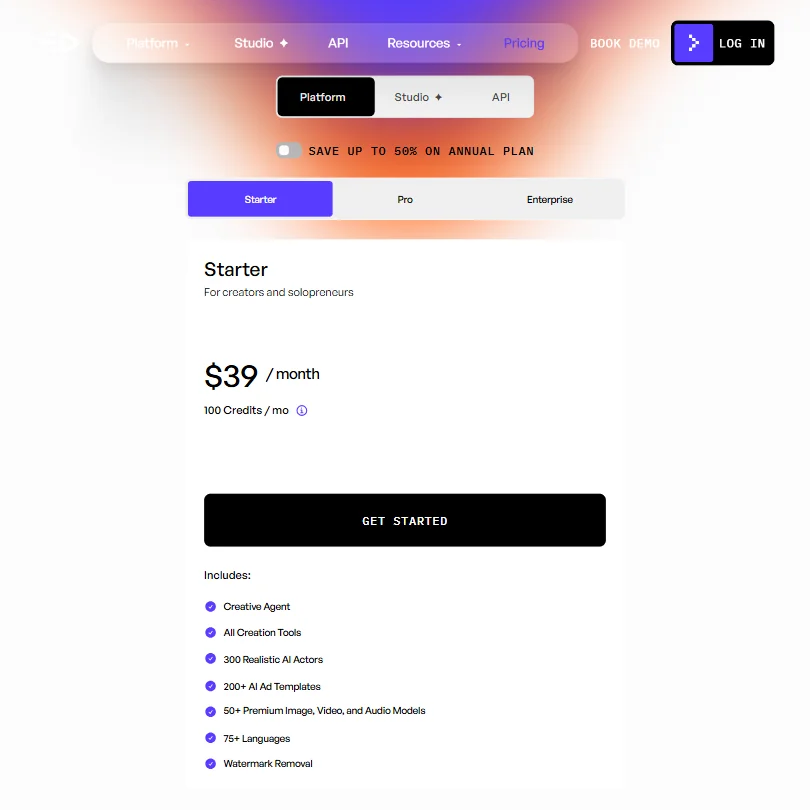
The Starter plan is $39 a month, as confirmed in the pricing screenshot we reviewed. That plan includes 100 credits per month, access to all creation tools, 300 realistic AI actors, 200+ AI ad templates, 50+ premium image, video, and audio models, 75 languages, and watermark removal. The annual plan offers up to 50% savings, which drops the effective monthly cost meaningfully if you're committing to it.
Pro runs $99 and scales up to $999 depending on usage tier. Enterprise is custom pricing through sales. The gap between Starter and Pro is substantial depending on which Pro tier you land on, and the self-serve pricing page doesn't surface all of that cleanly. That's a friction point for anyone trying to budget before talking to sales.
Not great. The refund policy isn't publicly stated either, which is less expected and a little concerning. That should be easier to find than it is.
What Creatify would argue in its own defense: this isn't a general-purpose video tool. It's an ad platform with intelligence, batch generation, and direct ad channel connections built in. You're paying for the whole workflow, not just a clip. That's a fair argument. Whether it holds for a solo operator on a tight budget is a different question.
The free plan is useful for evaluation. Ten credits, no card required. The watermark is annoying but expected. If you burn through two video ads and decide the output isn't worth $39, you're out nothing but time.
Creatify vs Pictory: Which AI Video Tool Is Better?
Pictory is a content repurposing tool. Blog posts become videos. Webinars get clipped. It's built for content marketers extracting short-form clips from longer material. Creatify is built to create ads from scratch. Those are different jobs, and conflating them leads to poor purchasing decisions.
For content teams trying to get more mileage out of existing material, Pictory is the more natural fit. The workflow is optimized for that. Using Creatify for that job would feel like using a hammer to do a screwdriver's job.
For performance marketers, the comparison flips hard. Pictory doesn't have avatar-based ad creation, batch generation at volume, or built-in ad channel launchers. It's not trying to. Creatify has all of those. The ad intelligence layer and A/B testing infrastructure are things Pictory simply doesn't offer.
On price, Pictory's plans start lower. That matters for someone experimenting. Creatify's $39 minimum is a bigger commitment before you know if the output quality works for your audience.
Pictory wins for content teams repurposing long-form material. Creatify wins for ad teams running paid creative at scale. Pick based on what your actual workflow looks like. Simple as that.
Who Should Use Creatify? (And Who Shouldn't)
DTC brands running paid social. That's the clearest fit. URL-to-video is designed around product pages, and the UGC avatar format is exactly what's working on Meta and TikTok right now. Batch creation means you can actually run creative testing without a production bottleneck.
Performance marketing agencies. Batch Generation and the ad launcher make sense for teams managing multiple clients across multiple channels. One seat on Starter limits that, but agencies doing real volume should probably be talking to sales anyway.
Ecommerce teams with no design or video staff. This is where Creatify solves a real pain point. Product URL to publishable video without a single person who knows how to edit video. That's not nothing.
Who shouldn't use it: anyone who needs precise, timeline-based editing control. The Ad Flow editor is not Premiere. Not trying to be. Video producers who want real post-production work should find a proper editor and not spend time getting frustrated with a node-based ad builder.
Solo creators on a tight budget. Try the free plan first. Two free video exports should tell you whether the output justifies $39 a month before you commit. The quality might be exactly what you need, or you might find it too templated for your audience.
L&D teams and corporate training creators should look elsewhere. Synthesia is purpose-built for that use case. Creatify's template library and workflow aren't oriented around internal communications at all.
Creatify Review Verdict
Creatify is a genuinely focused product in a space full of tools that try to do everything and end up doing nothing particularly well. The ad-specific workflow is the actual differentiator. Not the avatars alone. Not the templates alone. The combination of URL-to-video, batch generation at volume, and direct publishing to ad channels is a workflow that Pictory and even HeyGen aren't specifically optimized for.
The pricing is a real friction point. $39 to start, a Pro tier that scales to $999 without transparent mid-range pricing on the page, and no refund policy in plain sight. That's three things we'd want fixed before recommending it without hesitation to anyone on a budget. For teams with real ad spend, the monthly cost is a rounding error compared to creative production costs. For a solo operator, it's a harder sell.
We went in expecting another AI video tool with a performance-marketing coat of paint. The scope is ambitious. This one sits well above the middle of the pack.
Frequently Asked Questions
Does Creatify offer a free plan?
Yes. The free plan gives you 10 monthly credits, which works out to roughly two video ads or 20 image ads. No credit card required to sign up. Exports include a watermark, which is standard for free tiers. The free plan also includes access to 300 AI actors and 40 ad templates, making it a genuinely useful evaluation tier rather than a stripped-down teaser.











