SAASINSPECTOR
Midjourney logo

Midjourney Review

Artists, designers, and creatives seeking high-aesthetic AI image generation

Visit MidjourneyFrom $10/mo (Basic)

Research-based review. We analyzed vendor documentation, customer reviews on G2, Capterra, and Reddit, and live pricing — not hands-on testing yet. We update as our team puts tools through real workflows.

The verdict

Midjourney is a proprietary AI image generator built for creatives who prioritize stunning visual output, offering cinematic and painterly results that lead the market. Now at V8 Alpha with 2K default resolution and significantly faster generation, it's a serious tool for artists, designers, and creative directors. However, its Discord-rooted interface and steep prompt-syntax learning curve make it less accessible than more polished enterprise alternatives.

Pros

  • Midjourney consistently produces visually rich, cinematic, and atmospheric images that outperform most competitors on pure output quality.
  • V8 Alpha offers five times faster generation than V6, making the workflow significantly quicker for high-volume users.
  • Default 2K resolution output provides high-quality images suitable for professional creative projects without extra steps.
  • Text rendering within images has noticeably improved in recent model versions, addressing a long-standing weakness.
  • The web interface has genuinely improved the experience beyond the original Discord-only model.
  • A large and active user base of over 20 million means extensive community resources, tutorials, and prompt-sharing are readily available.
  • Adopted by artists, designers, and creative directors as a legitimate part of professional workflows, signaling real-world reliability.

Cons

  • The product's Discord roots result in a learning curve tied to command syntax rather than intuitive software design.
  • The interface and onboarding experience still feels unconventional compared to standard SaaS creative tools.
  • Midjourney runs on a proprietary model, limiting flexibility and transparency compared to open-source alternatives like Stable Diffusion.
  • It lacks the enterprise-focused features and integrations that Adobe Firefly offers for larger organizations.
  • Text-in-image rendering, while improved, still lags behind specialized challengers like Ideogram.
  • Output style leans toward a recognizable aesthetic that may not suit all creative briefs or brand needs.
From $10/mo (Basic)Free plan NoFree trial No

We spent time pulling apart the vendor docs, digging through G2 threads, and reading enough Reddit complaints to develop strong feelings about this one. This **Midjourney review** is the result. Founded in 2022 by David Holz, Midjourney built its reputation fast. Faster than almost anyone in AI image generation. The output quality got people's attention early, and it hasn't let go. But output quality is only part of the story, and the other parts are worth a harder look.

Midjourney homepage screenshot
Midjourney — Homepage

What is Midjourney?

Midjourney is a proprietary AI image generator based in San Francisco. It runs on its own model, currently at V6.1 in general release with V7 available and a V8 Alpha that dropped in March 2026. The model is not FLUX. Not Stable Diffusion. Their own thing, built for a specific aesthetic: cinematic, painterly, visually rich in a way that's become immediately recognizable.

For the first year or so, the entire product lived inside Discord. You sent a prompt to a bot. The bot returned four images. That was it. The web interface came later, and it's genuinely improved the experience. But the Discord roots still show up in the product's DNA. There's a learning curve that has more to do with command syntax than with any normal software interface.

The user base has crossed 20 million. That's not nothing. Artists, designers, and creative directors have made it part of their actual workflow. That kind of adoption tells you something. It also means there's a lot of noisy context available if you want to understand how real people feel about it, which we did.

The **ai image generator** draws comparisons to everything. Adobe Firefly is the enterprise alternative. Ideogram is the text-in-image challenger. Stable Diffusion is the open-source escape valve. Midjourney sits above most of them on pure visual output. The gaps elsewhere are real, though.

Midjourney Image Quality: How Good Are the Results?

Hard to argue with that. The output quality is where Midjourney has always led, and the V8 Alpha data suggests they're not slowing down. Five times faster generation than V6, 2K resolution as the default, and noticeably better text rendering in images are the headline claims. We cross-referenced those claims with early user reports from the Midjourney Discord and Reddit communities. The consensus: the quality jump is real.

What Midjourney consistently does well is a specific kind of image. Lush. Atmospheric. The kind of result that looks like a mood board for a film that doesn't exist yet. G2 reviewers with creative and marketing backgrounds flag this repeatedly. The word "stunning" comes up enough times to be mildly annoying. But it tracks.

Where it gets more complicated is in **prompt adherence**, which has historically been Midjourney's weak point relative to DALL-E 3. Their own V8 release notes call out improved prompt adherence directly, which is the company acknowledging a known issue. We're mildly skeptical until we see more head-to-head data from users who've been testing it. The community hasn't fully caught up yet.

Text rendering inside images was genuinely bad for a long time. Like, embarrassingly bad for a tool at this price and reputation. The V8 improvements here are getting positive reports. Progress, at least.

What you won't find in Midjourney outputs: the photographic precision that Stable Diffusion or even DALL-E 3 can hit with the right settings. That's a stylistic choice the model makes. Some users love it. Some find it limits commercial applications where literal accuracy matters more than beauty.

Midjourney Features: Text-to-Image, Video & Editing Tools

The core feature is **text-to-image generation**. You write a prompt. You get four images back. You pick one, upscale it, vary it, or start over. That loop is what most of the user base is in for. It's the thing they've perfected.

Around that core, there's more than people expect. Vary Region is their inpainting tool, letting you select part of an image and regenerate just that area. Zoom Out and pan expansion handle outpainting. Both work. Neither is as fine-grained as Photoshop's generative tools, but for a standalone image generator, it's a reasonable set of editing options.

The style reference system, the `--sref` parameter, is genuinely useful for maintaining visual consistency across a project. Character consistency has improved, which matters for anyone using the tool for anything sequential. Image prompts let you feed in a reference image and blend it with a text prompt.

Video generation exists. Worth noting: it's not their strength. Midjourney now supports image-to-video generation, turning a single image into a 5-second video, with longer clips possible through extensions, but we kept seeing users treat it as an experimental feature rather than a production workflow. It's there. We wouldn't lead with it as a reason to subscribe.

The `--chaos`, `--stylize`, and `--weird` parameters give you real control over how far the model interprets versus how literally it follows the prompt. Experienced users love these. New users find them bewildering. That tension runs through the whole product.

No ControlNet. No LoRA support. Those are not missing by accident. If you need fine-grained model customization at that level, Midjourney isn't the product. Krea covers more of that territory if that's what you're after.

API access exists but is in limited beta. The integrations list is short. Discord is still the primary interface, and that remains a strange choice for a product with 20 million users and $10/month plans. No Photoshop plugin, no Figma plugin, no Canva connection.

Is Midjourney Easy to Use?

Honestly, no. Not at first.

The Discord interface asks a lot of new users. You're typing commands in a chat window, reading documentation to understand what `--ar 16:9` means, and learning that `--no` is how you tell it what you don't want in the image. That's not a design philosophy most SaaS tools would defend in 2025.

The web interface is better. Cleaner. You can browse your generations, manage your account, and use the editing tools without being inside a chat application. We've seen it described as a significant quality-of-life improvement over the Discord experience. That tracks with what reviewers on G2 say.

But the learning curve is still real. Reddit threads from 2025 are full of users who've spent weeks just getting consistent outputs. Prompting for Midjourney is a skill. A learnable one, but still a skill. That's not inherently bad. Just honest.

**Ease of use is where Midjourney loses points to competitors** like DALL-E 3, which lives inside ChatGPT and asks nothing technical of the user. For casual users or anyone who doesn't want to learn prompt syntax, that gap is meaningful. Midjourney knows its user. That user is willing to put in time to get better results.

Midjourney Pricing: Free Plan vs Paid — Is It Worth It?

Midjourney pricing screenshot
Midjourney — Pricing

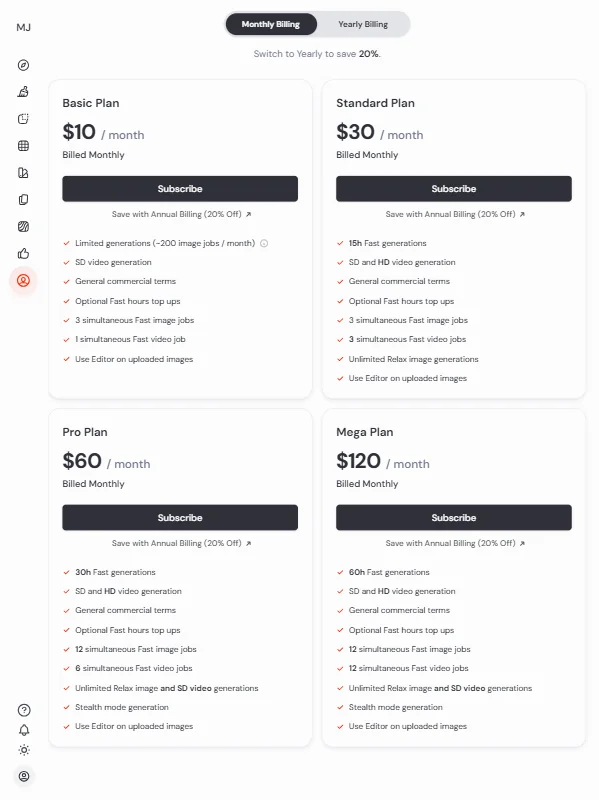
There's no free plan. There's no free trial. The free trial that existed was discontinued in March 2023. We mention this because people still search for it and still get disappointed when they find out. It's gone.

The Basic plan is **$10 per month**. That's the floor. You get limited fast GPU time and no stealth mode. It's a genuine entry point for individual users who generate occasionally.

The Standard plan is $30 per month and adds unlimited Relax mode generation along with more fast GPU hours. That's the plan most serious hobbyists land on. The Pro plan is $60 per month and adds stealth mode, which keeps your images private rather than visible to other community members. The Mega plan tops out at $120 per month for maximum fast GPU time.

We dug through the pricing page and found the math works if you generate a lot. If you're using it professionally and billing clients for the creative work, $30 or $60 per month is defensible. If you're a casual user testing the water, the $10 entry point is low enough to try.

The refund policy is a harder conversation. Strict no-refunds. No exceptions, based on what's publicly documented and what users report. Trustpilot has a 1.6 out of 5 rating from 359 reviews, and billing disputes and the no-refund policy account for a significant chunk of the negative reviews. That's not a product quality complaint. That's a company policy complaint. We'd call that a real issue worth flagging before you hand over a card number.

**Commercial usage rights come with all paid plans.** That's important and easy to miss. If you're using generated images in client work, you're covered on paid tiers.

Midjourney vs DALL-E 3: Which AI Image Generator Wins?

The comparison that comes up constantly in our research is Midjourney versus DALL-E 3. They're not trying to do the same thing, which makes the comparison less clean than it looks.

DALL-E 3 lives inside ChatGPT. You describe what you want in natural language. It follows instructions closely and literally. The results are good. Sometimes very good. What they're not is the kind of image Midjourney produces. Less cinematic. More accurate. Different goal.

**Midjourney's visual output is consistently more striking** than DALL-E 3 in the kinds of images where style matters: editorial, fashion, concept art, and atmospheric scenes. DALL-E 3 wins on prompt adherence and ease of access. No new interface to learn, no Discord, no command parameters.

For anyone in a design or creative role who cares deeply about the aesthetic quality of their outputs, Midjourney holds the edge. For anyone who needs fast, literal image generation without a learning curve, DALL-E 3 is the more accessible product. Adobe Firefly is worth mentioning for anyone deeply inside the Adobe ecosystem, and we cover it separately over at Adobe Firefly.

Ideogram is also gaining ground on Midjourney's weakest point: accurate text rendering inside images. That's a niche but real competitor for specific use cases.

Who Should Use Midjourney? (And Who Shouldn't)

Professional designers and concept artists. That's where the fit is clearest. People who generate hundreds of images to find the one that works, who've built a prompt vocabulary, and who care about the output being beautiful, not just correct.

Creative directors using it for mood boards. Illustrators treating it as a starting point. Game artists doing early visual exploration. These users show up in the G2 reviews, and their satisfaction rates are high.

Social media managers looking for quick, generic stock-style images. Probably not the right tool. The learning curve eats the time savings.

Developers wanting API access for a production integration. Not yet. The API is in limited beta. That's not a workflow you can depend on right now.

Small business owners who want occasional marketing images without a monthly commitment. The no-free-trial policy stings here. You're committing $10 before you've seen what your prompts actually produce on your use case.

Anyone who needs precise text inside their images and can't invest time in workarounds. The V8 improvements help, but this is still not Midjourney's strength.

Midjourney Review Verdict

Midjourney earns its reputation. The output quality is real. The V8 Alpha improvements in speed and resolution are genuinely promising, and the product has continued evolving faster than most of its direct competitors. For visual creative work where aesthetic quality is the priority, it's the benchmark.

The problems are also real. **The no-refund policy is the single loudest complaint across review platforms**, and it's not a minor issue. Billing disputes at that scale, with a 1.6 on Trustpilot, suggests the company needs to revisit this. The API remains immature for production use. The Discord-first design still alienates users who came up expecting a normal web application.

Support is thin. Email with a reported 39% response rate isn't support. That's a form that sometimes works. The Discord community is helpful but that's the community doing work the company should be doing.

Honestly, none of that changes the output argument. If beautiful AI images are the goal, Midjourney is still the tool most serious creators reach for first. The gaps are real. So is the quality.

Frequently Asked Questions

Does Midjourney have a free plan?

No. Midjourney discontinued its free trial in March 2023. The cheapest entry point is the Basic plan at $10 per month. There's no way to try the product before paying, which is worth factoring in before you commit.

Can I use Midjourney images commercially?

Yes, on any paid plan. Commercial usage rights are included when you're a paying subscriber. The caveat is that enterprise users or anyone generating very high volumes of commercial work should review the full terms of service, since the specifics around ownership have been a topic of ongoing discussion in creative and legal communities.

Is Midjourney better than Stable Diffusion?

Depends what you need. Midjourney produces more consistently polished outputs with less effort. Stable Diffusion is open-source, free to run locally, and supports ControlNet and LoRA customization that Midjourney doesn't offer at all. Midjourney wins on out-of-the-box visual quality. Stable Diffusion wins on flexibility and cost if you have the technical setup to run it.

Midjourney is featured in

Alternatives to Midjourney

See all Midjourney alternatives →

Other AI Image Generation options we've reviewed.

User reviews

Review Midjourney

Your rating

Reviews are moderated and appear once approved.