SAASINSPECTOR
Leonardo.Ai logo

Leonardo.Ai Review

AI art generation for casual creators, hobbyists, semi-professionals, and small businesses

Visit Leonardo.AiFrom $12/mo

Research-based review. We analyzed vendor documentation, customer reviews on G2, Capterra, and Reddit, and live pricing — not hands-on testing yet. We update as our team puts tools through real workflows.

The verdict

Leonardo.Ai is a multi-model AI image and video generation platform aimed at artists, digital creators, game developers, and small product teams who need more than a simple prompt-to-image tool. With features spanning image generation, video animation, editing, workflow automation via Blueprints, and REST API access, it functions more like a production toolkit than a consumer app. Despite a four-million-user base, the absence of formal reviews and a steep initial learning curve mean it rewards committed users more than casual ones.

Pros

  • Output image quality is genuinely strong, with Lucid Realism receiving consistent praise for photorealistic results in creator communities.
  • Phoenix model delivers style coherence comparable to Midjourney according to community feedback.
  • Offers an unusually broad feature set for one platform: image generation, video, editing, workflow automation, and a REST API.
  • Blueprints workflow automation makes it viable as a production pipeline tool rather than just a one-off generator.
  • Multiple model choices including Phoenix, Lucid Realism, Motion 1.0 and 2.0, and FLUX give advanced users real flexibility.
  • API access makes it a genuine option for developers who want to integrate AI image generation programmatically.
  • Appeals to a wide range of users beyond hobbyists, including game developers, product teams, and asset pipeline builders.

Cons

  • No formal review presence on G2 or Capterra makes independent validation of claims difficult for buyers.
  • Multiple model options can be disorienting for new users who are not sure which model to pick for their use case.
  • The platform is closer to a studio production toolkit than a simple prompt-and-go tool, creating a steeper learning curve.
  • Pricing works in ways that are not immediately transparent and require real digging to understand in practice.
  • The breadth of features may introduce unnecessary complexity for users who only need basic image generation.
  • Community-based feedback is fragmented across Reddit, Product Hunt, and forums rather than consolidated review platforms.
From $12/moFree plan YesFree trial No

Four million users. No G2 page. No Capterra listing. That absence is unusual for a tool at this scale, and our research had to work around it. We pulled from vendor documentation, Product Hunt threads, developer forum posts, and Reddit discussions going back through 2024. What we cross-referenced isn't a clean dataset. It's a usable one.

Leonardo.Ai homepage screenshot
Leonardo.Ai — Homepage

What we kept seeing is a tool that resists easy categorization. It's not a prompt-and-go ai image generator in the way Midjourney is. It's closer to a small studio's production environment. That's the appeal, or the friction, depending on who's sitting in front of it.

What is Leonardo.Ai?

Sydney-based, launched in 2022. Started as an image generation platform and expanded from there into video, editing, and workflow automation. The public user count sits at four million or more.

The core pitch is consolidation. One platform covering image generation, video animation, canvas editing, API access, and a workflow automation layer called Blueprints. Most competitors handle one or two of those. Leonardo is trying to handle all of them, which is either impressive or a warning sign depending on how that execution holds up under load.

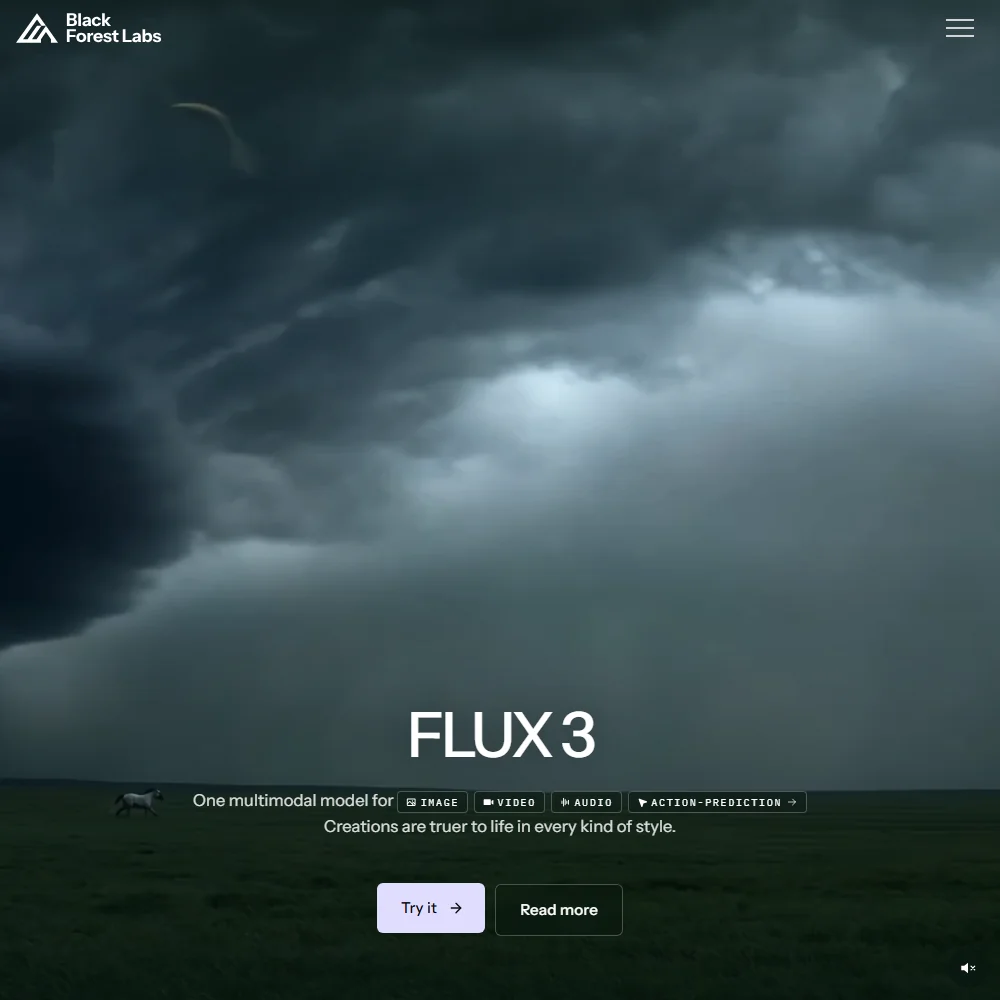
The model roster is wider than most. Phoenix and Lucid Origin are the flagship options, with Lucid Realism running alongside them for photorealistic work. On the video side, Motion 1.0 and 2.0 are both present, and FLUX sits in the mix as a third-party addition. Honestly, that's a lot of choices to put in front of a new user. Midjourney gives you one model and gets out of the way. Leonardo gives you five and expects you to know which one fits your use case.

Their stated audience is artists and digital creators. What the community posts actually reflect is broader. Small product teams, game developers building asset pipelines, developers who want a REST API and have no interest in a GUI. The platform's actual user base seems to have outgrown its original positioning.

Leonardo.Ai Image Quality: How Good Are the Results?

This is where the reputation is earned. Lucid Realism draws consistent praise in creator communities for photorealistic output, and Phoenix gets compared to Midjourney's style coherence repeatedly. We cross-referenced those comparisons across enough sources to take them seriously.

The quality tiers matter more here than on competing tools. Basic is what the free plan delivers. Enhanced is available from Essential upward. Free users are not experiencing the same product that paying subscribers are, and the gap between Basic and Enhanced is larger than Leonardo's marketing tends to imply. Worth knowing before you form an opinion from the free tier.

Motion 2.0 pulled back a lot of the disappointment around 1.0. Early 2024 community feedback on the first video model was not kind. The second version addressed enough of those complaints that the trajectory looks reasonable. We've seen worse recoveries in this category.

Upscaling gets flagged as genuinely functional by developers using Leonardo as a backend for client work. Not a checkbox feature. Several forum posts from users delivering professional print files cited it as a reason they stayed on paid plans. That tracks.

Leonardo.Ai Features: Text-to-Image, Video & Editing Tools

Leonardo.Ai features screenshot
Leonardo.Ai — Features

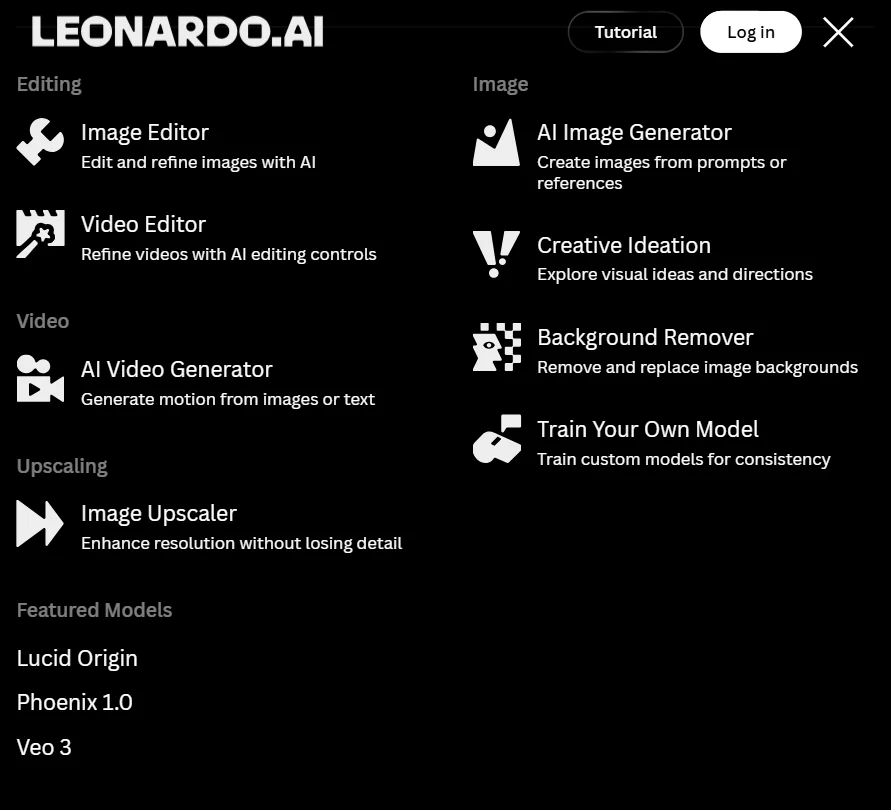
The feature surface is unusually wide. Text-to-image and video generation sit alongside inpainting, outpainting, and upscaling. All inside one platform, which is either convenient or overwhelming depending on what you came for.

Text-to-image is the foundation. Prompt goes in, model gets selected, quality settings get adjusted, generation runs. Negative prompts are supported, which is table stakes at this point. What's less common is the image reference system. You can feed up to six reference images into a generation, which is a real workflow tool for designers maintaining brand consistency. Not a novelty.

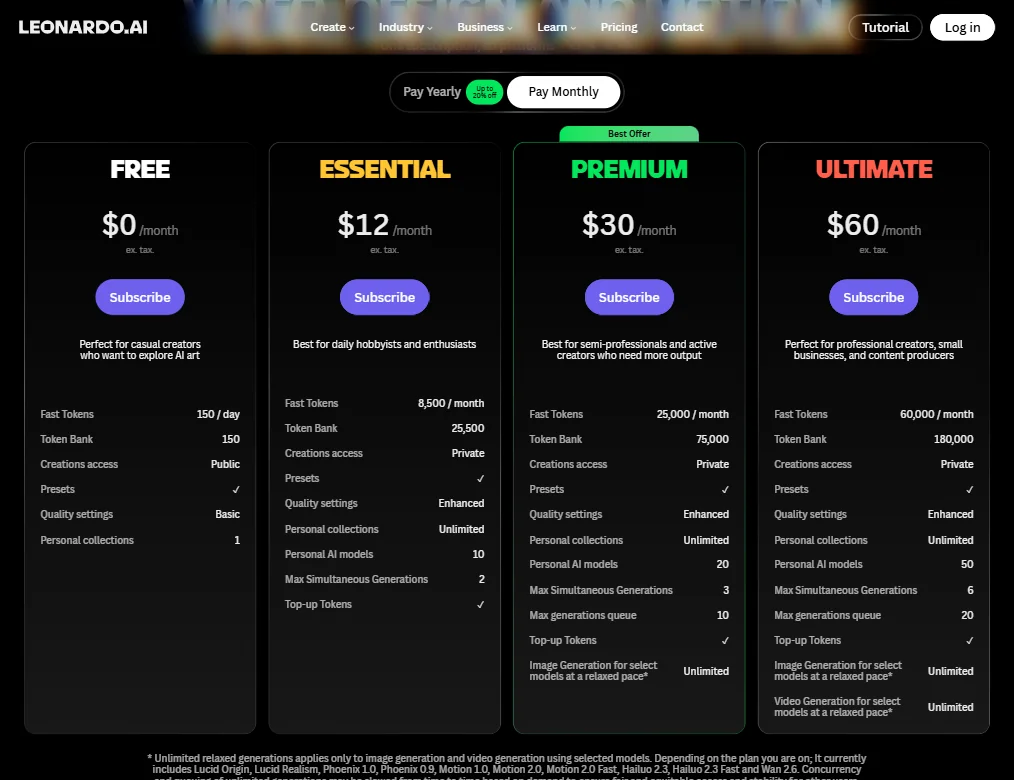
The personal AI model training is the more meaningful differentiator. LoRA-style fine-tuning on your own images, generating outputs in a consistent custom style. The Ultimate plan at $60 a month allows up to 50 personal AI models, which is significant capability for that price relative to building anything comparable yourself. The Premium plan caps at 20, Essential at 10. Those are real numbers, not theoretical ones.

Blueprints is the workflow automation layer, designed to chain generation steps without manual intervention. We'd describe it as a light pipeline builder. For one-off image work, you'll never open it. For teams running recurring asset production at volume, it may be the reason you don't leave.

Realtime Generation sounds like a gimmick. Product Hunt threads suggest otherwise. Seeing outputs update as you type reduces the prompt iteration cycle that frustrates people in every other tool in this category. You don't have to wait for a full generation to find out your prompt direction is wrong. That's a practical improvement.

The batch queue depth on Ultimate is 20 concurrent generation slots. Premium gets 10, Essential gets 2. For anyone treating Leonardo as a production backend, that queue structure changes what's operationally possible.

Is Leonardo.Ai Easy to Use?

There's a lot of surface area here. Models, quality settings, Elements, LoRA training, Blueprints, the canvas. A new user hitting the interface for the first time faces more decisions than any direct competitor puts in front of them.

Midjourney is notoriously clunky in its Discord-based interface but simple in what it demands of you. Leonardo is the reverse. Cleaner to look at, harder to configure. That tradeoff is coherent for the audience it's actually serving, but it's a real tradeoff.

The Flow State interface is described in vendor docs as a simplified mode for less experienced users. We found limited community feedback confirming how well it actually delivers on that. We're cautiously skeptical of that claim until more user data surfaces. One vendor describing their own simplified mode as accessible is not evidence it works.

Support runs through Intercom for official inquiries, with email available at support@leonardo.ai as a direct alternative. Discord operates separately as a community channel covering prompts, settings, and workflow questions. It's not the primary official support channel, though it's where a lot of practical knowledge lives. No live chat that our research found.

Reddit threads from 2024 show users repeatedly hitting confusion around the token system. Free users burning through daily allocations without understanding which features cost more per generation. That's a transparency problem, not a complexity problem. Fixable, but not yet fixed.

Leonardo.Ai Pricing: Free Plan vs Paid — Is It Worth It?

Leonardo.Ai pricing screenshot
Leonardo.Ai — Pricing

The free plan is real. 150 tokens per day, no expiration, available indefinitely. Generations are public, quality is capped at Basic, and you get one personal collection. It's a genuine ongoing tier, not a trial with a countdown. 25 of the 31 AI image generation tools we've reviewed carry a free plan, so this isn't rare. The daily token ceiling is tight for serious volume, but the access is legitimate.

Paid tiers run $12 a month for Essential, $30 for Premium, $60 for Ultimate. Essential delivers 8,500 Fast Tokens per month with a 25,500 Token Bank. Premium jumps to 25,000 Fast Tokens and a 75,000 Token Bank. Ultimate lands at 60,000 Fast Tokens and a 180,000 Token Bank. Those aren't rounding errors. They're meaningful scaling differences.

Private generations are available across all paid tiers. The free plan publishes everything. For commercial work, that's the first reason to move off free. Token top-ups are available on Essential and above, which matters if you hit your monthly ceiling before the cycle resets.

On watermarking: Leonardo's Help Center documentation states that paid plans remove watermarks from video generations. The documentation is less explicit about watermarking on standard image generations specifically. Not a total documentation gap, but not a complete picture either.

There is a public refund policy, and a Help Center article walking through how to request one. Refunds are manually assessed. Eligible grounds include major technical faults, misleading descriptions, and failure to deliver purchased tokens. Simple change-of-mind requests can be declined. Not the most permissive policy in the category. But it exists, it's findable, and users can read it before subscribing. That's the baseline expectation.

API access runs on a separate pricing track, either pay-as-you-go or custom. The $12 to $60 range on the main pricing page is not the full picture for developer use cases. Price those separately.

Leonardo.Ai vs Midjourney: Which AI Image Generator Wins?

Different tools for different problems. That's the real answer, and it's not a cop-out.

Midjourney is a single-model experience with a strong, opinionated aesthetic. You learn to prompt for it. It rewards patience with consistently good images and punishes anyone who wants fine-grained control. Fast to start, limited in what you can bend it toward.

Leonardo offers more models, more editing tools, and the LoRA training system. Midjourney doesn't do custom model training, full stop. That's a concrete capability difference, not a marketing comparison. Users who've moved from Midjourney to Leonardo and stayed cite that training capability and the editing suite as the reasons.

On raw aesthetic output for photographic realism in casual creator communities, Midjourney still gets more consistent praise. Lucid Realism is competitive, but the default gap hasn't fully closed. Phoenix has a different strength, specifically style coherence across variations, which serves a different creative need.

Midjourney's basic plan is $10 a month. Leonardo's Essential is $12. For that $2, you get substantially more tooling. Whether you'll use that tooling is the actual question worth answering before you subscribe.

For teams prioritizing high-volume API generation at tight cost, BFL is worth pricing out before committing to either.

Who Should Use Leonardo.Ai? (And Who Shouldn't)

Digital creators building consistent visual output across large volumes. The LoRA training and the six-image reference system are built for that workflow. Not adjacent to it.

Developers building image generation into products. The API structure, batch queue depth, and Blueprints automation exist for programmatic use at scale. Most tools in this category don't bother with that infrastructure.

Small game studios and concept artists. Community threads flag this group repeatedly as heavy users. Training a model on existing asset libraries and generating style-consistent variations is a genuine time reduction for that workflow.

Who shouldn't bother. Casual users who want a prompt box and a result. Midjourney is less friction. So is DALL-E 3 via ChatGPT. If you're not going to train a model, use the canvas, or touch the API, you're paying for infrastructure you'll ignore.

Teams already inside Adobe's ecosystem should look at Adobe Firefly first. The native integration with Photoshop and Illustrator is a workflow advantage Leonardo doesn't replicate.

Leonardo.Ai Review Verdict

Not a toy. One of the few platforms in this category that treats image and video generation as a production workflow. The feature breadth is real. The model quality is competitive. The paid tier pricing is defensible for what it delivers.

The friction is also real. Interface complexity rewards patience and penalizes casual use. The token system transparency problem hasn't been resolved. Free tier quality is meaningfully lower than what the showcase work represents.

But what we keep coming back to: almost nothing in this category combines custom model training, a batch queue, workflow automation, and a developer API at this price point. You'd have to stitch multiple tools together to replicate it. Most users won't do that. Most teams won't do that.

The missing G2 and Capterra presence is odd for a platform at four million users. We'd feel more confident about the support story with formal review data to cross-reference. Not a dealbreaker. A gap.

Creators and developers who'll actually use the depth here, the $30 Premium or $60 Ultimate plan is a reasonable commitment. Essential at $12 is a reasonable way to find out if you're one of them. Go in knowing this platform takes time to learn. Not an afternoon.

Frequently Asked Questions

Is Leonardo.Ai free to use?

Yes. The free plan provides 150 tokens per day with no time limit. It's a real ongoing tier, not a trial. Free generations are public and capped at Basic quality, which is noticeably below what paid plans produce. It's enough to understand the platform's basic mechanics, but it's not representative of what the tool actually delivers at its best.

Does Leonardo.Ai offer commercial usage rights?

Commercial rights come with paid plans. The free tier doesn't include them. Documentation on the full scope of the license isn't exhaustively detailed, so reading the terms directly before using generated images in commercial work is the sensible move. If commercial use is the point, Essential at $12 a month is the floor to consider.

How does Leonardo.Ai compare to Stable Diffusion?

Stable Diffusion is open-source and self-hosted. No monthly fee, unlimited generation, full control over your environment. Leonardo runs proprietary models on a managed platform with a GUI, API, and hosted training. You trade raw control and zero cost for convenience and integrated tooling. Developers who want to self-host and modify everything down to the model weights, Stable Diffusion wins. Creators who want a managed environment with less setup overhead, Leonardo is the more practical option.

Leonardo.Ai is featured in

Alternatives to Leonardo.Ai

See all Leonardo.Ai alternatives →

Other AI Image Generation options we've reviewed.

User reviews

Review Leonardo.Ai

Your rating

Reviews are moderated and appear once approved.