SAASINSPECTOR
Recraft logo

Recraft Review

Professional creators and teams needing AI image and video generation

Visit RecraftFrom $12/mo

Research-based review. We analyzed vendor documentation, customer reviews on G2, Capterra, and Reddit, and live pricing — not hands-on testing yet. We update as our team puts tools through real workflows.

The verdict

Recraft is a web-based AI image and design tool targeting professional designers who need outputs that fit real workflows, with its standout feature being native SVG vector generation directly from prompts. It has built a multi-model platform around its proprietary Recraft V4.1 model alongside Flux and GPT Image, earning strong praise from professional users for visual quality and design-ready typography. The lack of formal review platform presence makes independent verification difficult, but candid community sources paint a genuinely compelling picture.

Pros

  • Recraft generates native SVG vector files directly from prompts, a capability most AI image tools completely lack.
  • Recraft V4.1 produces outputs that designers describe as visually considered and professionally art-directed, not just technically correct.
  • Typography handling is design-ready quality, avoiding the mangled letterforms common in competing AI models.
  • The platform supports multiple models including Flux and GPT Image alongside its own proprietary model, functioning as a multi-model hub.
  • Complex vector graphics with consistent styles can be generated and edited, fitting directly into professional design workflows.
  • Strong positive signals come from professional designers and power users, not just hobbyists, lending credibility to quality claims.
  • The tool covers a broad output range including photography-style images, illustrative styles, and improving 3D renders.

Cons

  • Recraft has no G2 or Capterra listings despite launching in 2022, making structured, verified user reviews difficult to find.
  • The platform has quietly become a multi-model tool without clearly advertising that positioning, creating confusing brand communications.
  • Review data had to be sourced from Reddit, Product Hunt, and vendor docs rather than dedicated review platforms, limiting reliability.
  • The AI image space moves extremely fast, so Recraft's current model quality advantage may be short-lived.
  • The absence of structured review platforms makes it harder to assess customer support quality or long-term user satisfaction at scale.
From $12/moFree plan YesFree trial No

Recraft homepage screenshot
Recraft — Homepage

We pulled this Recraft review together from vendor documentation, Reddit threads, Product Hunt comments, and a close read of the pricing page. Recraft has a substantial G2 review presence and a Capterra product profile, although its Capterra review trail remains limited. That asymmetry is a little odd for a tool with this much traction, but it pushed us toward messier, more candid sources. What we found was more interesting than we expected.

What is Recraft?

San Francisco, 2022 launch, web-based. Recraft came in targeting a specific gap: professional designers who needed AI-generated output that could actually survive contact with a real production workflow.

The thing they built their identity around is native SVG vector generation from a text prompt. Most tools in this category hand you a raster. PNG, sometimes JPG, full stop. Recraft hands you an editable vector file. That distinction matters enormously to anyone who's ever had to trace an AI output in Illustrator at midnight before a client handoff.

Beyond that, Recraft now runs its own Recraft V4.1 model alongside a growing set of external ones. Nano Banana, Seedream, GPT Image, Flux, and a few others sit in the image generation layer. Video models including Kling, Grok Imagine Video, and Veo have been added on top. It's quietly become a multi-model platform without leaning into that positioning publicly. Strange call.

Recraft Image Quality: How Good Are the Results?

Product Hunt comments from working designers kept landing on the same observation: the outputs look considered. Not just technically passable, but visually directed. Art direction baked in, as the marketing copy puts it. We're normally suspicious of that kind of language. But the pattern repeated across enough independent voices that we stopped dismissing it.

The vector quality is what surprised us more. Generating clean, editable SVGs from a prompt sounds like a recipe for abstract garbage. From what we read, it mostly isn't. Typography that comes out design-ready, not the mangled letterforms you see when Midjourney or DALL-E 3 attempt text handling, gets mentioned consistently by reviewers who do this professionally.

Honestly, we're skeptical of "best model" claims across the board. The AI image space moves fast enough that yesterday's benchmark winner is next quarter's footnote. But Recraft V4.1 is drawing strong signals from professional users, not just enthusiasts running weekend projects.

Photography-style outputs get described as solid. Illustrative styles come up frequently. 3D rendering seems to be improving. Nothing we read suggested the raster side was weak, though Recraft clearly doesn't lead with it.

Recraft Features: Text-to-Image, Video & Editing Tools

Recraft features screenshot
Recraft — Features

Text-to-image is the entry point. But Recraft has stacked a lot on top of it without making a lot of noise about any of it.

Custom style creation from reference images is genuinely useful, not a checkbox. You drop in references, Recraft builds a reusable style, no model training required. The Teams plan lets you share those styles across a workspace, which is purpose-built for brand consistency problems that plague creative teams working at scale.

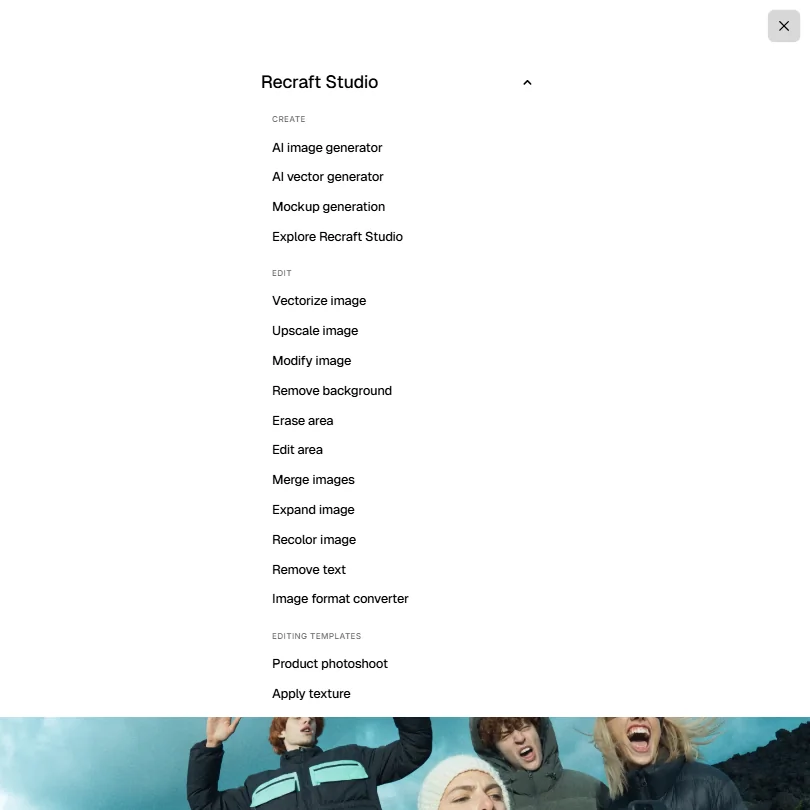
The editing side covers background removal and inpainting via an AI eraser. Creative Upscale is available on Basic and above. Outpainting is available in Recraft Studio and through the API, which is worth knowing before you assume it's tucked away behind a developer wall. Recraft supports negative prompts and custom reference-based styles. Native ControlNet and LoRA-training support are not clearly documented, so if your workflow depends on either, confirm before committing to a paid tier.

Recraft offers an official Figma plugin for generating and editing raster and vector assets inside Figma. It also supports vectorization, background removal, and upscaling inside that environment. Not great that this isn't more prominently surfaced in the main product docs, but it exists.

Video generation sits behind the Pro and Teams plans. Kling and Veo are in there, along with Grok Imagine Video, Sora, Seedance, and a few others. We haven't run the video ourselves, so we won't pretend to have strong opinions on quality. The multi-model approach at least gives users options rather than locking them to a single output style.

Color palette controls and the Extract Prompt feature (pull a prompt from an existing image) are small tools that working designers actually reach for. They get overlooked in most category rundowns. They shouldn't.

Is Recraft Easy to Use?

Web-only, nothing to install. Fine. But what we read from designers suggests the interface rewards patience in a way that consumer tools don't require.

The style library and custom style creation have a real learning curve. Not steep, but present. Reddit threads from 2024 described spending real time figuring out how to get consistent outputs from custom styles. Once people got there, the consensus was that the results justified it. Before that point, frustrating.

The Figma plugin changes the copy-paste-export loop significantly for designers who live in that environment. That was the most commonly cited friction point in what we read, and it now has a direct answer. Adobe users are a different story. No Photoshop plugin appears to exist, and for anyone deep in Creative Cloud, that gap is a daily inconvenience.

The API is well-regarded. Image generation, vector generation, editing, background removal, and vectorization are all covered. Async processing and batch jobs are supported. For teams building Recraft into a production pipeline, that's a real offering, not a token developer play.

Recraft Pricing: Free Plan vs Paid — Is It Worth It?

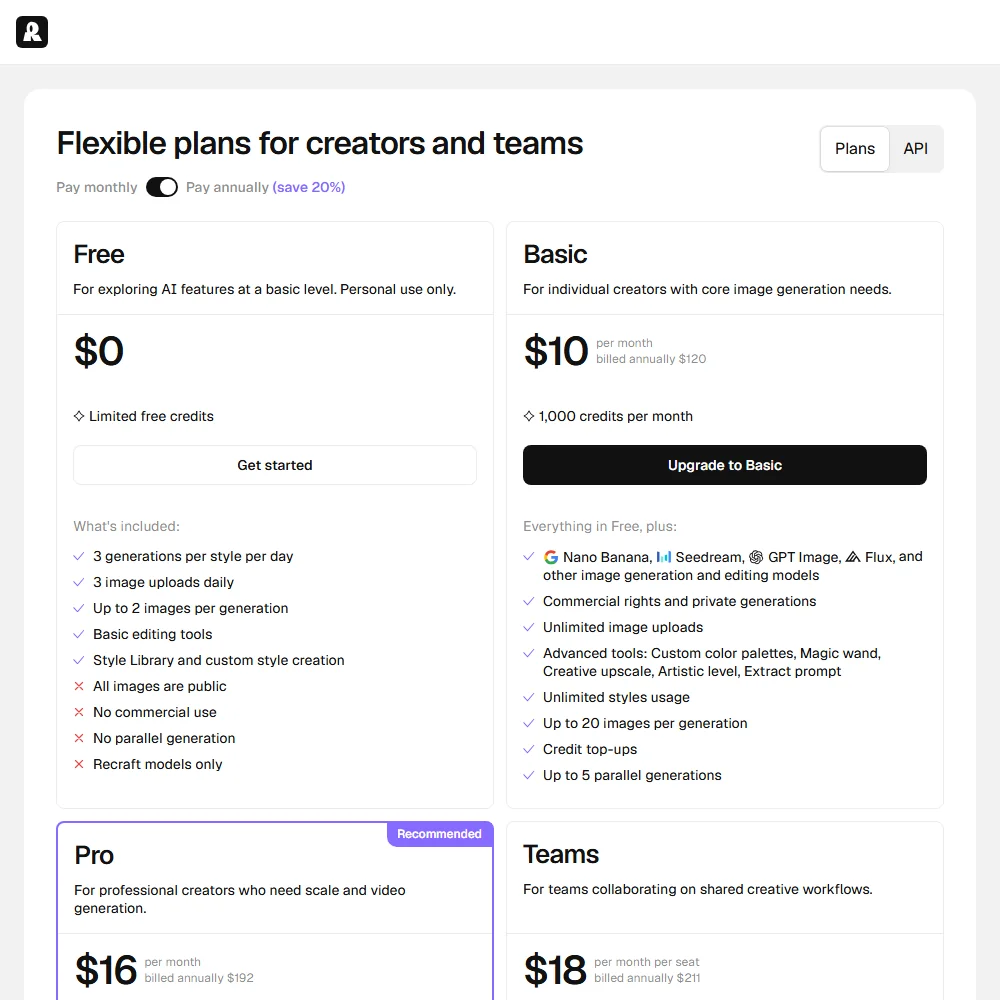
Free plan. Three generations per style per day, three image uploads daily, all images public, no commercial use. It's a try-before-you-buy tier. Not a working tier.

Basic is $12 a month billed monthly, 1,000 credits per month. Commercial rights, private generations, Creative Upscale, and advanced tools including custom color palettes, Magic Wand, and Extract Prompt all unlock here. That's where the tool becomes usable for actual client work.

Pro is $20 a month billed monthly, 2,000 credits per month. Video generation and priority image processing both sit here, along with up to 10 parallel generations for images and 10 for video. The resolution selector goes up to 16k on Pro. Teams is $22 per seat billed monthly, same credit allocation per seat, adding shared custom styles, centralized billing, centralized account management, and Premium 24/7 support with Single Sign-On.

Worth noting that the pricing page includes a resolution toggle at 2k, 4k, 8k, and 16k on both Pro and Teams. We don't see that flexibility on Basic. The annual billing option saves 20% across all paid tiers.

The refund policy carries a real condition. Fewer than 30 credits used total, and payment within the last 30 days. Not a no-questions-asked policy. We've seen worse. But read it before you spend a month testing aggressively and expect to walk away clean.

Enterprise exists. Contact sales. That tracks.

Recraft vs Midjourney: Which AI Image Generator Wins?

Midjourney is the first comparison most people reach for. Fair. The aesthetic output is exceptional, well-documented, and has a devoted user base. But Midjourney doesn't produce editable SVGs. It doesn't have a brand style system built for teams. It runs through Discord, which is either charming or maddening depending on who you ask.

Recraft trades some of Midjourney's raw visual drama for practical utility. A design director quoted in Recraft's own materials said Recraft is highly customizable where Midjourney isn't. That matched what we read from independent sources. For output going into a real deliverable rather than a portfolio post, Recraft's toolset makes more practical sense.

Against Adobe Firefly, the comparison shifts. Firefly's commercial licensing story is cleaner because Adobe's training data is licensed. Firefly also lives inside Creative Cloud, and for anyone deep in that stack, that integration weight is substantial. Most independent commentary suggests Recraft's outputs look better. But Firefly's workflow fit wins for Adobe users, full stop.

Ideogram built its identity around text rendering in raster images. Recraft's vector typography is strong. For text-heavy design work in raster format specifically, Ideogram competes seriously, and we wouldn't argue otherwise. Recraft wins on the vector side. That's not a close call.

Who Should Use Recraft? (And Who Shouldn't)

Freelance graphic designers and illustrators. That's the clearest fit. The vector output alone justifies a Pro subscription for anyone regularly delivering SVG assets to clients.

Brand and creative teams needing consistent style outputs across multiple people. The shared custom styles on Teams is purpose-built for that problem, not a generic collaboration checkbox.

Developers building image or vector generation into products. The API is genuinely capable. Batch jobs and async processing aren't common at this price point.

General consumers who just want to make images and don't care about SVG or brand systems. Simpler tools exist at the same price. Recraft has depth that casual users won't reach and won't miss.

Photographers looking primarily for photo editing. The AI Photo Editor exists, but Recraft's core identity is generative design. It's not Lightroom with an AI layer.

Recraft Review Verdict

We came in expecting a solid but narrow vector tool. It's more than that now.

The SVG generation remains the headline differentiator. Nothing else in the category does it as cleanly. But the expanding model roster, the reference-based style system, the Figma plugin, and a pricing structure that actually maps to feature tiers make Recraft a serious platform for professional designers. Not a one-trick product.

The absence of a Photoshop plugin is the most persistent friction point in what we read. The Figma plugin addresses a major chunk of that complaint, but Adobe users are still left with the copy-paste loop. That's daily friction that shouldn't exist at this point in the tool's maturity.

The free plan won't convert many people because it's too restricted to show what the tool can actually do. Three generations per style per day, public images only, no commercial use. That's not a demo. That's a speed bump. And given that Recraft's strongest differentiators (vector output, style creation, video) are all locked behind paid tiers, the free plan is doing almost no sales work for them.

Still. For designers working in vectors, teams needing brand consistency, or anyone wanting a design-focused alternative to Midjourney, Recraft earns the subscription. The outputs are strong. The pricing is fair. The Figma integration is real. We'd recommend it with the Adobe caveat attached.

Frequently Asked Questions

Does Recraft offer a free plan?

Yes, there's a permanent free tier. Three generations per style each day, three image uploads daily, everything you make is public, and commercial use isn't allowed. It's genuinely limited. Basic at $12 a month is where the tool becomes usable for real work, with commercial rights, private generations, and 1,000 credits per month unlocking there.

Can Recraft generate real SVG vector files?

It can, and this is genuinely unusual in the category. Recraft's vector output produces editable SVG files, not rasterized images wrapped in an SVG container. Designers handing off clean vector assets to clients or pulling them into Illustrator will find this actually works. Recraft also offers an official Figma plugin that handles vector generation and editing directly inside Figma, along with vectorization and background removal.

How does Recraft compare to Midjourney for professional design work?

Midjourney produces exceptional images but it's built around aesthetic output, not design workflow. Recraft trades some of that raw visual drama for things designers actually need: vector export, a brand style system, color palette controls, and a Figma plugin. For work ending up in a real deliverable rather than a social post, Recraft's toolset is more practical. Midjourney still wins on pure image drama. That's not nothing, but it's not always what the job requires.

Recraft is featured in

Alternatives to Recraft

See all Recraft alternatives →

Other AI Image Generation options we've reviewed.

User reviews

Review Recraft

Your rating

Reviews are moderated and appear once approved.