SAASINSPECTOR
Ideogram logo

Ideogram Review

Designers, marketers, and content creators needing high-quality text rendering in AI-generated images

Visit IdeogramFrom Basic Plan is free

Research-based review. We analyzed vendor documentation, customer reviews on G2, Capterra, and Reddit, and live pricing — not hands-on testing yet. We update as our team puts tools through real workflows.

The verdict

Ideogram is a web and mobile AI image generator built specifically to excel at accurate text rendering inside images, making it a strong choice for designers creating logos, posters, and typographic visuals. The 3.0 model significantly expanded its photorealism capabilities, broadening its appeal beyond text-heavy use cases. With over a million users and a focused feature set, it scores well for its niche but falls short for users needing video or more versatile creative tools.

Pros

  • Ideogram offers the most accurate AI text rendering in the consumer market, making it ideal for logos, posters, and typographic designs.
  • The 3.0 model released in March 2025 brought significant photorealism improvements that impressed long-time users.
  • The core workflow is simple and beginner-friendly, covering prompt input, style presets, aspect ratio selection, and batch generation in one interface.
  • Background removal and inpainting tools are built directly into the same interface, removing the need for external editing software.
  • Available on web, iOS, and Android, giving users flexibility across devices.
  • Architecturally built to treat text as a first-class element, which is a genuine technical differentiator from tools like Midjourney or DALL-E 3.
  • Users who originally used it only for text-heavy work began adopting it for broader creative projects after the 3.0 update.

Cons

  • Ideogram currently offers no video generation, text-to-video, or animation capabilities whatsoever.
  • Earlier model versions (1.0 and 2.0) had notably weaker photorealism, which may have damaged its reputation among users who haven't returned since.
  • The tool's identity is heavily tied to text rendering, which may limit its appeal for users who don't need typographic image work.
  • User frustrations appear consistently enough across Trustpilot and Reddit to suggest recurring pain points beyond just missing features.
  • As a relatively young platform launched in 2023, it lacks the maturity and feature depth of more established AI image tools.
From Basic Plan is freeFree plan YesFree trial No

We've spent a lot of time in the research trenches on this one. Ideogram launched in 2023 out of Toronto, got a lot of attention fast, and now has over a million users. For this ideogram review, we pulled together Trustpilot write-ups, Reddit discussions, vendor documentation, and pricing data to build an honest picture. What we kept seeing across user reports was a tool with one very specific, very real advantage over almost everything else in AI image generation. We also kept seeing the same frustrations. Both are worth getting into.

Ideogram homepage screenshot
Ideogram — Homepage

What is Ideogram?

Ideogram is a web-based AI image generator. Also iOS and Android. It launched publicly in 2023 and has since released three major model versions, with Ideogram 3.0 dropping in March 2025. The headline capability, the one they push in every piece of marketing copy, is accurate text rendering inside generated images. Logos, posters, product labels, typographic designs. That's the lane.

Most AI image tools handle text the same way: poorly. Letters blur together, words get scrambled, individual characters come out mangled. Ideogram was built from the ground up to treat text as a first-class element inside the image. That's genuinely different. Not "different" in the marketing sense. Actually architecturally different from what Midjourney or DALL-E 3 prioritize.

The core workflow is straightforward. You write a prompt. You pick a style preset, aspect ratio, and model version. You generate a batch. Then you edit, upscale, or remix from there. Background removal and inpainting are both available inside the same interface. Nothing about the workflow is complicated.

What they don't do: video. No text-to-video, no animation, no video-related tools at all right now. If that's on your list, Ideogram isn't the answer yet.

Ideogram Image Quality: How Good Are the Results?

Honestly, the photorealism improvements in 3.0 surprised us. Based on what we read across Reddit threads from early 2025, users who'd been around since version 1.0 or 2.0 were noticeably impressed. One recurring pattern: people who'd primarily used Ideogram for text-heavy work started using it for broader creative work after 3.0 landed.

The text rendering is legitimately the strongest in the consumer market right now. That's not a bold claim from us. It's what you find when you cross-reference the tool against user comparisons on Reddit and Product Hunt. Put a prompt like "a neon sign reading 'Open Late'" into Midjourney and into Ideogram, and the gap is obvious. Midjourney is beautiful. The letters might say something completely unintended. Ideogram's letters say what you told them to say.

Beyond the text angle, photorealism output quality in Ideogram 3.0 is competitive with the mid-tier alternatives. Not quite at Midjourney's aesthetic peak for purely artistic or cinematic work. That's the honest read. Midjourney still has a visual richness that Ideogram hasn't fully matched for non-text image work. But the gap is narrowing, and 3.0 closed a lot of ground.

Style presets cover photorealism, illustration, anime, and 3D render modes. That's four distinct lanes you can drop into without writing style descriptors into the prompt yourself. Style reference control arrived with 3.0, which lets you feed in a reference image to anchor the visual direction. Users on Trustpilot flagged this as one of the most useful things in the update.

We're not going to oversell it. For abstract art, highly detailed fantasy scenes, or work where text is irrelevant, Midjourney probably wins on raw beauty. But for anything where words need to appear clearly inside an image, Ideogram is the right call. Not even close.

Ideogram Features: Text-to-Image, Video & Editing Tools

Ideogram features screenshot
Ideogram — Features

The generation side covers text-to-image and image-to-image with both style and image reference inputs. You get negative prompt support. Batch generation is in there too, and the CSV upload option for batch generation is something we didn't see many tools offering at this price point. That's a real feature for anyone producing volume output.

Inpainting works. You can edit specific regions of an image without regenerating the whole thing. Background removal is built in. Upscaling is available. No outpainting yet, which some users flagged as a gap. No ControlNet, no LoRA support. Those are real limitations for users who've come from Stable Diffusion or tools like OpenArt where model fine-tuning is part of the workflow.

The Magic Prompt feature is worth mentioning. It's Ideogram's built-in prompt enhancer. You write something minimal, it expands it into a more detailed generation prompt. Reddit users are split on this. Some love it for getting unstuck. Others say it drifts from their original intent. Fair.

Export formats are PNG and JPG. That's it. No SVG. For logo work specifically, that's frustrating. You're getting a raster file out of a tool that's partly marketed at logo creation. You'd need to take the output into a separate vector tool to make it truly print-ready. That's a real extra step that doesn't get mentioned on the homepage.

The API is available at ideogram.ai/api and covers REST-based access. No Photoshop plugin, no Figma plugin, no Canva integration. If you need Ideogram inside another tool, you're building something yourself or finding a third-party automation layer. That tracks for a young product, but it's a gap that competitors have already addressed.

Private generations require a paid plan. On the free tier, your outputs are public. That matters more for some use cases than others, but it's worth knowing before you start.

Is Ideogram Easy to Use?

Very. We kept seeing this across Trustpilot reviews and Reddit posts from new users. The web interface doesn't require any technical background. You don't need to understand model weights or sampling methods. Pick a style, write a prompt, generate. That's genuinely accessible.

The mobile apps exist on iOS and Android, which makes it one of fewer image generators that's actually built for phone use, not just adapted for it. User feedback on the mobile experience is mostly positive, though heavier editing work still seems to happen on desktop based on what we read.

The onboarding doesn't ask much of you, which cuts both ways. New users get into creation quickly. But more advanced users, the ones who want granular control, prompt weighting, or multi-layer composition, will hit a ceiling. Ideogram gives you style controls and aspect ratio selection. It doesn't give you the parameter depth that Stable Diffusion or something like Adobe Firefly offers to experienced designers.

The style presets genuinely help bridge that gap. If you don't know how to prompt for a cinematic photorealistic look, picking "Realistic" from the style menu gets you most of the way there. That's a smart design choice for a broad audience.

We don't have hands-on data on generation speed. What we read suggests it's fine, not exceptional. Some Reddit posts from late 2024 mentioned queue delays during peak hours on free accounts. Paid users seem to have priority. Standard stuff.

Ideogram Pricing: Free Plan vs Paid — Is It Worth It?

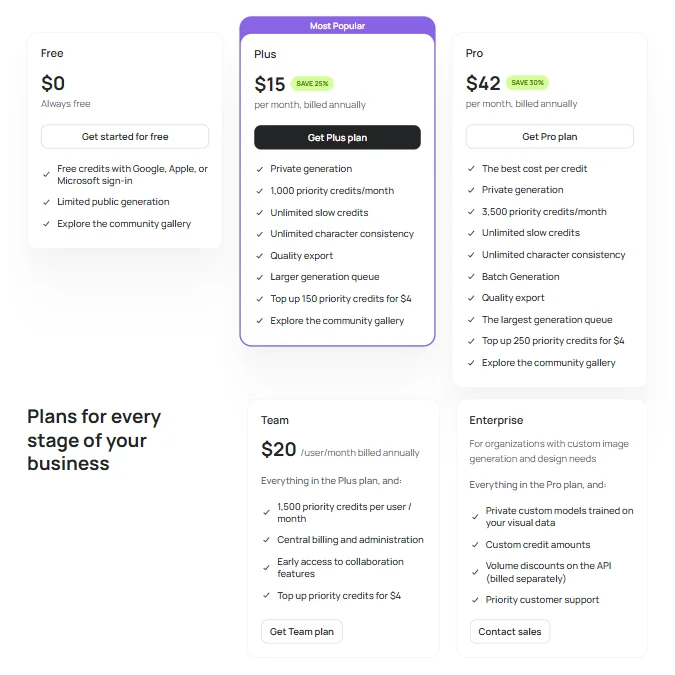
Ideogram pricing screenshot
Ideogram — Pricing

The free plan exists and generates real images. That's better than several competitors. The catch is public generations, limited daily outputs, and no access to priority generation. Worth testing the tool on, not worth running a real workflow on.

Paid tiers start at $20 per month for the plus plan. Pro hits $60 per month. Enterprise is custom, no pricing on the page.

Ideogram does state its refund policy in its Terms of Service, and it is fairly strict. Subscription payments are generally non-refundable, and users do not receive credits for partially used billing periods unless the terms say otherwise. That means it is worth checking the plan carefully before upgrading, especially if you are choosing a higher tier for batch generation or faster processing.

At $20, the entry cost is slightly high but still competitive. The jump to $60 for Pro is steeper, and we'd want to see clearer documentation on what exactly changes between Plus and Pro before committing. Generation limits, private outputs, and API access seem to be the levers. But the details aren't presented cleanly.

Commercial rights come with paid plans. Not with the free tier. That's standard practice in this category, but it's important. Anything you generate on the free plan shouldn't go into commercial work without checking the terms carefully.

Value-wise, for designers and marketers with a real text-in-image use case, the $20 price is probably justified. For casual generative art use without a text requirement, there are cheaper options. That's the honest read.

Ideogram vs Midjourney: Which AI Image Generator Wins?

Depends entirely on what you're making. Which is the only honest answer.

Midjourney is still the aesthetic benchmark for purely artistic AI image work. The image quality at the top tier is remarkable. Cinematic lighting, painterly composition, complex scene rendering. Midjourney does these things better than Ideogram right now. But Midjourney's text rendering is still unreliable. It always has been. That's not a new complaint.

Ideogram wins cleanly on anything where words appear inside the image. Logos. Poster copy. Product mockups with label text. Typographic art. That specific use case is where the gap between Ideogram and Midjourney is biggest, and it's not subtle. Midjourney users dealing with text regularly use workarounds, add the text in post, or generate and regenerate hoping for a readable result. Ideogram just handles it.

Midjourney also has no free plan. $10 per month minimum. Ideogram's free tier gives you real access before you commit anything. That matters for new users trying to decide.

On the customization side, Midjourney has more depth for experienced users. Parameter control, aspect ratio precision, version selection, and the broader community of prompt sharing around it give it more surface area for serious creative work. Ideogram's style presets are easier but more limited.

The answer for most users with a text requirement: Ideogram. For pure artistic output with no text: Midjourney still has the edge. We've seen worse product positioning than "we beat Midjourney at text." That's a defensible claim. It holds up.

Who Should Use Ideogram? (And Who Shouldn't)

Marketers building social graphics with copy baked in. That's a natural fit. The combination of reliable text rendering, multiple aspect ratios, and batch generation handles a real production workflow there.

Brand designers doing concept mockups for logos or poster campaigns. Ideogram gives you a starting point that actually includes legible type. Most other tools force you to add that in post.

Content creators who need a fast, cheap, easy tool and aren't worried about fine-tuned control. The free plan is a real on-ramp. The low Basic tier doesn't ask for much commitment.

Who shouldn't use it. Artists who need deep parameter control and model-level customization. The LoRA and ControlNet gaps are real for that audience. Game developers needing on-brand asset generation at scale would likely find a more purpose-built option better suited to their needs. Video creators shouldn't bother yet. There's nothing here for them right now.

Solo developers who want API-first integration with minimal wrapper work might also feel the friction. The API exists, but the broader integration ecosystem is thin for now. If you need Ideogram inside your existing creative stack without building custom pipes, that's a harder sell today than it might be in a year.

Ideogram Review Verdict

Ideogram is a genuinely good tool with a genuinely specific strength. The text rendering advantage is real and documented. It's not a marketing claim we're skeptical of. It's the one thing that keeps coming up from actual users in actual reviews, and it's the thing that separates Ideogram from the broader field of AI image generators in a meaningful way.

Ideogram 3.0 also improved photorealism enough that the tool is no longer a one-trick product. You can use it for broader creative work now and get competitive results. That's progress worth acknowledging.

What holds it back is the integration gap. No Figma, no Photoshop, no Canva. The API is there, but building around it takes work that most of the target audience won't want to do. The raster-only export is a real problem for logo use cases specifically. The missing refund policy transparency is the kind of thing that erodes trust slowly. Not a dealbreaker, but not a good look.

The pricing is fair at the entry level. $20 a month for what you get is reasonable. The Pro tier at $60 needs clearer justification for most users to feel confident about the jump.

We'd recommend Ideogram to anyone with a real text-in-image workflow. For everything else, it's a solid option with some meaningful gaps. Not the most fully-featured tool in the category, but the most purposeful one for its specific use case. That's worth something.

Frequently Asked Questions

Does Ideogram have a free plan?

Yes, and it's a real one. You can generate images without paying. The limits are that your outputs are public and daily generation is capped. Don't use it for anything commercially sensitive, because the terms around commercial rights only kick in on paid plans.

How good is Ideogram's text rendering compared to other AI image generators?

Ideogram's text rendering accuracy is the strongest we've seen documented across user comparisons at this price point. Tools like Midjourney, DALL-E 3, and Stable Diffusion all struggle with legible text inside images to varying degrees. Ideogram was specifically built to address that problem, and based on user reports and comparison outputs shared on Reddit and Product Hunt, it shows.

Does Ideogram support commercial use?

Commercial rights are included on paid plans, starting at the $20 per month plus tier. Free plan generations don't carry commercial rights, so anything you plan to use in client work or publish commercially should be generated on a paid account. Always worth checking the current terms page directly, since policies in this category get updated.

Ideogram is featured in

Alternatives to Ideogram

See all Ideogram alternatives →

Other AI Image Generation options we've reviewed.

User reviews

Review Ideogram

Your rating

Reviews are moderated and appear once approved.