Free gives 100 compute units a day with no credit card, full access to the real-time image models and no watermark.
Best of · 8 tools ranked
Best Free Multi-Model AI Tools
Find the best free multi-model AI platforms, where many image and video models sit under one login instead of one app per model. Compare them by what the free plan gives: daily or one-off credits, watermarks on exports, commercial use and which models you can reach, so you know where each plan stops before you start.
Updated 3 October 2026Ranked by our score, worked out from each vendor’s own pages.How we score →All Multi-Model AI Platforms →
Our top 3 Free Multi-Model AI Tools
A free account works, but every generation is watermarked and only one job runs at a time, so use it to see what the models make before you publish.
Starting costs nothing, and video downloads from a free account carry a watermark that the Beginner plan removes.
Best Free Multi-Model AI Tools, ranked
2 of 8 export without a watermark1 of 8 hand out daily credits
#ToolScoreFree plan gives youPaid from
Free plan, limits not published
✓ No watermarkPaid $9/moShow detailsHide details01 Krea: Best for free image generation with no card9.4Score 9.4 out of 10Free plan, limits not published✓ No watermark$9/moVisit site ↗ReviewDetailsCloseShow more about Krea
Free plan, limits not published
✓ No watermarkPaid $9/mo
Show detailsHide detailsKrea: Best for free image generation with no card
9.4Score 9.4 out of 10Free plan, limits not published✓ No watermark$9/moVisit site ↗ReviewDetailsClose
Free gives 100 compute units a day with no credit card, full access to the real-time image models and no watermark. The limits are firm: no video at all, no commercial license, and upscaling capped at 2K. LoRA training from 50 images is included. Choose it over Higgsfield when you want clean image output at no cost, and move on once a client needs the work cleared for commercial use.
- Krea's free plan gives 100 compute units a day with no credit card required, full access to the real time image models.
- It includes current third party models: Kling 3.0, Veo 3.1, Seedance 2.0, Nano Banana Pro, GPT-IMG-2 and Flux 2.
- The free plan cannot generate video at all; video concurrency is set to zero.
Free plan, limits not published
✕ WatermarkedPaid $19/moShow detailsHide details02 Higgsfield: Best for trying top video models, watermark included9.0Score 9.0 out of 10Free plan, limits not published✕ Watermarked$19/moVisit site ↗ReviewDetailsCloseShow more about Higgsfield
Free plan, limits not published
✕ WatermarkedPaid $19/mo
Show detailsHide detailsHiggsfield: Best for trying top video models, watermark included
9.0Score 9.0 out of 10Free plan, limits not published✕ Watermarked$19/moVisit site ↗ReviewDetailsClose
A free account works, but every generation is watermarked and only one job runs at a time, so use it to see what the models make before you publish. Starter removes the watermark. One credit pool reaches Kling 3.0, Veo 3.1, Seedance 2.0, Nano Banana Pro, GPT Image 2 and Flux 2. Content can train its models by default. Pick it over Pika to compare the newest video models, and Pika when clean free exports matter more.
- Kling 3.0, Veo 3.1, Seedance 2.0, Nano Banana Pro, GPT Image 2 and Flux 2 are all on the account alongside Higgsfield's own Soul models.
- Seedance 2.0 generates synchronized dialogue and sound in the same pass as the video.
- Every generation on the free account carries a visible watermark.
Up to 100 tokens a day, 10 GB of storage retained
? Watermark not statedPaid $10.99/moShow detailsHide details03 RunDiffusion: Best for ComfyUI and Auto1111 in the browser8.0Score 8.0 out of 10Up to 100 tokens a day, 10 GB of storage retained? Watermark not stated$10.99/moVisit site ↗ReviewDetailsCloseShow more about RunDiffusion
Up to 100 tokens a day, 10 GB of storage retained
? Watermark not statedPaid $10.99/mo
Show detailsHide detailsRunDiffusion: Best for ComfyUI and Auto1111 in the browser
8.0Score 8.0 out of 10Up to 100 tokens a day, 10 GB of storage retained? Watermark not stated$10.99/moVisit site ↗ReviewDetailsClose
A free plan of up to 100 tokens a day opens ComfyUI and Auto1111 with 10 GB of storage kept for 72 hours, and a 30-minute free trial sits beside it. Premium image, video and editing tools and LoRA training are not on it. It states that it never uses customer data to train third-party or foundational models. Pick it over Tensor when private handling of your uploads matters, and Tensor for a bigger free model library.
- A free plan gives up to 100 tokens a day with access to ComfyUI and Auto1111 and 10 GB of storage.
- It trains its own Juggernaut and Photo Flux fine-tunes in house, alongside other companies' models like Kling 3.0 Pro, Veo 3.1 and Nano Banana Pro.
- Seedance 2.0 is not among the models listed; the site names Bytedance Seedance 1.5 Pro instead.
Personal and evaluation use only, no commercial rights
? Watermark not statedPaid $15/moShow detailsHide details04 Scenario: Best for a daily 50-credit allowance for testing7.8Score 7.8 out of 10Personal and evaluation use only, no commercial rights? Watermark not stated$15/moVisit site ↗ReviewDetailsCloseShow more about Scenario
Personal and evaluation use only, no commercial rights
? Watermark not statedPaid $15/mo
Show detailsHide detailsScenario: Best for a daily 50-credit allowance for testing
7.8Score 7.8 out of 10Personal and evaluation use only, no commercial rights? Watermark not stated$15/moVisit site ↗ReviewDetailsClose
Free gives 50 credits every day with no credit card, though the output is for personal and evaluation use only, with no commercial rights. On standard accounts it may use your content to improve its AI, with no opt-out outside an Enterprise contract. It has no model of its own, and custom LoRA training starts at Pro. Choose it to try a canvas that chains models, and RunDiffusion if your uploads must stay out of training.
- The free plan gives 50 credits every day with no credit card required.
- Paid plans include a full commercial license to sell or deliver work to clients without royalties.
- Free plan output is for personal and evaluation use only, with no commercial rights.
Daily free credits and community models, commercial use is paid
✕ Watermarked↻ Daily creditsPaid $9.90/moShow detailsHide details05 Tensor: Best for SDXL checkpoints and free LoRA training7.6Score 7.6 out of 10Daily free credits and community models, commercial use is paid✕ Watermarked↻ Daily credits$9.90/moVisit site ↗ReviewDetailsCloseShow more about Tensor
Daily free credits and community models, commercial use is paid
✕ Watermarked↻ Daily creditsPaid $9.90/mo
Show detailsHide detailsTensor: Best for SDXL checkpoints and free LoRA training
7.6Score 7.6 out of 10Daily free credits and community models, commercial use is paid✕ Watermarked↻ Daily credits$9.90/moVisit site ↗ReviewDetailsClose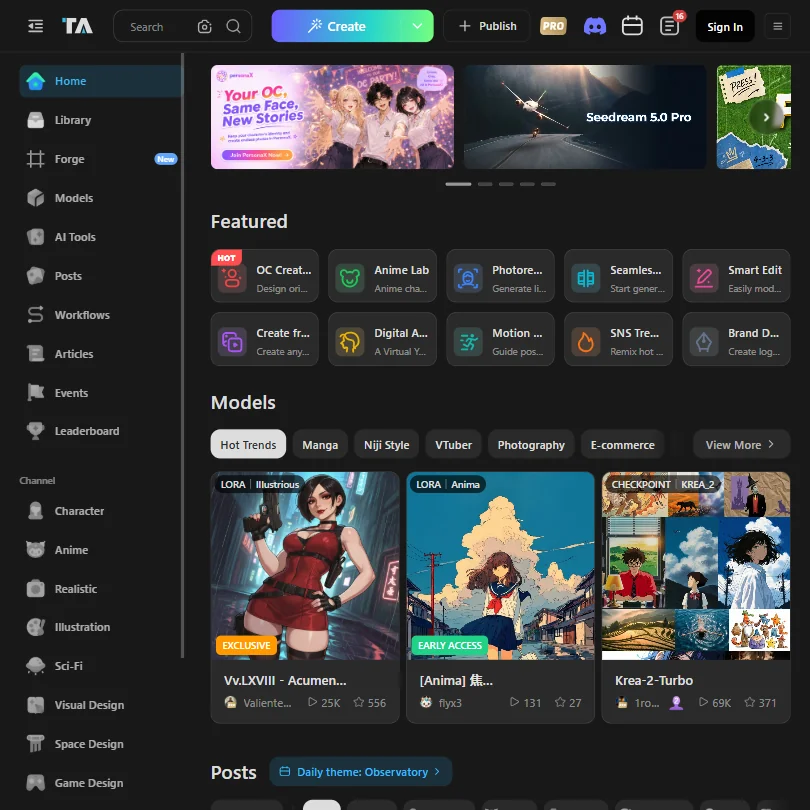
The free Starter plan never expires: 50 credits a day for images and video, access to more than a million community models and LoRAs, and LoRA training itself. The stops are a watermark on free output, commercial rights on paid plans only, and file storage that lasts 7 days. Premium models such as Kling and Nano Banana run through Forge on a separate Energy currency. Pick it over SeaArt AI for SDXL and Illustrious checkpoints.
- The free Starter plan never expires and includes 50 credits a day for image and video generation.
- Even the free plan gives access to more than a million community models and LoRAs.
- The Pro plan's fast-generation pool is capped at 200 generations a month, not unlimited.
Free to start, no payment needed to begin creating
✕ WatermarkedPaid $5.99/moShow detailsHide details06 SeaArt AI: Best for creating from a phone, free to start7.0Score 7.0 out of 10Free to start, no payment needed to begin creating✕ Watermarked$5.99/moVisit site ↗ReviewDetailsCloseShow more about SeaArt AI
Free to start, no payment needed to begin creating
✕ WatermarkedPaid $5.99/mo
Show detailsHide detailsSeaArt AI: Best for creating from a phone, free to start
7.0Score 7.0 out of 10Free to start, no payment needed to begin creating✕ Watermarked$5.99/moVisit site ↗ReviewDetailsClose
Starting costs nothing, and video downloads from a free account carry a watermark that the Beginner plan removes. Standard and above include unlimited image generation with no credit cost, while unlimited use of the named video and image models sits on Master. LoRA training is on every plan from Beginner up, and iOS and Android apps exist. Pick it over PicLumen when most of your work happens on a phone.
- The free plan does not require payment to start creating.
- Beginner, the cheapest paid plan at $5.99 a month, already removes the watermark from video downloads.
- Video first and last frame control is limited to Standard, Professional and Master; it is not on Beginner.
20 Lumens a day, about 20 images or one video
✕ WatermarkedPaid $7.59/moShow detailsHide details07 PicLumen: Best for a daily image allowance across many models6.5Score 6.5 out of 1020 Lumens a day, about 20 images or one video✕ Watermarked$7.59/moVisit site ↗ReviewDetailsCloseShow more about PicLumen
20 Lumens a day, about 20 images or one video
✕ WatermarkedPaid $7.59/mo
Show detailsHide detailsPicLumen: Best for a daily image allowance across many models
6.5Score 6.5 out of 1020 Lumens a day, about 20 images or one video✕ Watermarked$7.59/moVisit site ↗ReviewDetailsClose
The free Basic plan gives 20 Lumens a day, about 20 images or one video, in normal generation mode, with no commercial-use rights; Lite is the first plan without a watermark. Relax Mode's unlimited images start on Standard. It has no API, no SOC 2 and no GDPR reference in its privacy policy. Pick it over SeaArt AI for a standing daily allowance across Seedance, Kling 3.0, Veo 3.1, GPT Image 2, Midjourney and FLUX.
- PicLumen has a standing free plan with 20 Lumens a day, enough for about 20 images or one video.
- The cheapest paid plan, Lite, is watermark-free for $7.59 a month.
- The free plan carries no commercial-use rights.
No watermark, all models, credit packs only
✓ No watermarkPaid $8/moShow detailsHide details08 Pika: Best for watermark-free social clips on credit packs6.2Score 6.2 out of 10No watermark, all models, credit packs only✓ No watermark$8/moVisit site ↗ReviewDetailsCloseShow more about Pika
No watermark, all models, credit packs only
✓ No watermarkPaid $8/mo
Show detailsHide detailsPika: Best for watermark-free social clips on credit packs
6.2Score 6.2 out of 10No watermark, all models, credit packs only✓ No watermark$8/moVisit site ↗ReviewDetailsClose
The free plan is watermark-free and reaches every model with two parallel generations, but it has no monthly credits, so generation is paid for through one-time credit packs, and there is no commercial license. That license starts at Creator. Pika 2.5 sits beside Seedance, Veo 3.1 and Wan 3.0, with lip sync and clip extension. Content may train its models by default, with no self-serve opt-out. Pick it over Higgsfield for clean exports; Kling and Flux are not on it.
- Pika combines its own Pika 2.5 video model with Seedance, Veo 3.1, Wan 3.0 and GPT Image 2.5 in one account.
- The free plan and the $10 Starter plan are both watermark-free.
- Kling and Flux are not among the models Pika lists.
How to choose a free multi-model AI platform
A multi-model platform sells one login for many image and video models, and the free plan decides how much of that variety you can actually touch. Some give a small daily pot of credits, one holds back video completely, one stamps every output, and one offers no monthly credits at all. This guide covers what each free plan allows, what you can and cannot do with the output, and which platform suits which kind of creator.
Start with the job, not the tool
Creators come to these platforms for four different reasons, and the tools are shaped accordingly.
- Trying the headline video and image models. Higgsfield, Krea and PicLumen all list Kling, Veo, Seedance and GPT Image in one account, and Pika pairs its own video model with Seedance and Veo.
- Working with open and community models. Tensor.Art hosts checkpoints and LoRAs other users have trained, and RunDiffusion runs ComfyUI and Auto1111 in the browser. SeaArt AI sits closer to this camp, with LoRA training on every plan.
- Keeping a character or style consistent. Higgsfield's Soul ID learns a character from at least 20 of your photos, Krea trains LoRAs from 50 images on the free plan, and Pika's Character Studio locks a face from a single reference photo.
- Chaining models into a pipeline. Krea Nodes and Scenario's canvas let you connect models in sequence, with an agent that can build the chain from a description.
Match the job first and the free plan questions below become easier to answer.
| Job | Start with | Runner-up and the trade-off |
|---|---|---|
| Try many video models | Higgsfield | Pika has no watermark on its free plan but no monthly credits either |
| Image work with a free daily pot | Krea | Tensor.Art gives 50 credits a day and a far larger community library |
| Train your own style | Tensor.Art | Krea also trains LoRAs free, from 50 images |
| Run ComfyUI without installing it | RunDiffusion | Scenario chains models on a visual canvas and trains them only on Pro and above |
| Short social video with lip sync | Pika | Higgsfield's Seedance 2.0 makes dialogue and sound in the same pass |
| Cheap image volume | SeaArt AI | PicLumen's free pot is 20 Lumens a day, and its Lite plan adds a limited commercial license |
What you actually get for free
The free plans fall into four patterns, and each rations something different.
- Credit pools across many models. Krea gives 100 compute units a day with no card, all on image models, since video is switched off. Scenario gives 50 credits a day with no card. PicLumen gives 20 Lumens a day, about 20 images or one video. Higgsfield's free account works across its models, with a watermark on every generation and one job at a time.
- Open-model hubs. Tensor.Art's free Starter plan never expires and includes 50 credits a day for images and video, access to more than a million community models, and LoRA training. RunDiffusion gives up to 100 tokens a day with ComfyUI and Auto1111, 10 GB of storage held for 72 hours, and no premium tools or LoRA training.
- Pay as you go. Pika's free plan gives 0 credits a month. You buy one-time credit packs, then get every model, two parallel generations of each kind and no watermark.
- A free start with a low entry price. SeaArt AI's free plan needs no payment to start. Its Beginner plan is the cheapest paid step on the page and takes the watermark off video downloads.
Which tool fits which creator
- Social video makers. Start with Pika, because the free plan is watermark-free and covers all of its models, with lip sync part of the product. Add Higgsfield for its Seedance 2.0 dialogue when a clip needs sound, accepting the watermark while testing.
- Designers and illustrators. Start with Krea, because the free plan gives the real time image models and a daily pot with no card. Its upscaling is capped at 2K on the free plan, so save the final render for a paid month.
- Brand and game artists building a style. Start with Tensor.Art, because LoRA training is free there, and add Krea for a second trainer. Scenario trains custom models on its Pro plan and above, and offers a daily free pot to test its canvas first.
- ComfyUI users. Start with RunDiffusion, because it hosts ComfyUI and Auto1111 and has its own fine-tuned Juggernaut models. The free plan holds files for 72 hours, so export what you want.
- Hobbyists exploring. Start with Tensor.Art or SeaArt AI. Tensor.Art stores free files for 7 days, so download your favorites the same day.
- Creators who need many video models on one bill. Start with Higgsfield. It lists Kling 3.0, Veo 3.1, Seedance 2.0, Nano Banana Pro, GPT Image 2 and Flux 2 on one account, priced per generation.
Where free plans stop
| Limit | Tools | What happens at the limit |
|---|---|---|
| Daily credits | Krea (100 units), Scenario (50), Tensor.Art (50), RunDiffusion (100 tokens), PicLumen (20 Lumens) | The pot refills the next day |
| Jobs at once | Higgsfield (1), Pika (2 of each kind) | Extra generations wait in line |
| Storage | Tensor.Art (7 days), RunDiffusion (72 hours) | Files are removed, so download first |
| Features held back | Krea (no video, upscaling to 2K), RunDiffusion (no premium tools or LoRA training) | Those need a paid plan |
| Commercial use | Krea, Scenario, PicLumen, Pika (none on free), Tensor.Art (paid plans only) | Output is for personal use until you upgrade |
| Watermark | Higgsfield (every output) | Starter removes it |
The two limits that catch people are the commercial one and storage. A beautiful free render cannot go into a client deck at Krea, Scenario, PicLumen or Pika, and a file left in Tensor.Art or RunDiffusion disappears on a schedule. Download as you go and treat free output as practice.
What you give up by staying free
The loss is breadth as much as volume. Krea's free plan is images only, RunDiffusion's leaves out its premium image, video and editing tools, and Scenario trains custom models only from Pro. Because each model is priced per generation, the same pot buys very different amounts: Krea lists a Kling 3.0 generation at about 1,000 credits, Seedance 2.0 at about 300 and Veo 3.1 at about 1,300.
Free also means slower. Higgsfield holds you to one job at a time and Pika to two parallel generations of each kind. Scenario and RunDiffusion do not publish per-model costs outside the app, so you learn what a generation costs only after signing in.
Privacy and who sees your work
Training terms vary widely, and they matter if you upload your own photos or client references.
| Tool | Training on your content |
|---|---|
| RunDiffusion | Not used to train third-party or foundation models |
| Higgsfield | Used by default unless you delete your content or account |
| Scenario | Used by default, with no opt-out short of an Enterprise contract |
| Pika | Used by default, with no self-serve opt-out |
Keep personal or client reference images to RunDiffusion, and treat uploads to Higgsfield, Scenario and Pika as material they may learn from. Krea's standard terms do not say clearly, and a no-training clause is sold as a Business add-on.
Mistakes to avoid
- Judging a platform by its model list. Every platform here lists much the same models, but each charges per generation. Compare what a day of credits buys on the model you will use most.
- Expecting video from Krea's free plan. Video is switched off there. Use PicLumen's one daily video or Pika's credit packs to test video first.
- Delivering client work from free output. Krea, Scenario, PicLumen and Pika free plans carry no commercial license, and Tensor.Art grants it on paid plans only. Re-render on a paid plan before delivery.
- Uploading private references without reading the defaults. Higgsfield, Scenario and Pika may train on what you upload. Use RunDiffusion for private material.
- Treating Pika's free plan as a monthly allowance. It carries 0 credits a month, so each generation draws from a credit pack you pay for.
When it is worth paying
You are ready to pay when free output keeps failing a requirement: a watermark you cannot post, a client who needs a license, or a daily pot that ends before the idea does.
| If you are | Upgrade to | What changes |
|---|---|---|
| Posting video on Higgsfield | Higgsfield Starter | The watermark comes off |
| A designer who needs more volume | Krea Pro | 20,000 credits a month, plus unlimited relaxed generation on the Krea 2 image family |
| Delivering work from Scenario | Scenario Starter or higher | A full commercial license, with custom training from Pro |
| Posting short clips on Pika | Pika Creator | A commercial license and 3,150 credits a month |
| Using PicLumen daily | PicLumen Lite | Watermark-free output and a limited commercial license, with a full one on Standard |
| Training styles on Tensor.Art | Tensor.Art Pro | 300 credits a day, larger LoRA runs of up to 1,000 images and private, unlisted models |
Billing changes the real price. PicLumen, Pika, SeaArt AI and Tensor.Art each cost less per month on a yearly term, while Higgsfield Starter costs the same monthly or yearly. RunDiffusion's free trial lasts 30 minutes, and Scenario's daily pot works as its trial.
Using two free tools together
Because each platform is strong in a different place, a pair of free accounts covers more than one alone.
- Explore ideas in Tensor.Art or SeaArt AI, where a free daily pot goes a long way on images.
- Refine the best frame in Krea, using its real time models and editor.
- Animate the result in Pika, whose free plan stays watermark-free.
A second pairing suits consistent looks: train a style LoRA free in Tensor.Art, and lock a face from one reference photo with Pika's Character Studio.
How we picked
Every tool here is ranked by its score, and each score is worked out from the vendor’s own published pages: pricing, plans, features and terms. No score is adjusted by hand. All 8 tools have enough published facts to be scored, and on average 88% of each score comes from facts the vendor publishes. The facts behind these scores were checked between 19 September 2026 and 28 October 2026.
| Ranked as | On this page | What we score | Scoring guide |
|---|---|---|---|
| Multi-model AI platforms14 reviewed | 8 | 5 criteria, 28 checked facts: for video, for images, pricing, workflow and teams, privacy and trust | How we score these → |
Common questions
Is there a free AI image and video generator with no watermark?
Krea's free plan has no watermark but covers images only. Pika's free plan is watermark-free and includes video and every model, though it pays for generation through credit packs instead of monthly credits. Higgsfield, Tensor, SeaArt AI and PicLumen all stamp free output, and the stamp comes off on Higgsfield Starter, SeaArt AI Beginner and PicLumen Lite.
Where can I use Stable Diffusion online free?
Tensor gives 50 credits a day and hosts open checkpoints such as Stable Diffusion 1.5 and SDXL 1.0, plus a library of community LoRAs. RunDiffusion gives up to 100 tokens a day with ComfyUI and Auto1111, and a 30-minute trial. Tensor suits browsing community models, and RunDiffusion suits people who already know those tools.
Is there a free AI upscaler in these platforms?
Krea includes upscalers that reach 22K, with the free plan limited to 2K. Higgsfield has an upscale tool, and RunDiffusion and PicLumen list upscaling among their features. Of these, Krea's free 2K cap is the clearest to plan around, and its free images carry no watermark either, which makes it the natural first stop for an upscale.
Can I use free AI-generated images and videos commercially?
Treat free output as personal. Krea, Scenario, Tensor, PicLumen and Pika all withhold a commercial license from free users. Pika's starts on Creator, Tensor's on paid plans, PicLumen's with a limited one on Lite, and Scenario's with its paid plans. If a client will use the work, budget for the first paid tier.
Which free plan lets me train my own style or character?
Tensor includes LoRA training on its free Starter plan, and Krea trains from 50 images on free. RunDiffusion starts LoRA training at Hobby, Scenario at Pro, and SeaArt AI lists it from Beginner. Higgsfield's Soul ID builds a consistent character from at least 20 of your own photos. Tensor is the roomiest free route.
How many images does a free daily allowance make?
Only PicLumen turns its allowance into a figure: 20 Lumens a day buys about 20 images or one video. Krea gives 100 compute units, Tensor and Scenario 50 credits, and RunDiffusion 100 tokens, and none of those publishes an image count. If you need a predictable number, PicLumen is the easiest to plan around.
Why does one video cost more credits than another?
Each model is priced per generation. Krea's own cost table puts a Kling 3.0 generation at about 1,000 credits, Seedance 2.0 at about 300 and Veo 3.1 at about 1,300, with cheaper Fast or Lite versions. Scenario and RunDiffusion do not publish per-model costs outside the app. Try the cheaper models before the headline ones.