Our research on Higgsfield started where it usually does: vendor docs cross-referenced against what actual users report. We pulled from G2, Reddit threads, and a Trustpilot pool of over 2,000 reviews. Founded in 2023 out of San Francisco, Higgsfield has moved fast. The bet they're making isn't on one proprietary model beating Runway or Kling. It's on aggregation. Whether that bet pays off at the prices they're asking depends heavily on what kind of work you're doing.

What is Higgsfield?
The core idea is a model aggregator with proprietary tools layered on top. Seedance 2.0, Kling 3.0, Sora 2, Google Veo 3, Grok Video, and a few others all sit behind the same model picker. Two of those carry most of the marketing weight. The rest fill out the roster. On top of that, Higgsfield ships its own DoP cinematic camera controls, a Soul ID system for character consistency, a LipSync Studio, and a Canvas workflow builder.
The workflow hub includes over 50 pre-built apps organized into dedicated studios. Marketing Studio. Shorts Studio. Explainer Studio. The pitch is that you stop jumping between five different platforms to make a product explainer and a short-form Instagram video. One place. That's reasonable.
They've also built an Adobe Premiere Pro plugin and a DaVinci Resolve Studio integration. A Claude MCP connection exists for developers building on top of the platform. Honestly, the surface area here is bigger than most tools sitting at a comparable price point. That's not automatically a good thing.
Higgsfield Features: Logo, Graphics, UI & Brand Design Capabilities

No logo generation. No brand kit. No vector output. No print-ready files. Worth being direct about that upfront, because a few reviewers we found discovered it only after subscribing. What Higgsfield does instead is video and image generation at scale across a wide model range, and that's where its attention actually is.
Image generation runs through models including GPT Image 2, Seedream 5.0 Pro, and their own Soul 2.0. The image-to-video pipeline is where reviewers consistently report spending the most time. Push a still into motion, apply camera moves from the DoP system, upscale the result up to 4K using Topaz. That flow works, from what we can tell. Inpainting and background removal round out the editing side, though neither does anything a dedicated image editor can't match.
The animation stack is the real draw. Talking avatars, lipsync, draw-to-video, motion control. These features show up in positive G2 reviews with some regularity. Content creators specifically call out the camera controls. That tracks. The DoP system is proprietary, and it gives Higgsfield something no other aggregator is doing in quite the same way.
Collaboration features live in Higgsfield Collab and Canvas. Team sharing is mentioned in their documentation. We couldn't find meaningful user commentary on how it actually holds up at team scale. Small flag.
Higgsfield Design Quality: How Good Are the AI-Generated Results?
Depends on the model. That's the honest answer. Sora 2 output looks like Sora 2 output. Veo 3 output looks like Veo 3 output. Higgsfield doesn't transform the underlying quality of what those models produce. It gives you access without forcing you to build separate accounts on five different platforms.
The quality story gets more interesting when you look at the proprietary layer. Soul ID for character consistency is the feature called out most often in positive reviews. Maintaining a character across multiple shots is one of the genuinely hard problems in AI video right now, and reviewers say it works better than expected. We're cautiously optimistic on that. G2 currently shows 78 verified reviews at a 4.5 out of 5, which gives that signal more weight than it had a few months ago when the review count was much smaller.
The Trustpilot pool sits above 2,000 reviews, but we haven't been able to confirm what the aggregate rating is from that pool. Large counts with unreported averages sometimes indicate the average isn't flattering. Worth watching.
Image output gets decent marks for photorealism. Reviewers in marketing roles mention product visuals and social content as the primary use cases. Nobody in our research pool was using this for print work, which makes sense given where the platform is pointed.
Higgsfield Templates & Assets: How Deep Is the Library?
The 50-plus pre-built apps are the main template asset. These aren't traditional drag-and-drop templates in the Canva sense. They're structured workflows aimed at specific output types. Shorts Studio gets the most mentions. Explainer Studio turns up in marketer reviews. That's roughly the use pattern we see repeated across sources.
Viral presets exist and seem to do exactly what the name implies, outputting content formatted for short-form social. Fine. The asset library is thin relative to what a tool like Canva or a Picsart-style platform offers, but that comparison isn't really fair in either direction. Higgsfield isn't competing there and doesn't pretend to be.
If you need a deep static template library for graphics or presentations, this isn't the place. The library here is a collection of video and image generation workflows, not a stock asset library. That's a meaningful distinction. Not great that some users only found this out after subscribing.
Is Higgsfield Easy to Use for Non-Designers?
The model picker is the first obstacle. When you can choose from a dozen different AI models, someone has to know which one to pick for which job. That's not obvious to a non-technical user. A social media manager who wants a quick product video might find the options paralyzing. Reviewers with production backgrounds seem to orient faster.
Canvas adds another layer. Powerful in theory. In practice, learning a canvas-style workflow builder on top of figuring out which AI model to use is a double learning curve. Higgsfield's documentation is described by users as basic, and the Discord community has become the primary channel for anything beyond surface-level questions. That's worth knowing before you buy. Billing, credits, and subscriptions are handled separately through email support rather than Discord, so the support picture is split.
The 50-plus apps do help flatten the curve for specific jobs. Land in Shorts Studio and stay there, and the experience is much more guided. That's probably the right entry point for someone newer to AI video.
Standard tier support includes a bot on live chat and email access. We've seen worse. But for a plan running close to $79 a month, a bot at the front of the queue is not inspiring.
Higgsfield Pricing: Is It Worth It vs Hiring a Designer?

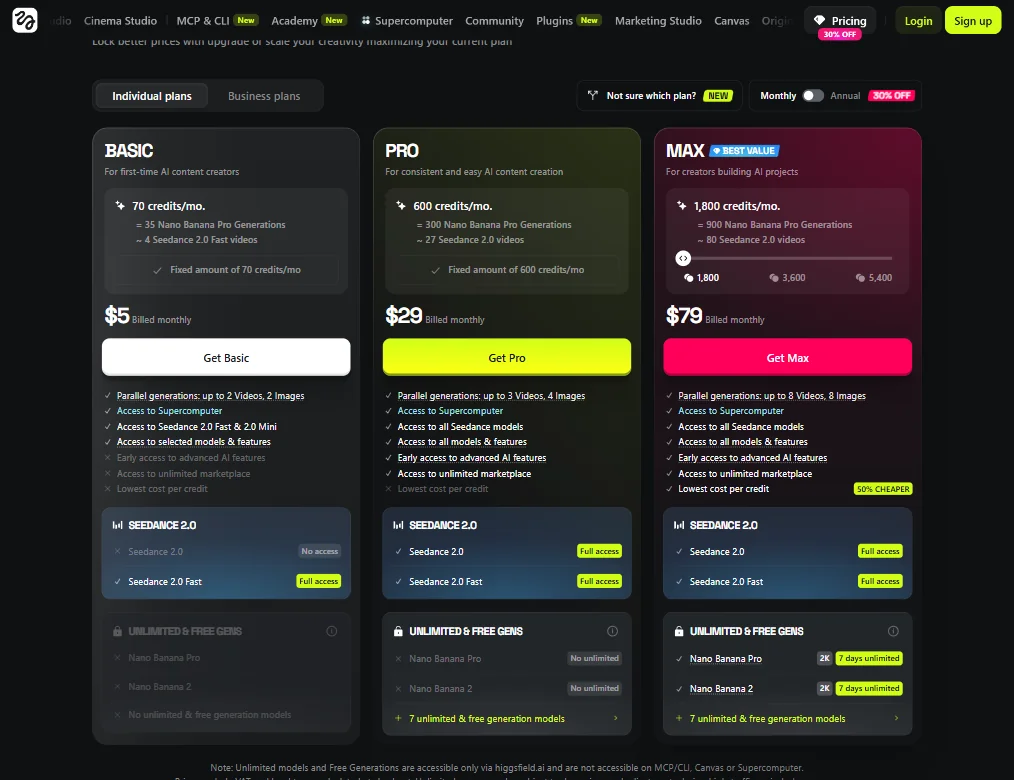
Three individual plans visible in their current pricing. Basic at $5 a month billed monthly, with 70 credits and access to Seedance 2.0 Fast. Pro at $29 a month, with 600 credits and full access to Seedance 2.0 and Seedance 2.0 Fast. Max at $79 a month, with 1,800 credits, full Seedance 2.0 access, Nano Banana Pro and Nano Banana 2 with 7 days unlimited, and a 50% cheaper per-credit cost flagged as the plan's headline value claim. No free plan. No free trial. That last part comes up in reviews more than anything else about pricing.
Users report paying upfront with no clear refund window and no trial period to evaluate whether the tool fits their workflow. Reddit surfaces this complaint repeatedly. We haven't found any public response from Higgsfield addressing it. That's a real friction point when the model roster and feature depth require actual hands-on time before you know if this clicks.
At $5 a month the Basic plan probably covers basic experimentation, though 70 credits and 4 Seedance 2.0 Fast videos monthly is a tight ceiling. At $29 and $79, you're paying for model access and generation volume that only makes sense with consistent, heavy use. Occasional users will almost certainly overpay. No enterprise pricing is listed, which is a gap if they're targeting teams at any real scale.
RunwayML offers trial generations. Pika Labs lets you test before committing. Higgsfield asks for a credit card first. That's a real difference in purchase risk.
Higgsfield vs RunwayML: Which AI Design Tool Wins?
RunwayML is the natural comparison. Both target video creators. Both run AI video generation as the core function. The key difference is model philosophy. RunwayML bets on its own Gen-3 Alpha. Higgsfield bets on access to everyone's model.
Want Sora 2, Veo 3, and Kling 3.0 in one place without maintaining three separate accounts? Higgsfield has a real convenience argument there. Want a more mature platform with better documentation and a known refund policy? RunwayML has the longer track record.
Higgsfield's cinematic camera controls are the clearest differentiator against Runway. No other aggregator is doing exactly that. For filmmakers and directors-of-photography types, the DoP system is worth serious consideration. For general content production, the gap narrows considerably.
Kling AI is worth a separate mention. Higgsfield runs Kling as one of its models. If you're already paying for Kling AI directly, there's overlap to think through. Krea operates in a similar lane, covering AI image, video, and generative workflows, and its current model library is substantial, listing 30 image models, 25 video models, and additional audio, editing, lipsync and motion-transfer models. The evidence doesn't support calling Krea shallow on model depth. Both platforms are doing meaningful aggregation.
Who Should Use Higgsfield? (And Who Shouldn't)
Filmmakers and directors who want cinematic camera controls baked into AI generation. That's the clearest fit. The DoP system is built for them, and reviewers in that category respond positively.
Active content creators producing social video at volume, especially short-form. Shorts Studio and the viral presets are built for that cadence.
Casual experimenters and small teams with limited budget for trial-and-error? Harder sell. No free tier and an unclear refund policy make this an expensive way to find out the tool doesn't fit. There's no brand kit, no vector output, and none of the static design infrastructure that a brand-focused team needs. A tool like Adobe Firefly handles the brand-consistent creative side far better if that's the primary job. Occasional users will almost certainly burn through a Basic plan without getting proportionate value back.
Higgsfield Review Verdict
Aggregating the top AI video models into one workflow with proprietary cinematic controls on top is a coherent product idea. Not just a reskin. The DoP system and Soul ID are real features with real user validation behind them, and 78 G2 reviews at 4.5 out of 5 is starting to say something meaningful.
The weak spots are also real. No trial period is a policy choice, not a technical limitation. Documentation is thin. Support is light for what they charge at the upper tiers. Brand consistency tools are absent entirely. The Trustpilot picture is murky enough that we're not going fully enthusiastic.
At $29 a month for the Pro plan, it's a defensible spend for active video creators who want model variety without juggling multiple subscriptions. At $79 a month, you need to be using it constantly for the math to work. The aggregator model only saves money if you'd otherwise be paying for three or four separate tools. Most casual users aren't in that position.
We'd like a free trial before telling anyone to commit. Until there's one, the recommendation carries a caveat. Worth watching as the platform matures. Not a slam dunk at current pricing terms.
Frequently Asked Questions
Does Higgsfield offer a free trial?
No, and that's one of the most consistent complaints in our research. No free plan, no trial period before billing begins. You're paying upfront with no clearly stated refund window, which is a meaningful risk compared to competitors like RunwayML that let you test before committing. Fair complaint. We'd say the same.
What AI models does Higgsfield use?
Higgsfield runs a mix of proprietary and third-party models. Their own DoP camera system and Soul 2.0 sit alongside Kling 3.0, Seedance 2.0, Google Veo 3, Sora 2, and a few others. The idea is that you pick the right model for the job rather than being locked into one. In practice, knowing which model to pick takes real familiarity with the platform. Non-technical users don't always get that context upfront.
How does Higgsfield compare to RunwayML for video generation?
RunwayML has a longer track record, better documentation, and a more polished onboarding experience. Higgsfield counters with a broader model roster and cinematic camera controls that RunwayML doesn't replicate. Serious filmmakers tend to gravitate toward the DoP system specifically. For general content production, the difference shrinks, and RunwayML's trial access gives it a clear edge for anyone still in the decision phase.