
Buffer's been around since 2010. That's not a minor point. Most tools in this category launched recently and will quietly disappear before they matter. Buffer stuck around long enough to become something like default infrastructure for a certain kind of user. Whether it belongs in your stack is a separate question, and one we'll get into.

Mostly yes. Real caveats apply.
What is Buffer?
A social media scheduling tool aimed at creators, small businesses, and agencies posting consistently across multiple platforms. It covers 11 networks, includes an AI assistant, ships a content calendar, basic analytics, and a link-in-bio feature called Start Page. That's the core of it.
What actually separates Buffer from most competitors is the pricing model. Per-channel billing. You pay for the accounts you connect, not a flat seat count that assumes you need everything. For a solo creator managing two or three accounts, that's a genuinely good deal. For an agency with 20-plus clients, the math gets complicated fast.
Honestly, the most striking thing about Buffer is how deliberately un-enterprise the whole product feels. No white-label. No competitor analysis. No enterprise tier listed anywhere. They've made a clear choice about who they're building for, and that either fits your situation or it doesn't.
Buffer Features: Scheduling, AI Content & Analytics
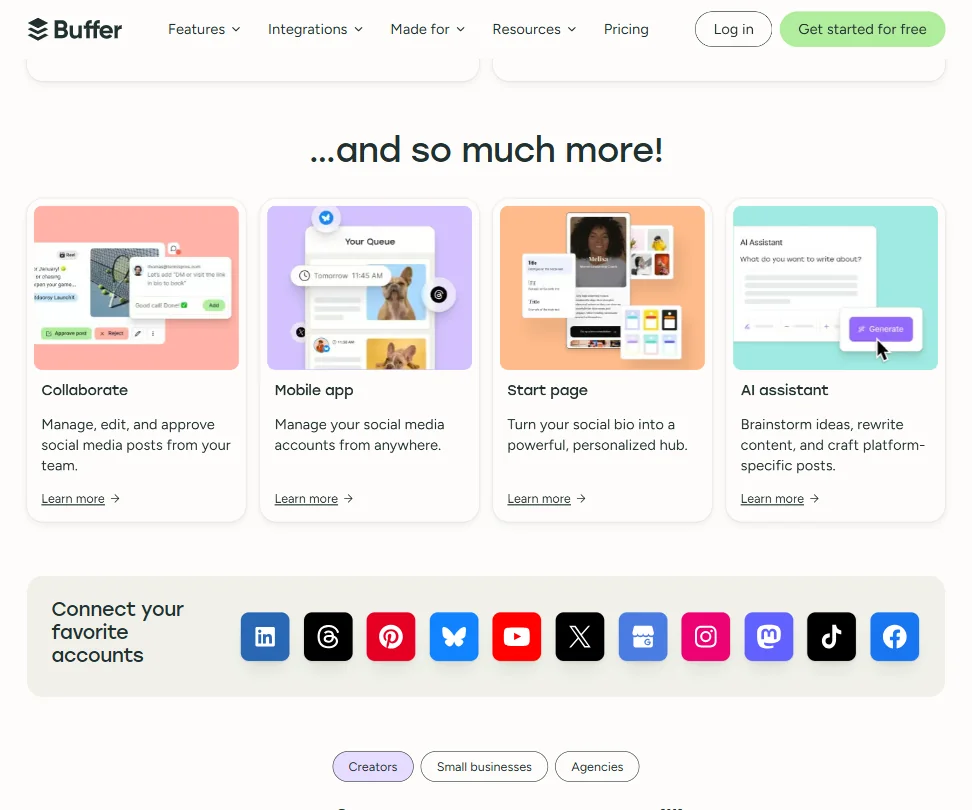
Publishing is where Buffer is strongest. Post scheduling works across all 11 supported platforms. The free plan holds 10 scheduled posts per channel, which is functional for someone starting out. Paid plans on Essentials and Team remove that cap entirely, giving you unlimited scheduled posts per channel.
The content calendar shows week or month views. You can drag things around, shuffle queue order, and reschedule without digging through menus.
Bulk scheduling exists, though it's queue-based rather than a true CSV import like some competitors offer. Worth knowing before you assume it works the same way.
Community inbox is included on paid plans and lets you reply to comments across connected accounts from one place. We'd treat it as a bonus, not a reason to choose Buffer over something built around engagement first.
Analytics is the more complicated story. The free plan gives basic post metrics. Essentials and Team get Insights, which Buffer's docs describe as "answers, not just analytics." In practice that means trend data and content performance recommendations. Useful. Not transformative. There's no competitor tracking, no audience demographic breakdown that rivals what Sprout Social provides at its pricing tier. Buffer's analytics are good enough for most creators and not good enough for a client expecting a 20-page monthly report. That's the ceiling.
Buffer Platform Support: Which Networks Does It Cover?
Eleven platforms. Facebook and Instagram are there. TikTok scheduling works. LinkedIn posts and company pages are supported. Those four cover what most users actually need.
Beyond those, Buffer connects to Threads and Bluesky. That's genuinely ahead of several competitors still catching up on those two. YouTube Shorts scheduling is available, which matters more than it did two years ago.
Pinterest is in. Google Business Profile is in. Mastodon and X round it out.
No Snapchat. Nothing on short-video discovery beyond TikTok and YouTube Shorts. For most small businesses, that's fine. If you're deep in short-form video strategy across a wide spread of platforms, you'll feel the gaps.
Crossposting works as you'd expect. You pick a post, select multiple channels, Buffer handles the distribution. Platform-specific formatting adjustments are mostly manual. The AI assistant can help adapt copy per platform, but it won't automatically resize images or reformat carousels. That tracks with what most tools at this price do.
Buffer AI Content Creation: Caption & Copy Quality
The AI Assistant is included on every plan, including the free tier. That's genuinely unusual and worth crediting. Buffer doesn't specify what model runs underneath it, which is increasingly a yellow flag in a market where everyone else is naming their model partner. Could be fine. Could be a wrapper on something generic.
What it does: brainstorm post ideas, rewrite drafts in a different tone, generate platform-specific captions, and help repurpose existing content. The Ideas feature stores up to 100 ideas on the free plan, unlimited on paid plans. Nice touch for writers who catch inspiration at odd hours.
Hashtag Manager on paid plans lets you save and reuse tag sets. More practical than research-grade hashtag tools. Don't expect keyword volume data. Do expect a decent library system for the tags you already know work.
Is Buffer Easy to Use?
Generally yes. The interface isn't trying to impress you. It just works. The queue view is clear. Scheduling a post takes under a minute once you know where things are.
Mobile apps for iOS and Android are available. The Chrome extension is useful for queuing content directly from the browser. Both are standard at this point, but worth confirming they're there.
Where ease of use gets complicated is the per-channel pricing model itself. Flexible, yes. But it also means constant mental math. Each channel costs money. Adding a new client means adding channels. Not Buffer's fault exactly, but a real friction point the model creates.
Onboarding is simple. No steep learning curve. Support runs through a human team across time zones, which is a meaningful detail. No bots on live chat, at least according to their positioning. It's what they say.
Buffer Pricing: Is It Worth It for Creators & Agencies?
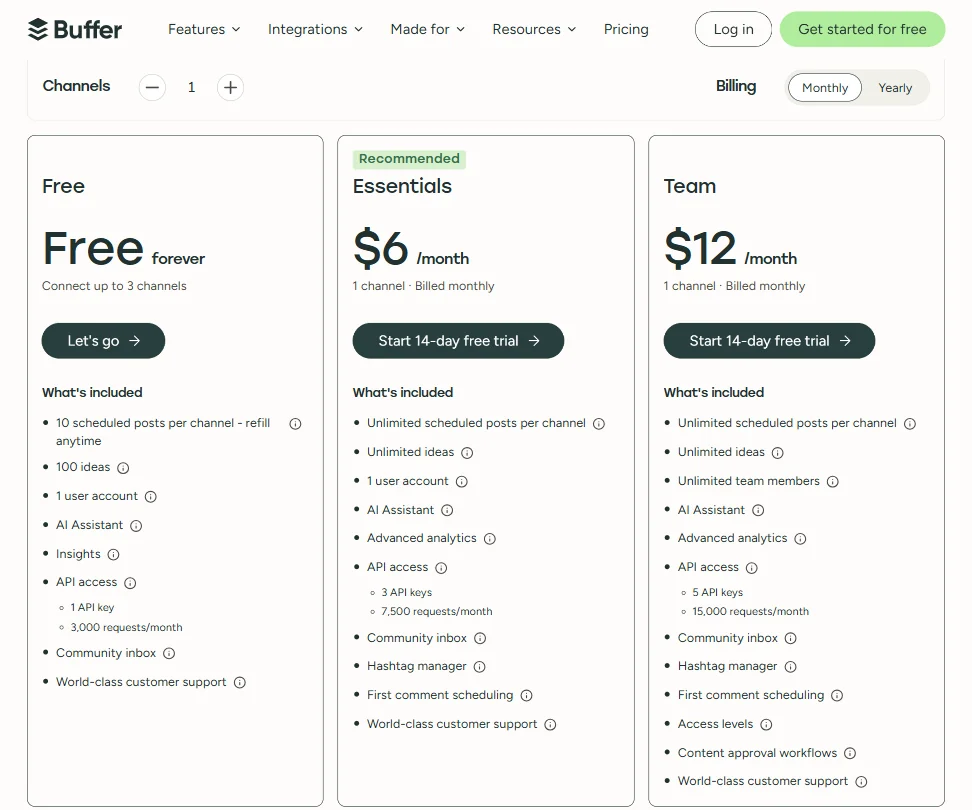
The free plan is real. Three channels, 10 scheduled posts per channel, 100 stored ideas, and the AI Assistant included with one user account. That's enough to actually use the product, which puts Buffer ahead of tools that give you a free plan that only works if you post twice a week and invite no one.
The screenshot shows monthly billing at $6 per month for Essentials and $12 per month for Team, both covering one channel billed monthly. Billed yearly, Essentials drops to $5 per month per channel and Team to $10 per month per channel. Essentials includes 3 API keys with 7,500 requests per month. Team bumps that to 5 API keys and 15,000 requests per month, and adds Access levels plus Content approval workflows that Essentials doesn't have.
For a single creator managing three channels, you're looking at $15 a month on Essentials billed yearly. Genuinely cheap. For an agency managing 15 client accounts across multiple platforms, you could land at $150 a month or more, and suddenly Hootsuite's flat-rate pricing starts looking more attractive.
On refunds: Buffer publicly offers refunds within seven days for new monthly subscriptions and 30 days for new annual subscriptions. Purchases through Apple or Google follow those stores' own processes. That's a clear policy and better than what several competitors publicly state.
The per-channel model rewards users with a small, stable account set. It punishes growth at the agency end. We've seen worse models, but there's a ceiling before it stops feeling like a deal.
Buffer vs Hootsuite: Which Social Media Tool Wins?
Depends entirely on scale. At the small end, Buffer wins on price. Hootsuite's paid plans start significantly higher and the free tier was effectively eliminated for new users. Buffer's free plan is still functional. That matters.
Hootsuite has more built-in analytics, more team workflow features, and social listening that Buffer doesn't touch. It's a heavier tool aimed at a different buyer. Most Buffer users don't need what Hootsuite provides. They also can't afford it.
The Buffer vs Hootsuite comparison often comes down to one question: are you running social media for your own brand or for clients? Buffer is built for the former. Hootsuite and tools like Sendible are more squarely built for the agency workflow, with client reporting and white-label options that Buffer simply doesn't offer.
Sprout Social doesn't belong in the same pricing tier at all. Enterprise gear. Publer is a closer competitor on price and feature set. Later is worth comparing if Instagram is your primary platform.
Buffer isn't trying to beat Hootsuite on features. Probably the right call.
Who Should Use Buffer? (And Who Shouldn't)
Solo creators managing a small account set. That's the core fit, and it still shows throughout the product.
Small businesses posting regularly to three or four platforms. At $5 to $10 per channel per month billed yearly, the math works. The scheduling is solid. The learning curve is low.
Agencies above 12 to 15 active client channels should look harder at the per-channel costs. At some point you're paying more than flat-rate alternatives charge for similar functionality. Vista Social is worth examining for that use case, especially if white-label reporting is a need. Not great for them here.
Anyone needing deep competitor analysis or multi-brand social listening should look elsewhere. Buffer doesn't do either and doesn't pretend to.
Teams needing content approval workflows do get that on the Team plan, but the feature set is basic compared to what Sprout Social or Hootsuite offer for enterprise teams. Context, not a knock.
Buffer Review Verdict
Buffer is one of the more honest tools in this category. It knows what it is. The per-channel Buffer social media scheduler model is its best idea and its most limiting one at the same time. Cheap at small scale, gets expensive faster than it should when you grow.
AI Assistant is included on the free plan. Platform coverage is impressive for the price. Threads and Bluesky support puts it ahead of several larger competitors on network breadth. The 14-day free trial on paid plans and a clear refund window on both monthly and annual subscriptions make it lower-risk to test than most.
The gaps are real. No white-label. No competitor tracking. Analytics that plateau before they're useful for client reporting. None of those are dealbreakers for the user Buffer is actually targeting. They'd matter a lot to the wrong buyer.
Not a flashy value proposition. A functional one.
Right situation: small stable account set, a creator or small business that doesn't need reporting muscle, a buyer who appreciates paying less by default. Anyone outside that profile should pressure-test the per-channel costs before committing to annual billing.
How Buffer compares
Buffer scores 5.7 out of 10 among the AI social media management tools we rate. These three do the same job and are the closest to it, compared on what each vendor publishes.
Hootsuite
Buffer has a free plan and Hootsuite does not. Five profiles cost $30 a month on Buffer against $99 a month on Hootsuite, and Hootsuite adds bulk scheduling plus a Wisdom AI agent that drafts and monitors competitors, generating images too. Buffer skips images and bulk scheduling but keeps GDPR and a Community inbox on every paid tier.
Pick Hootsuite if you want bulk scheduling and AI image generation with your posts.
Pick Buffer if you want a free plan and a cheaper way to run five profiles.
Sprout Social
Sprout Social costs $99 a month for five profiles versus $30 on Buffer, and only Sprout has an AI agent (Trellis) plus paid-ads reporting and influencer management. Buffer counters with a free plan and GDPR coverage, and both have a unified inbox, but Buffer never states SOC 2 while Sprout does.
Pick Sprout Social if you need paid-ads reporting, influencer management or SOC 2.
Pick Buffer if you want five profiles for $30 a month with a free plan.
Later
Later costs $25 a month for five profiles, cheaper than Buffer's $30, but Buffer publishes to X and Bluesky and Later lists neither. Buffer also has a free plan and an API, both missing on Later.
Pick Later if you post to Instagram or Pinterest and want single sign-on.
Pick Buffer if you need X or Bluesky publishing, an API, or a free plan.
Frequently Asked Questions
Does Buffer's free plan actually work, or is it too limited to be useful?
More functional than most. Three channels, 10 scheduled posts per channel, 100 stored ideas, and the AI Assistant are all included with no credit card required. For a solo creator or small business getting started with scheduled posting, it's enough to build a real workflow. The 10-post cap per channel is the main constraint. Post more than twice a day and you'll hit it.
Is Buffer good for agencies managing multiple clients?
At five to eight active client accounts, the per-channel pricing is still competitive. Above 12 to 15 channels, the monthly cost starts climbing past what flat-rate tools charge for similar functionality. Buffer also doesn't offer white-label reporting, which is a real problem for agencies sending branded reports to clients. Worth doing the channel math before committing.
How does Buffer's AI Assistant compare to dedicated AI writing tools?
It's a scheduling tool's AI, not a writing tool's AI. It handles first drafts, tone rewrites, and platform-specific caption adaptation well enough. It won't replace a proper copywriter and it doesn't produce the output quality of a tool built specifically around AI content generation. For quick caption drafts inside the scheduling workflow, it's useful. Don't expect it to carry a content strategy.