Hootsuite has been around since 2008. Most tools from that era are gone. This one isn't.
What is Hootsuite?
Founded in Vancouver and still based there, Hootsuite is one of the few social media management platforms from its generation that's still actively developed and genuinely used at scale.
The product sits at the enterprise-adjacent end of the market. It isn't built for solo creators looking for something cheap. It's built for social media managers running multi-account, multi-network operations, and for marketing teams that need real structure around approvals, reporting, and collaboration. Agencies use it. Large internal teams use it. The feature set reflects those priorities without apology.
Hootsuite released Wisdom AI, its proprietary AI layer. Trend tracking, competitor intelligence, and caption drafting all run through it. More on that below.
Hootsuite Features: Scheduling, AI Content & Analytics
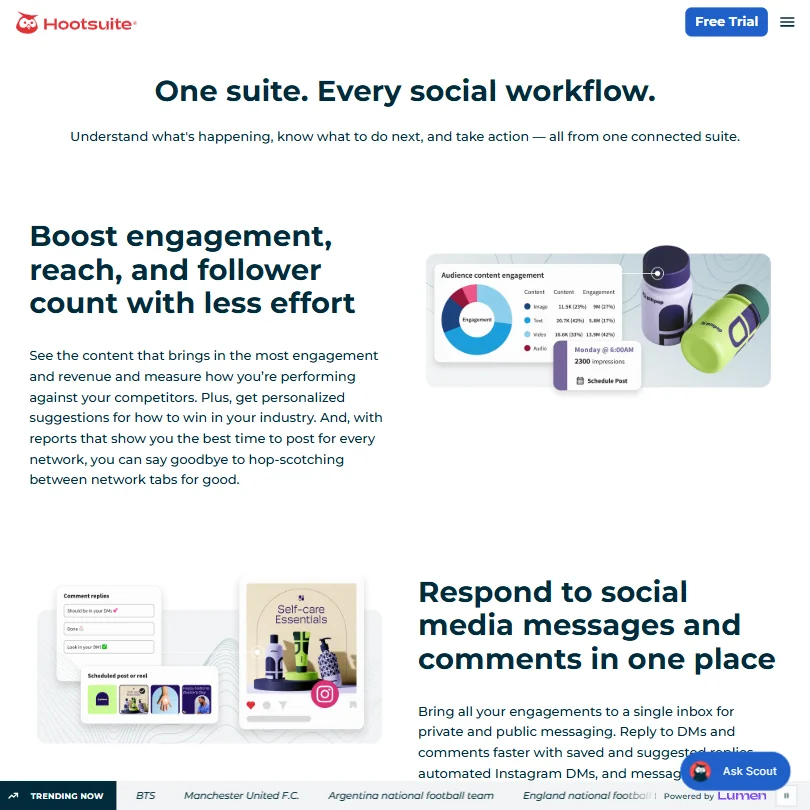
Scheduling is what Hootsuite built its name on. Unlimited social posts on paid plans, bulk scheduling available from the Standard tier, a centralized calendar that spans every connected network. That core infrastructure is mature.
The bulk scheduling and custom performance reports sit together in a dashboard that, structurally, makes the value case Hootsuite pitches.
Honestly, the feature list is long enough to become its own problem. Hootsuite includes employee advocacy tools through a product called Parliament. It has auto-routing for incoming messages, team performance tracking, and approval workflows. These are enterprise features. If your team doesn't need them, they add visual weight without adding utility.
The analytics side is real. Custom reporting, best-time-to-post recommendations by network, team efficiency metrics, and a competitor analysis module that tracks posting frequency and sentiment. Core analytics and customizable reports are available across paid plans, while more advanced ROI and enterprise-scale capabilities depend on the selected plan or additional package. Not the deepest analytics stack in the market, that distinction probably belongs to Sprout Social, but it's more than adequate for most teams.
Hootsuite Platform Support: Which Networks Does It Cover?
Instagram and Facebook are the obvious anchors. LinkedIn, Twitter/X, TikTok, and YouTube round out the core coverage, with Pinterest also in the mix. That list covers the majority of what most teams actually need.
The depth of each integration matters more than the count.
Hootsuite supports over 100 integrations, including Canva and Salesforce. Designers can push assets from Canva directly into the scheduling queue without exporting files manually. Small thing on paper. In practice, it reduces a lot of back-and-forth.
Hootsuite AI Content Creation: Caption & Copy Quality
Wisdom AI handles caption drafting. It generates posts based on trending topics and brand context, pulls hashtag suggestions from an Instagram-specific generator, and can surface trending content by topic or hashtag. That's the documented capability set.
Wisdom AI also handles trend forecasting and competitor sentiment analysis. Whether that crosses into genuinely useful territory or feature marketing territory probably depends on how much your team actually interrogates the data. Teams that just want quick caption drafts will likely never touch the competitor intelligence layer.
Is Hootsuite Easy to Use?
Not on day one. That's the honest answer.
The onboarding is functional but assumes some prior knowledge. Enterprise teams tend to arrive with onboarding support. Smaller teams are often clicking through alone.
The dashboard is powerful, but the information density is high. The learning curve is real, and Hootsuite Academy helps without fully solving it. Webinars, help docs, and a community forum are all available and reasonably well-built. They still require a time investment that some teams don't have.
Mobile apps on iOS and Android get decent marks for scheduling tasks. The analytics side is weaker on mobile, complex reporting lives on the web app. That tracks for a platform of this age and complexity.
Hootsuite Pricing: Is It Worth It for Creators & Agencies?
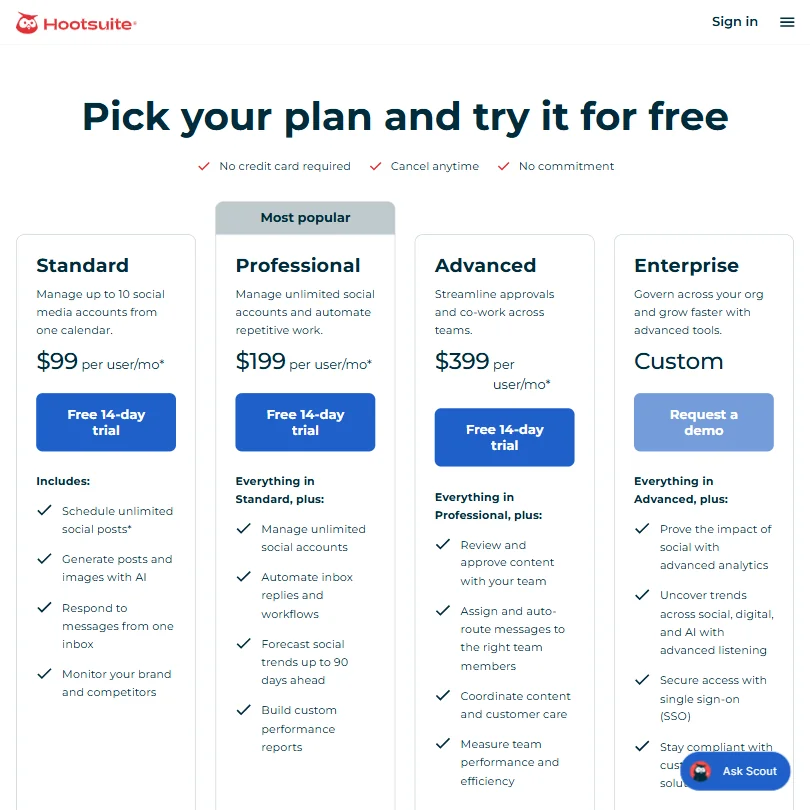
$99 per user per month for the Standard plan, which covers up to 10 social media accounts and includes unlimited post scheduling, AI-generated posts and images, a shared inbox, and brand monitoring. No permanent free plan exists. The trial is 14 days. Bulk scheduling is blocked during the trial, so you can't fully evaluate the features most teams actually care about without committing money first. We find that approach annoying.
The Professional plan lands at $199 per user per month and adds unlimited social accounts, inbox automation and workflows, trend forecasting up to 90 days ahead, and custom performance reports. Advanced runs $399 per user per month and layers in content approval workflows, team message routing, and team performance metrics. Enterprise carries custom pricing and requires a sales conversation.
Ask about the refund policy before you commit to $399 per month, since none is published.
Sprout Social's new Essentials tier starts at $79 per seat monthly with annual billing, while its plan actually named Standard costs $199 and remains substantially more expensive than Hootsuite Standard. So Hootsuite isn't the cheapest option at the low end, but it's not obviously worse value than Sprout once you move up the tiers.
Marketing teams managing genuine multi-account operations with real budgets. That's the pricing fit. Solopreneurs and small agencies with three client accounts will feel the cost immediately. For that bracket, tools like Sendible or Buffer cover the essentials at a fraction of the spend.
For larger teams, the calculation is more defensible. Approval workflows, Salesforce and HubSpot integrations, and a real analytics layer aren't available in cheaper tools at the same level of polish. You're paying for infrastructure.
Hootsuite vs Sprout Social: Which Social Media Tool Wins?
Both tools target enterprise-adjacent buyers. Both have real analytics. Both have team workflow features. The differences are genuine but narrower than either company's marketing implies.
Sprout Social runs deeper on social listening and CRM-style features. Hootsuite runs broader on platform coverage and integration count. Sprout Social's pricing starts higher once you move past its Essentials tier, so for teams that don't need CRM-level social listening, Hootsuite represents a more practical entry point.
One thing Hootsuite has that Sprout doesn't is Parliament. If getting employees to actively share company content is part of the strategy, that's a material differentiator. If it isn't, it's invisible.
Who Should Use Hootsuite? (And Who Shouldn't)
Mid-size and enterprise marketing teams. Clearest fit. Multi-account management, approval workflows, team performance tracking, and a reporting layer that doesn't require a separate tool. Hootsuite covers those needs in one place without asking you to stitch together a stack.
Agencies with multiple client accounts can make it work. They need to be at a scale where $199 or more per month is justifiable. Small agencies with a handful of clients will feel the pricing.
Solo creators and solopreneurs. Not the right fit. The price alone rules it out for most, and the feature depth beyond scheduling is largely wasted on a one-person operation.
Brands that care about employee advocacy should look harder at Hootsuite than at most alternatives. Parliament is a real differentiator, and it doesn't appear in the comparable feature sets of Buffer, Later, or SocialPilot.
Teams already inside the Salesforce or HubSpot ecosystem will find the integrations worth something concrete.
Hootsuite Review Verdict
Mature platform. Real scheduling infrastructure. An analytics stack that covers most teams' actual needs. The Wisdom AI layer is a genuine attempt at intelligence rather than a feature checkbox, though the caption output still trails the marketing copy by a noticeable margin.
Pricing is the tension point. $99 per user per month is the floor, not the typical spend, and most teams with real multi-account needs will land at $199 or above. No free plan softens the commitment. Ask about the refund policy, since none is published.
For the team that genuinely needs what Hootsuite offers, the price is defensible. For the team stretching to justify it, better options exist at lower price points. We'd still call this one of the better-built platforms in the space. That's not nothing, given how many competitors have appeared since 2008.
How Hootsuite compares
Hootsuite scores 6.8 out of 10 among the AI social media management tools we rate. These three do the same job and are the closest to it, compared on what each vendor publishes.
Sprout Social
Hootsuite and Sprout Social both charge $99 a month for five profiles, so the AI features decide it. Hootsuite's Wisdom agent generates images and writes in your brand voice, both missing from Sprout's Trellis, while Sprout offers a browser extension and a 30 day free trial against Hootsuite's 14.
Pick Sprout Social if you want a browser extension and a longer free trial.
Pick Hootsuite if you want AI that generates images and writes in your voice.
Buffer
Buffer has a free plan and costs $30 a month for five profiles against Hootsuite's $99, a third of the price. Hootsuite answers with bulk scheduling, an AI agent that drafts and monitors competitors, and a Wisdom AI that generates images and writes in your brand voice, none of which Buffer offers.
Pick Buffer if you want bulk scheduling and an AI agent that generates images.
Pick Hootsuite if you want a free plan and a much lower price for five profiles.
Later
Later costs $25 a month for five profiles against Hootsuite's $99, and Later includes single sign-on on every plan where Hootsuite reserves SSO for Enterprise. Hootsuite still publishes to Google Business Profile, a network Later skips, and only Hootsuite's Wisdom AI agent generates images and drafts content for you.
Pick Later if you want Google Business Profile publishing and AI image generation.
Pick Hootsuite if you want single sign-on on every plan at a quarter of the price.