

Three plans, a 14-day trial, and no permanent free tier. That's the SocialBee commercial structure before we get into anything else.
What is SocialBee?
Founded in Cluj-Napoca, Romania, SocialBee has been running since 2016. The pitch targets solopreneurs, small businesses, and social media managers who want a content system, not just a queue.
The thing that genuinely separates it from most competitors is the evergreen content recycling architecture. You build a post library, organize everything into named content categories, and the tool cycles through them on a schedule. Posts don't expire into a void. They rotate back. For anyone running social media without a dedicated team, that's a different value proposition than what Buffer or Later offer.
The AI Copilot is the other differentiator. It reads your website, asks a few setup questions, and generates a structured content strategy with categorized draft posts ready to edit. Honestly, that's a more aggressive onboarding attempt than most tools in this space bother with.
SocialBee Features: Scheduling, AI Content & Analytics
The scheduling side is where SocialBee has clearly put its energy. Flexible per-profile posting schedules, best-time recommendations, and the ability to mark posts as evergreen or set them to expire are all present. First comment scheduling is included too.
Bulk scheduling via CSV uploads is locked to Accelerate and Pro. Not Bootstrap. That's a real gap if you're managing a dense content calendar on the entry-level plan. Factor that in early.
Analytics range is significant across tiers. Bootstrap caps at three months of historical data. Accelerate and Pro both extend to two years. Pro adds branded export reports on top of that. Audience growth data is present. Competitor analysis is not, which is a genuine omission at these price points. We've seen tools at $29 per month offer at least a basic competitive view.
The team functionality covers a post approval system, internal notes, and up to three user seats per workspace on Pro. Functional for a small operation. Not designed for a 15-person agency.
SocialBee Platform Support: Which Networks Does It Cover?
Facebook and Instagram are the obvious anchors. LinkedIn, Twitter/X, Pinterest, TikTok, and Google Business Profile sit alongside them. YouTube, Bluesky, and Threads round out the list.
Bluesky and Threads coverage is notable because several larger tools are still behind on both. Publer has caught up. Metricool has. A number of bigger names haven't. SocialBee having both is a real point in its favor, not a marketing footnote.
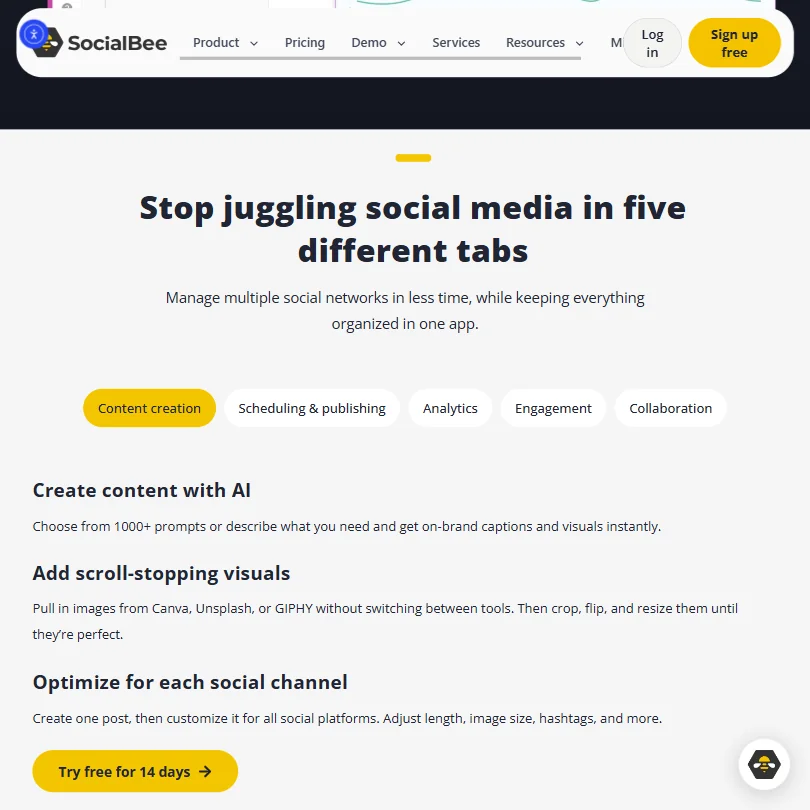
The cross-platform post customization is also genuinely useful. Draft once, then adjust copy length, swap image dimensions, and edit hashtags per network. No duplicate drafts needed.
SocialBee AI Content Creation: Caption & Copy Quality
The AI runs on a GPT-based model that SocialBee has built on top of, with over 1,000 baked-in prompts. You can write your own description and generate captions from scratch. Post variations are supported, so you're not locked into one output per idea.
The Copilot strategy builder is the more interesting piece. It ingests your website and generates a structured content plan with categorized draft posts rather than just a loose list of captions. Most scheduling tools produce a few captions and stop. This one tries to build the scaffolding first. We're cautiously positive on that, though the output quality clearly depends on how well your website communicates what your business actually does.
Multilingual generation is listed as supported. We wouldn't rely on it for non-English-first markets without independent testing. Fair.
Is SocialBee Easy to Use?
The interface has a density problem on first exposure.
Mobile apps exist on iOS and Android. The primary experience is browser-based, which is expected at this price point.
Canva integration is direct, pulling designs into SocialBee without a separate tab. Unsplash and GIPHY are also connected. Small friction saves that add up across a week.
SocialBee University is their help resource. Live chat is listed as available. Hours aren't publicly stated. We don't know what "available" means in practice.
SocialBee Pricing: Is It Worth It for Creators & Agencies?

Bootstrap at $29 per month. Accelerate at $49. Pro at $99. Those are the month-to-month figures visible in the current pricing layout, with annual billing bringing those figures down. No credit card is required for the 14-day trial. A 30-day money-back guarantee applies to paid plans.
Bootstrap at $29 per month covers five social profiles, ten content categories, ten content sources, and analytics capped at three months. Bulk uploads are out. The hashtag organizer is out. For a starting plan, that's a stripped experience compared to what Buffer offers at comparable entry pricing.
Accelerate at $49 is where most real use cases land. Ten profiles, 50 content categories, 30 content sources, two years of analytics data, the hashtag organizer, bulk post editor, and CSV uploads. The jump from Bootstrap is steep, and it's also where SocialBee actually becomes the tool it's marketed as.
Pro at $99 adds 25 social profiles, five workspaces, three user seats per workspace, unlimited content categories and sources, and branded analytics exports. Workable for a small agency team. Not built for anything larger.
No API access appears in the documentation. That's a gap for anyone building tighter workflow integrations.
SocialBee vs Buffer: Which Social Media Tool Wins?
Buffer has a permanent free tier. SocialBee doesn't. That's the first split, and it matters for budget-constrained users.
Buffer is cleaner to learn. SocialBee is more capable once you're past the initial friction. The category-based recycling library has no real equivalent in Buffer's feature set. Buffer's analytics are also more limited on lower tiers than SocialBee's comparable plans, which push to two years of historical data on Accelerate and Pro.
For pure publishing simplicity, Buffer wins. For anyone who wants a content system with rotation and strategic structure, SocialBee has the edge.
The AI Copilot is also a meaningful gap. Buffer's AI tools are more basic. SocialBee's strategy builder is a more serious attempt at helping users figure out what to post, not just where.
Who Should Use SocialBee? (And Who Shouldn't)
Solo operators managing multiple brand accounts. That's the clean fit.
Small marketing teams without a dedicated social media person will also find value here. The approval workflow is simple enough to not become overhead. The AI output gives a starting point without requiring a copywriter on staff.
Who probably shouldn't bother: anyone needing deep competitor analysis, enterprise-grade reporting, or API access for broader stack integration. Those needs aren't met, and paying $99 a month for a tool that stops short on those fronts will frustrate quickly.
Larger agencies managing 20-plus client accounts should look at something built for that load. Vista Social handles multi-client agency workflows with more dedicated infrastructure than SocialBee currently offers.
SocialBee Review Verdict
Not a revelation. A solid, specific tool with a clear identity. The evergreen recycling system and the AI Copilot strategy builder are genuinely differentiated in a category where most products offer minor variations on the same queue-and-publish model. Ten networks covered, Bluesky and Threads included.
The Bootstrap plan is a problem. Most real use cases require Accelerate at $49 per month, and the gap between the two tiers is steep enough that the entry price feels like a bait figure. Analytics without any competitor data is also a real limitation.
The content recycling system alone justifies a trial for anyone managing social media without dedicated support. No other tool in this price range handles it as coherently. Budget a week for the category logic to click before drawing conclusions. SocialBee scores 5.6 out of 10 among the AI social media management tools we rate. These three do the same job and are the closest to it, compared on what each vendor publishes. SocialBee re-queues evergreen posts, does bulk scheduling, and generates AI images for posts, none of which Buffer offers; Buffer's AI Assistant only writes text. Buffer has a free plan and a Start Page link-in-bio product, neither of which SocialBee has, and its five profiles cost $30 a month against $29 a month on SocialBee. Buffer also has a public API and a browser extension; SocialBee has neither. Pick Buffer if you want a free plan, an API and a link-in-bio page. SocialBee's $29 a month plan covers five social profiles, re-queues evergreen posts, and schedules a first comment, none of which Hootsuite does. Hootsuite's five profiles cost $99 a month and add competitor tracking, mentions beyond your own profiles, and paid-ads reporting, none of which SocialBee offers. Both generate AI images for posts. Hootsuite also holds a SOC 2 report. Pick Hootsuite if you need competitor tracking, mention listening and paid-ads reporting. Later's cheapest plan is $25 a month for five profiles against $29 a month on SocialBee, but Later does not list X among its networks, where SocialBee does. Later includes a link-in-bio page and tracks competitor accounts and mentions on higher plans, none of which SocialBee offers. SocialBee's Copilot builds a full content plan and posting schedule for you; Later has no such agent. Later's policy states it trains its AI on your content. Pick Later if you need a link-in-bio page and competitor tracking on a budget.How SocialBee compares
Buffer
Pick SocialBee if you want bulk scheduling, evergreen re-queuing and AI images.Hootsuite
Pick SocialBee if you want automatic re-queuing and first comments at a lower price.Later
Pick SocialBee if you post to X and want an AI agent planning content.
Frequently Asked Questions
Does SocialBee have a free plan?
No permanent free plan. SocialBee offers a 14-day free trial with no credit card required. Paid plans carry a 30-day money-back guarantee. Anyone needing a free tier that never expires would need to look elsewhere, Buffer being the obvious first stop.
What makes SocialBee different from other social media schedulers?
The evergreen content recycling system is the real answer. Most schedulers publish once and move on. SocialBee builds a rotating post library organized into named categories, so content keeps circulating after it's published. The AI Copilot, which generates a content strategy from your website rather than just captions, is also more developed than what most competitors offer at this price point.
Is SocialBee worth it for small agencies?
Pro at $99 per month is probably the honest tier for a small agency, and it has real limits. Three user seats per workspace and five workspaces is workable for a tight team. Anything larger and the infrastructure starts to feel constrained. The approval workflow and internal notes are useful additions. This isn't purpose-built agency software, though. Know what you're buying before committing.