

The short pitch holds up. Upload a long video, get a stack of short clips ready for TikTok, Instagram Reels, or YouTube Shorts. The AI handles the cutting, the captions, the reframing. The questions are about how well it handles those things, how much it costs per tier, and whether the rough edges are tolerable.
What is Vizard.ai?
Founded in 2020 and based in San Francisco, Vizard.ai is a web-based video repurposing tool built for people who produce long video and need short clips. Podcasters. Marketing teams running social at volume. Agencies managing content for multiple clients. That's the audience, and the product is organized tightly around that use case.
The workflow is one upload, many outputs. You drop in a long-form video, the AI analyzes it, surfaces clip candidates, and from there you edit via transcript, adjust captions, reframe for vertical formats, and push to social. That loop is the whole product. They haven't drifted far from it.
Vizard.ai Features: Video Generation, Editing & AI Capabilities

The headline feature is batch clip generation. One video in, 30 or more platform-ready clips out.
The text-based editor is the second feature worth understanding. You edit the video by editing the transcript. Cut a sentence, the footage goes with it. Not unique to Vizard.
Auto-reframe handles the shift from 16:9 to 9:16. For talking-head content and interviews, it's genuinely useful.
AI B-rolls and AI emojis are in the product. How much real-world use those actually get is an open question. AI highlight keywords bold or animate key terms in captions automatically.
The caption system supports translation into 100 or more languages. That's a real differentiator for teams producing content across markets. The iOS app launched recently and mobile editing is now technically available, but most professional workflows seem to stay on web. The Business tier includes shared workspaces, brand kit support, and client preview sharing.
Vizard.ai Video Quality: How Good Does the Output Actually Look?
The free plan exports at 720p only. Creator at $29/month and Business at $39/month both unlock 4K export. That gap matters if your content needs to hold up in a client presentation or on a large screen.
Instagram Reels, TikTok, and YouTube Shorts compress everything anyway, and 720p often looks fine at those dimensions.
Vizard.ai AI Avatars & Voiceover: How Realistic Are They?
There aren't any. Full stop.
Vizard.ai has no AI avatar feature, no voice cloning, no text-to-speech, and no background removal. This is a repurposing tool, not a generation tool. If you came here looking for an AI presenter or synthetic narrator, HeyGen is the relevant product. Completely different category.
We don't say that as a knock. Focus is a feature, and Vizard has it. But anyone buying this expecting avatar or voiceover capabilities is buying the wrong product.
Is Vizard.ai Easy to Use?
The text-based editing model is the main reason. No timeline to learn. If you can edit a Google Doc, you can follow the basic editing logic here.
The web version is clearly the primary product, and that's where the experience is most polished.
Vizard.ai Pricing: Is It Worth It for Creators & Teams?
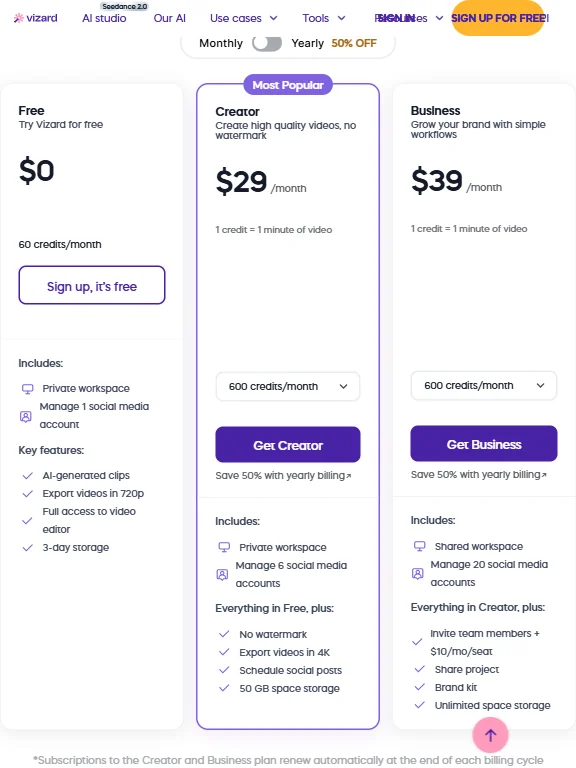
Three tiers. Free, Creator, and Business. The free plan gives you 60 credits per month, watermarked exports at 720p, and management of one social media account. Useful for testing. Not useful for anything professional.
Creator runs $29/month, or roughly $14.50/month billed annually. That gets you 4K export, no watermark, 600 credits per month, and management of up to six social media accounts. Business sits at $39/month, around $19.50/month annually, and adds shared workspaces, management of up to 20 social media accounts, the brand kit, and unlimited space storage. Enterprise pricing requires a sales conversation.
At $14.50/month annualized, Creator is reasonably priced compared to Opus Clip, which starts in similar territory but scales cost faster with usage. Munch and Vidyo.ai sit in the same range. Per-month cost isn't the concern here.
Check the refund policy before paying. Refund requests must be made within seven days of purchase, and refunds only apply to unused services, except in billing-error cases. That's a tight window with a narrow scope, and the pricing page doesn't state it clearly.
No traditional free trial. The free plan functions like one but with persistent limits. That distinction matters if you want to test 4K output before committing to an annual plan.
Vizard.ai vs Opus Clip: Which AI Video Tool Is Better?
These two tools are doing the same core job. The differences come down to team features and workflow preferences, not fundamental capability.
Opus Clip is the better-known brand. It gets more press and tends to appear first in comparison searches. Its AI clip scoring, which ranks clips by predicted virality, is something Vizard doesn't directly match.
The team collaboration features skew more complete on Vizard, especially client preview sharing.
Caption translation into 100 or more languages is Vizard's clearest structural advantage over Opus Clip. Producing multilingual content for different markets, that matters a lot. Making English-only TikToks, it's irrelevant.
Price is close enough that it shouldn't drive the decision. Workflow preference and team size will.
Who Should Use Vizard.ai? (And Who Shouldn't)
Solo podcasters. Clean fit. Upload a long episode, get a week of social clips out, with auto-captions and vertical reframing handled automatically.
Marketing teams running social at volume are a natural match, especially managing multiple brands or clients. The brand kit and workspace features earn their place at the Business tier.
Agencies handling multilingual content have a specific reason to look here. The caption translation breadth is real, and it's hard to match at this price.
Avoid it if you need AI-generated video from scratch. Vizard only works with existing footage. No text-to-video, nothing generated. Workflows that start from a script rather than a recording should look at Fliki instead.
Also avoid it if you need tight integration with Adobe Premiere or DaVinci Resolve. Those integrations don't exist. Professional editors inside established post-production pipelines won't find a clean fit here.
Vizard.ai Review Verdict
Vizard.ai does one thing and doesn't pretend otherwise. Take long video, make short clips, do it fast, with decent captions, across multiple platforms. That loop is real.
The batch generation is fast. The text-based editing is approachable. The team features at $39/month punch above what you'd expect at that price.
The gaps are real too. The refund policy is restrictive and not stated publicly, which is a problem. Anyone expecting avatar or voice features is buying the wrong product.
Recommended for the right use case. Content teams repurposing long-form video at volume, the value case is there.
How Vizard.ai compares
Vizard.ai scores 6.8 out of 10 among the clip repurposing tools we rate. These two do the same job and are the closest to it, compared on what each vendor publishes.
Opus Clip
Opus Clip costs $15 a month against Vizard.ai's $29 a month, and Opus Clip scores clips by predicted performance and adds AI voiceover, features Vizard.ai does not have. Vizard.ai answers with 4K exports where Opus Clip's paid plan is stated at 1080p, and covers 100 languages against Opus Clip's 20. Vizard.ai also states it does not train its AI on your videos, while Opus Clip's own policy applies that promise only to enterprise customers.
Pick Opus Clip if you want clip virality scoring and a cheaper plan.
Pick Vizard.ai if you want 4K exports and wider language coverage.
Submagic
Submagic charges $19 a month against Vizard.ai's $29 a month, but Vizard.ai has a free plan and Submagic does not, and Vizard.ai accepts videos up to 600 minutes long against Submagic's 30 minute cap. Submagic adds AI voiceover, lip sync and single sign on, none of which Vizard.ai offers. Vizard.ai states it does not train its AI on your videos, a policy not confirmed on Submagic's own site.
Pick Submagic if you want built in voiceover, lip sync and SSO.
Pick Vizard.ai if you need a free plan and much longer video limits.











