SAASINSPECTOR
PicLumen logo

PicLumen Review

PicLumen is a multi-model AI platform that runs Kling, Veo and Seedance for video and GPT Image for stills, alongside background removal, face swapping and an upscaler for finishing images. A node-based canvas and an iOS companion app sit beside a free daily allowance, and paid plans add commercial rights, watermark-free exports and a relaxed mode for unlimited generation.

Visit PicLumenFrom $7.59/mo

Research-based review. Features and prices are checked on the vendor's own website, and the score is worked out from those facts. We haven't tested it hands-on yet.

The verdict

PicLumen's standing free plan and relaxed unlimited mode make it an accessible way to try several models, though Magnific still leads on desktop apps and single sign-on for larger teams.

Pros

  • PicLumen has a standing free plan with 20 Lumens a day, enough for about 20 images or one video.
  • The cheapest paid plan, Lite, is watermark-free for $7.59 a month.
  • PicLumen offers Seedance, Kling 3.0, Veo 3.1, GPT Image 2, Midjourney and FLUX alongside its own canvas and editing tools.
  • Relax Mode gives unlimited image generation on Standard, Pro and Elite once your Lumens run out.
  • PicLumen includes an infinite canvas for building image and video pipelines.
  • PicLumen bundles an image upscaler with background removal, face swap and sketch-to-reality editing.
  • A companion iOS app, Naivideo, lets you generate video from a phone.

Cons

  • The free plan carries no commercial-use rights.
  • PicLumen does not offer an API.
  • PicLumen has no SOC 2 certification and its privacy policy makes no GDPR reference.
  • PicLumen's terms let it use content you post publicly to train its models, with no opt-out.
  • Team collaboration is limited to the custom-quoted Enterprise plan.
  • Support is limited to email only.
From $7.59/moFree plan YesFree trial Yes
6.5/10

Spec Score

PicLumen against 13 multi-model AI platforms
#10
of 13 multi-model AI platforms
-0.7
vs the average
86%
from published facts
Ahead of other multi-model AI platforms
Pricing+2.1
Behind other multi-model AI platforms
Privacy and trust-4.7For images-1.3Workflow and teams-1.1
Every criterion
Tap a row for the facts
For video7.5
+0.1 vs 7.4 avg22.5 of 30 points
Video model families offered5 video model families2 / 3
Offers Kling 3yes1.5 / 1.5
Offers Veo 3.1yes1.5 / 1.5
Offers Seedance 2yes1 / 1
Lip syncnot published, half points0.5 / 1
Extends a clip past its endnot published, half points0.5 / 1
You set the first and last framenot published, half points0.5 / 1
Why these numbers

Video model families offered: Worked out from the models fact. Video model families: kling, minimax, seedance, veo, wan.

Offers Kling 3: Worked out from the models fact.

Offers Veo 3.1: Worked out from the models fact.

Offers Seedance 2: Worked out from the models fact.

For images6.5
-1.3 vs 7.8 avg19.5 of 30 points
Image model families offered6 image model families2.5 / 3
Offers Nano Banana Prono0 / 1.5
Offers GPT Image 2yes1.5 / 1.5
Offers Flux 2no0 / 1
Upscaleryes1 / 1
Edits images (inpaint, erase, relight)yes1 / 1
Trains a model or LoRA on your imagesnot published, half points0.5 / 1
Why these numbers

Image model families offered: Worked out from the models fact. Image model families: flux, gpt image, midjourney, nano banana, qwen, seedream.

Offers Nano Banana Pro: Worked out from the models fact.

Offers GPT Image 2: Worked out from the models fact.

Offers Flux 2: Worked out from the models fact.

Upscaler: Listed among AI Tools on the homepage.

Edits images (inpaint, erase, relight): Also 'Background Remover', 'Face Swap', 'Sketch to Reality', 'Outpainting and remixing' listed as dedicated editing tools.

Pricing8.5
+2.1 vs 6.4 avg12.8 of 15 points
Cheapest paid plan, monthly$7.594 / 4
What unlimited generation coversits own models only1.5 / 3
Free planyes2 / 2
Commercial use allowedyes1 / 1
Why these numbers

Cheapest paid plan, monthly: Cheapest paid plan on the monthly term. Toggled Monthly/Yearly; annual figures are the effective per-month rate.

What unlimited generation covers: Relax Mode on PicLumen own models (images Standard+, video Pro+).

Free plan: Standing free tier (Basic), not a time-limited trial.

Commercial use allowed: Rights scale by plan; Lite (cheapest paid) is only a 'limited' license, Standard and up get a full license. Free/Basic has no commercial rights at all.

Workflow and teams6.5
-1.1 vs 7.6 avg7.8 of 12 points
Canvas or node workflowsyes2.5 / 2.5
An AI agent that runs multi-step jobsnot published, half points1 / 2
APIno0 / 2
Shared team workspaceyes2 / 2
Where it runswebios1 / 1.5
Why these numbers

Canvas or node workflows: Pricing page also gates 'Canvas Projects' (10/20/50/100) and 'Nodes Per Canvas' (up to 300 on Elite) by plan.

API: No API or developer page exists (piclumen.com/api redirects to the homepage); no API mentioned in pricing, FAQ, homepage nav, or Terms of Service. Enterprise FAQ only mentions 'flexible Lumen allocation, centralized billing, content privacy, and dedicated support', no API.

Shared team workspace: Gated to the custom-quoted Enterprise plan; no team/seat feature on Lite/Standard/Pro/Elite individual plans.

Where it runs: 'Naivideo' is PicLumen's companion iOS app (linked to apps.apple.com/app/naivideo-ai-video-studio). No Android/Google Play, Windows, or Mac app found.

Privacy and trust1.5
-4.7 vs 6.2 avg2 of 13 points
Does not train AI on your uploadsno0 / 4
SOC 2no0 / 2
GDPRno0 / 1.5
Single sign-onno0 / 1
The cheapest paid plan exports without a watermarkyes1.5 / 1.5
Why these numbers

Does not train AI on your uploads: Scoped to 'Public Content' in the Terms of Service (section 7.4); no opt-out offered. Policy for private/non-public generations is not addressed separately in the Privacy Policy or ToS.

SOC 2: No SOC2 mention anywhere; no dedicated trust/security page exists. Checked Privacy Policy, Terms of Service, and pricing FAQ.

GDPR: Privacy Policy contains no GDPR references, only generic 'data protection laws' language; governing law is Hong Kong, not an EU framework.

Single sign-on: No SSO mentioned even in the Enterprise FAQ description, nor in Privacy Policy or Terms of Service.

The cheapest paid plan exports without a watermark: Listed as an included checkmark feature on the Lite plan (cheapest paid tier, US$7.59/mo).

yesnonot published average for multi-model AI platforms
How the Spec Score works

Scored from what PicLumen publishes on its own site. Not a hands-on test.

Compared with 14 multi-model AI platforms. Facts checked 19 Sep 2026.

A fact the vendor does not publish gets half the points, or the typical value for a number, and says so. It never counts as a no. How we score.

PicLumen is a multi-model creator platform for images and short video, built around a standing free daily plan rather than a time-limited trial. What decides whether it fits you is how much commercial-use rights and model access you need: those scale up with the paid tiers rather than coming free.

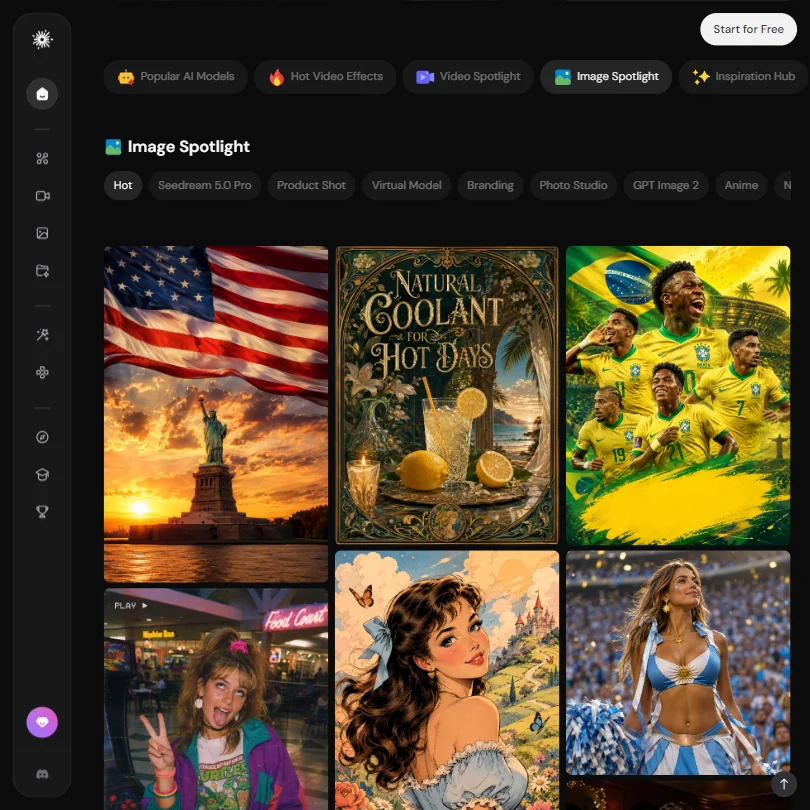
PicLumen homepage screenshot
PicLumen, Homepage

What is PicLumen?

PicLumen is a web app at piclumen.com, with a companion iOS app called Naivideo for generating video from a phone. Rather than building its own generation models, PicLumen brings together third-party image, video and audio models in one account, alongside its own canvas, editing and upscaling tools.

Other companies' models on PicLumen

For video, PicLumen offers Seedance 2.5, Seedance 2.0, Seedance 2.0 Mini, Wan 3.0, MiniMax H3, Kling 3.0 and Veo 3.1. For images it adds GPT Image 2, GPT Image 2.5 (in its Flare and Sunburst modes), ChatGPT Image 2, ChatGPT Image 2.5, Seedream 5.0 Pro, Nano Banana, Midjourney, Qwen Image 3.0 and FLUX. Nano Banana Pro is not among the models listed. Audio comes from Suno v6.

What you can make with PicLumen

PicLumen features screenshot
PicLumen, Features

For images, PicLumen bundles an upscaler with a set of editing tools: background removal and replacement, virtual model and outfit changing, face swap, and sketch-to-reality conversion. GPT Image 2.5's Sunburst mode is positioned for precise, premium editing, while Flare handles faster, more general creation.

Workflows, agents and teams

PicLumen's Canvas lets you build image and video pipelines on an infinite canvas, with the number of canvas projects and nodes per canvas increasing by plan. PicLumen does not offer an API. Team collaboration, described as flexible allocation, centralized billing and dedicated support, is limited to the custom-quoted Enterprise plan.

PicLumen pricing: what each plan gives

PicLumen pricing screenshot
PicLumen, Pricing

The free Basic plan gives 20 Lumens a day, enough for about 20 images or one video, in Normal generation mode, with no commercial-use rights.

Lite costs $7.59 a month ($6.09 a month billed yearly) for 750 Lumens a month, about 750 images or 30 videos, watermark-free, with a limited commercial license.

Standard costs $24.99 a month ($19.99 billed yearly) for 2,500 Lumens, about 2,500 images or 100 videos, with a full commercial license.

Pro costs $49.99 a month ($37.49 billed yearly) for 6,000 Lumens, about 6,000 images or 240 videos, with a full commercial license that adds extension rights.

Elite costs $359.99 a month ($269.99 billed yearly) and spans four Lumen sub-tiers from 15,000 to 60,000 a month; the top sub-tier makes about 60,000 images or 2,300 videos, with a business-level commercial license.

Relax Mode lets you keep generating after your Lumens run out, at lower priority and slower speed, but only with PicLumen's own model series. It gives unlimited image generation on Standard, Pro and Elite, unlimited video generation on Pro and Elite, and limited access on Lite.

Privacy and support

PicLumen's terms give it a right to use content you post publicly to train its models, develop new products and market its services, with no opt-out offered. PicLumen has no SOC 2 certification and its privacy policy makes no GDPR reference; it is governed by the laws of Hong Kong. It does not offer SSO. Support is by email at service@piclumen.com.

Who PicLumen suits

PicLumen suits people who want a free daily allowance across a wide spread of third-party models, plus a canvas for chaining image and video steps together, image upscaling and editing tools like background removal and face swap without paying anything upfront.

It suits less well anyone who needs commercial rights immediately, since the free plan carries none and Lite's license is only limited. Teams that need an API, SOC 2, GDPR coverage or SSO, or that post confidential content publicly on the platform, should look elsewhere or read the terms first.

How PicLumen compares

PicLumen scores 6.5 out of 10 among the multi-model AI platforms we rate. These three do the same job and are the closest to it, compared on what each vendor publishes.

6.5PicLumen
vs
7.0SeaArt AI

SeaArt AI

SeaArt AI costs $5.99 a month against PicLumen's $7.59, and runs on Android as well as iOS and the web. PicLumen offers Kling 3 and Veo 3.1, which SeaArt AI does not list among its 10 video models. Both include a free plan, unlimited generation, an upscaler and image editing. SeaArt AI also offers lip sync.

Pick SeaArt AI if you want an Android app and lip sync.
Pick PicLumen if you want Kling 3 and Veo 3.1.

PicLumen vs SeaArt AI →
6.5PicLumen
vs
5.3getimg.ai

getimg.ai

PicLumen's cheapest plan is $7.59 a month, slightly less than getimg.ai's $10, and PicLumen offers Kling 3, Veo 3.1 and Seedance 2, none of which appear among getimg.ai's 2 video models. PicLumen also includes a free plan and unlimited generation on some models, which getimg.ai lacks. getimg.ai offers Flux 2 among its image models, which PicLumen does not list. getimg.ai's privacy policy discusses GDPR rights; PicLumen's does not.

Pick getimg.ai if you specifically need Flux 2 for image generation.
Pick PicLumen if you want Kling 3, Veo 3.1 and a free plan.

PicLumen vs getimg.ai →
6.5PicLumen
vs
7.0OpenArt

OpenArt

PicLumen costs $7.59 a month against OpenArt's $14, and includes a free plan plus unlimited generation on some models; OpenArt offers neither. OpenArt lists more than double the video models, 14 against PicLumen's 7, and adds Nano Banana Pro and single sign-on, which PicLumen does not offer. Both support Kling 3, Veo 3.1 and image editing. PicLumen's paid plans export without a watermark, matching OpenArt's.

Pick OpenArt if you want more video models and Nano Banana Pro.
Pick PicLumen if you want a free plan with unlimited generation.

PicLumen vs OpenArt →

Frequently Asked Questions

Does PicLumen have a free plan?

Yes. The Basic plan gives 20 Lumens a day, about 20 images or one video, in Normal mode, but with no commercial-use rights.

Which models does PicLumen offer?

Video comes from Seedance, Wan 3.0, MiniMax H3, Kling 3.0 and Veo 3.1. Images come from GPT Image 2 and 2.5, Seedream 5.0 Pro, Nano Banana, Midjourney, Qwen Image 3.0 and FLUX. Audio comes from Suno v6.

What do PicLumen's plans cost and make?

Lite is $7.59 a month for 750 Lumens, Standard is $24.99 for 2,500, Pro is $49.99 for 6,000, and Elite is $359.99 for 15,000 to 60,000, each roughly convertible into images or videos at about 1 and 20 to 25 Lumens respectively.

What is PicLumen's Relax Mode?

It lets you keep generating with PicLumen's own models after your monthly Lumens are used up, at lower priority. It is unlimited for images from Standard up, and for video from Pro up, but does not apply to third-party models like Seedance or Kling.

PicLumen is featured in

Alternatives to PicLumen

Other Multi-Model AI Platforms options we've reviewed.

Adobe logo

Adobe

Professional design teams who need vector editing, video editing and mockups within one desktop suite

8.4
Rank #1 of 6 AI graphic design tools
Best:Workflow and output10
Weakest:Pricing3
Does not train AI on what you upload: yesPublishes or schedules to social: yes
From $69.99No free plan
97% from published facts · checked 19 Sep
Figma logo

Figma

Product teams wanting one shared workspace for design systems, prototypes and developer handoff

8.1
Rank #2 of 6 AI UI design tools
Best:Teams and platforms10
Weakest:What you can make7
Free plan: yesFree trial: noAPI: yes
Price not publishedFree plan
96% from published facts · checked 19 Sep
Canva logo

Canva

Small teams making branded social posts, print and video without hiring a designer

7.8
Rank #3 of 6 AI graphic design tools
Best:Teams and platforms10
Weakest:What you can make7
Publishes or schedules to social: yes
From $18Free plan
90% from published facts · checked 19 Sep
Recraft logo

Recraft

Professional creators and teams needing AI image and video generation

Not scored yet
Free plan: yesFree trial: noAPI: yes
From $12Free plan
Gemini logo

Gemini

Everyday productivity, creative work, and AI assistance at work, school, or home

Not scored yet
Free plan: yesFree trial: noAPI: yes
From $4.99Free plan
HeyGen logo

HeyGen

Solo creators and advanced individuals creating AI videos at scale

8.9
Rank #1 of 7 AI avatar video tools
Best:Avatars10
Weakest:Pricing6.9
Free plan: yesFree trial: noAPI: yes
From $29Free plan
95% from published facts · checked 16 Sep

User reviews

Review PicLumen

Your rating

Reviews are moderated and appear once approved.