SAASINSPECTOR
SeaArt AI logo

SeaArt AI Review

Digital artists, content creators, and social media users seeking an all-in-one AI image and video generation platform

Visit SeaArt AIFrom Free (with daily Stamina credits)

Research-based review. We analyzed vendor documentation, customer reviews on G2, Capterra, and Reddit, and live pricing — not hands-on testing yet. We update as our team puts tools through real workflows.

The verdict

SeaArt AI is an all-in-one creative platform launched in 2023, targeting image generation, video creation, LoRA training, and AI character tools for experienced digital creators. With 50 million registered users and a 4.0 Trustpilot score, it shows real traction, but rewards technically savvy users far more than casual ones. It's a powerful but demanding tool that requires effort to unlock its best results.

Pros

  • Massive community model library with reportedly over one million model entries gives experienced users enormous creative flexibility.
  • Supports multiple AI engines including Flux AI, Kling AI, and Stable Diffusion checkpoints, allowing model-specific optimization.
  • AI Image Upscaler consistently receives positive user feedback as a reliable finishing step for improving output quality.
  • All-in-one platform covering text-to-image, video generation, face swap, LoRA training, and AI character interaction in one place.
  • Available across web, iOS, and Android, providing broad cross-platform accessibility.
  • Free tier with daily Stamina credits allows users to explore the platform without immediate payment commitment.
  • Strong Trustpilot rating of 4.0 out of 5 across 913 reviews indicates meaningful user satisfaction among experienced creators.
  • Prompt templates and community resources help users who invest time learning the platform achieve genuinely good results.

Cons

  • Default image generation quality disappoints casual users expecting Midjourney-level results without manual model selection or prompt expertise.
  • Quality varies significantly depending on which model is selected, creating a confusing and inconsistent experience for new users.
  • The platform's wide feature footprint for a two-year-old product raises questions about depth and reliability across all tools.
  • Stamina credit system gates most interesting features behind a usage currency that can frustrate users on the free tier.
  • The platform heavily rewards effort and expertise, making it poorly suited for users who want quick, accessible results.
  • Complexity of navigating a one-million-entry community model library creates a steep learning curve without clear guidance.
From Free (with daily Stamina credits)Free plan Yes

Fifty million registered users. That's not a small number. When we started pulling research on SeaArt AI, that figure was hard to ignore, and honestly, it set off a few questions. We cross-referenced their platform claims against Trustpilot reviews, Reddit threads, and whatever vendor documentation surfaced, and the picture that emerged is a lot more complicated than the homepage suggests. This **seaart ai review** covers what the platform actually does, what it doesn't do particularly well, and where the real friction lives.

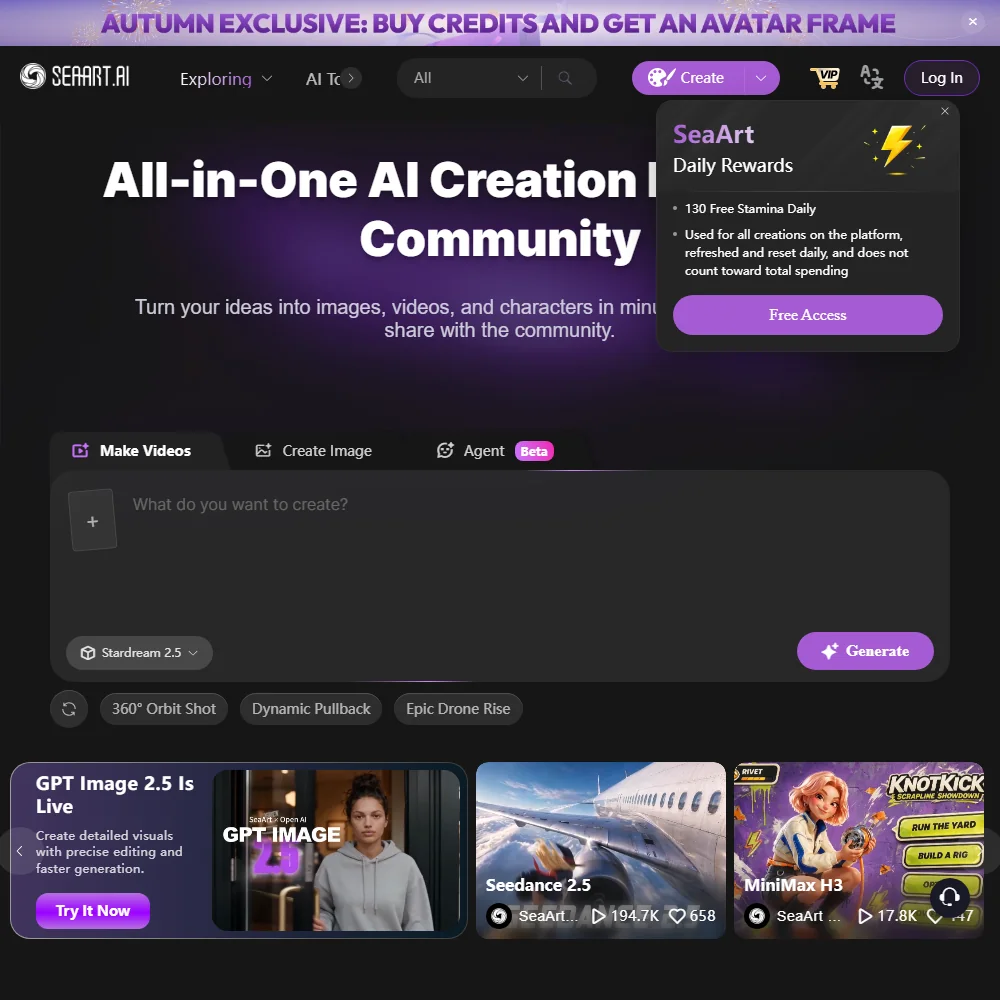
SeaArt AI homepage screenshot
SeaArt AI — Homepage

What is SeaArt AI?

Founded in 2023 and headquartered in Hong Kong, SeaArt positions itself as an all-in-one creative platform. Not just an image generator. Image generation, video creation, AI character interaction, face swap tools, LoRA training, and a community model library that reportedly tops one million entries. The whole thing runs on a mix of proprietary technology and Stable Diffusion, with external model integrations layered on top, including Flux AI and Kling AI.

That's a wide footprint for a two-year-old product. Honestly, almost suspiciously wide.

The platform runs on web, iOS, and Android. It offers a free tier built around daily "Stamina" credits, which is their word for the usage currency that gates most of the interesting features. More on that in the pricing section.

SeaArt AI Image Quality: How Good Are the Results?

The honest answer is: it depends heavily on which model you use. SeaArt doesn't run a single image engine. It routes you through multiple options, including Flux AI and Stable Diffusion checkpoints pulled from its community library. That means quality varies a lot, and not always in ways that are obvious to new users.

What we kept seeing in Trustpilot feedback, where the rating sits at 4.0 out of 5 across 913 reviews, is that experienced users who know how to pick models and write prompts get genuinely good results. People who come in expecting something closer to Midjourney's default quality often leave disappointed. The platform rewards effort. It doesn't reward casual users.

The **AI Image Upscaler** draws consistent positive mentions. Users treating it as a finishing step report solid results. Less enthusiasm around the base generation quality at default settings.

SeaArt AI Features: Text-to-Image, Video & Editing Tools

The feature list is long. Genuinely long. Text-to-image with prompt templates. An AI Video Generator that pulls from Seedance 2.0 in 4K, plus Veo and Kling 3.0 integrations added as of their April 2026 update. Reference-to-image tools. An AI Image Editor with inpainting via the AI Eraser. Background removal. LoRA model training. Cloud-based ComfyUI workflows. The platform also does face swap and lip sync, and there's an AI Sway Dance and AI Baby Dance feature that will either charm or alarm you depending on your use case.

That tracks for a platform chasing a social media creator audience.

On the video side, the Seedance 4K integration is the headline feature right now. We couldn't independently verify real-world output quality from public reviews, but the integration itself appears functional based on user reports. The Film Set Effects and Bullet Time Effect tools are more gimmicky, clearly aimed at short-form social content rather than serious production work.

ControlNet support is in there too, which matters for anyone coming from a Stable Diffusion background. So is negative prompt support. The **seaart ai stable diffusion** connection is real and fairly deep, not just cosmetic.

One gap that stands out: batch generation isn't publicly documented. Neither is outpainting. For a platform this feature-heavy, those are odd omissions.

Is SeaArt AI Easy to Use?

Not particularly. We dug through user feedback and the pattern is consistent. New users frequently describe feeling overwhelmed. The interface crams a lot of options into the same screen, and the model selection process alone can be paralyzing if you don't already know what Stable Diffusion checkpoints are.

The free tier's Stamina credit system also creates friction early. You're rationed from day one, which means new users are making decisions under resource pressure before they've learned the interface. That's a rough onboarding design.

The mobile apps on iOS and Android smooth some of this out, mostly by hiding the more advanced options. Whether that's a feature or a compromise depends on what you're trying to do. For quick social content, the mobile path works. For anything involving LoRA training or ComfyUI workflows, you're back on desktop and back in the deep end.

We've seen worse onboarding. But not among tools claiming 50 million users.

SeaArt AI Pricing: Free Plan vs Paid — Is It Worth It?

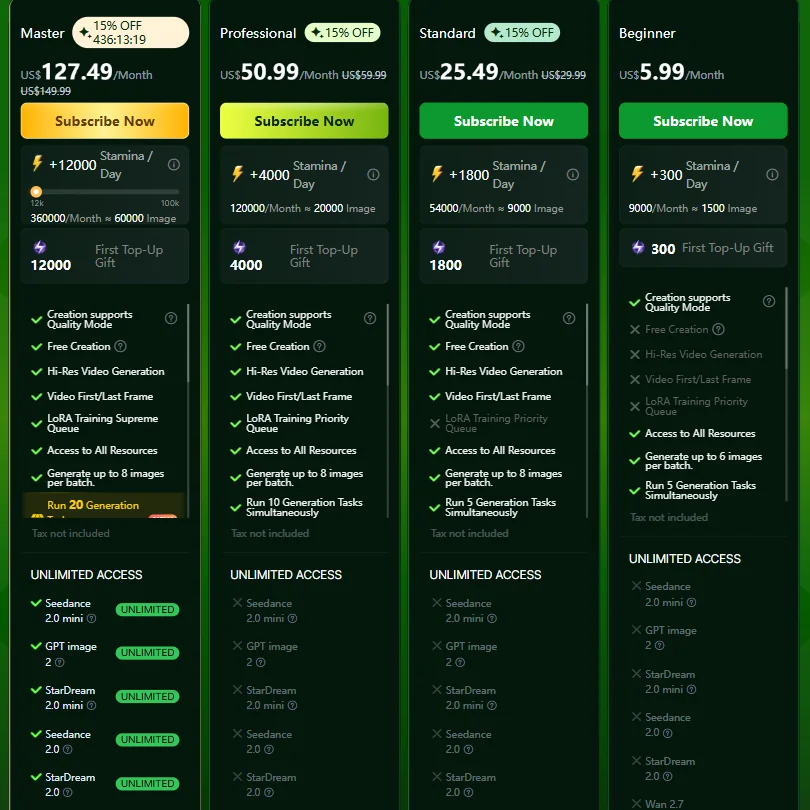
SeaArt AI pricing screenshot
SeaArt AI — Pricing

This is where the research gets frustrating. **SeaArt AI's paid plan pricing is not publicly stated** anywhere we could find. No pricing page with tier breakdowns. The Stamina credit system is how the free plan works, but what you pay to get more credits, or what a paid subscription actually costs, requires either signing up or digging through third-party sources.

We dug through the pricing page and found essentially nothing useful from the outside.

That's a genuine problem. It's not a dealbreaker for everyone, but opacity on pricing is a pattern that correlates with aggressive upselling inside the product. We're not saying that's happening here. We're saying the signal is there.

Private generation (no public feed) is locked to paid plans. Watermark-free output also appears to require payment, though this isn't explicitly documented. Commercial use rights? Not publicly stated either. That last one matters a lot for anyone using outputs professionally.

SeaArt AI vs Midjourney: Which AI Image Generator Wins?

Depends on what you're actually trying to do. Midjourney produces aesthetically polished images faster, with less technical knowledge required. The default output quality is higher. It doesn't have a free plan anymore, and it doesn't do video, face swap, or LoRA training.

SeaArt AI does all of those things. The trade-off is that it demands more from the user to get good results. You have to understand the model library. You have to know how to write Stable Diffusion-style prompts. If you come in cold, Midjourney will make you look good faster.

For users who want a broader creative toolkit and are comfortable with some complexity, SeaArt's depth is real. For pure image quality with minimal effort, Midjourney is still the answer.

Worth noting: Leonardo AI and Civitai overlap with SeaArt more than Midjourney does. Both offer community model libraries and Stable Diffusion-based workflows. SeaArt's video and animation tools give it an edge in breadth, but Leonardo's interface is cleaner by most accounts we read.

Who Should Use SeaArt AI? (And Who Shouldn't)

Social media creators who want one platform for images and short-form video content. That's the core fit. The animation tools like Face Dance and AI Lip Sync are clearly built for that audience. The mobile apps support that workflow.

Stable Diffusion power users who want a cloud-based environment with model access and ComfyUI support. SeaArt gives them that without managing their own hardware.

People who need commercial rights clarity, transparent pricing, or documented API access should look elsewhere. The gaps in documentation hurt real business use cases. Adobe Firefly covers the commercial rights question explicitly and sits inside tools creative teams already use daily.

Beginners expecting a Canva-like experience will bounce fast. The platform isn't hostile to new users, but it's not designed around them either.

SeaArt AI Review Verdict

SeaArt AI is a genuinely ambitious platform that launched fast and packed in features aggressively. Two years old, 50 million registered users, video generation, LoRA training, and a community model library with real depth. That's not nothing.

The cracks show up in the details. **Pricing opacity is the worst issue here.** No public tier breakdown, no stated API access. For a platform this size, that's not an oversight. It's a choice. And it's the kind of choice that makes it hard to recommend SeaArt AI to anyone running a business where those answers matter.

The free tier is functional but rationed. The quality ceiling is real but requires work to reach. The interface rewards experienced Stable Diffusion users and frustrates everyone else.

If you're in the right audience, this platform offers a lot for the price of learning it. Outside that audience, the friction-to-value ratio doesn't hold up.

Frequently Asked Questions

Is SeaArt AI free to use?

Yes, there's a free plan. It runs on daily Stamina credits that gate how many generations you can run. Once you exhaust them, you either wait or pay. What paid plans cost isn't clearly published, which makes it hard to evaluate whether the upgrade is worth it before you're already inside the product.

What AI models does SeaArt AI use?

SeaArt runs a mix of its own proprietary models and Stable Diffusion-based community checkpoints, with integrations plugged in from Flux AI and Kling AI as headline additions. The community library reportedly holds over a million models. That breadth is a real advantage for experienced users, but it also means output quality varies more than it would on a single-model platform.

How does SeaArt AI compare to Leonardo AI?

Both platforms lean on Stable Diffusion infrastructure and community model libraries, so they overlap significantly. SeaArt has a broader set of video and animation tools, including Seedance 4K generation and lip sync features. Leonardo's interface is generally described as cleaner and easier to navigate by users who've tried both. If video and animation tools matter to you, SeaArt has more to offer. If you want a smoother image generation experience, Leonardo is worth checking first.

SeaArt AI is featured in

Alternatives to SeaArt AI

See all SeaArt AI alternatives →

Other AI Image Generation options we've reviewed.

User reviews

Review SeaArt AI

Your rating

Reviews are moderated and appear once approved.