Our research on getimg.ai started with the homepage and ended up in some pretty candid Reddit threads. This getimg.ai review draws from vendor documentation, pricing pages, and user feedback we found across G2, Capterra, and Product Hunt. We haven't sat in the tool ourselves. What we kept seeing, though, was a consistent pattern: a lot of power packed into one place, with a few decisions that make you scratch your head. Founded in 2022, the platform has moved fast. The 2.0 overhaul landed in late 2025 and brought some real changes, including the retirement of DreamBooth.

That last part matters. No free trial, no free plan. For a tool going up against Midjourney and Adobe Firefly, that's a deliberate bet.
What is getimg.ai?
The pitch is straightforward: one platform, a lot of models. getimg.ai bundles over 48 AI models for images, video, music, and speech into a single web interface. You're not committing to one model's aesthetic or one company's roadmap. You pick from FLUX.2, Seedream, GPT Image, Kling, Google Veo, Sora, and a handful of others, all inside the same login.
That breadth is genuinely unusual. Most tools in this category bet on one model and build around it. getimg.ai bets on access. Whether that's better depends entirely on what you actually need.
The target users are clear from the docs: marketers, content creators, e-commerce teams, and game designers. Not hobbyists looking to play around for free. The 2026 platform overhaul made that positioning more explicit by killing the free tier entirely.
getimg.ai Image Quality: How Good Are the Results?
This is where multi-model platforms get complicated. Quality isn't one number, it's a function of which model you pick and how well the platform is actually running that model's inference. We cross-referenced their docs with what users were saying on Product Hunt and G2, and the picture is mostly good. FLUX.2 and Seedream outputs get called out positively. GPT Image 1.5 results look sharp when the task fits it.
What we kept seeing in reviews from marketing roles is that consistency across outputs was the real win, not peak quality on any single generation. The image reference feature lets you upload a reference and get consistent style or character replication across multiple generations. For teams running product photography or e-commerce content, that apparently matters more than having the absolute best single model available.
Honestly, that surprised us. We expected quality complaints to dominate. They mostly don't.
Video quality is a harder read. The text-to-video side routes through external models like Google Veo and Sora. So you're really getting a wrapper around those models, not a proprietary engine. Whether that's a problem depends on whether the wrapper adds anything useful. From what we found, it mostly just adds convenience.
getimg.ai Features: Text-to-Image, Video & Editing Tools

The feature list here is genuinely long. Start with the image side. Text-to-image works across multiple models. Image-to-image handles style transfer and background swapping. There's inpainting for targeted edits. Outpainting for expanding compositions. Background removal is instant and produces transparent PNGs.
The editing tools get less attention than they deserve. Inpainting and outpainting in particular felt undermarketed based on what we read. Users who discovered them seemed to stick around longer. Those who came purely for text-to-image generation sometimes didn't.
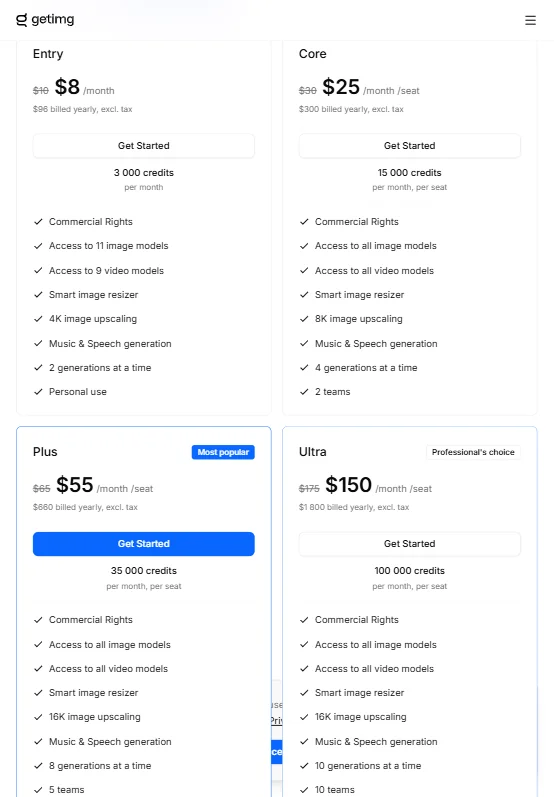
Upscaling scales with plan tier. Entry gets 4K. Core gets 8K. Plus and Ultra go up to 16K. Batch generation also scales by tier, from 2 simultaneous generations on Entry up to 10 on Ultra. For anyone running content at volume, that gap matters more than the upscaling ceiling.
On the video side, the tool handles text-to-video, image-to-video animation, and video upscaling. Three upscaling models, available across all plans. That's a fair inclusion. The models doing the heavy lifting there are third-party, as mentioned, so don't expect proprietary breakthroughs.
Two things we couldn't confirm from any public doc: whether negative prompts are supported, and whether ControlNet or LoRA fine-tuning is available. The docs aren't specific, and reviews didn't clarify it either. We'd want to know before paying $65 a month.
Is getimg.ai Easy to Use?
The platform runs entirely on web. No desktop app, no Photoshop plugin, no Figma integration. Just a browser.
For most of the people this tool is aimed at, that's probably fine. Natural language prompts in 20+ languages, no special syntax required. The promise is that you don't need to learn prompt engineering. We're somewhat skeptical of that framing on the video side, but for basic image generation it seems to hold up.
G2 reviews from 2024 and 2025 generally called the interface approachable. A few complaints surfaced about the number of options feeling overwhelming at first, which is an honest tradeoff when you're exposing 48+ models in one UI. That's not a design failure. That's a consequence of the multi-model approach.
The real ease-of-use story is probably the batch generation and team collaboration features. Those are not beginner features. They're workflow features. If you're a solo creator testing prompts, you'll never touch them. If you're managing a small content team, they're the reason you'd pay the Plus rate.
Not great on integrations, though. REST API access exists. That's it. No Canva, no Figma, no Photoshop. For creative teams already embedded in design tools, that's a gap.
getimg.ai Pricing: Free Plan vs Paid — Is It Worth It?

There is no free plan. There's also no free trial. We dug through the pricing page and found three tiers. Entry is $10 a month billed monthly, or $8 billed yearly. Plus is $65 monthly, $55 yearly. Ultra is $175 monthly, $150 yearly.
No enterprise pricing listed publicly. No stated refund policy either. That second one is a problem. When you're asking people to commit at least $96 a year with no trial period, some clarity on what happens if the tool doesn't deliver seems reasonable. We didn't find it.
What you get as you move up the tiers is mostly more: more batch generations, higher upscaling resolution, and presumably faster queue access. The jump from $10 to $65 is steep if batch generation at scale isn't your use case. A lot of solo creators would land on Entry, find the 2-simultaneous-generation limit frustrating, and either upgrade or leave.
At $10 entry with commercial rights included, it's not an awful starting point. But the lack of any trial to validate whether the models suit your specific output needs before charging your card? We don't love that.
getimg.ai vs Midjourney: Which AI Image Generator Wins?
Midjourney is the obvious comparison and the most-searched one. The difference comes down to what you actually want from a tool like this.
Midjourney is a focused bet on aesthetics. It does one thing and does it at a very high level. The community around it is huge. The output has a recognizable style that a lot of people pay for specifically. It doesn't do video. It doesn't do inpainting or outpainting in the same workflow. And the Discord-based interface still trips people up.
getimg.ai is a breadth bet. More models, more output types, more editing tools. The interface is more conventional. For teams who need video alongside images, or who want editing tools in the same platform, getimg.ai has a real advantage. For someone who just wants the best-looking still images and is willing to learn Midjourney's system, Midjourney probably wins that comparison on output ceiling.
The pricing overlap is real. Midjourney's Basic plan runs $10 a month. So does getimg.ai Entry. At that level it's a genuine question of what you value. More tools, or better aesthetics from one tool. Neither answer is wrong.
Adobe Firefly is a different comparison. That's a tool for people already paying for Creative Cloud. The integration story is completely different. getimg.ai doesn't try to be Photoshop-adjacent. Worth knowing if you're evaluating both.
Who Should Use getimg.ai? (And Who Shouldn't)
E-commerce teams. That's probably the clearest fit we found. Background removal, image consistency via reference uploads, batch generation, and commercial rights on every plan. That combination is purpose-built for product photography at volume.
Content marketers and social teams with ongoing visual needs also make sense at the Core or Plus tier. Not because the tool is cheap at those prices, but because the workflow consolidation is real. One login for images, video clips, and editing work beats juggling three separate subscriptions.
Game designers get a mention in the vendor docs and it's not unreasonable. The style reference and character consistency features are genuinely useful for asset generation. Though teams with more specific needs around structured asset pipelines might want to look at something like Scenario, which is purpose-built for game studios.
Solo hobbyists looking for a free playground. Not the fit. The free tier is gone and the $10 entry with a 2-generation batch limit isn't designed for casual experimentation. The tool has moved upmarket and the pricing reflects it.
Teams deeply embedded in Figma or Photoshop workflows. The integration story won't satisfy them right now.
getimg.ai Review Verdict
getimg.ai is a real product doing something genuinely useful. The multi-model access story is credible, not marketing fluff. The editing features are better than the homepage makes them look. Commercial rights on every plan is a clean call that competitors sometimes fumble.
The pricing transparency is where it falls short most visibly. No trial period, no stated refund policy, and a jump from $10 to $65 that requires a lot of faith in a tool you haven't used. That's a lot to ask.
The 2026 overhaul was clearly a deliberate move upmarket. DreamBooth gone, free tier gone, focus tightened. We respect the clarity of that decision even if it makes the recommendation harder. This isn't a dabble-and-decide tool anymore. You're buying in.
For the right team, the value is there. For anyone still evaluating whether AI image generation fits their workflow at all, go find a tool with a trial first. Come back to getimg.ai when you know what you're buying.
Frequently Asked Questions
Does getimg.ai have a free plan or free trial?
No. As of the 2026 platform overhaul, the free tier was retired entirely. There's no free trial either. The entry point is $10 a month billed monthly, or $8 billed yearly. We'd strongly recommend checking whether a refund policy exists before committing, because it isn't stated publicly anywhere we could find.
What AI models does getimg.ai use?
The platform currently runs over 48 models. The headline ones for images are FLUX.2 and Seedream. For video generation, it routes through Google Veo, Sora, and Kling among others. The model list gets updated, so the vendor docs are the best place to check what's current at any given time.
Is getimg.ai good for commercial use?
Commercial rights are included on every paid plan, which is a cleaner policy than some competitors manage. That means you can use outputs for client work, product marketing, or resale without an additional license tier. Whether the output quality holds up for your specific commercial use case is a harder question to answer without a trial period to test it.