SAASINSPECTOR
Tensor logo

Tensor Review

Digital artists, anime creators, and AI enthusiasts seeking a large model library with LoRA and ComfyUI support

Visit TensorFrom $9.90 for 3000 Credits

Research-based review. We analyzed vendor documentation, customer reviews on G2, Capterra, and Reddit, and live pricing — not hands-on testing yet. We update as our team puts tools through real workflows.

The verdict

Tensor is a browser-based AI image generation platform built around the Stable Diffusion ecosystem, offering access to over 400,000 community models, LoRA training, and tools like text-to-video and image animation — all without local hardware. It scored well for power users and anime-style work, but beginners may struggle with model selection and an increasingly cluttered interface. Pricing, commercial rights, and support quality remain areas of concern that prospective users should investigate before subscribing.

Pros

  • Access to over 400,000 community models spanning photorealistic, anime, and experimental styles without installing any software.
  • Supports the full Stable Diffusion ecosystem including SDXL, FLUX, LoRA training, and ComfyUI workflow imports.
  • Browser-based platform eliminates the need for a local GPU setup, making advanced AI image generation accessible to more users.
  • Anime-style image generation is particularly strong, with a large and active community producing high-quality fine-tuned models.
  • Offers a wide feature set including text-to-image, text-to-video, image animation, editing tools, and digital avatar creation.
  • Output quality can compete with tools charging significantly more when the right model checkpoint is selected.
  • Version 1.1 update introduced claimed 95%+ character accuracy and improved prompt understanding.

Cons

  • Image quality is highly model-dependent, meaning beginners who pick the wrong checkpoint will see noticeably poor or outdated results.
  • The platform's wide and expanding feature surface area makes it difficult for new users to find the most useful tools.
  • Users coming from tools like Midjourney or Adobe Firefly may find the quality floor lower than expected.
  • Pricing details are unclear and lack the transparency users need to evaluate value before committing.
  • Commercial rights terms are murky, creating uncertainty for creators who want to monetize their generated content.
  • Support quality is questionable based on community feedback, with limited clarity on what users can expect.
  • The rapid expansion of features appears to come at the cost of a coherent, beginner-friendly user experience.
From $9.90 for 3000 CreditsFree plan YesFree trial No
Our research on Tensor started where most of these reviews start: Reddit threads, product pages, and the comments sections that vendors pretend don't exist. For a tensor art review, the signal is surprisingly strong. The platform has cleared one million users and hosts over 400,000 community models. That's a real number, not a rounding error. What's murkier is everything around it:commercial rights, support quality. We'll get into all of that.

What is Tensor?

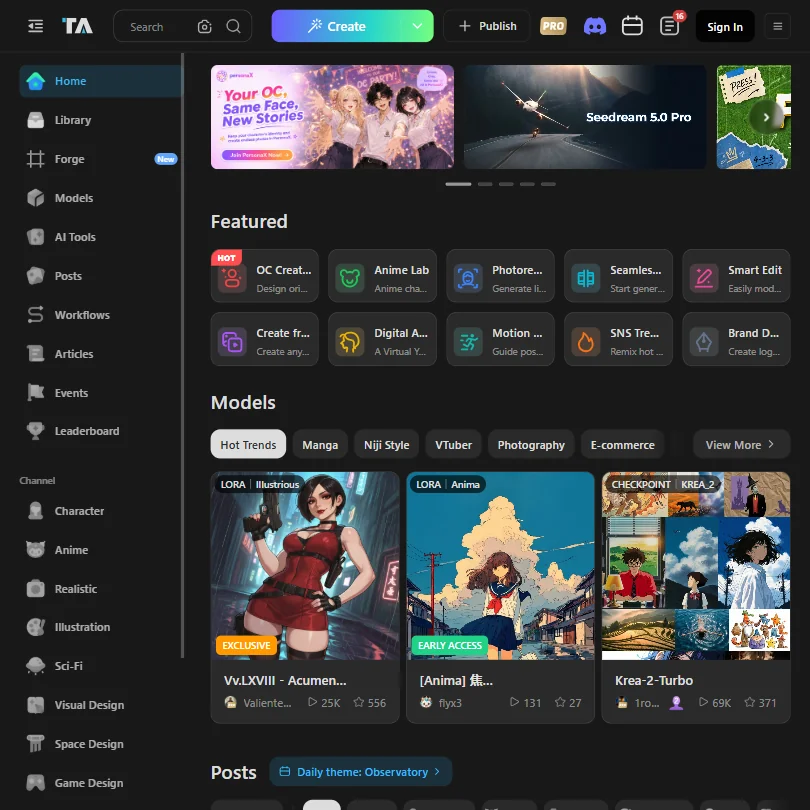
Tensor launched in 2022 and positioned itself as a browser-based home for the entire Stable Diffusion ecosystem. That's a specific bet. Rather than building a closed model with curated aesthetics, they opened the door to community fine-tunes, custom **LoRA training**, ComfyUI workflow imports, and everything else that would normally require a local GPU setup to touch. The idea is that you get the power of a full Stable Diffusion stack without installing anything. The model library is the anchor. Over 400,000 models available, many of them community-built, spanning photorealistic styles, anime, and everything in between. They've added FLUX and SDXL support alongside the older SD checkpoints. Text-to-image is the core. But they've also added text-to-video, image animation, and a suite of editing tools. Digital avatar creation showed up at some point too. It's a lot. Honestly, maybe too much. The product keeps expanding and the surface area is wide enough that new users sometimes struggle to find the most useful parts.

Tensor Image Quality: How Good Are the Results?

Output quality depends almost entirely on which model you pick. That's the honest answer. With SDXL or a well-trained FLUX checkpoint, results can be impressive. Anime-style work in particular tends to come out well, which tracks given the community that's built up around the platform. Their Version 1.1 update claimed 95%+ character accuracy and better prompt understanding. We're cautiously optimistic about that claim, but we haven't verified it ourselves. What we kept seeing in user reports is that **quality is model-dependent to a degree that can frustrate beginners**. Pick the wrong checkpoint and your output looks dated. Pick the right one and it competes with tools charging twice as much. Reddit threads surface this pattern regularly. Experienced SD users tend to praise the output ceiling. People coming from Midjourney or Adobe Firefly often find the floor lower than expected. The IP-Adapter and reference image support are legitimately useful for consistency across generations. ControlNet is in there too. For character work and style-locked projects, that combination is hard to beat in the browser-based space.

Tensor Features: Text-to-Image, Video & Editing Tools

The feature list is genuinely long. Text-to-image is the baseline. From there: img2img with style controls, inpainting, outpainting, upscaling, and background removal. Video features include animation and style transfer. Batch generation is available. Multiple aspect ratios. ControlNet support. Negative prompts with attention weighting. That's more than most browser tools offer. Fair. The standout is the **ComfyUI workflow support**. Most platforms that run Stable Diffusion behind the scenes hide the plumbing. Tensor exposes it. You can import ComfyUI workflows directly and run them in-browser. For users who've spent time building node-based pipelines locally, that's a meaningful unlock. We don't know of many browser tools that go that far. LoRA support is extensive. You can use community LoRAs from the library or train your own. Custom LoRA training in-browser is something a lot of hobbyist artists will actually use. The community model library adds to this. It's closer to Civitai's model-sharing culture than it is to the polished, opinionated approach of something like Midjourney. On the video side, we'd temper expectations. Image animation and video style transfer exist, but the reviews we read suggest this is still maturing. Not a reason to skip the tool. Just not a reason to pick it either.

Is Tensor Easy to Use?

Not really, no. That's not a dealbreaker, but it needs saying clearly. The interface carries the weight of everything it supports. **New users without Stable Diffusion experience will have a steep climb.** There are model pickers, LoRA weight sliders, attention weighting in prompts, and ComfyUI node graphs. Each of those requires context to use well. The help center is described as basic, and the Discord community is the real support layer. We cross-referenced the vendor docs with what users said on Reddit. The pattern that kept coming up: experienced SD users feel at home immediately. People arriving from text-and-click tools like Adobe Firefly find the cognitive load heavy. That gap is real, and Tensor hasn't done much to close it based on what we could find. The mobile apps exist on iOS and Android. Whether they smooth out the experience meaningfully, we couldn't confirm from the data we reviewed.

Tensor Pricing: Free Plan vs Paid — Is It Worth It?

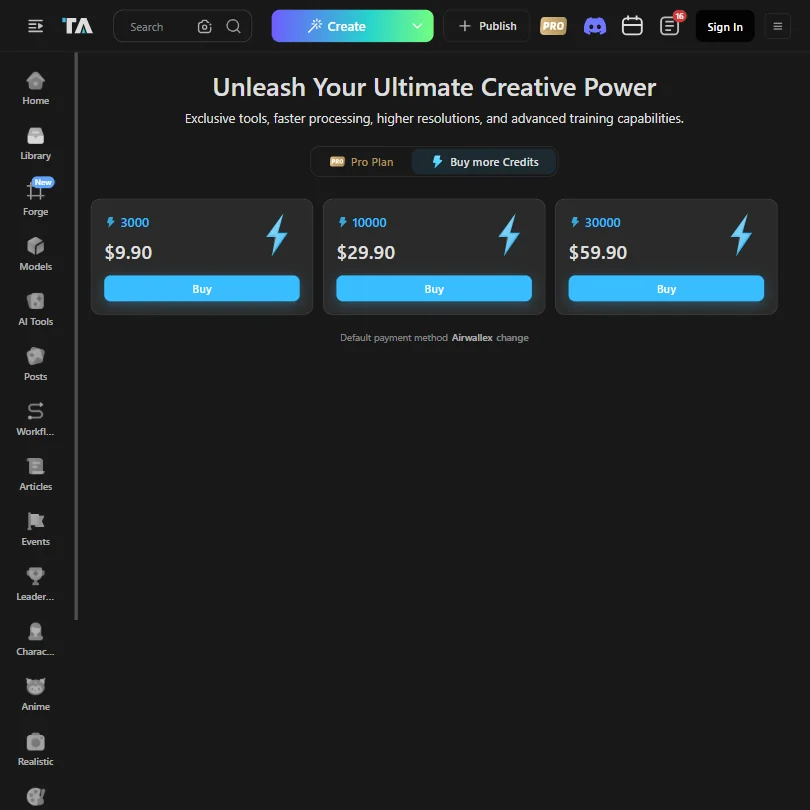
Tensor pricing screenshot
Tensor — Pricing
Tensor’s pricing is clearer than we first thought, at least for credit purchases. The current pricing view shows three paid credit bundles: 3,000 credits for $9.90, 10,000 credits for $29.90, and 30,000 credits for $59.90. There is also a Pro plan option shown in the interface, along with a separate option to buy more credits.

Tensor homepage screenshot
Tensor — Homepage

That means the credit bundle pricing itself is not hidden. What is still less clear is the full subscription structure: what the Pro plan includes, whether private generations require a paid plan, whether free-plan outputs carry a watermark, and how unused credits or refunds are handled. Tensor could make those details easier to understand before users pay.

Commercial use is also more nuanced than our first draft suggested. Tensor’s terms say it does not claim ownership or copyright over generated images, but users still need to check the rules for the specific models they use. Some models may have their own restrictions, so professional users should confirm model permissions before using outputs in client or commercial projects.

For hobbyists, Tensor’s free access and credit-based system still make it a useful tool to explore. For professional users, the credit bundle prices are now visible, but the platform would be stronger if it made plan benefits, refund terms, watermark rules, private generation settings, and model-level commercial permissions clearer upfront.

Tensor vs Civitai: Which AI Image Generator Wins?

Civitai is the clearest comparison. Both are community-driven, both live in the Stable Diffusion ecosystem, and both organize themselves around model sharing. The difference is in what the platform actually does with those models. Civitai is primarily a model repository with generation features bolted on. Tensor built the generation experience first and the library around it. **Tensor's in-browser ComfyUI support is the deciding factor** for users who want to run complex workflows without touching a local install. If you need a model library for offline work, Civitai probably has the deeper catalog. For running generations directly in the browser with community models, Tensor has the more complete setup. That's a narrow but meaningful distinction. Adobe Firefly is a completely different product aimed at a completely different user. Firefly is cleaner, better documented, and built for people inside the Adobe ecosystem. It won't give you custom LoRA support or community checkpoints. That's the tradeoff.

Who Should Use Tensor? (And Who Shouldn't)

Anime artists and digital illustrators who've spent time in the SD ecosystem. That's the core fit. The community model library skews toward that style heavily, and the LoRA training and ControlNet support make character consistency achievable in-browser. This is a tool built by that community, for that community, and it shows. AI enthusiasts who want to experiment with ComfyUI workflows without buying a GPU. The browser-based workflow support is genuinely underrated for this use case. People who shouldn't bother: anyone who needs commercial rights clarity before generating. The terms are too vague right now. Also, anyone coming from a polished, guided experience expecting clean defaults. Tensor rewards people who already know what settings they want.

Tensor Review Verdict

Tensor is a capable tool with a real community behind it. The model library is extensive. The ComfyUI support is legitimately rare for a browser product. The LoRA training and IP-Adapter support put it ahead of most competitors on customization. For the right user, this is an excellent free option with room to grow.

The pricing issue is less about hidden credit costs and more about missing plan clarity. Tensor does show credit bundle prices: 3,000 credits for $9.90, 10,000 credits for $29.90, and 30,000 credits for $59.90. But the full Pro plan details, refund terms, watermark rules, private generation settings, and model-level commercial permissions are not as clear as they should be. For casual users, that may not matter much. For anyone generating images for client or commercial work, those gaps are worth checking before paying.

The ease-of-use gap is also real. If you don't already have Stable Diffusion experience, you'll spend time learning the tool rather than using it. That's not unique to Tensor, but the interface doesn't do much to help. We'd recommend Tensor confidently to experienced SD users who want a browser-based setup without local installation. Everyone else should go in with realistic expectations about the learning curve.

Frequently Asked Questions

Is Tensor free to use?

There's a free tier with daily credits, and it doesn't require a credit card to start. The catch is that free outputs carry a watermark, and private generation requires a paid plan. The free plan is genuinely functional for experimentation, but it's not suitable for anything you'd deliver to a client.

Does Tensor support commercial use?

This is where we couldn't find a clear answer. Commercial rights aren't publicly stated in the documentation we reviewed. That's a real problem if you're generating work for paid projects. We'd recommend checking the current terms of service directly before using generated images commercially.

How does Tensor compare to Midjourney?

They're solving different problems. Midjourney is a closed, opinionated model tuned for aesthetic quality with minimal user control. Tensor is an open-ended platform where you pick from hundreds of thousands of community models and configure the output heavily. Tensor gives you more control. Midjourney gives you more reliable quality with less effort. Depends which one you actually want.
Tensor is featured in

Alternatives to Tensor

See all Tensor alternatives →

Other AI Image Generation options we've reviewed.

User reviews

Review Tensor

Your rating

Reviews are moderated and appear once approved.